
1. Einleitung
Vielen Dank für Ihren Einkauf.asing the CROSSIO 23'' Outdoor Ceiling Fan with Lights. This manual provides essential information for the safe installation, operation, and maintenance of your new fan. Please read these instructions thoroughly before installation and retain them for future reference.
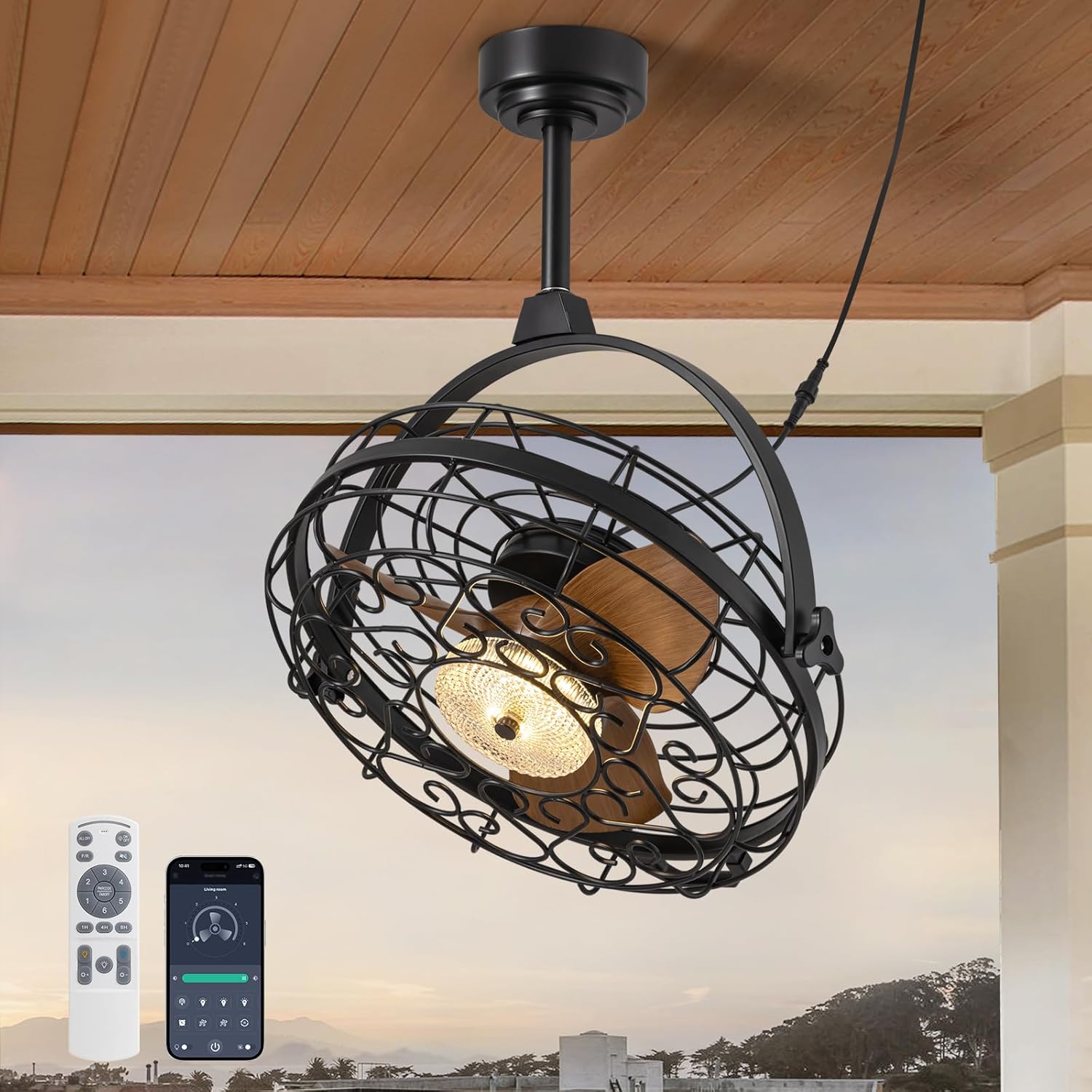
Image 1.1: The CROSSIO 23-inch outdoor ceiling fan, showcasing sein Design, die Fernbedienung und die Smartphone-App-Oberfläche.
Hauptmerkmale:
- Outdoor & Indoor Ready: Wet-rated design suitable for patios, gazebos, covered porches, living rooms, and bedrooms. Features a sealed motor and rust-proof materials for safe operation in wet conditions.
- Dimmable Fan Light: Integrated LED light with three adjustable color temperatures (Warm 3000K, Natural 4500K, Cool 6000K) and seamless dimming from 10% to 100%.
- Multiple Ceiling Compatibility: Designed for various mounting options including hanging with hooks, fixing to solid wood ceilings, or mounting to an outlet box. Includes two down rod lengths for flexible installation heights.
- Dual 360° Rotation & Reversible Motor: Manual 360° vertical and horizontal adjustment to direct airflow. Reversible motor function provides downdraft cooling in summer and updraft warm air circulation in winter.
- 6-Speed & Timer Function: Six customizable fan speeds and a convenient timer function (1, 4, or 8 hours) for automatic shut-off.
- Kontrollmethoden: Operable via included remote control and a dedicated smartphone application.
2. Sicherheitshinweise
Please observe the following safety precautions to reduce the risk of fire, electric shock, or personal injury.
- Lesen Sie alle Anweisungen vor der Installation und Verwendung sorgfältig durch.
- Vor der Installation oder Wartung muss sichergestellt werden, dass die Stromversorgung am Leitungsschutzschalter unterbrochen ist.
- All electrical connections must be in accordance with local codes, ordinances, and the National Electric Code (NEC). If you are unfamiliar with electrical wiring, consult a qualified electrician.
- The fan must be mounted to a structure capable of supporting a minimum of 35 lbs (15.9 kg).
- Betreiben Sie den Ventilator nicht mit einem beschädigten Kabel oder Stecker.
- Vermeiden Sie es, Finger oder Gegenstände in die Ventilatorflügel zu stecken, während der Ventilator in Betrieb ist.
- This fan is wet-rated for outdoor use in covered areas. Do not expose to direct heavy rain or submerge in water.
- Stellen Sie sicher, dass der Ventilator in einer Höhe installiert wird, in der die Flügel mindestens 2.13 Meter (7 Fuß) über dem Boden sind.
- Verwenden Sie nur vom Hersteller angegebene Ersatzteile.
3. Packungsinhalt
Prüfen Sie vor Beginn der Installation, ob alle Komponenten vorhanden und unbeschädigt sind. Sollten Teile fehlen oder beschädigt sein, wenden Sie sich bitte an den Kundendienst.
- Ceiling Fan Unit (with integrated light)
- Fernbedienung
- Mounting Hardware Kit (screws, anchors, brackets)
- Down Rods (2 lengths)
- Bedienungsanleitung (dieses Dokument)
4. Spezifikationen
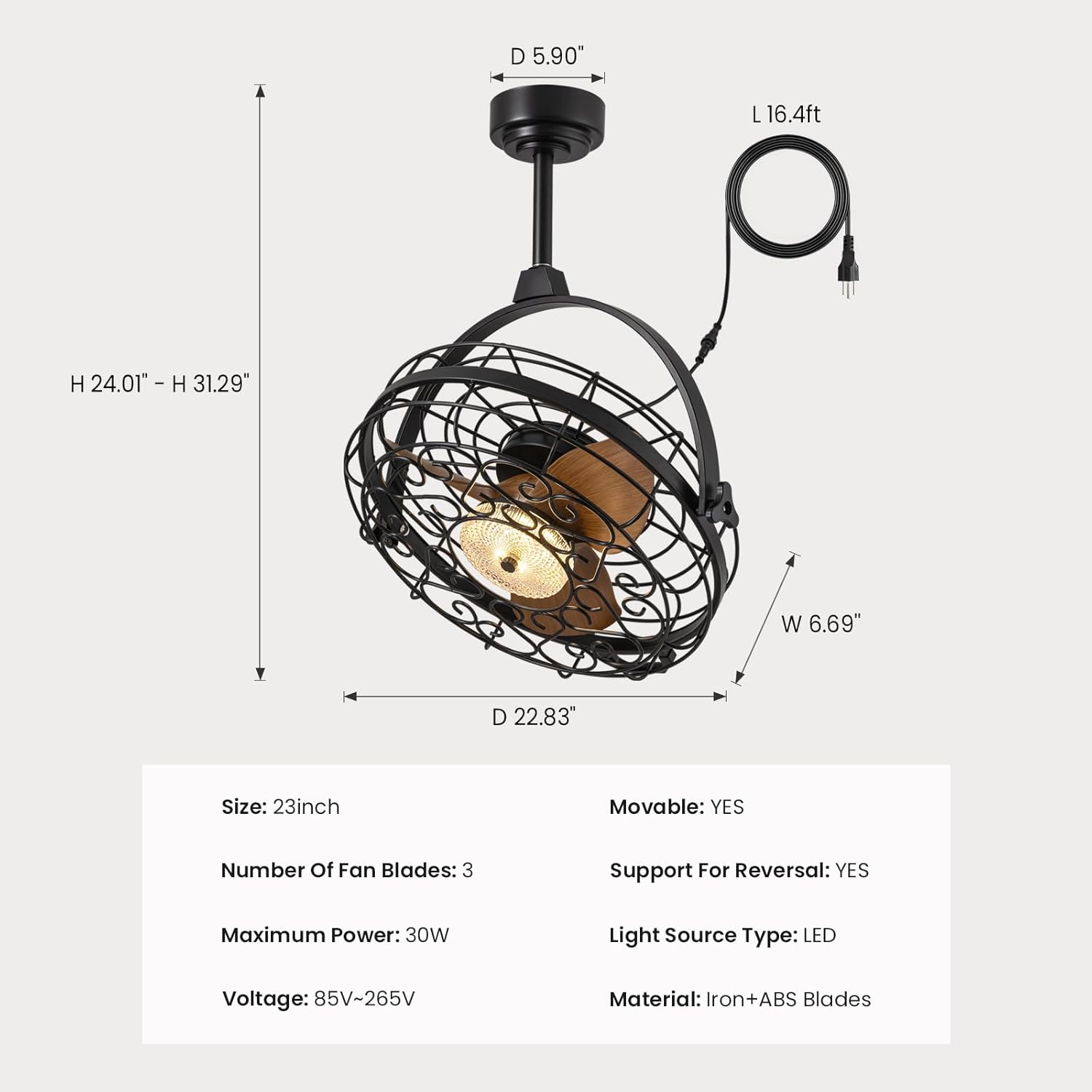
Image 4.1: Detailed dimensions of the fan unit, including height, width, and depth.
| Besonderheit | Spezifikation |
|---|---|
| Modellname | FS8912-01 |
| Marke | KREUZ |
| Größe | 23 Zoll |
| Technische Daten | 5"T x 20"B x 20"H |
| Artikelgewicht | 22.5 Pfund |
| Number of Fan Blades | 3 |
| Maximale Leistung | 30 W |
| Bandtage | 85 V bis 265 V |
| Stromquelle | AC |
| Lichtquellentyp | LED |
| Material | Iron + ABS Blades |
| Kontrollmethode | App, Fernbedienung |
| Verwendung im Innen- und Außenbereich | Innenbereich, Außenbereich (für Feuchträume geeignet) |
| Besondere Merkmale | Adjustable Color Temperature, Dimmable, Timer, Waterproof, 360° Rotation, Reversible Motor |
| UPC | 733241251473 |
5. Installationsanweisungen
Before installation, ensure the power is turned off at the circuit breaker. Follow these steps for your chosen mounting method.

Image 5.1: Three available installation options: mounting to an outlet box, fixing to solid wood, or hanging with a ceiling hook.
General Steps for All Installations:
- Bereiten Sie den Montageort vor: Ensure the ceiling structure can support the fan's weight (minimum 35 lbs).
- Assemble Down Rod: Attach the desired length of down rod to the fan motor housing.
- Netzkabel anschließen: The fan comes with a 16ft flexible cord and a 3-prong plug. Ensure the power outlet is within reach and properly grounded.

Image 5.2: The 16ft flexible power cord with a 3-prong plug for easy connection.
Option 1: Outlet Box Mounting
- Secure the mounting bracket to a UL-listed outlet box (not included) that is rated for fan support.
- Attach the fan's down rod assembly to the mounting bracket.
- Make electrical connections (live, neutral, ground) from the fan to the outlet box wiring.
Option 2: Solid Wood Ceiling Mounting
- Drill pilot holes into the solid wood ceiling beam.
- Secure the mounting bracket directly to the wood using appropriate screws (provided in hardware kit).
- Attach the fan's down rod assembly to the mounting bracket.
Option 3: Ceiling Hook Hanging
- Install a sturdy ceiling hook (provided in hardware kit) into a secure ceiling joist or beam.
- Hang the fan unit from the ceiling hook using the integrated hanging mechanism.

Image 5.3: The fan is designed for easy hanging and removal, particularly with the ceiling hook option.
6. Bedienungsanleitung
The CROSSIO ceiling fan can be controlled using the included remote control or a smartphone application.

Image 6.1: The remote control and smartphone application provide comprehensive control over fan and light functions.
Fernbedienungsfunktionen:
- Lichtschalter: Schaltet das Licht EIN/AUS.
- Wind Speed Adjustment (1-6): Erhöht oder verringert die Lüfterdrehzahl.
- Timer-Taste (1H/4H/8H): Stellt ein, dass sich der Ventilator nach 1, 4 oder 8 Stunden automatisch ausschaltet.
- Anpassung der Farbtemperatur: Cycles through Warm (3000K), Natural (4500K), and Cool (6000K) light.
- Helligkeitsanpassung (+/-): Dims or brightens the light from 10% to 100%.
- F/R (Vorwärts/Rückwärts) Taste: Ändert die Drehrichtung der Lüfterflügel.
Steuerung per Smartphone-App:
Download the CROSSIO app from your device's app store. Follow the in-app instructions to pair your fan. The app provides all the functions available on the remote control, plus additional smart features.
Lüftergeschwindigkeitseinstellungen:
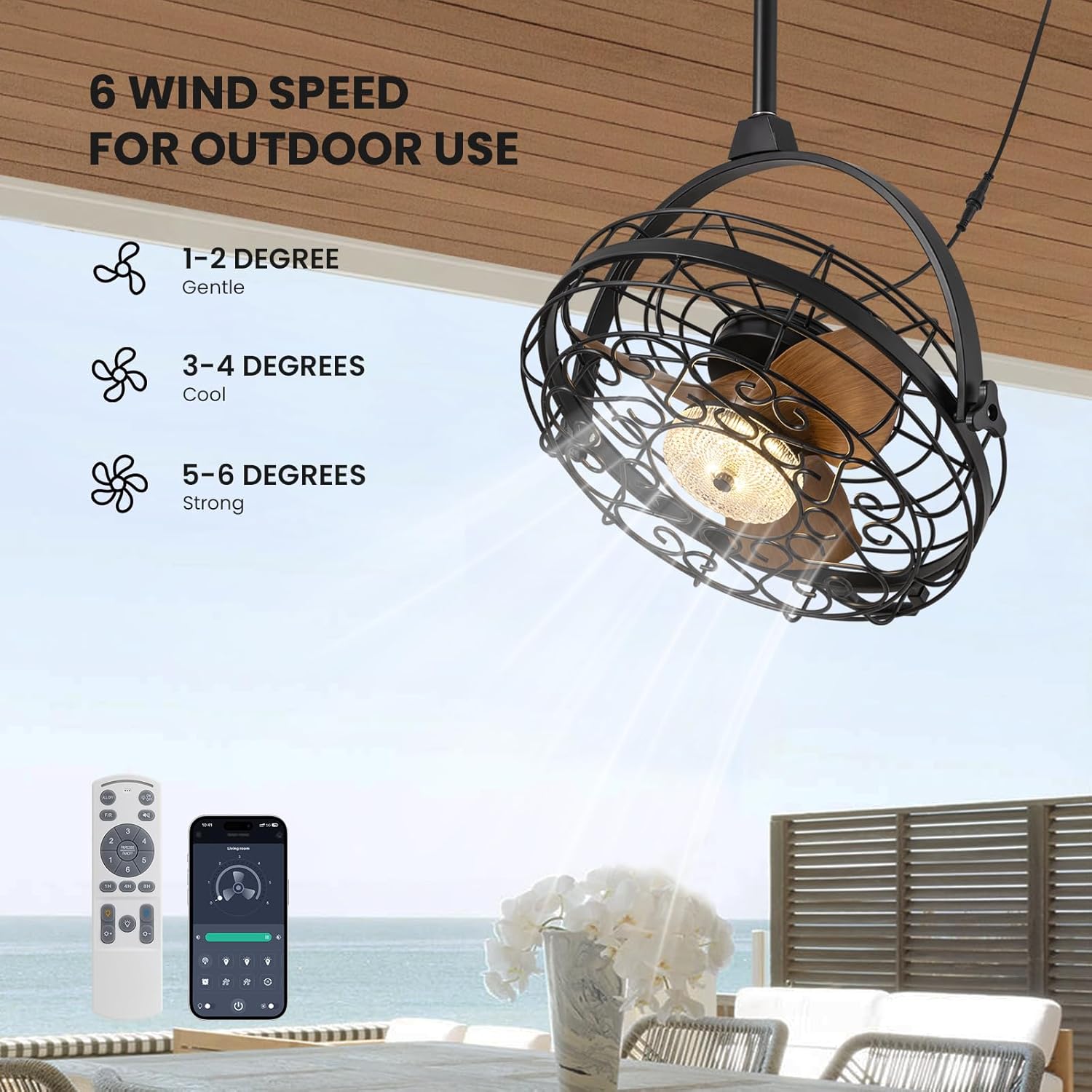
Image 6.2: The fan offers 6 distinct wind speed settings, from gentle to strong.
- Geschwindigkeiten 1-2: Gentle airflow, ideal for quiet environments or light breeze.
- Geschwindigkeiten 3-4: Cool airflow, suitable for moderate temperatures.
- Geschwindigkeiten 5-6: Strong airflow, effective for warmer conditions or larger areas.
Dimmable Light Operation:

Image 6.3: The integrated LED light can be adjusted to three color temperatures and dimmed from 10% to 100% brightness.
Use the color temperature button to cycle through 3000K (Warm), 4500K (Natural), and 6000K (Cool) settings. Use the brightness adjustment buttons to set the light intensity from 10% to 100%.
360°-Drehfunktion:

Image 6.4: The fan head can be manually adjusted 360 degrees both horizontally and vertically to direct airflow precisely.
The fan head can be manually rotated 360 degrees horizontally and vertically. This allows you to direct the airflow to specific areas as needed, providing flexible cooling.
Umkehrbare Motorfunktion:
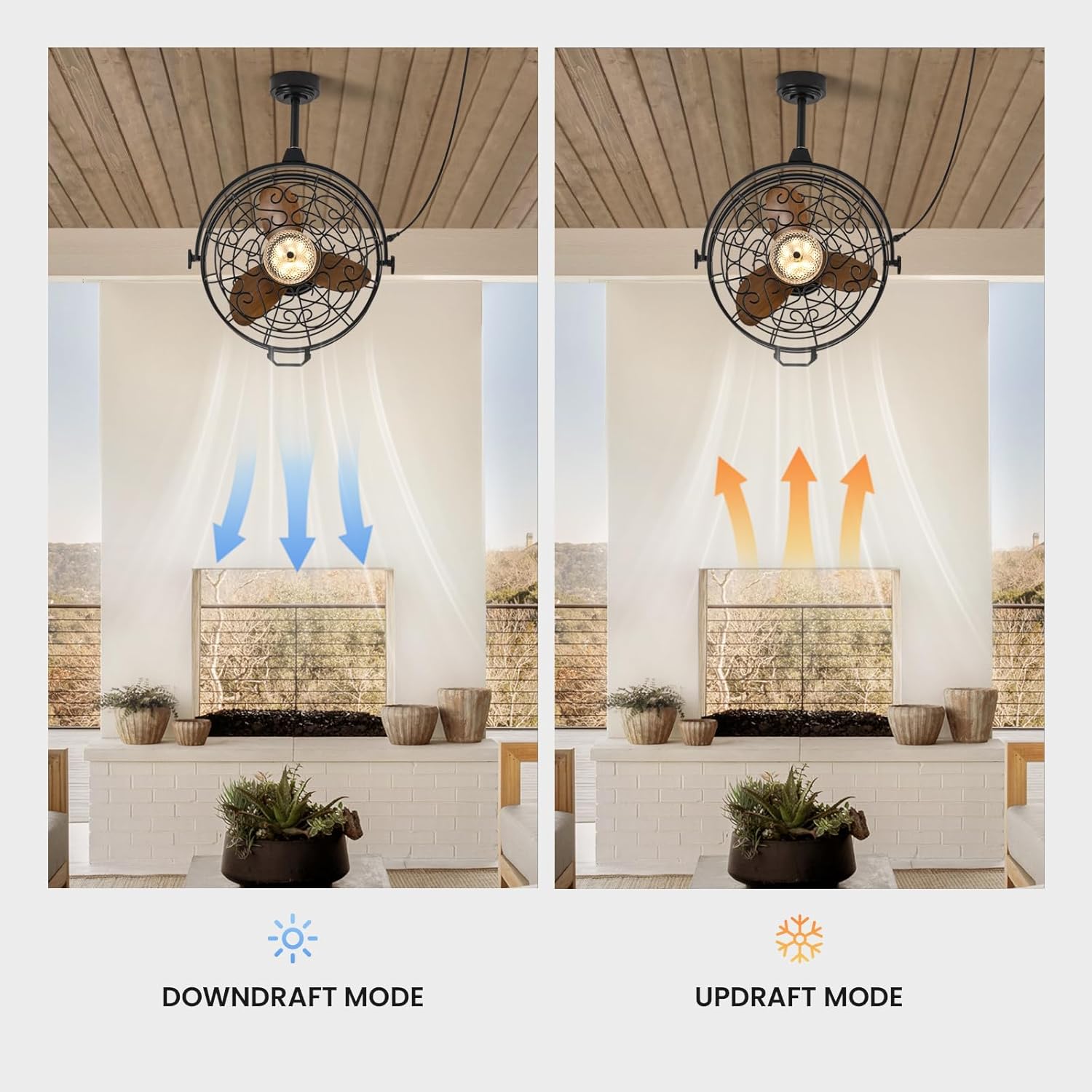
Image 6.5: The fan operates in downdraft mode for cooling in summer and updraft mode for circulating warm air in winter.
Use the F/R button on the remote or the corresponding setting in the app to switch the fan's rotation direction:
- Downdraft Mode (Summer): Die Flügel drehen sich gegen den Uhrzeigersinn und drücken die Luft nach unten, um einen Kühleffekt zu erzeugen.
- Updraft Mode (Winter): Die Flügel drehen sich im Uhrzeigersinn und saugen Luft nach oben, um die in der Nähe der Decke eingeschlossene warme Luft zu zirkulieren.
7. Wartung
Regelmäßige Wartung gewährleistet optimale Leistung und verlängert die Lebensdauer Ihres Ventilators.
- Reinigung: Wipe the fan housing and blades with a soft, damp cloth. Do not use abrasive cleaners or solvents. Ensure the fan is completely dry before operating.
- Abstauben: Periodically dust the fan blades and light fixture to prevent buildup that can affect performance and light output.
- Inspektionen: Regularly check all connections and mounting hardware for tightness. Ensure the power cord is free from damage.
- Lichtquelle: Die LED-Lichtquelle ist fest integriert und kann in der Regel nicht vom Benutzer ausgetauscht werden. Bei einem Defekt der Lampe wenden Sie sich bitte an den Kundendienst.
Caution: Always disconnect power before cleaning or performing any maintenance.
8. Fehlerbehebung
Sollten Sie Probleme mit Ihrem Lüfter haben, beachten Sie bitte die folgenden häufig auftretenden Probleme und Lösungen.
| Problem | Mögliche Ursache | Lösung |
|---|---|---|
| Lüfter schaltet nicht ein | Keine Stromversorgung Batterie der Fernbedienung schwach/leer Fan not properly plugged in | Leistungsschalter und Wandschalter prüfen Ersetzen der Fernbedienungsbatterien Stellen Sie sicher, dass der Stecker vollständig in eine funktionierende Steckdose eingesteckt ist |
| Licht geht nicht an | Lichtschalter aus LED-Fehler | Press the light switch button on the remote/app Wenden Sie sich an den Kundendienst, um Hilfe zu erhalten |
| Der Ventilator macht übermäßige Geräusche. | Lose Befestigungsschrauben Verstopfung der Lüfterblätter | Ensure all mounting screws are tightened Check for any objects interfering with the blades (with power off) |
| Fernbedienung funktioniert nicht | Batterien schwach/leer Hindernis zwischen Fernbedienung und Lüfter Fan not paired | Batterien ersetzen Sorgen Sie für klare Sicht Refer to pairing instructions in the app or contact support |
| Schwacher Luftstrom | Lüfterdrehzahl zu niedrig Incorrect fan direction (winter mode in summer) | Erhöhen Sie die Lüftergeschwindigkeit Switch to downdraft mode (counter-clockwise rotation) |
Sollte das Problem nach Anwendung dieser Lösungsansätze weiterhin bestehen, wenden Sie sich bitte an den Kundendienst.
9. Garantie und Support
Garantieinformationen:
This CROSSIO product is covered by a manufacturer's warranty against defects in materials and workmanship. The specific terms and duration of the warranty may vary. Please retain your proof of purchase for warranty claims.
Kundendienst:
For any questions, technical assistance, or warranty claims, please contact CROSSIO customer support. You can typically find contact information on the product packaging, the official CROSSIO webWebsite oder über Ihre Einkaufsplattform.
When contacting support, please have your product model number (FS8912-01) and proof of purchase readily available.