
Pinmoco H200477E-BLPU
Pinmoco Cross Legged Office Chair User Manual
Model: H200477E-BLPU
1. Einleitung
Thank you for choosing the Pinmoco Cross Legged Office Chair. This manual provides essential information for the safe and efficient use of your new chair. Please read it thoroughly before assembly and operation, and retain it for future reference.
This chair is designed to accommodate various sitting positions, including cross-legged, squatting, or kneeling, offering comfort and flexibility for different users and activities such as office work, meditation, or yoga.
2. Wichtige Sicherheitshinweise
WARNING: To prevent injury, please adhere to the following safety guidelines:
- Überschreiten Sie nicht die empfohlene maximale Gewichtsgrenze. 330 Pfund (150 kg) für sicheren Gebrauch.
- Vor Gebrauch sicherstellen, dass alle Schrauben und Bolzen fest angezogen sind. Regelmäßig überprüfen und gegebenenfalls nachziehen.
- Halten Sie Kleinteile während der Montage von Kindern fern.
- Use the chair only for its intended purpose as an office or meditation chair.
- Vermeiden Sie es, auf dem Stuhl zu stehen oder ihn als Trittschemel zu benutzen.
- Do not expose the chair to extreme temperatures or direct sunlight for prolonged periods, as this may damage the material.
3. Packungsinhalt
Before beginning assembly, verify that all components are present and undamaged. If any parts are missing or damaged, please contact Pinmoco customer support.
- Basic Components of Cross Legged Chair (Seat, Backrest, Base, Wheels, Gas Lift)
- Installation Tools and Accessories (Allen Wrench, Screws)
- Handbuch (Dieses Dokument)

Image: The Pinmoco Cross Legged Office Chair in black PU leather, showcasing its unique design with a separate footrest and backrest.
4. Aufbau und Montage
Assembly of the Pinmoco Cross Legged Office Chair is straightforward. Follow these steps carefully:
- Räder an der Basis befestigen: Insert the five caster wheels into the holes at the end of each leg of the chair base. Push firmly until they click into place.
- Gaslift einsetzen: Setzen Sie den Gasdruckfederzylinder in die mittlere Öffnung des Stuhlgestells ein.
- Sitzmechanismus montieren: Attach the seat mechanism to the underside of the main seat cushion using the provided screws. Ensure the lever is facing the front.
- Sitz an Gasdruckfeder befestigen: Setzen Sie den montierten Sitz vorsichtig auf den Gasdruckfederzylinder.
- Rückenlehne anbringen: Secure the backrest support to the main seat mechanism using the provided screws. Then, attach the backrest cushion to the backrest support.
- Fußstütze anbringen: Secure the footrest to the main chair frame using the designated screws.
Tip: It is recommended to assemble the chair on a soft, clean surface to prevent scratches.

Image: Detailed dimensions of the chair's wider seat cushion and footstool, including backrest width (18.9") and seat cushion width (19.3") and depth (14.96").
5. Bedienungsanleitung
Your Pinmoco Cross Legged Office Chair offers several adjustable features for optimal comfort and posture.
5.1. Sitzhöhenverstellung
To adjust the seat height, locate the lever under the right side of the seat. While seated, pull the lever up to lower the seat. To raise the seat, lift your weight off the seat and pull the lever up. Release the lever at your desired height. The seat cushion height adjusts from 20 to 27 inches.

Image: A close-up of the chair's height adjustment lever, demonstrating the 10-inch higher adjustable seat range.
5.2. Rückenlehnenverstellung
The backrest offers two adjustable positions. Use the provided Allen wrench to loosen the bolts securing the backrest, adjust it to your preferred angle, and then re-tighten the bolts securely. This allows for customized lumbar support.

Image: A user adjusting the 2-stage backrest, highlighting the extra-wide lumbar support provided by the cloud-shaped backrest.
5.3. Footstool Swivel
The innovative footrest rotates a full 360 degrees, allowing you to effortlessly adjust your posture without moving the entire chair. Simply rotate the footstool to find your most comfortable position.
Video: This video demonstrates the 360-degree swivel feature of the footstool, showcasing how users can easily change their sitting posture for various activities like working, gaming, or meditating. The video also highlights the adjustable backrest and seat height.

Image: A woman comfortably seated cross-legged on the Pinmoco chair at a desk, illustrating its ergonomic design for office use.
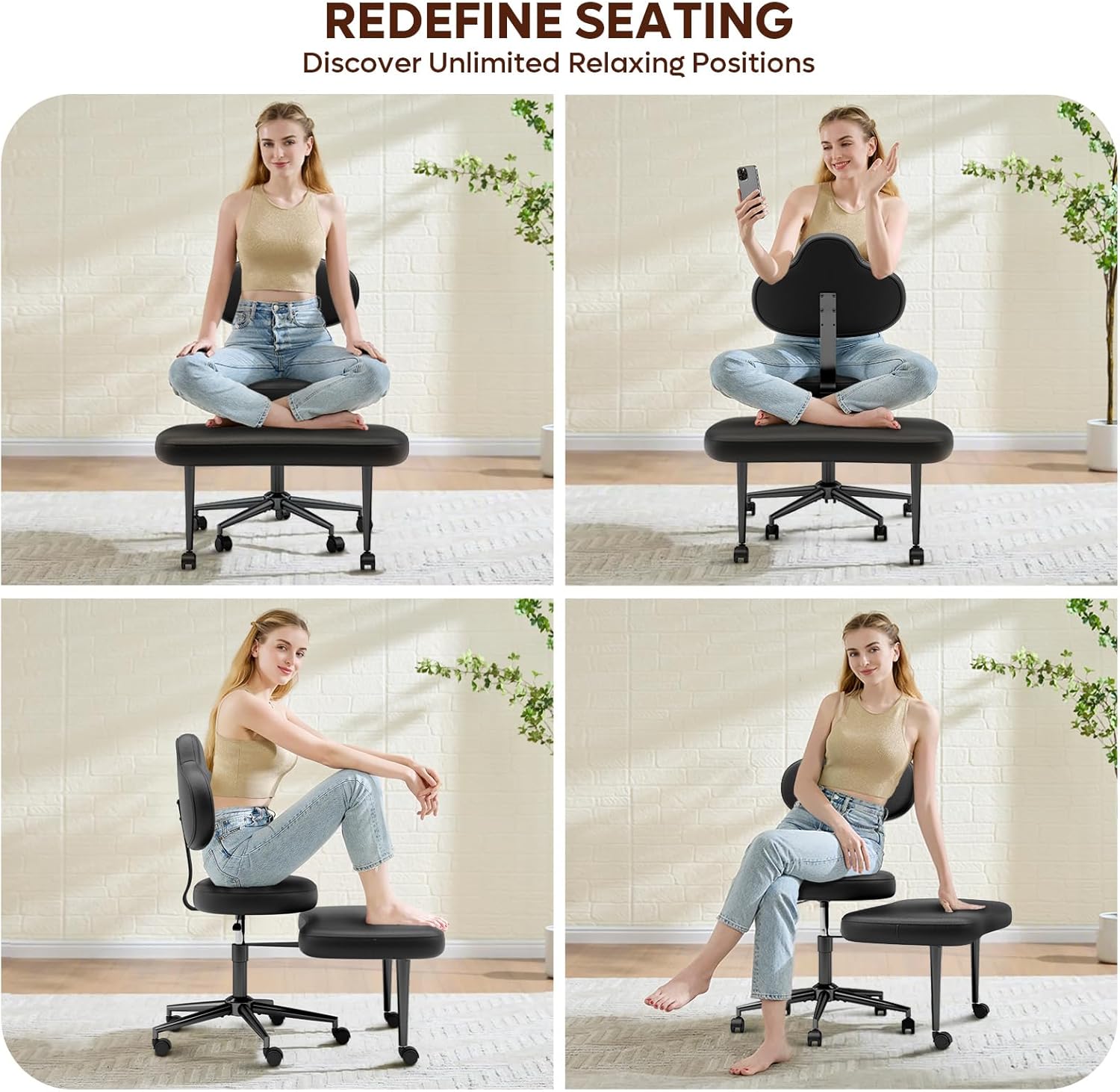
Image: A collage of four images demonstrating the versatility of the chair for various activities: office work, gaming, yoga/meditation, and general leisure, highlighting its ability to support multiple relaxing positions.
6. Pflege und Wartung
Proper care will extend the life and appearance of your Pinmoco chair.
- Reinigung: PU-Lederoberflächen mit einem weichen, feuchten Tuch abwischen.amp cloth. For teddy velvet surfaces, use a soft brush or vacuum to remove dust and debris. For spills, blot immediately with a clean, dry cloth. Do not use harsh chemicals or abrasive cleaners.
- Wasserdichte Eigenschaft: The PU leather material is waterproof and easy to clean.
- Inspektion: Überprüfen Sie regelmäßig alle Schrauben und Bolzen auf festen Sitz. Ziehen Sie diese gegebenenfalls nach, um Stabilität und Sicherheit zu gewährleisten.
- Bewegung: When moving the chair, lift it rather than dragging it to prevent damage to the floor or chair components.

Bild: Eine Nahaufnahme view of the black PU leather surface of the chair, showing its waterproof properties with water droplets visible on the material.
7. Fehlerbehebung
Sollten Sie Probleme mit Ihrem Stuhl haben, beachten Sie bitte die folgenden häufig auftretenden Probleme und Lösungen:
| Problem | Mögliche Ursache | Lösung |
|---|---|---|
| Der Stuhl wackelt oder ist instabil. | Lose Schrauben oder unebener Boden. | Prüfen und ziehen Sie alle Montageschrauben fest. Stellen Sie sicher, dass der Stuhl auf einer ebenen Fläche steht. |
| Die Sitzhöhenverstellung funktioniert nicht. | Gas lift issue or lever mechanism obstruction. | Stellen Sie sicher, dass der Hebel vollständig eingerastet ist. Sollte das Problem weiterhin bestehen, muss die Gasdruckfeder möglicherweise ausgetauscht werden. Wenden Sie sich an den Kundendienst. |
| Die Räder rollen nicht reibungslos. | Debris in casters or damaged wheels. | Clean any hair or debris from the wheel casters. If wheels are damaged, contact customer support for replacements. |
| Missing parts or bent bar upon delivery. | Transportschäden oder Verpackungsfehler. | Contact Pinmoco customer support immediately for parts replacement or upgrade service. |
8. Produktspezifikationen
| Besonderheit | Detail |
|---|---|
| Marke | Pinmoco |
| Modellname | H200477E-BLPU |
| Farbe | Schwarz |
| Technische Daten | 34.25"T x 27.95"B x 35.83"H |
| Sitztiefe | 19.5 Zoll |
| Breite der Stuhlrückenlehne | 18.9 Zoll |
| Zurück Stil | PU Leather Back (Cloud Shape) |
| Besondere Merkmale | Adjustable Backrest, Adjustable Height, Back Support, Foot Rest, PU Leather |
| Maximalgewichtsempfehlung | 330 Pfund (150 kg) |
| Material | Kunstleder |
| Artikelgewicht | 27.9 Pfund |
| GTIN (UPC) | 00810187170485 |
9. Garantie und Support
Pinmoco is committed to providing high-quality products and customer satisfaction. For any questions, concerns, or warranty claims, please contact our customer support team.
- Kundendienst: If you encounter a missing parts or a bent bar, please contact us in time, we provide parts replacement or upgrade service.
- Online-Hilfe: Visit the official Pinmoco Store for more information and support: Pinmoco Direct Store.
Ask a question about this manual
Ask about setup, troubleshooting, compatibility, parts, safety, or missing instructions. Manuals+ will review the question and use this page’s manual context to help answer it.