
1. Einleitung
The ACwO DwOTS Zing Wireless Earbuds are designed to provide a high-quality audio experience with advanced features. This manual will guide you through the setup, operation, and maintenance of your new earbuds.
Video 1: ACwO DwOTS Zing Wireless Earbuds Overview. This video provides a brief introduction to the product and its key features.
2. Lieferumfang
Carefully unpack your ACwO DwOTS Zing Wireless Earbuds. The package should contain the following items:
- ACwO DwOTS Zing Wireless Earbuds (Left and Right)
- Ladeetui
- USB-Ladekabel
- Ohrstöpsel (verschiedene Größen)
- Scan Me Card (for digital manual/app access)
- Garantiekarte
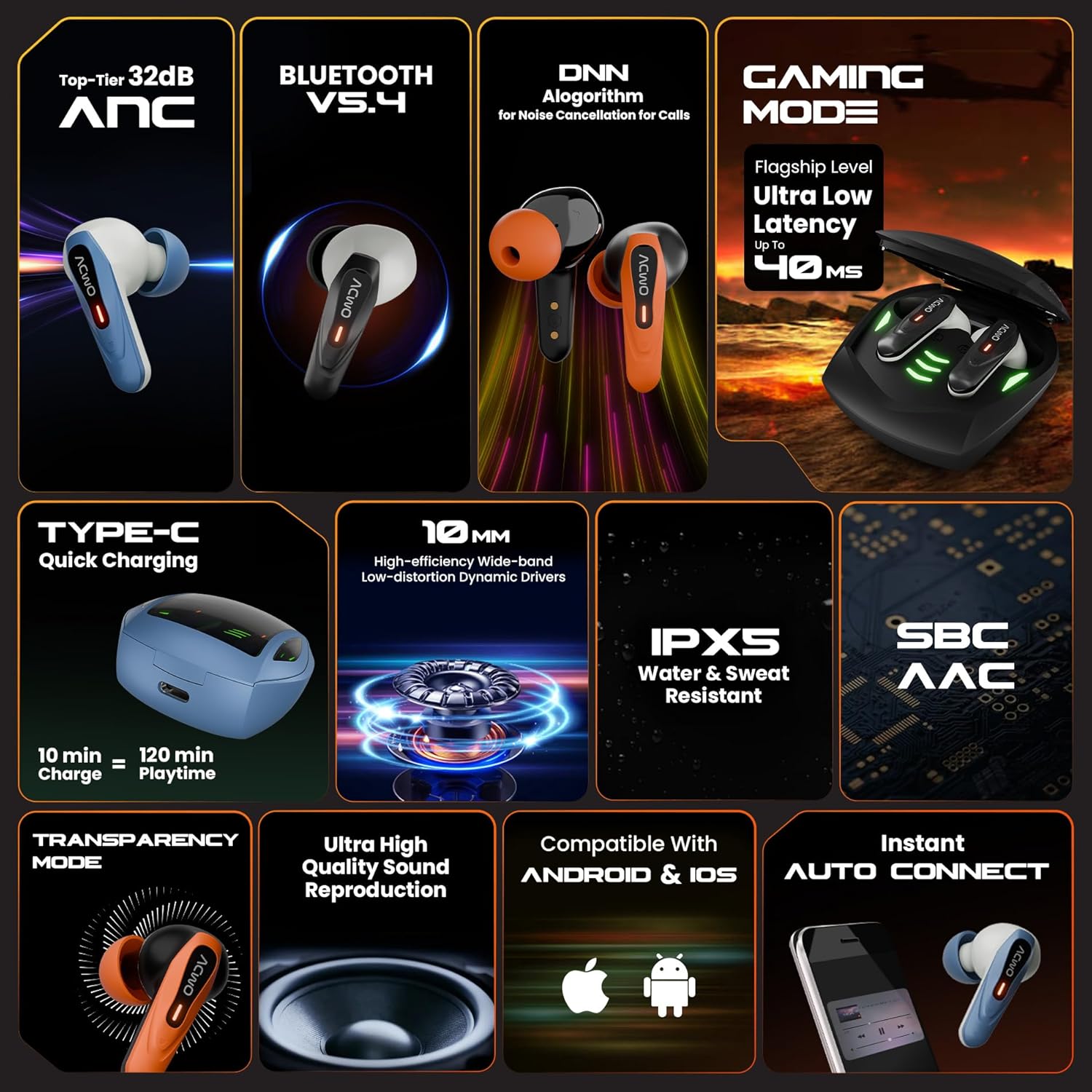
Image 1: Contents of the ACwO DwOTS Zing package, showing the earbuds, charging case, and accessories.
3. Produktmerkmale
The ACwO DwOTS Zing Wireless Earbuds incorporate several features for an enhanced audio experience:
- Aktive Geräuschunterdrückung (ANC): Up to 32dB ANC for immersive listening.
- Bluetooth V5.4: Für eine stabile und effiziente drahtlose Verbindung.
- Lange Spielzeit: Bis zu 55 Stunden Gesamtspielzeit mit dem Ladecase.
- Geringe Latenz: 40ms low latency for gaming and video synchronization.
- HYPERBOOST™ Charging: 10 minutes of charge provides up to 120 minutes of playtime.
- 10-mm-Dynamische Treiber: High-efficiency, wide-band, low-distortion drivers for powerful bass.
- IPX5 Water & Sweat Resistant: Geeignet für Workouts und Outdoor-Aktivitäten.
- Audio-Codecs: Supports SBC and AAC for quality audio streaming.
- Transparenzmodus: Allows ambient sounds to be heard for situational awareness.
- Quad ENC Microphones: For clear call quality with environmental noise cancellation.
- Instant Auto Connect: Earbuds automatically connect to paired devices upon opening the case.
- Kompatibilität: Funktioniert sowohl mit Android- als auch mit iOS-Geräten.

Image 2: Visual representation of key features such as 32dB ANC, Bluetooth V5.4, 40ms low latency gaming mode, and HYPERBOOST charging.

Bild 3: Nahaufnahme view of the earbuds highlighting the four ENC microphones for clear calls.
4. Einrichtung
4.1 Erstaufladung
- Legen Sie beide Ohrhörer in das Ladeetui.
- Connect the USB charging cable to the Type-C port on the charging case and to a power source.
- The LED indicators on the case will show charging status. Ensure the earbuds and case are fully charged before first use.

Image 4: The charging case connected via a Type-C cable, illustrating the charging process.
4.2 Bluetooth-Kopplung
- Öffnen Sie das Ladecase. Die Ohrhörer wechseln automatisch in den Kopplungsmodus, was durch blinkende LED-Leuchten angezeigt wird.
- Aktivieren Sie Bluetooth auf Ihrem Gerät (Smartphone, Tablet usw.).
- Suchen nach "ACwO DwOTS Zing" in the list of available Bluetooth devices.
- Select "ACwO DwOTS Zing" to connect. Once connected, the LED indicators on the earbuds will stop flashing.
- Die Ohrhörer verbinden sich beim Herausnehmen aus dem Ladecase automatisch wieder mit dem zuletzt gekoppelten Gerät.
4.3 Tragen der Ohrhörer
- Choose the eartips that provide the most comfortable and secure fit for optimal sound quality and ANC performance.
- Stecken Sie die Ohrstöpsel in Ihre Ohren und drehen Sie sie vorsichtig, bis sie fest sitzen.
5. Bedienungsanleitung
The ACwO DwOTS Zing Earbuds feature touch controls for various functions. Refer to the "Scan Me Card" included in your package for detailed touch control gestures, as these may vary.
5.1 Grundlegende Bedienelemente (typisch)
- Abspielen/Pause: Tippen Sie einmal auf einen der Ohrhörer.
- Nächster Titel: Doppeltippen Sie auf den rechten Ohrhörer.
- Vorheriges Lied: Doppeltippen Sie auf den linken Ohrhörer.
- Anruf annehmen/beenden: Tippen Sie einmal auf einen der Ohrhörer.
- Anruf ablehnen: Einen der Ohrhörer lange drücken.
- Sprachassistenten aktivieren: Dreimaliges Tippen auf einen der Ohrhörer.
5.2 ANC und Transparenzmodus
The earbuds support Active Noise Cancellation (ANC) and Transparency Mode. A long press (e.g., 2 seconds) on a specific earbud (refer to your "Scan Me Card" for exact configuration) typically cycles through these modes:
- ANC ein: Blendet Umgebungsgeräusche aus.
- Transparenzmodus: Ermöglicht es Ihnen, Ihre Umgebung wahrzunehmen, während Sie Audioinhalte hören.
- Normalmodus: Neither ANC nor Transparency is active.
5.3 Gaming-Modus
To activate the low latency Gaming Mode, perform the specific touch gesture indicated on your "Scan Me Card". This mode reduces audio delay, which is beneficial for gaming and video playback.

Image 5: User engaged in mobile gaming with the earbuds, demonstrating the low latency feature.
6. Wartung
6.1 Reinigung
- Reinigen Sie die Ohrhörer und das Ladecase regelmäßig mit einem weichen, trockenen, fusselfreien Tuch.
- Ohrstöpsel abnehmen und mit milder Seife und Wasser reinigen, anschließend gründlich trocknen lassen, bevor sie wieder angebracht werden.
- Stellen Sie sicher, dass die Ladekontakte an beiden Ohrhörern und am Ladecase sauber und frei von Verunreinigungen sind.
6.2 Speicherung
- Bewahren Sie die Ohrhörer bei Nichtgebrauch im Ladeetui auf, um sie zu schützen und geladen zu halten.
- Avoid exposing the earbuds to extreme temperatures, humidity, or corrosive liquids.
7. Fehlerbehebung
If you encounter issues with your ACwO DwOTS Zing Earbuds, refer to the following common solutions:
| Problem | Mögliche Lösung |
|---|---|
| Ohrhörer lassen sich nicht koppeln |
|
| Kein Ton von einem Ohrhörer |
|
| Ladeprobleme |
|
| Schlechte Anrufqualität |
|
8. Spezifikationen
| Besonderheit | Detail |
|---|---|
| Modellnummer | DWOTSZING-BLK |
| Bluetooth-Version | V5.4 |
| Aktive Geräuschunterdrückung (ANC) | Bis zu 32 dB |
| Gesamtspielzeit | Bis zu 55 Stunden (mit Ladeetui) |
| Geringe Latenz | 40 ms (Gaming-Modus) |
| Ladetechnik | HYPERBOOST™ (10 min charge = 120 min playtime) |
| Treibergröße | 10 mm dynamische Treiber |
| Wasserbeständigkeit | IPX5 (wasser- und schweißbeständig) |
| Mikrofone | Quad ENC Microphones |
| Konnektivität | Kabellos (Bluetooth) |
| Technische Daten | 61.5 x 54.5 x 32.5 cm |
| Artikelgewicht | 42 g |
| Hersteller | ACwO Lifestyle Pvt Ltd |
9. Garantie und Support
Your ACwO DwOTS Zing Wireless Earbuds come with a standard brand warranty. Please refer to the included Warranty Card for details on warranty coverage and terms.
For further assistance, product registration, or to access the full digital manual, please use the "Scan Me Card" provided in the box or visit the official ACwO support webWebsite.
You can also find more information on the product detail page on Amazon.in.


