
1. Einleitung
Thank you for choosing the suevery AMD Ryzen5 5600GT Gaming PC. This high-performance desktop computer is designed to provide a seamless experience for gaming, e-learning, video and audio streaming, home entertainment, business office tasks, video conferencing, photo and video editing, and daily trading. This manual provides essential information for setting up, operating, maintaining, and troubleshooting your new PC to ensure optimal performance and longevity.

Bild 1: Vorderseite view of the suevery AMD Ryzen5 5600GT Gaming PC, showcasing its transparent side panel and vibrant RGB fans.
2. Sicherheitshinweise
Please read and follow these safety guidelines carefully to prevent damage to your PC and ensure personal safety:
- Stromversorgung: Use only the power supply unit provided with your PC. Ensure the power outlet is properly grounded.
- Belüftung: Do not block any ventilation openings. Maintain adequate space around the PC for proper airflow to prevent overheating.
- Flüssigkeit und Feuchtigkeit: Keep the PC away from liquids, moisture, and extreme temperatures. Do not operate the PC with wet hands.
- Platzierung: Stellen Sie den PC auf eine stabile, ebene Fläche. Vermeiden Sie es, ihn in der Nähe von Wärmequellen oder in direktem Sonnenlicht aufzustellen.
- Wartung: Do not attempt to service the PC yourself. Refer all servicing to qualified service personnel. Opening the PC case may void your warranty.
- Reinigung: Vor der Reinigung den Netzstecker ziehen. Ein weiches, trockenes Tuch verwenden. Keine flüssigen oder Aerosolreiniger verwenden.
3. Packungsinhalt
Bitte überprüfen Sie beim Auspacken, ob alle folgenden Artikel enthalten sind:
- suevery AMD Ryzen5 5600GT Gaming PC (Model: SUSU-V900W)
- Stromkabel
- Dokumentation (Schnellstartanleitung, Garantiekarte)
- RGB Lighting (Integrated feature)
If any items are missing or damaged, please contact your retailer or suevery customer support immediately.
4. Installationsanleitung
Follow these steps to set up your suevery Gaming PC:
- PC auspacken: Carefully remove the PC from its packaging. Retain all packaging materials for future transport or servicing.
- Peripheriegeräte anschließen:
- Monitor: Connect your monitor to the PC using an HDMI or VGA cable. The PC features one HDMI port and one VGA port.
- Tastatur und Maus: Connect your keyboard and mouse to the available USB ports. The PC has 4 USB 2.0 ports and 2 USB 3.0 ports.
- Andere Geräte: Schließen Sie weitere Peripheriegeräte wie Lautsprecher, Kopfhörer oder externe Laufwerke an.
- An die Stromversorgung anschließen: Plug the power cable into the PC's power input and then into a grounded electrical outlet.
- Netzwerkverbindung: The PC supports Wi-Fi 802.11ax for wireless internet connectivity. An Ethernet port is also available for a wired connection.

Image 2: Rear panel of the PC, illustrating the available USB, HDMI, VGA, and audio ports for connecting peripherals.

Image 3: Diagram detailing the PC's dimensions and the location of front and rear USB ports, along with signal interfaces.
5. Bedienungsanleitung
This section outlines the basic operation of your suevery Gaming PC.
5.1 Ein-/Ausschalten
- So schalten Sie das Gerät ein: Press the power button located on the front of the PC. The system will boot up, and the operating system (Windows) will load.
- So schalten Sie das Gerät aus: It is recommended to shut down the PC through the operating system's shutdown procedure (Start Menu > Power > Shut down). Avoid direct power disconnection unless absolutely necessary.
5.2 Systemfunktionen
- Prozessor: Equipped with an AMD Ryzen5-5600GT 6-core, 12-thread processor (3.6GHz base, up to 4.6GHz Turbo) for efficient multitasking and gaming.
- Erinnerung: 16GB of high-speed DDR4 RAM at 3200MHz ensures smooth performance across multiple applications and demanding games.
- Lagerung: A 512GB NVMe SSD provides ultra-fast boot times, rapid application loading, and ample Speicher für Sie files und Spiele.
- Grafik: Integrated AMD Radeon RX Vega7 Graphics (1.9G) supports popular games and provides clear visuals for 1080P gaming and 4K content streaming.
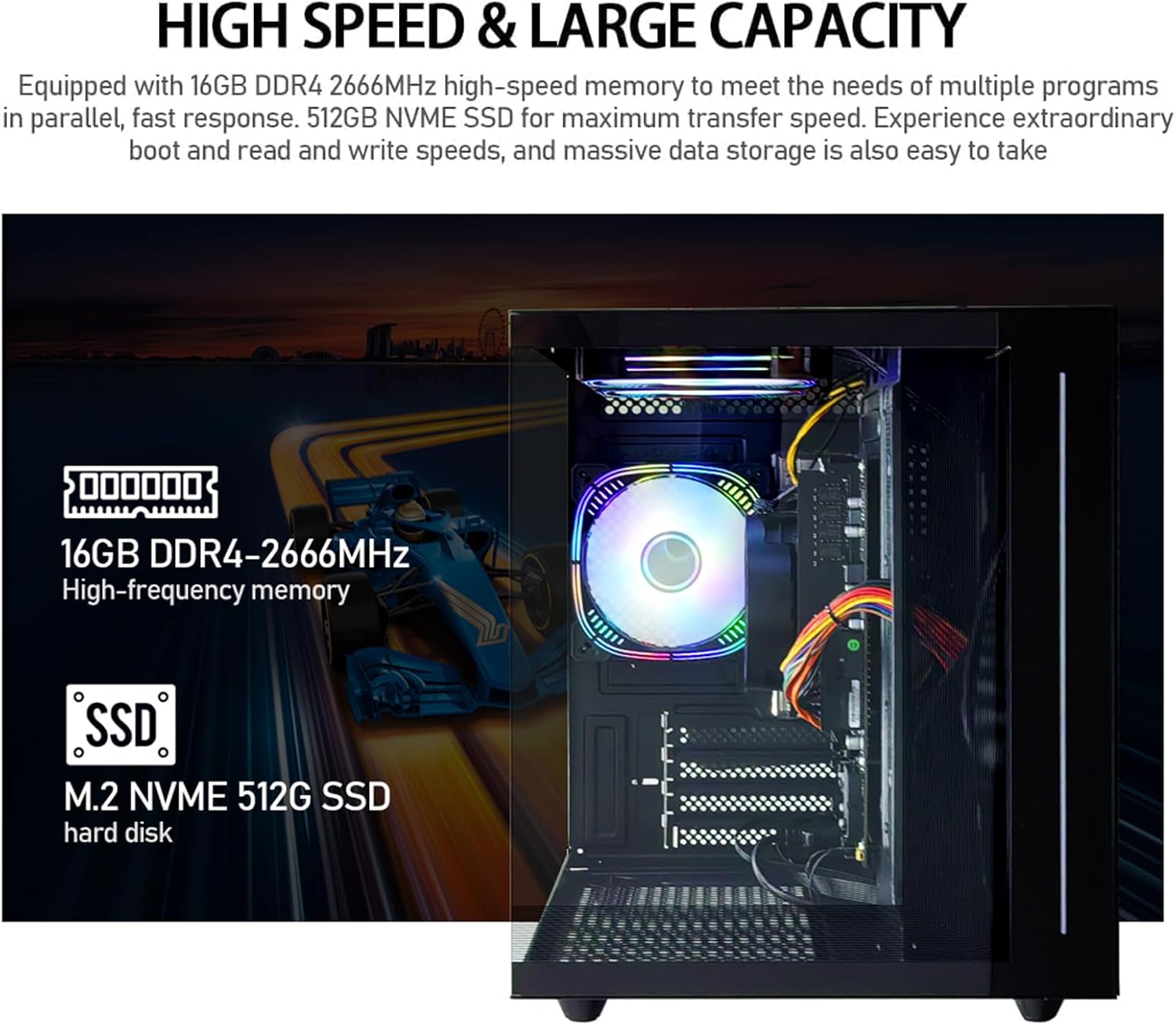
Abbildung 4: Intern view of the PC, emphasizing the 16GB DDR4 high-frequency memory and the M.2 NVMe 512GB SSD for high-speed data transfer.

Image 5: Visual representation of the AMD Radeon Vega Graphics 7 capabilities, suitable for esports games, video clips, graphic design, and corporate office tasks.
6. Wartung
Proper maintenance ensures the longevity and performance of your PC.
6.1 Reinigung
- Exterieur: Use a soft, lint-free cloth to wipe the exterior surfaces. For stubborn marks, slightly dampspülen Sie das Tuch mit Wasser aus.
- Belüftung: Regularly check and clean the ventilation grilles to prevent dust buildup, which can impede airflow and cause overheating. Use compressed air to gently clear dust from fan blades and vents.
6.2 Belüftung und Kühlung
The PC is equipped with three built-in 120mm chassis fans for rapid heat dissipation and cooling, ensuring stable performance during intensive use. Ensure these fans are not obstructed.

Image 6: Illustration of the PC's cooling system, highlighting the RGB-enabled fans designed for rapid and silent heat dissipation.
6.3 Softwareaktualisierungen
Keep your operating system, drivers, and applications updated to ensure security, stability, and optimal performance. Windows updates are managed through the operating system settings.
7. Fehlerbehebung
Dieser Abschnitt bietet Lösungen für häufig auftretende Probleme.
- Kein Strom:
- Stellen Sie sicher, dass das Netzkabel sowohl mit dem PC als auch mit der Steckdose fest verbunden ist.
- Überprüfen Sie die Funktionsfähigkeit der Steckdose, indem Sie ein anderes Gerät anschließen.
- Check the power switch on the back of the PC (if present) is in the 'On' position.
- Keine Anzeige auf dem Monitor:
- Confirm the monitor is powered on and correctly connected to the PC's HDMI or VGA port.
- Stellen Sie sicher, dass an Ihrem Monitor die richtige Eingangsquelle ausgewählt ist.
- Try connecting the monitor to a different port if available, or test with another monitor.
- Das System ist langsam oder reagiert nicht:
- Schließen Sie unnötige Anwendungen, die im Hintergrund laufen.
- Prüfen Sie, ob auf Ihrer SSD ausreichend freier Speicherplatz vorhanden ist.
- Führen Sie einen Virenscan durch, um nach Schadsoftware zu suchen.
- Stellen Sie sicher, dass Ihr Betriebssystem und Ihre Treiber auf dem neuesten Stand sind.
- Keine Internetverbindung:
- Stellen Sie bei WLAN sicher, dass der WLAN-Adapter aktiviert ist und Sie mit dem richtigen Netzwerk und dem richtigen Passwort verbunden sind.
- For wired connection, ensure the Ethernet cable is securely connected to both the PC and the router/modem.
- Starten Sie Ihren Router/Ihr Modem neu.
If you encounter issues not covered here, or if the problem persists, please contact suevery customer support.
8. Spezifikationen
| Komponente | Spezifikation |
|---|---|
| Modellnummer | SUSU-V900W |
| Prozessor | AMD Ryzen5-5600GT (6 Cores, 12 Threads, 3.6GHz up to 4.6GHz Turbo) |
| Prozessorsockel | Sockel AM4 |
| RAM | 16GB DDR4 3200MHz (Max. 32GB) |
| Lagerung | 512GB NVMe SSD (PCIE x 4 interface) |
| Grafik | Integrated AMD Radeon RX Vega 7 Graphics (1.9G) |
| Betriebssystem | Windows |
| Kabellose Konnektivität | Wi-Fi 802.11ax |
| USB 2.0-Anschlüsse | 4 |
| USB 3.0-Anschlüsse | 2 |
| HDMI-Anschlüsse | 1 |
| VGA Ports | 1 |
| Chassis Fans | 3 x 120mm (Built-in) |
| Abmessungen (L x B x H) | 39.62 x 35.81 x 33.27 cm |
| Gewicht | 6.89 kg |
9. Garantie und Support
Your suevery AMD Ryzen5 5600GT Gaming PC comes with a standard manufacturer's warranty. Please refer to the warranty card included in your package for specific terms and conditions, including warranty duration and coverage details.
For technical support, service inquiries, or to report any issues, please contact suevery customer support through the contact information provided on your warranty card or the official suevery website. Please have your model number (SUSU-V900W) and purchase details ready when contacting support.