
1. Einleitung
This manual provides detailed instructions for the proper setup, operation, and maintenance of your Daakro AK45 Home Audio Amplifier. Please read this manual thoroughly before using the device to ensure optimal performance and safety. The AK45 is a 2-channel stereo amplifier designed for passive speakers, featuring Bluetooth 5.4 connectivity, multiple input options, and adjustable audio controls.

Figure 1: Daakro AK45 Home Audio AmpVerstärker und Fernbedienung
2. Produktüberschreitungview
2.1 Bedienelemente auf der Vorderseite

Abbildung 2: Layout der Frontplatte
- Stromschalter: Schaltet die um amplifier ein oder aus.
- USB/SD-Eingang: Ports for connecting USB flash drives or SD cards for media playback.
- Höhenregelung: Adjusts the high-frequency audio output (±12dB).
- Bassregelung: Adjusts the low-frequency audio output (±12dB).
- Mikrofonlautstärkeregelung: Adjusts the volume level for connected microphones.
- Mikrofoneingänge (MIC1, MIC2): Zwei 6.5-mm-Klinkenbuchsen (1/4") zum Anschluss von Mikrofonen.
- Master-Lautstärkeregler: Adjusts the overall output volume (0-32dB).
- Modus-Taste: Cycles through input sources (Bluetooth, RCA, USB, SD, FM).
- Wiedergabesteuerung: Buttons for previous track, play/pause, next track.
- LED-Anzeige: Zeigt den aktuellen Modus, die Lautstärke und Informationen zum Musiktitel an.
2.2 Anschlüsse auf der Rückseite
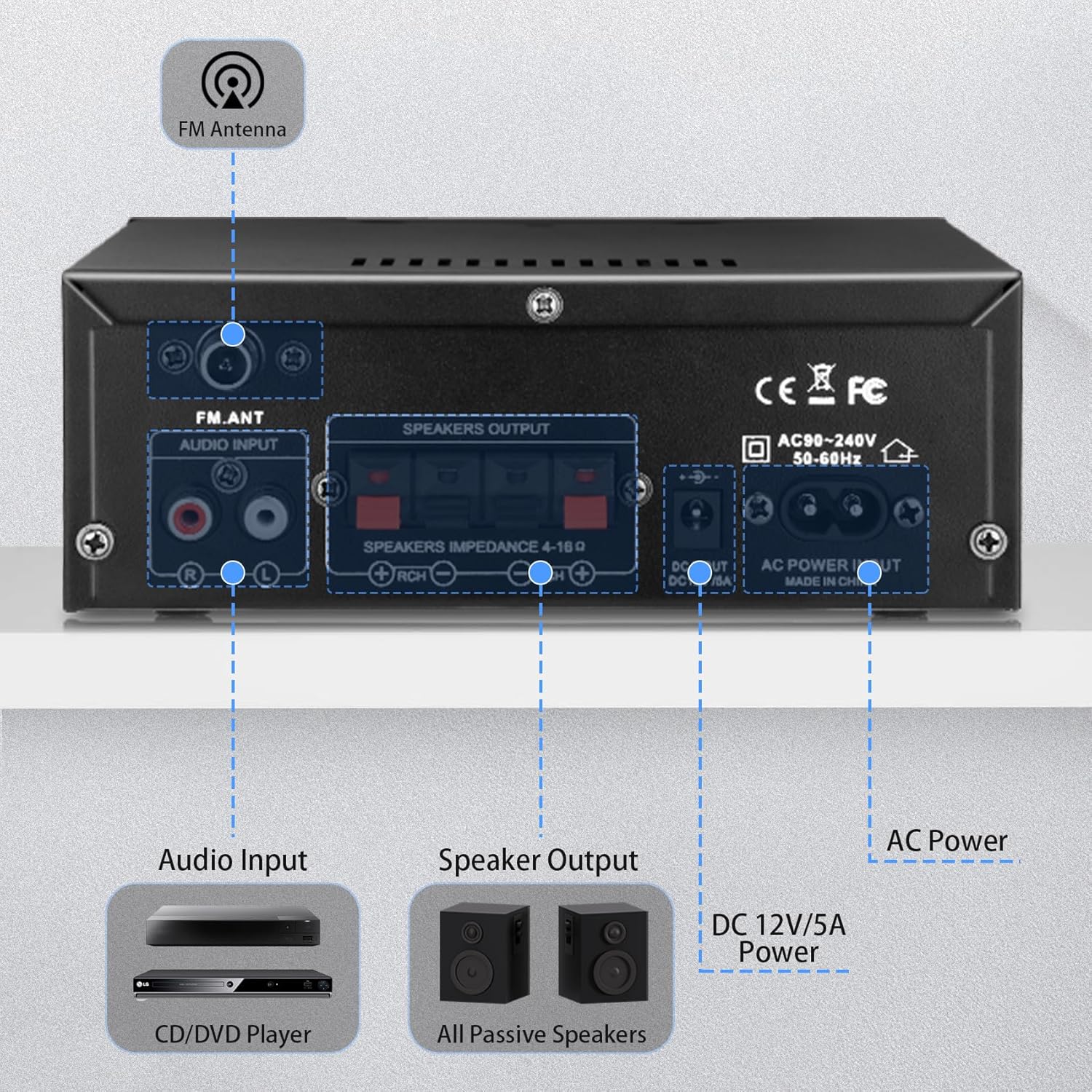
Abbildung 3: Anschlüsse auf der Rückseite
- FM-Antenneneingang: Schließt die mitgelieferte FM-Antenne für den Radioempfang an.
- Audioeingang (RCA): Red and white RCA jacks for connecting external audio sources like CD players or tape decks.
- Lautsprecherausgang: Terminals for connecting passive speakers (4-16Ω impedance). Ensure correct polarity (+ to + and - to -).
- Gleichstromeingang 12V/5A: Connects to a 12V/5A DC power adapter (not included).
- Wechselstromeingang: Connects the included AC power cable (AC90-240V, 50-60Hz).
2.3-Fernbedienung
Die mitgelieferte Fernbedienung ermöglicht eine bequeme Bedienung des Geräts. amplifier from a distance. Functions include power on/off, mode selection, volume adjustment, track control, and EQ settings (if available).
Abbildung 4: Fernbedienung
Notiz: Remove the isolation plastic sheet from the battery compartment of the remote control before first use.
3. Einrichtung
- Lautsprecher anschließen: Connect your passive speakers to the 'SPEAKERS OUTPUT' terminals on the rear panel. Ensure the positive (+) terminal of the amplifier connects to the positive (+) terminal of the speaker, and the negative (-) terminal connects to the negative (-). The ampDer Verstärker unterstützt Lautsprecher mit einer Impedanz von 4-16Ω.
- Audioquellen anschließen:
- Cinch-Eingang: Use an RCA cable to connect devices like CD players or tape decks to the 'AUDIO INPUT' jacks.
- USB/SD-Karte: Stecken Sie einen USB-Stick oder eine SD-Karte in die entsprechenden Steckplätze an der Vorderseite.
- Bluetooth: For Bluetooth connection, ensure the ampDer Verstärker ist eingeschaltet und im Bluetooth-Modus.
- FM-Antenne anschließen: Attach the included FM antenna to the 'FM_ANT' connector on the rear panel for improved radio reception.
- Mikrofone anschließen: If using microphones, plug them into the 'MIC1' or 'MIC2' 1/4" jacks on the front panel.
- Stromanschluss: Connect the AC power cable to the 'AC POWER INPUT' on the rear panel and then to a wall outlet. Alternatively, if using a DC power source, connect a 12V/5A DC adapter to the 'DC 12V/5A' input.
4. Bedienungsanleitung
4.1 Ein-/Ausschalten
Drücken Sie den „POWER“-Schalter auf der Vorderseite, um das Gerät einzuschalten. ampVerstärker ein- oder ausgeschaltet. Die LED-Anzeige leuchtet auf, wenn das Gerät eingeschaltet ist.
4.2 Auswahl des Eingangsmodus
Press the 'MODE' button on the front panel or remote control to cycle through the available input sources: Bluetooth (BLUE), RCA (AUX), USB, SD, and FM radio.
4.3 Bluetooth-Kopplung
- Schalten Sie den amplifier to Bluetooth mode using the 'MODE' button. The LED display will show 'BLUE'.
- Aktivieren Sie auf Ihrem Gerät (Smartphone, Tablet, Computer) Bluetooth und suchen Sie nach verfügbaren Geräten.
- Select 'AK45' from the list of devices to pair. A confirmation sound will indicate successful pairing.
Notiz: Maintain a distance of within 30ft/10m between the device and amplifier without obstructions for optimal Bluetooth performance. For TV or PC connections, keep the distance within 15ft/5m.

Abbildung 5: Bluetooth 5.4-Konnektivität
4.4 Anpassen der Audiopegel
- Master-Lautstärke: Rotate the large 'VOLUME' knob on the front panel or use the volume buttons on the remote control to adjust the overall sound level.
- Höhen/Bass: Use the 'TREBLE' and 'BASS' knobs to fine-tune the high and low frequencies according to your preference.
- Lautstärke von dem Mikrofon: Adjust the 'MIC/VOL' knob to control the volume of connected microphones.
4.5 USB/SD-Karten-Wiedergabe
Wenn ein USB-Laufwerk oder eine SD-Karte eingesteckt wird, ampDer Verstärker schaltet automatisch in den USB/SD-Modus und beginnt mit der Wiedergabe kompatibler Audiodateien. files. Use the playback controls (previous, play/pause, next) on the front panel or remote to manage your music.
4.6 Mikrofonnutzung
Connect up to two microphones to the 'MIC1' and 'MIC2' inputs. Adjust the 'MIC/VOL' knob to control microphone volume. This feature is suitable for home karaoke or public address applications.
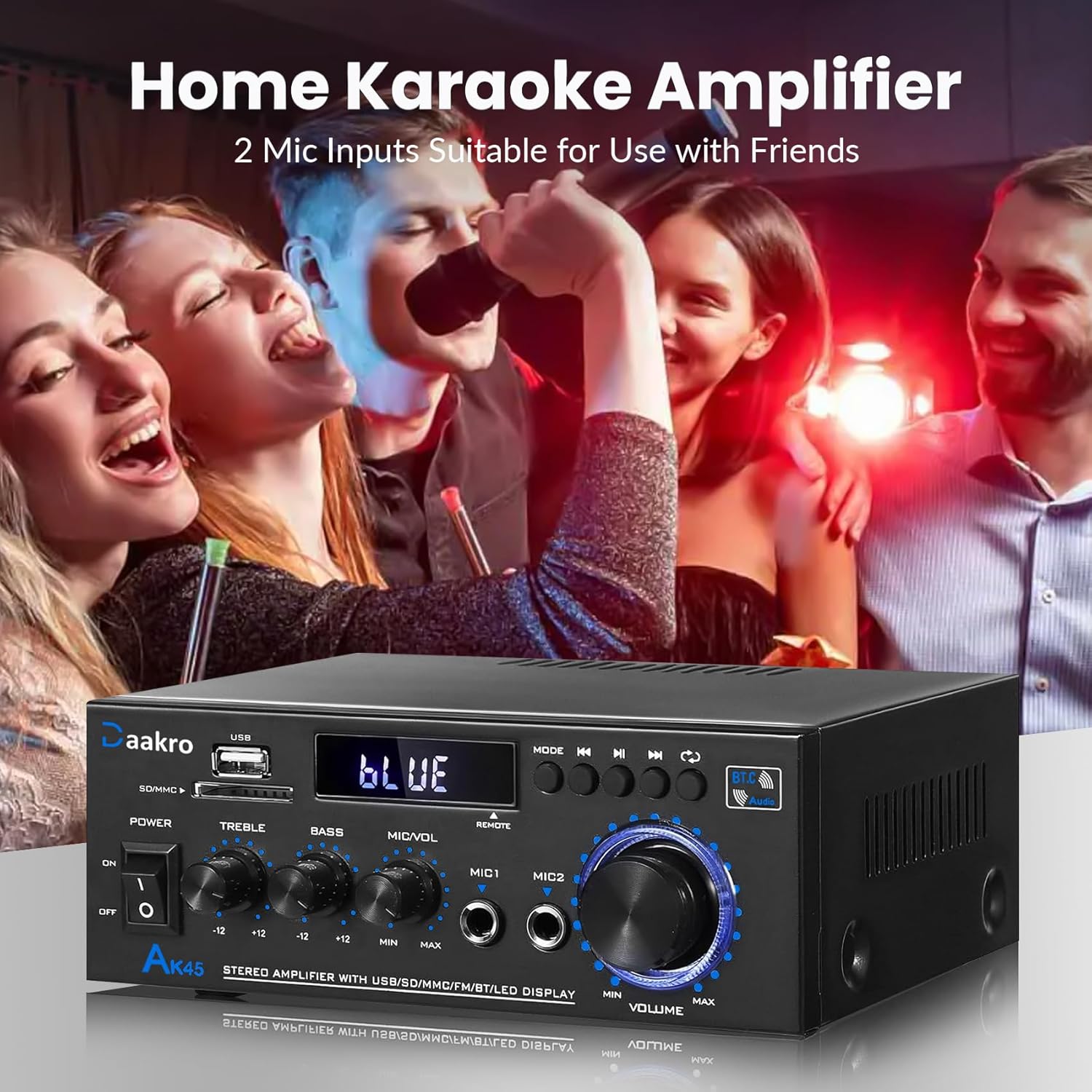
Figure 6: Home Karaoke Application
5. Wartung
- Reinigung: Reinigen Sie die Außenseite des ampVerstärker. Vermeiden Sie die Verwendung von flüssigen Reinigern oder Lösungsmitteln, da diese die Oberfläche oder die internen Bauteile beschädigen können.
- Belüftung: Stellen Sie sicher, dass amplifier has adequate ventilation. Do not block the ventilation openings on the top or sides of the unit.
- Lagerung: Bei längerer Nichtbenutzung lagern Sie die ampVerstärker an einem kühlen, trockenen Ort ohne direkte Sonneneinstrahlung und extreme Temperaturen aufstellen.
- Stromabschaltung: Always disconnect the power cable from the wall outlet before performing any cleaning or maintenance.
6. Fehlerbehebung
- Kein Strom:
- Prüfen Sie, ob das Stromkabel fest mit beiden Geräten verbunden ist. ampVerstärker und die Wandsteckdose.
- Stellen Sie sicher, dass sich der Netzschalter an der Vorderseite in der Position „EIN“ befindet.
- Überprüfen Sie die Funktion der Wandsteckdose, indem Sie ein anderes Gerät anschließen.
- Kein Ton:
- Confirm that speakers are correctly connected to the 'SPEAKERS OUTPUT' terminals with correct polarity.
- Check that the correct input mode is selected (Bluetooth, RCA, USB, SD, FM).
- Increase the 'MASTER VOLUME' knob and ensure it is not at minimum.
- Verify that the audio source device is playing and its volume is turned up.
- Ensure passive speakers are used, as the AK45 is not compatible with active speakers.
- Probleme mit der Bluetooth-Verbindung:
- Stellen Sie sicher, dass amplifier is in Bluetooth mode ('BLUE' on display).
- Delete 'AK45' from your device's Bluetooth list and attempt to re-pair.
- Reduce the distance between your device and the amplifier, and remove any obstructions.
- Starten Sie beide Geräte neu. ampVerstärker und Ihr Bluetooth-Gerät.
- Schlechte Klangqualität (Verzerrungen, geringe Lautstärke):
- Überprüfen Sie die Lautsprecheranschlüsse auf lose Kabel oder falsche Polarität.
- Adjust 'TREBLE' and 'BASS' controls.
- Stellen Sie sicher, dass die Audioquelle ein sauberes Signal liefert.
- Verify that the speaker impedance is within the supported 4-16Ω range.
- Der amplifier uses an upgraded TPA3116 chip for clear audio.

Figure 7: TPA3116D2 Chip for Enhanced Audio Performance
- USB-/SD-Karte wird nicht gelesen:
- Stellen Sie sicher, dass das USB-Laufwerk oder die SD-Karte richtig eingesteckt ist.
- Überprüfen Sie, ob die files on the USB/SD card are in a compatible audio format.
- Versuchen Sie es mit einem anderen USB-Stick oder einer anderen SD-Karte.
- Fernbedienung funktioniert nicht:
- Ensure the isolation plastic sheet has been removed from the battery compartment.
- Tauschen Sie die Batterie in der Fernbedienung aus.
- Richten Sie die Fernbedienung direkt auf das/die/das ampFrontplattensensor des Verstärkers.
7. Spezifikationen
- Modell: AK45
- Ausgangsleistung: 50W + 50W (Theoretical, at 24V/5A, 4-8Ω impedance)
- AmpLifier-Chip: TPA3116
- Bluetooth-Version: 5.4 (QCC3040 core)
- Eingabeschnittstellen: 1x RCA, 2x 1/4" Microphone, 1x USB, 1x SD Card Slot, Bluetooth 5.4, FM Radio
- Lautsprecherimpedanz: 4-16Ω (Passive Speakers Only)
- Frequenzgang: 20 Hz – 20 kHz
- Tonsteuerung: Treble ±12dB, Bass ±12dB
- Stromversorgung: AC90-240V, 50-60Hz (or DC 12V/5A)
- Abmessungen: 8.78 x 8.31 x 3.7 Zoll
- Artikelgewicht: 1.94 Pfund
7.1 Output Power vs. Power Supply and Impedance

Figure 8: Power Output Table
| Stromversorgung | Lautsprecherimpedanz | Maximale Ausgangsleistung |
|---|---|---|
| 9V | 4 Ω | 15 W |
| 6 Ω | 12 W | |
| 8 Ω | 10 W | |
| 12 V | 4 Ω | 20 W |
| 6 Ω | 15 W | |
| 8 Ω | 12 W | |
| 18 V | 4 Ω | 30 W |
| 6 Ω | 20 W | |
| 8 Ω | 15 W | |
| 22 V | 4 Ω | 40 W |
| 6 Ω | 30 W | |
| 8 Ω | 20 W | |
| 24 V | 4 Ω | 50 W |
| 6 Ω | 40 W | |
| 8 Ω | 30 W |
8. Lieferumfang
Upon opening your Daakro AK45 Home Audio Amplifier package, you should find the following items:
- 1x Daakro AK45 Home Audio AmpLifier-Einheit
- 1x Fernbedienung
- 1x AC-Stromkabel
- 1x FM-Antenne
- 1x Bedienungsanleitung (dieses Dokument)
Abbildung 9: Packungsinhalt
9. Garantie und Support
Daakro is committed to providing high-quality audio equipment and customer satisfaction.
- Garantie: Für dieses Produkt gilt eine 30-Tage-Garantie ab Kaufdatum.
- Kundendienst: We offer 24-hour online customer service to assist with any inquiries or issues you may encounter.
- Zufriedenheitsgarantie: We strive for 100% customer satisfaction.
For support, please refer to the contact information provided with your purchase or visit the official Daakro store on Amazon.