
1. Einleitung
The AirheadStorm FS899C is a versatile digital multimeter designed for accurate electrical measurements. This device can measure AC/DC current and voltage, capacitance, continuity, resistance, frequency, non-contact voltage (NCV), and ambient temperature. Featuring a large backlit display and a rechargeable battery, it is suitable for both home and industrial electrical tasks.
This manual provides essential information for the safe and effective use of your FS899C Digital Multimeter. Please read it thoroughly before operation and retain it for future reference.
2. Packungsinhalt
Verify that all items listed below are present and in good condition upon opening the package:
- 1 x AirheadStorm FS899C Digital Multimeter
- 2 x Messleitungen (rot und schwarz)
- 1 x USB-C Ladekabel
- 1 x Bedienungsanleitung (Dieses Dokument)
- 1 x Verpackungsbox

Figure 2.1: Contents of the FS899C package, including the multimeter, test leads, and charging cable.
3. Sicherheitshinweise
Always adhere to basic safety precautions when using electrical testing equipment to reduce the risk of fire, electric shock, or personal injury. Improper use can result in electric shock or damage to the meter.
- Inspect the Meter: Before each use, check the meter and test leads for any damage. Do not use the meter if it appears damaged or if the insulation on the test leads is compromised.
- Bandtage Grenzen: Nicht mehr als die angegebene Menge auftragen.tage) wie auf dem Messgerät markiert, zwischen den Klemmen oder zwischen einer beliebigen Klemme und der Erdung.
- Proper Terminal Use: Ensure the test leads are connected to the correct input terminals for the measurement function selected.
- Vermeiden Sie stromführende Leitungen: Messen Sie den Strom in einem Stromkreis mit Spannung nicht.tage exceeding the meter's specified limits.
- Arbeitsumgebung: Use the meter in a dry environment. Avoid using it in wet or damp Bedingungen.
- Persönliche Schutzausrüstung: Always wear appropriate personal protective equipment, such as safety glasses, when working with electrical circuits.
- Aufprallschutz: The meter features an impact-resistant plastic housing designed to protect against damage from drops. However, avoid unnecessary drops and handle the device with care.
- Wartung: Refer all servicing to qualified service personnel. Do not attempt to repair the meter yourself.
4. Produktmerkmale
The AirheadStorm FS899C Digital Multimeter offers a range of features for efficient and accurate electrical testing:
- Vielseitige Messmöglichkeiten: Accurately measures AC/DC current and voltage, capacitance, continuity, resistance, frequency, non-contact voltage (NCV), and ambient temperature.
- Wiederaufladbarer Akku: Equipped with a USB-C rechargeable battery, providing up to 8 hours of operation after approximately 2 hours of charging.
- Großes Display mit Hintergrundbeleuchtung: Features a 4.8-inch display with backlight for clear visibility in various lighting conditions.
- Integrated Torch: A practical torch function assists in illuminating dark work areas.
- Datenhaltefunktion: Allows users to freeze the current reading on the display for convenient recording.
- Langlebige Konstruktion: Impact-resistant plastic housing provides protection against accidental drops.
- High Accuracy with True RMS: Offers precise measurements with a count capacity of up to 6000.
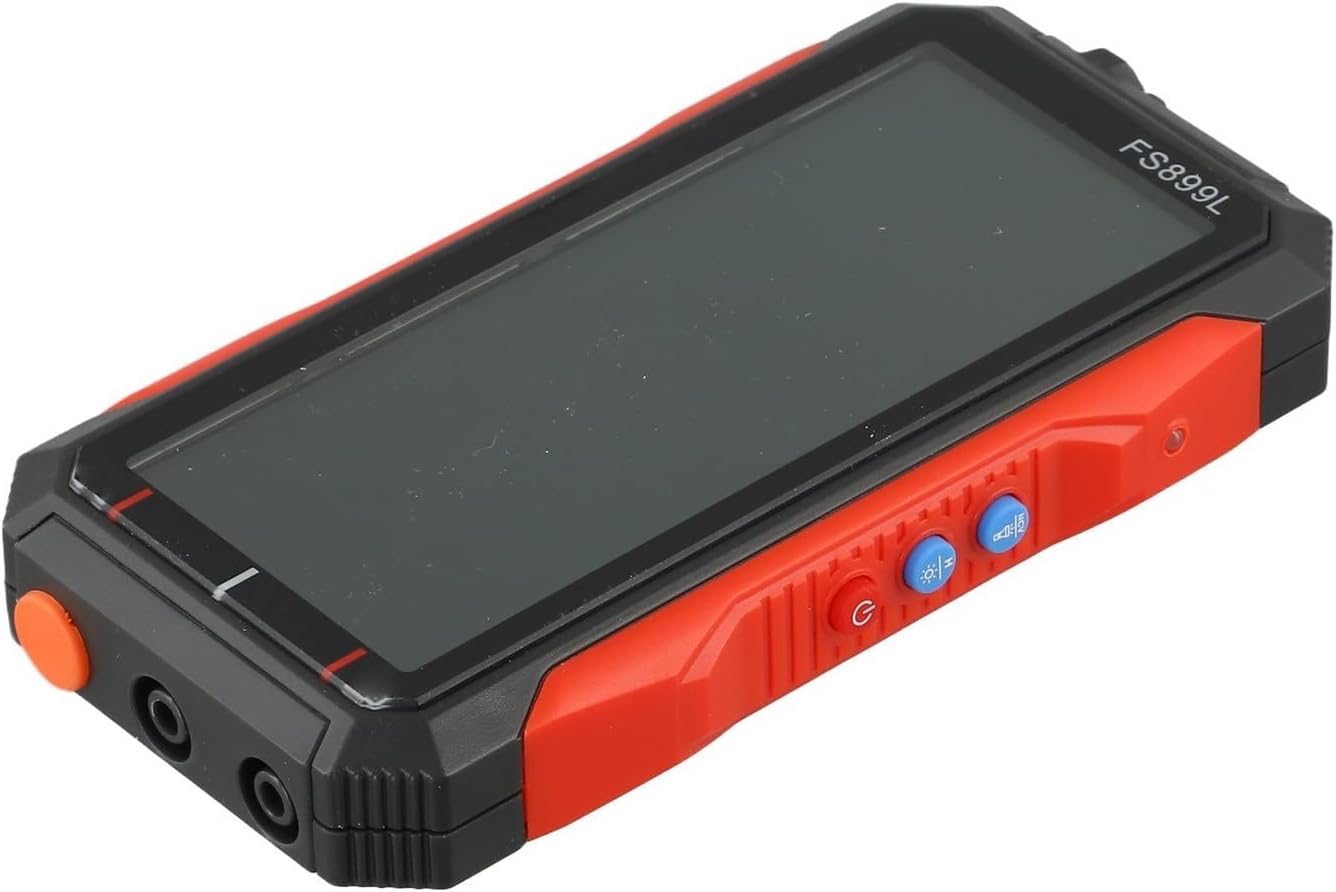
Abbildung 4.1: Seite view of the FS899C multimeter, highlighting its robust casing and control interface.
5. Einrichtung
5.1 Aufladen des Multimeters
- Locate the USB-C charging port on the side of the multimeter.
- Connect the provided USB-C charging cable to the multimeter and to a standard USB power adapter (not included).
- The charging indicator on the display will show the charging status. A full charge typically takes approximately 2 hours and provides up to 8 hours of operation.
5.2 Anschließen der Testleitungen
Always ensure the multimeter is powered off before connecting or disconnecting test leads.
- Legen Sie den Rot Testleitung in die VΩmA Eingangsbuchse für Lautstärketage, resistance, capacitance, frequency, and low current measurements.
- Legen Sie den Schwarz Testleitung in die COM (gemeinsame) Eingangsbuchse.
- For high current measurements (up to 10A), insert the Rot Testleitung in die 10 A Eingangsbuchse.
6. Bedienungsanleitung
6.1 Ein-/Ausschalten
Halten Sie die Leistung button to turn the multimeter on or off.
6.2 Funktionsauswahl
The FS899C typically features an auto-ranging function, simplifying operation. For specific modes, use the function buttons on the device.

Figure 6.1: The FS899C display showing active measurements for voltage, resistance, and temperature, along with mode indicators.
6.3 Gängige Messungen
- Bandtage Messung (AC/DC):
- Connect the red lead to VΩmA and the black lead to COM.
- Wählen Sie die entsprechende Wechsel- oder Gleichspannung.tage-Modus.
- Schließen Sie die Prüfspitzen parallel an den zu prüfenden Stromkreis oder das zu prüfende Bauteil an.
- Strommessung (AC/DC):
- WARNUNG: Stellen Sie sicher, dass der Stromkreis spannungsfrei ist, bevor Sie den Zähler in Reihe schalten.
- For low current, connect the red lead to VΩmA; for high current (up to 10A), connect the red lead to 10A. Connect the black lead to COM.
- Select the appropriate AC or DC current mode.
- Schließen Sie die Messspitzen in Reihe mit dem Stromkreis an.
- Widerstandsmessung:
- Connect the red lead to VΩmA and the black lead to COM.
- Select the resistance mode (Ω).
- Ensure the circuit or component is de-energized before measuring resistance. Connect the probes across the component.
- Durchgangsprüfung:
- Connect the red lead to VΩmA and the black lead to COM.
- Select the continuity mode (often indicated by a speaker icon).
- Touch the probes to the ends of the circuit or component. A beep indicates continuity.
- Kapazitätsmessung:
- Connect the red lead to VΩmA and the black lead to COM.
- Select the capacitance mode (F).
- Stellen Sie sicher, dass der Kondensator vor dem Test vollständig entladen ist. Schließen Sie die Messspitzen an die Kondensatoranschlüsse an.
- Frequenzmessung:
- Connect the red lead to VΩmA and the black lead to COM.
- Select the frequency mode (Hz).
- Verbinden Sie die Sonden mit der Signalquelle.
- Kontaktloses Volumentage (NCV)-Erkennung:
- Wählen Sie den NCV-Modus.
- Hold the top of the multimeter near a live conductor. The meter will indicate the presence of AC voltage durch einen akustischen Alarm und/oder eine optische Anzeige.
6.4 Datenhaltefunktion
Drücken Sie die HALTEN button to freeze the current reading on the display. Press it again to release the hold function and resume live readings.
7. Wartung
7.1 Reinigung
Wischen Sie die Oberfläche des Zählers ab.asing mit Adamp Verwenden Sie ein Tuch und ein mildes Reinigungsmittel. Scheuermittel oder Lösungsmittel sind nicht geeignet. Stellen Sie sicher, dass das Messgerät vor Gebrauch vollständig trocken ist.
7.2 Batteriepflege
The FS899C uses a rechargeable battery. To prolong battery life:
- Laden Sie den Akku vor dem ersten Gebrauch vollständig auf.
- Vermeiden Sie es, den Akku häufig vollständig zu entladen.
- If storing the meter for an extended period, charge it periodically (e.g., every 3-6 months) to maintain battery health.
7.3 Prüfung der Testleitungen
Regularly inspect the test leads for any cuts, cracks, or damage to the insulation. Replace damaged leads immediately to prevent electric shock hazards.
8. Fehlerbehebung
| Problem | Mögliche Ursache | Lösung |
|---|---|---|
| Das Messgerät lässt sich nicht einschalten. | Low or discharged battery. | Charge the multimeter using the provided USB-C cable. |
| Falsche oder instabile Messwerte. | Falsche Funktion ausgewählt; schlechte Verbindung der Messleitung; externe Störungen. | Verify the correct measurement function. Ensure test leads are securely connected. Move away from strong electromagnetic fields. |
| "OL" or "OVERLOAD" displayed. | Die Messung überschreitet den Messbereich des Messgeräts. | Select a higher range if available, or ensure the measured value is within the meter's specifications. |
| Kein Durchgangssignal. | Unterbrechung; Durchgangsprüfung nicht ausgewählt. | Check the circuit for breaks. Ensure the meter is in continuity mode. |
9. Spezifikationen
| Parameter | Wert |
|---|---|
| Modell | FS899C |
| Anzeige | 4.8-inch, Backlit |
| Count Capacity | Up to 6000 counts |
| DC-Voltage Reichweite | 60mV to 600V (Accuracy: ±(1.2%+5d)) |
| AC-Lautstärketage Reichweite | 60mV to 600V (Accuracy: ±(1.5%+8d)) |
| Gleichstrombereich | 300mA to 10A (Accuracy: ±(2.2%+8d)) |
| Wechselstrombereich | 300mA to 10A (Accuracy: ±(2.5%+8d)) |
| Widerstandsbereich | 600Ω to 60MΩ (Accuracy: ±(1.5%+10d)) |
| Kapazitätsbereich | 10nF to 60mF (Accuracy: ±(10%+88d)) |
| Frequenzbereich | (Specific range not provided, but implied by feature) |
| Batterie | Wiederaufladbar (USB-C) |
| Betriebsdauer | Bis zu 8 Stunden (nach 2 Stunden Ladezeit) |
| Technische Daten | 6.3 x 4.72 x 1.38 Zoll |
| Artikelgewicht | 9.4 Unzen (267 Gramm) |
| Hersteller | AirheadStorm |
10. Garantie und Support
For warranty information, technical support, or service inquiries regarding your AirheadStorm FS899C Digital Multimeter, please contact the retailer or manufacturer directly. Retain your proof of purchase for warranty claims.