
1. Einleitung
Thank you for choosing the OUILA LED Cabinet Lighting with Motion Sensor. This manual provides essential information for the safe and efficient use of your new lighting product. Please read it thoroughly before installation and operation, and retain it for future reference.
This product is a 60cm LED strip light designed for under-cabinet use, featuring a motion sensor, three adjustable color temperatures, and dimmable brightness. It is battery-powered and USB rechargeable, making it suitable for various indoor applications such as kitchens, bathrooms, bedrooms, closets, and bookshelves.
2. Sicherheitshinweise
- Do not expose the light to water or excessive moisture. This product is designed for indoor use only.
- Versuchen Sie nicht, das Gerät zu zerlegen, zu reparieren oder zu verändern. Nicht autorisierte Änderungen können zum Erlöschen der Garantie führen und Sicherheitsrisiken bergen.
- Halten Sie das Gerät von Wärmequellen, direkter Sonneneinstrahlung und brennbaren Materialien fern.
- Verwenden Sie zum Laden ausschließlich das mitgelieferte USB-Typ-C-Kabel. Stellen Sie sicher, dass die Ladespannungtage ist kompatibel (5V).
- Außerhalb der Reichweite von Kindern aufbewahren.
- If the product is damaged or malfunctions, discontinue use immediately and contact customer support.
3. Packungsinhalt
Bitte prüfen Sie das Paket auf folgende Artikel:
- OUILA LED Cabinet Light (x2)
- USB-Typ-C-Ladekabel (x2)
- Magnetic Adhesive Tape (x2 sets)
- Bedienungsanleitung

Image: Contents of the OUILA LED Cabinet Lighting package, showing two light bars and their respective USB charging cables.
4. Produktmerkmale
- Bewegungssensor: Automatically detects motion within 3 meters and a 100-degree range. The light turns off after 20 seconds of no motion to conserve energy.
- 3 Beleuchtungsmodi: Choose between Always On, Always Off, and Motion Sensor (Night Detection) modes.
- 3 Farbtemperaturen: Adjustable to Warm White (3000K), Neutral Light (4000K), and Cool White (6500K) to suit different environments and preferences.
- Stufenloses Dimmen: Adjust brightness from 10% to 100% with a long press. Features a memory function to recall the last brightness setting.
- Wiederaufladbarer Akku: Built-in 5000mAh polymer lithium battery provides extended use.
- USB-Typ-C-Aufladung: Bequemes und schnelles Laden.
- Ultradünnes Design: Slim 9mm aluminum housing for discreet installation.
- Einfache Installation: Integrated magnets for direct attachment to metal surfaces or use with included adhesive magnetic tape for non-metal surfaces.

Image: Visual representation of the three color temperatures (6500K White, 4000K Natural, 3000K Warm) and the stepless dimming capability of the light.

Image: Illustration of the motion sensor's detection range, showing a 3-meter distance and 100-degree angle, with indicators for light turning on and off based on movement.
5. Einrichtung und Installation
The OUILA LED Cabinet Light offers two installation methods:
Method 1: Direct Magnetic Attachment (for iron surfaces)
The light bar has integrated magnets on its back. Simply attach it directly to any magnetic metal surface, such as a refrigerator or metal cabinet.
Method 2: Adhesive Magnetic Tape (for non-iron surfaces)
- Clean the target surface thoroughly to ensure it is dry and free of dust or grease.
- Peel off the protective film from one side of the adhesive magnetic tape.
- Stick the adhesive side firmly onto the desired installation location.
- Attach the LED cabinet light to the magnetic strip. The built-in magnets in the light will securely hold it in place.

Image: Visual guide demonstrating how to install the light using either direct magnetic attachment to an iron surface or by using the provided super sticky magnetic tape for non-iron surfaces.
6. Bedienung
The light features a control panel with buttons for mode selection, brightness adjustment, and color temperature changes.
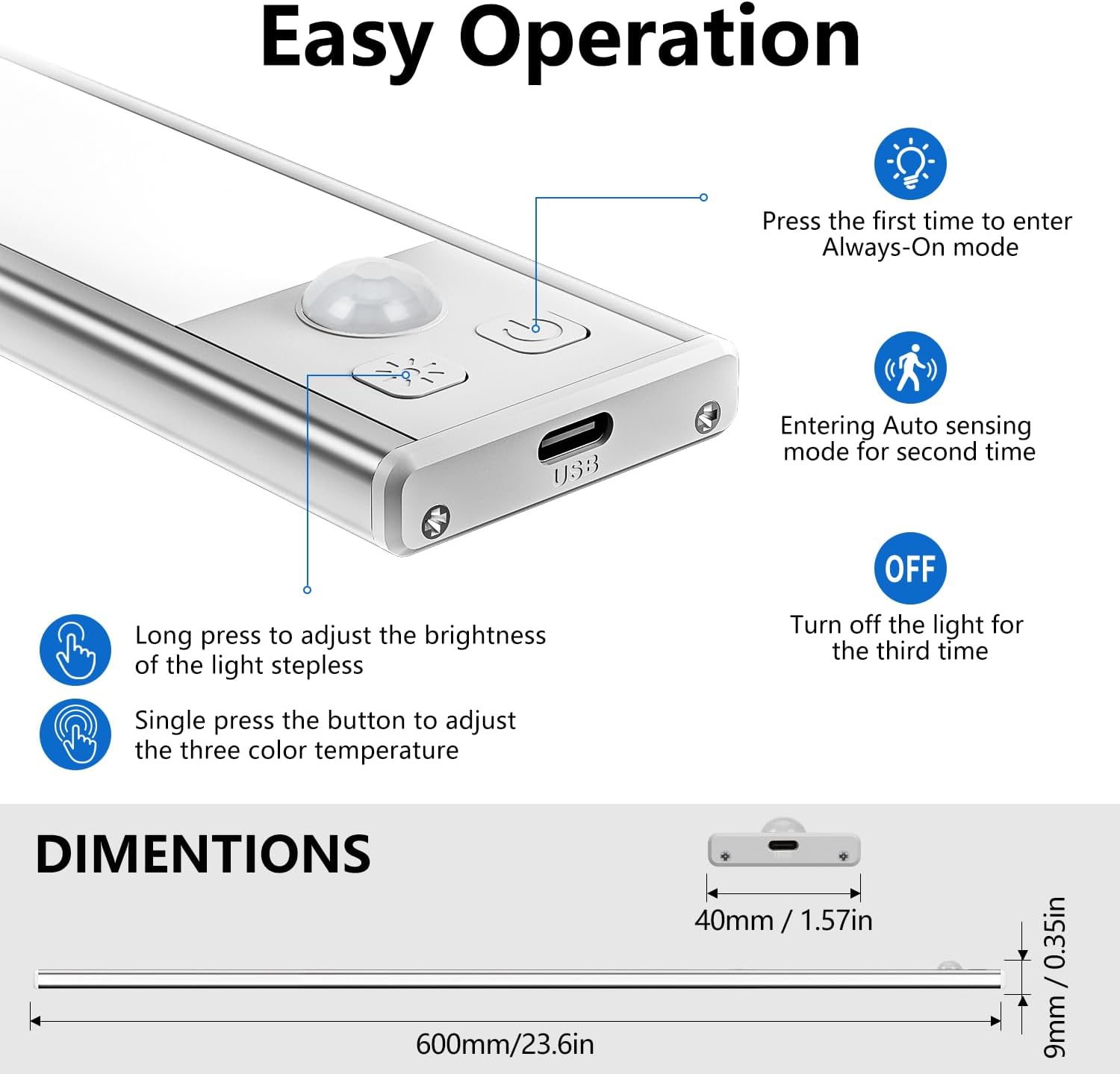
Image: Close-up of the light's control panel, detailing the functions of the buttons for power, mode selection, brightness adjustment, and color temperature changes.
Stromversorgung und Modusauswahl
- Erster Druck: Tritt ein Immer an mode. The light will remain on continuously.
- Zweites Drücken: Tritt ein Automatische Erkennung (Motion Sensor) mode. The light will turn on when motion is detected in darkness and turn off after 20 seconds of no motion.
- Drittes Drücken: Turns the light Aus.
Helligkeitsanpassung (Dimmen)
- Lange drücken: Press and hold the brightness button to adjust the light intensity. The brightness will cycle between 10% and 100%. Release the button when the desired brightness is reached.
- The light has a memory function and will retain the last brightness setting when turned back on.
Farbtemperaturanpassung
- Einzelpresse: Press the color temperature button to cycle through the three available color temperatures: Warm White (3000K), Neutral Light (4000K), and Cool White (6500K).
7. Aufladen
The OUILA LED Cabinet Light is equipped with a built-in 5000mAh rechargeable battery.
- Connect the provided USB Type-C charging cable to the charging port on the light.
- Plug the other end of the cable into a USB power source (e.g., USB charger, computer, power bank).
- Ladeanzeige: A red light indicates that the device is charging. A green light indicates that the battery is fully charged.
- Eine vollständige Aufladung dauert in der Regel etwa 4 Stunden.
- At full brightness, the light can operate for at least 15 hours. Usage time varies depending on brightness settings and mode.
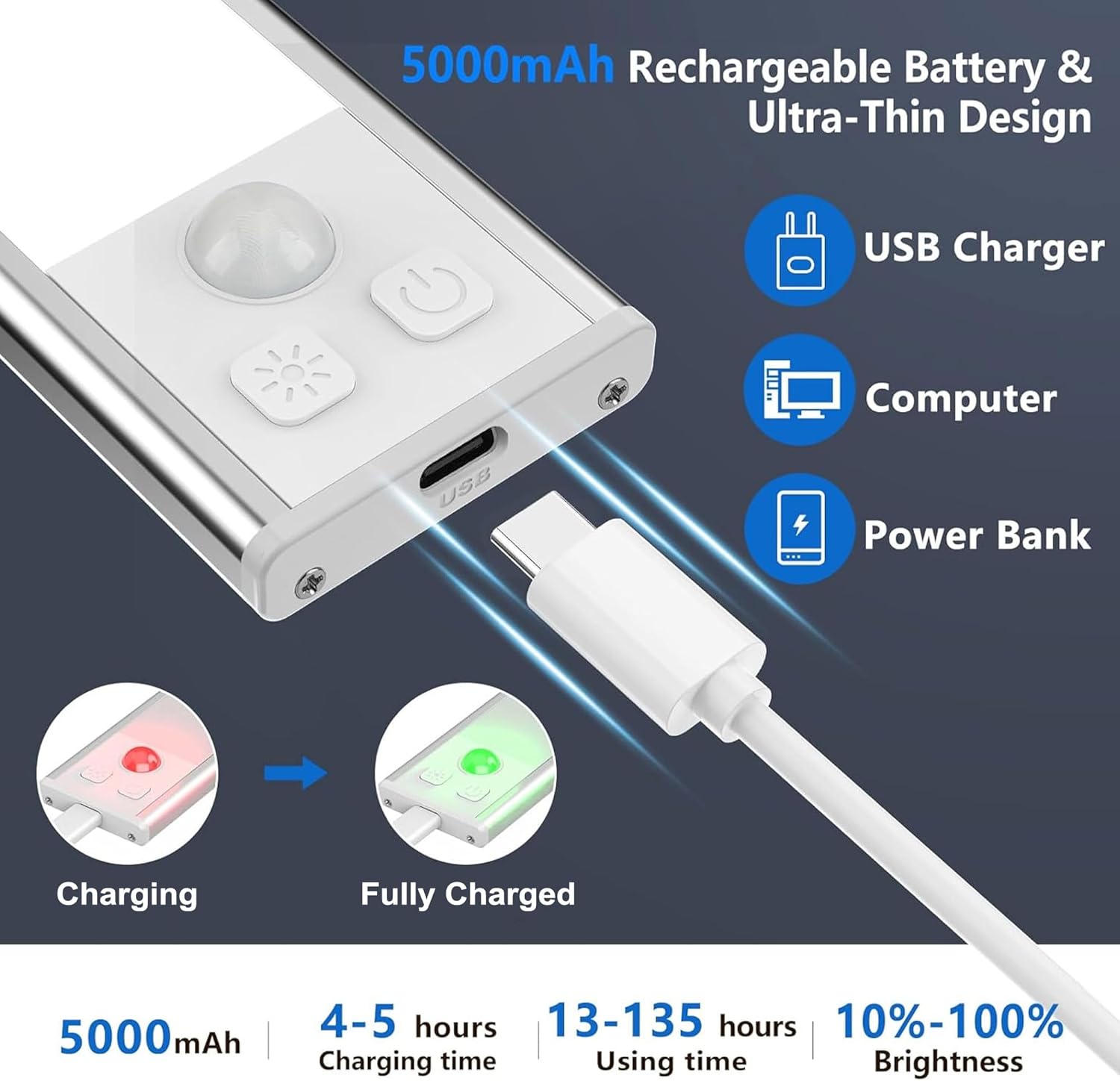
Image: Illustration of the USB-C charging process, showing the charging port, compatible power sources (USB charger, computer, power bank), and the red/green indicator lights for charging status.
8. Wartung
- Clean the light surface with a soft, dry cloth. Do not use abrasive cleaners or solvents.
- Ensure the charging port is free of dust and debris to maintain proper connection.
- Bewahren Sie die Lampe an einem kühlen, trockenen Ort auf, wenn sie längere Zeit nicht benutzt wird.
9. Fehlerbehebung
Licht geht nicht an:
- Prüfen Sie, ob der Akku geladen ist. Schließen Sie ihn an eine Stromquelle an und beobachten Sie die Ladeanzeige.
- Ensure the light is not in "Always Off" mode. Press the mode button to cycle through modes.
Der Bewegungssensor funktioniert nicht:
- Ensure the light is in "Auto Sensing" (Motion Sensor) mode.
- Verify that the ambient light is low enough for the sensor to activate (night detection).
- Überprüfen Sie, ob der Sensor durch Fremdkörper blockiert ist.
- Ensure motion is within the 3-meter, 100-degree detection range.
Das Licht flackert oder dimmt unerwartet:
- Der Akku ist möglicherweise schwach. Laden Sie das Gerät vollständig auf.
10. Spezifikationen
| Modellnummer | GLS-C019 |
| Maße | 60 x 4 x 0.9 cm |
| Gewicht | 740 g (für die 2er-Packung) |
| Material | Aluminium |
| Batteriekapazität | 5000 mAh (Polymer-Lithium) |
| Ladezeit | Ca. 4 Stunden |
| Betriebsdauer | 15+ hours (at full brightness, varies with settings) |
| Farbtemperaturen | 3000K (Warm White), 4000K (Neutral Light), 6500K (Cool White) |
| Reichweite des Bewegungssensors | 3 meters / 100 degrees |
| Auto-Off-Zeit | 20 Sekunden (nachdem keine Bewegung mehr erkannt wurde) |
| Stromquelle | Batteriebetrieben |
| Innen-/Außenbereich | Innenbereich |
11. Garantie und Support
OUILA products are manufactured to high-quality standards. For any questions, technical support, or warranty claims, please contact your retailer or the OUILA customer service team through the platform where you purchased the product. Please have your purchase details and model number (GLS-C019) ready when contacting support.