
HTC TWS6
HTC Wireless Earbuds TWS6 5.3 Benutzerhandbuch
Modell: TWS6
Einführung
Welcome and thank you for choosing the HTC Wireless Earbuds TWS6 5.3. This manual provides detailed instructions to help you set up, operate, and maintain your earbuds for optimal performance. Please read this manual thoroughly before using your device.
Packungsinhalt
Bitte überprüfen Sie, ob alle Artikel in Ihrem Paket vorhanden sind:
- 2 x HTC Earbuds
- 1 x USB-C Ladekabel
- 1 x Ladekoffer
- 2 Paar x Ohrstöpsel aus Gummi (S/L)
- 1 x Quick Start Guide (physical document)

Produkt überview
Familiarize yourself with the components of your HTC TWS6 earbuds.
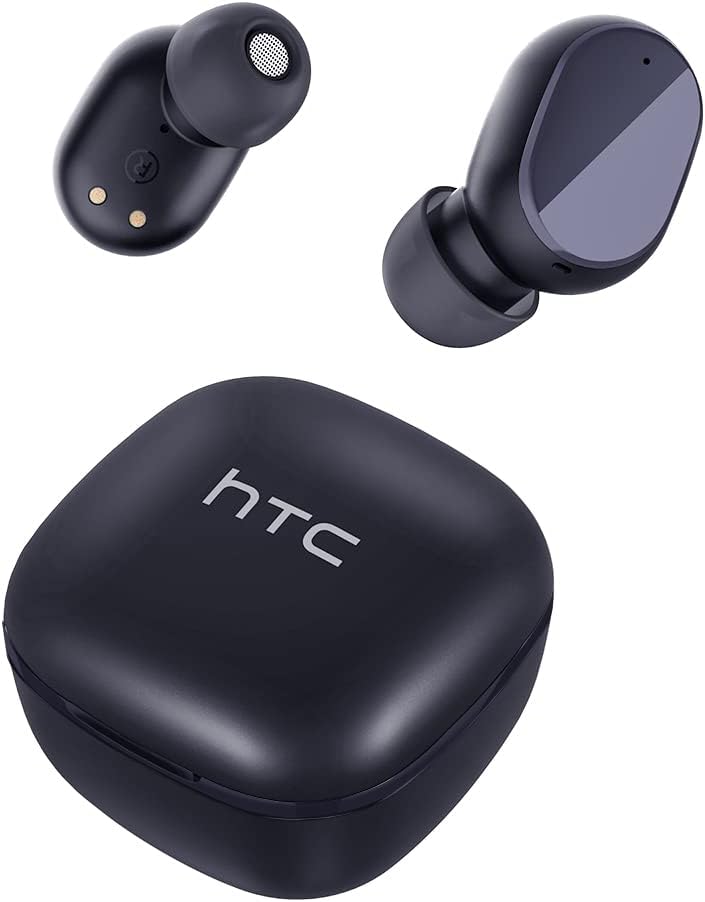

Aufstellen
Aufladen der Ohrhörer und des Gehäuses
Vor dem ersten Gebrauch die Ohrhörer und das Ladecase vollständig aufladen.
- Legen Sie die Ohrhörer in das Ladeetui.
- Verbinden Sie das USB-C-Kabel mit dem Ladeanschluss am Gehäuse und einer Stromquelle.
- Die Kontrollleuchte am Gehäuse zeigt den Ladestatus an.
- A full charge provides approximately 5 hours of playback for earbuds and up to 22 hours with the charging case.

Bluetooth-Kopplung
Befolgen Sie diese Schritte, um Ihre Ohrhörer mit Ihrem Gerät zu koppeln:
- Öffnen Sie das Ladeetui. Die Ohrhörer wechseln automatisch in den Kopplungsmodus.
- Aktivieren Sie Bluetooth auf Ihrem Gerät (Smartphone, Tablet usw.).
- Suchen nach "HTC TWS6" in der Liste der verfügbaren Bluetooth-Geräte.
- Select "HTC TWS6" to connect. A voice prompt will confirm successful pairing.

Tragen der Ohrhörer
For optimal sound quality and comfort, choose the correct eartip size and wear the earbuds properly.
- Select the eartips (S, M, L) that best fit your ears.
- Führen Sie jeden Ohrhörer vorsichtig in Ihren Gehörgang ein.
- Durch leichtes Drehen wird ein sicherer und bequemer Sitz gewährleistet.
Bedienungsanleitung
Intelligente Touch-Bedienelemente
The HTC TWS6 earbuds feature intuitive touch controls:
- Musik abspielen/pausieren: Tippen Sie einmal auf einen der Ohrhörer.
- Nächster Titel: Doppeltippen Sie auf den rechten Ohrhörer.
- Vorheriges Lied: Doppeltippen Sie auf den linken Ohrhörer.
- Lautstärke erhöhen: Dreimaliges Tippen auf den rechten Ohrhörer.
- Lautstärke runter: Tippen Sie dreimal auf den linken Ohrhörer.
- Anruf annehmen/beenden: Tippen Sie einmal auf einen der Ohrhörer.
- Anruf ablehnen: Halten Sie einen der Ohrhörer 2 Sekunden lang gedrückt.
- Sprachassistenten aktivieren: Halten Sie einen der Ohrhörer 3 Sekunden lang gedrückt.

Ein-/Ausschalten
Die Ohrhörer schalten sich automatisch ein, wenn sie aus dem Ladecase genommen werden, und schalten sich aus, wenn sie wieder in das Case eingesetzt und der Deckel geschlossen wird.
To manually power on, press and hold the touch area for 3 seconds. To manually power off, press and hold the touch area for 5 seconds.
Wartung und Pflege
Reinigung
Reinigen Sie Ihre Ohrhörer und das Ladecase regelmäßig, um optimale Leistung und Hygiene zu gewährleisten.
- Verwenden Sie ein weiches, trockenes, fusselfreies Tuch, um die Ohrhörer und das Ladecase abzuwischen.
- Ohrstöpsel abnehmen und mit milder Seife und Wasser reinigen, anschließend gründlich trocknen lassen, bevor sie wieder angebracht werden.
- Keine Scheuer- oder Lösungsmittel verwenden.
Wasserbeständigkeit (IPX5)
The HTC TWS6 earbuds are IPX5 sweatproof, meaning they are resistant to splashes and sweat.
Notiz: They are not designed for submersion in water. Avoid exposing them to heavy rain, showering, or swimming. Ensure the charging port is dry before charging.

Lagerung
Bewahren Sie die Ohrhörer bei Nichtgebrauch in ihrem Ladeetui auf, um sie zu schützen und geladen zu halten.
An einem kühlen, trockenen Ort aufbewahren und vor extremen Temperaturen schützen.
Fehlerbehebung
| Problem | Lösung |
|---|---|
| Ohrhörer lassen sich nicht koppeln | Ensure earbuds are charged. Turn off and on Bluetooth on your device. Forget "HTC TWS6" from your device's Bluetooth list and re-pair. |
| Nur ein Ohrhörer funktioniert | Legen Sie beide Ohrhörer zurück in das Ladecase, schließen Sie den Deckel und öffnen Sie ihn anschließend wieder. Stellen Sie sicher, dass beide Ohrhörer geladen sind. |
| Geringe Lautstärke oder schlechte Klangqualität | Adjust volume on your device. Clean eartips and earbud mesh. Try different eartip sizes for a better seal. |
| Ladeproblem | Check USB-C cable and power adapter. Ensure charging contacts on earbuds and case are clean and dry. |
| Ohrhörer trennen sich häufig | Ensure your device is within the Bluetooth range (approx. 10 meters/33 feet) and there are no significant obstructions. |
Sollten die Probleme weiterhin bestehen, wenden Sie sich bitte an den Kundendienst.
Technische Daten
| Besonderheit | Detail |
|---|---|
| Modellname | TWS6 |
| Bluetooth-Version | 5.3 |
| Konnektivitätstechnologie | Kabellos |
| Drahtlose Kommunikationstechnologie | Bluetooth |
| Akkulaufzeit (Ohrhörer) | 5 Stunden |
| Gesamtspielzeit (mit Hülle) | 22 Stunden |
| Ladezeit (Case) | Ungefähr 5 Stunden |
| Wasserbeständigkeit | IPX5 (schweißfest) |
| Kontrollmethode | Berühren |
| Mikrofon | Ja (mit ENC) |
| Kompatible Geräte | Android and iOS Smartphones, Gaming Devices |
| Material | Plastik |
| Artikelgewicht | 3.17 Unzen |
| UPC | 734257974554 |
| Lärmschutz | Adaptive Geräuschunterdrückung |
| Audiotreibertyp | Dynamischer Treiber |
| Impedanz | 199.99 Ohm |
Garantie und Support
HTC provides a 360-day warranty extension for this product, as detailed in the product information.
For technical assistance, warranty claims, or any inquiries, please contact HTC customer support.
Kundendienst: Refer to the contact information provided in your product packaging or visit the official HTC webWebsite für die aktuellsten Supportoptionen.
Zugehörige Dokumente - TWS6
 |
HTC True Wireless Earbuds 6 – Kurzanleitung Erste Schritte mit Ihren HTC True Wireless Earbuds 6 (Modell: TWS6). Diese Anleitung behandelt Einrichtung, Kopplung, Steuerung, technische Daten und Echtheitsprüfung der kabellosen Ohrhörer von HTC. |
 |
Edifier TWS6 True Wireless Ohrhörer – Benutzerhandbuch Entdecken Sie die Edifier TWS6 True Wireless Earbuds mit dieser Bedienungsanleitung. Erfahren Sie mehr über Produktfunktionen, Tragehinweise, Aufladen, Bluetooth-Kopplung, Bedienung, häufig gestellte Fragen und Pflege für ein optimales Hörerlebnis. |
 |
SOAR True Wireless Earbuds Benutzerhandbuch – TWS6 Ausführliches Benutzerhandbuch für die SOAR True Wireless Earbuds (Modell TWS6). Enthält Garantieinformationen, technische Daten, Anschlussanleitung, Bedienungshinweise und Sicherheitshinweise. Erfahren Sie, wie Sie Ihre SOAR-Ohrhörer koppeln, verwenden und pflegen. |
 |
HTC True Wireless Earbuds 1+ – Kurzanleitung | HTC TWS4 Beginnen Sie schnell mit Ihren HTC True Wireless Earbuds 1+ (Modell HTC TWS4). Diese Anleitung behandelt das Auspacken, die Kopplung, die Bedienelemente, die LED-Anzeigen, die technischen Daten und die Echtheitsprüfung. |
 |
TREBLAB X8 True Wireless Earbuds Benutzerhandbuch Ausführliches Benutzerhandbuch für die TREBLAB X8 True Wireless Earbuds mit detaillierten Informationen zu Funktionen wie aktiver Geräuschunterdrückung, Bluetooth 5.4, IPX5-Wasserschutz, 40 Stunden Wiedergabezeit und zwei ENC-Mikrofonen für optimalen Klang und Komfort bei Sport und Reisen. |
 |
HTC True Wireless Earbuds 7 Quick Start Guide | Model HTC TWS7 Concise guide to setting up, pairing, and using your HTC True Wireless Earbuds 7 (Model HTC TWS7). Includes controls, LED notifications, technical specifications, and authenticity check. |
Ask a question about this manual
Ask about setup, troubleshooting, compatibility, parts, safety, or missing instructions. Manuals+ will review the question and use this page’s manual context to help answer it.