
1. Einleitung
This manual provides essential information for the safe and efficient installation, operation, and maintenance of your Tbest 63A 4P Automatic Transfer Switch (ATS). This device is designed to automatically switch between a normal power source and a backup power source, ensuring continuous power supply to critical loads. Please read this manual thoroughly before installation and use.
2. Sicherheitshinweise
WARNING: Risk of Electric Shock. Installation and servicing must be performed by qualified personnel only.
- Vor der Installation oder Wartung des Schalters müssen stets alle Stromquellen getrennt werden.
- Sorgen Sie für eine ordnungsgemäße Erdung, um elektrische Gefahren zu vermeiden.
- Prüfen Sie, ob alle Verbindungen sicher und gemäß den örtlichen Elektrovorschriften korrekt verdrahtet sind.
- Betätigen Sie den Schalter nicht, wenn er beschädigt erscheint oder nicht richtig funktioniert.
- Tragen Sie während der Installation und Wartung geeignete persönliche Schutzausrüstung (PSA).
3. Produktüberschreitungview
The Tbest 63A 4P Automatic Transfer Switch is a robust device designed for reliable power management. Key features include:
- Single Motor Drive: Ensures simple structure and stable conversion with minimal noise and impact.
- Enhanced Mechanism: Features an improved inhibition mechanism for quick closing and breaking, extending mechanical life.
- Langlebige Konstruktion: Made from flame-retardant plastic, offering good insulation, high-temperature resistance, and protection against overload, undervoltage, short circuit, and phase failure.
- Electrical Interlock Protection: Guarantees reliable and non-interfering automatic switching.
- Breite Anwendung: Suitable for critical power supply needs in fire protection systems, ports, hospitals, shopping malls, banks, and industrial facilities.
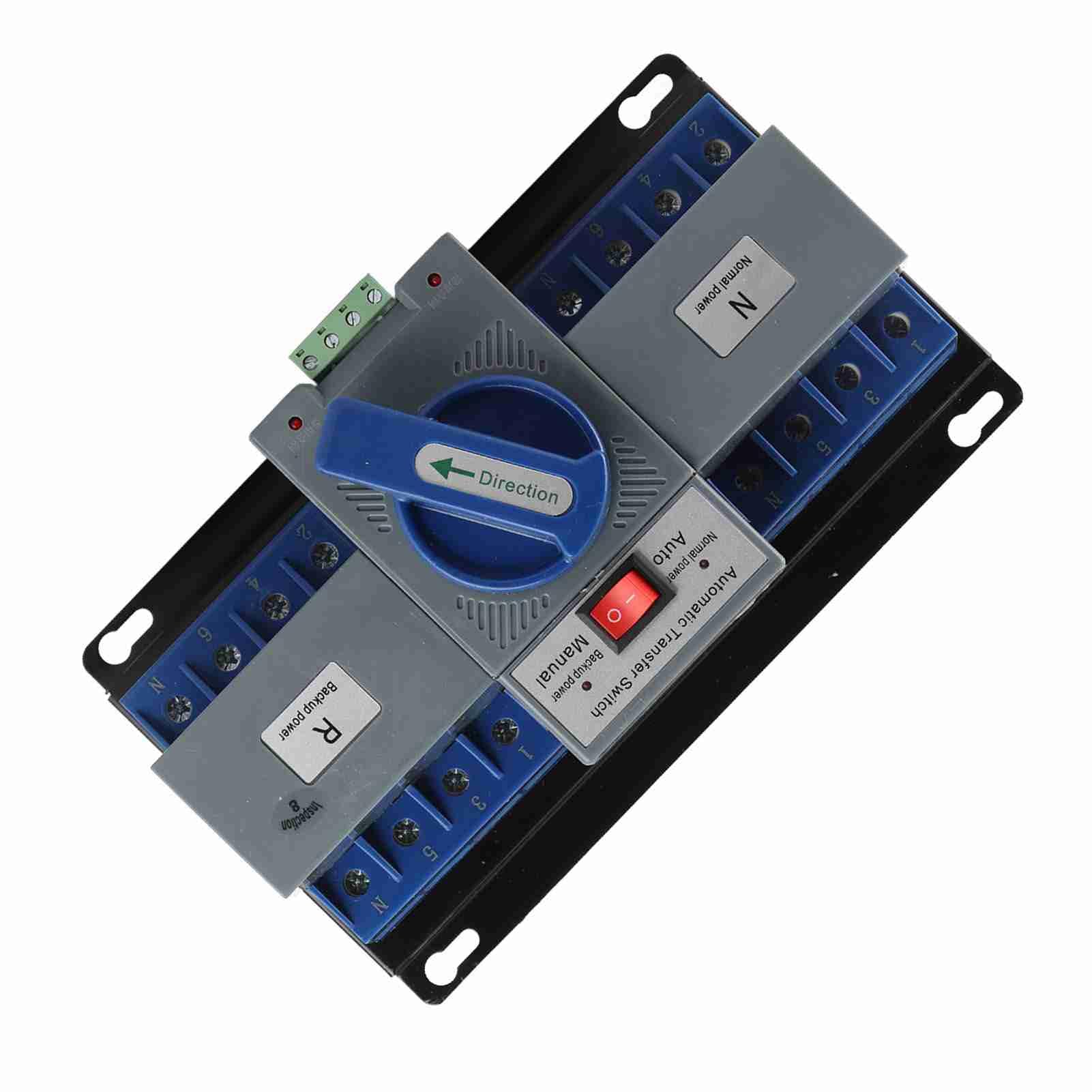
Abbildung 1: Vorderseite view of the Tbest 63A 4P Automatic Transfer Switch, showing the main controls and terminal blocks.
4. Einrichtung und Installation
Follow these general steps for installing the automatic transfer switch. Consult a qualified electrician for specific wiring diagrams and local code compliance.
- Montage: Securely mount the ATS in a suitable enclosure or panel, ensuring adequate ventilation and clearance for wiring.
- Stromabschaltung: Ensure all power sources (normal and backup) are completely disconnected and locked out before proceeding with wiring.
- Normal Power Connection: Connect the normal power source (utility) to the designated 'Normal Power' terminals (labeled 'N' on the device). Ensure correct phase and neutral connections.
- Backup Power Connection: Connect the backup power source (e.g., generator) to the designated 'Backup Power' terminals (labeled 'R' on the device). Ensure correct phase and neutral connections.
- Lastanschluss: Connect the electrical load (circuits to be powered) to the 'Load' terminals of the ATS.
- Steuerverkabelung: Connect any necessary control wiring for automatic operation, if applicable.
- Überprüfung: Überprüfen Sie alle Kabelverbindungen sorgfältig auf festen Sitz und korrekte Ausführung.

Abbildung 2: Schräg view of the ATS, highlighting the 'Normal Power' and 'Backup Power' terminal blocks for wiring connections.
5. Bedienungsanleitung
The Tbest Automatic Transfer Switch offers both automatic and manual operation modes.
5.1 Modusauswahl
The switch features a selector for operating mode:
- Automatikmodus: When the selector is set to 'Auto', the switch will automatically transfer the load between the normal and backup power sources based on power availability. If normal power fails, it will switch to backup. When normal power returns, it will switch back.
- Manueller Modus: When the selector is set to 'Manual', the transfer switch will remain in its current position until manually operated.
5.2 Manual Transfer
In 'Manual' mode, or for testing purposes, the large blue 'Direction' handle can be used to manually switch between power sources:
- Rotate the handle towards 'N' (Normal power) to connect the load to the normal power source.
- Rotate the handle towards 'R' (Backup power) to connect the load to the backup power source.

Abbildung 3: Nahaufnahme view of the 'Automatic Transfer Switch' selector (Auto/Manual) and the 'Direction' handle for manual operation.
6. Wartung
Regelmäßige Wartung gewährleistet die Langlebigkeit und den zuverlässigen Betrieb Ihres ATS.
- Sichtprüfung: Überprüfen Sie den Schalter regelmäßig auf Anzeichen von Beschädigungen, lockeren Verbindungen oder Überhitzung.
- Reinigung: Halten Sie den Schalter frei von Staub und Schmutz. Verwenden Sie zum Reinigen ein trockenes, nichtleitendes Tuch.
- Verbindungsprüfung: Annually, or as needed, verify that all electrical connections are tight and secure.
- Funktionstest: Periodically test the automatic transfer function by simulating a normal power outage (if safe to do so) to ensure it switches correctly to backup power and back.
7. Fehlerbehebung
Sollten Sie Probleme mit Ihrem ATS haben, beachten Sie bitte die folgenden gängigen Schritte zur Fehlerbehebung:
| Problem | Mögliche Ursache | Lösung |
|---|---|---|
| Der Switch schaltet nicht automatisch um. | Selector in 'Manual' mode; no power from backup source; control wiring issue. | Set selector to 'Auto'. Check backup power source. Inspect control wiring. |
| Keine Stromversorgung. | No power from normal or backup source; tripped breaker; loose connections. | Check both power sources. Reset breakers. Verify all wiring connections. |
| Overheating or unusual noises. | Overload; loose connections; internal fault. | Reduce load. Tighten connections. Disconnect power and contact qualified personnel. |
If the problem persists after attempting these solutions, contact a qualified electrician or Tbest customer support.
8. Spezifikationen
| Besonderheit | Spezifikation |
|---|---|
| Modellnummer | Tbest946gkyex3c |
| ASIN | B0F1D97DQB |
| Hersteller | Tbest |
| Verpackungsabmessungen | 9.06 x 5.91 x 5.12 Zoll |
| Artikelgewicht | 3.67 Pfund |
9. Garantie und Support
For warranty information or technical support, please contact Tbest customer service through their official channels. Keep your purchase receipt and model number (Tbest946gkyex3c) handy for faster service.
Die Kontaktdaten des Kundendienstes finden Sie oft auf der Website des Herstellers. weboder über den Einzelhändler, bei dem das Produkt gekauft wurde.