
1. Einleitung
Thank you for choosing the JUNJIEUNVO Q16 PRO Wireless Translation Earbuds. These earbuds are designed to provide a versatile audio experience, featuring real-time language translation, high-definition sound, and an open-ear design for comfort. This manual provides essential information for setting up, operating, and maintaining your device.
2. Packungsinhalt
- JUNJIEUNVO Q16 PRO Wireless Translation Earbuds (Left and Right)
- Ladecase mit intelligentem Touchscreen
- Bedienungsanleitung
- Ladekabel (USB-C)
3. Produktüberschreitungview

Abbildung 3.1: JUNJIEUNVO Q16 PRO Wireless Translation Earbuds and Charging Case. This image displays the white and silver earbuds with their unique ear-hook design, alongside the charging case which features a digital display showing time and battery levels.
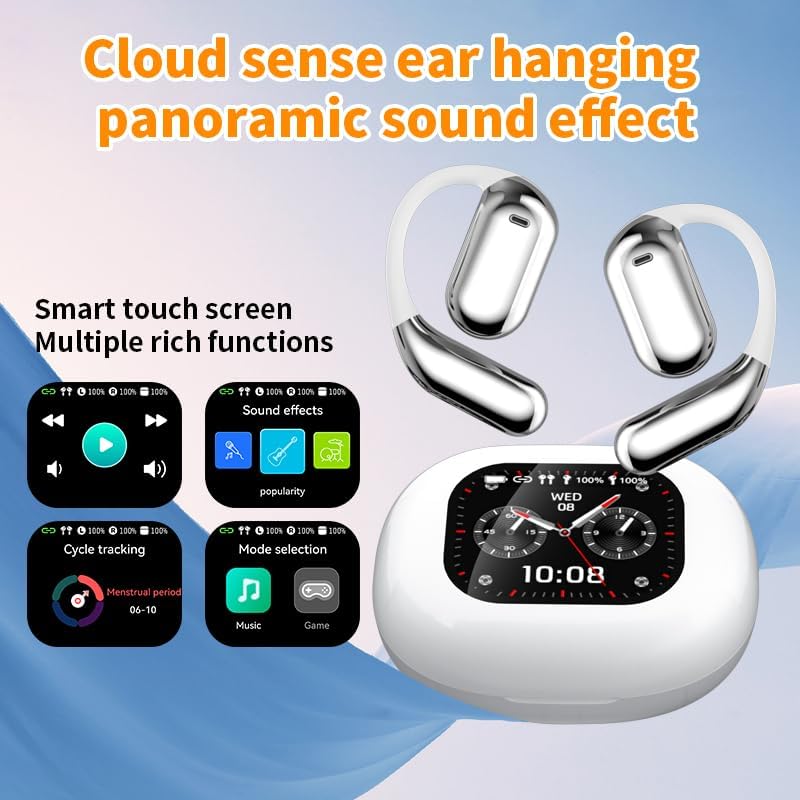
Abbildung 3.2: Smart Touch Screen Functions. This image highlights the charging case's smart touch screen, illustrating various functions such as media playback controls, sound effects, cycle tracking, and mode selection (music/game).

Abbildung 3.3: Environmental Noise Cancellation (ENC). This image depicts a person wearing the earbuds, with an overlay illustrating how the ENC technology reduces ambient noise by up to 99.44%, providing a clearer audio experience.

Abbildung 3.4: Open-Ear Design for Comfort. This image shows a person wearing the earbuds, emphasizing the open-ear design that offers comfort and allows for awareness of external sounds, protecting ear canal health.

Abbildung 3.5: Multiple Sound Adjustment Modes. This image displays the charging case's screen showing "Sound effects" with options for various music genres, indicating the ability to customize audio preferences.

Abbildung 3.6: Extended Battery Life and Rich Functions. This image showcases the earbuds and charging case, highlighting a 40-hour endurance with a 500mAh charging case capacity, along with a mention of multiple functions.

Abbildung 3.7: Earbuds and Charging Case (Open View). A detailed view of both earbuds and the open charging case, showing the internal design and charging contacts.

Abbildung 3.8: Earbuds in Charging Case. This image shows the earbuds securely placed within their charging case, ready for charging or storage.

Abbildung 3.9: Earbuds and Charging Case (Angled View). Another perspective of the earbuds and charging case, emphasizing their sleek design and compact form factor.
4. Einrichtung
4.1 Aufladen der Ohrhörer und des Ladecase
Vor dem ersten Gebrauch die Ohrhörer und das Ladecase vollständig aufladen.
- Legen Sie die Ohrhörer in das Ladecase. Achten Sie darauf, dass sie richtig in ihren jeweiligen Fächern sitzen (L für links, R für rechts).
- Connect the charging cable to the USB-C port on the charging case and to a power source.
- Das digitale Display am Ladecase zeigt den Ladestatus an.
A full charge for the earbuds takes approximately 1.5 hours. The charging case has a 500mAh battery, providing extended use.
4.2 Koppeln mit einem Gerät
The earbuds use Bluetooth 5.4 for a stable connection up to 10 meters.
- Öffnen Sie das Ladeetui. Die Ohrhörer wechseln automatisch in den Kopplungsmodus.
- Aktivieren Sie Bluetooth auf Ihrem Gerät (Smartphone, Tablet usw.).
- Suchen nach available Bluetooth devices and select "Q16 PRO" from the list.
- Sobald die Verbindung hergestellt ist, zeigen die Ohrhörer eine erfolgreiche Kopplung an, und das Gerät zeigt sie als verbunden an.
Die Ohrhörer verbinden sich beim Herausnehmen aus dem Ladecase automatisch wieder mit dem zuletzt gekoppelten Gerät, sofern Bluetooth auf dem Gerät aktiviert ist.
5. Bedienungsanleitung
5.1 Intelligente Touchscreen-Funktionen
The charging case features a smart touch screen for easy control of various functions. Navigate through options by swiping or tapping on the screen.
- Medienwiedergabe: Control music (play, pause, skip tracks) directly from the screen.
- Soundeffekte: Select from various sound modes.
- Modusauswahl: Switch between music and game modes.
- Zyklusverfolgung: Access additional features if supported by the connected application.
5.2 Touch-Steuerung (Ohrhörer)
The earbuds themselves also feature touch-sensitive areas for basic controls:
- Einmaliges Tippen: Musik abspielen/pausieren, Anruf annehmen/beenden.
- Doppeltippen (links): Vorheriger Titel.
- Doppeltippen (rechts): Nächster Titel.
- Lange drücken: Sprachassistent aktivieren, Anruf ablehnen.
5.3 Übersetzungsfunktion
The Q16 PRO earbuds support real-time translation for up to 144 languages. This feature typically requires a dedicated application on your connected smartphone.
- Download and install the companion translation application (refer to the app store or product packaging for details).
- Open the application and follow the on-screen instructions to connect your earbuds.
- Select the desired source and target languages within the application.
- Use the earbuds as instructed by the application for real-time translation during conversations or audio playback.
5.4 Sound Adjustment Modes
Customize your audio experience through the charging case's smart touch screen. Available sound modes include:
- Normal
- Pop
- Felsen
- Jazz
- Klassik
- Volk
- Custom (user-defined equalizer settings)
5.5 IPX5 Wasserdichtigkeitsklasse
The earbuds are rated IPX5 waterproof, meaning they are resistant to splashes and sweat. They are suitable for sports and outdoor activities but should not be submerged in water.
6. Wartung
- Reinigung: Reinigen Sie die Ohrhörer und das Ladecase mit einem weichen, trockenen Tuch. Vermeiden Sie die Verwendung von Scheuermitteln oder aggressiven Chemikalien.
- Lagerung: Bewahren Sie die Ohrhörer bei Nichtgebrauch im Ladeetui auf, um sie zu schützen und geladen zu halten.
- Vermeiden Sie extreme Temperaturen: Do not expose the device to extreme heat or cold, as this can damage the battery and internal components.
- Wassereinwirkung: While IPX5 rated, avoid prolonged exposure to water or high humidity. Ensure the charging port is dry before charging.
7. Fehlerbehebung
| Problem | Mögliche Lösung |
|---|---|
| Ohrhörer lassen sich nicht koppeln | Ensure earbuds are charged. Turn off and on Bluetooth on your device. Forget "Q16 PRO" from your device's Bluetooth list and re-pair. |
| Kein Ton von einem Ohrhörer | Check battery level of both earbuds. Place both earbuds back in the case, close it, then reopen to reset. Re-pair with your device. |
| Ladeetui lädt nicht | Ensure the charging cable is securely connected. Try a different USB-C cable and power adapter. |
| Übersetzungsfunktion funktioniert nicht | Ensure the companion app is installed and updated. Check app permissions (microphone, internet). Verify a stable internet connection. |
| Schlechte Tonqualität | Ensure earbuds are clean. Check the distance to your device (within 10m). Avoid obstacles between earbuds and device. |
8. Spezifikationen
| Besonderheit | Detail |
|---|---|
| Modellname | YYK-Q16 PRO |
| Bluetooth-Version | V5.4 + EDR |
| Chip | Blue Flood |
| Unterstützte Protokolle | AVRCP V1.6, A2DP V1.3, HFP V1.7, Simultaneous LE and BR / EDR |
| Usage/Playback Time | Ungefähr 8 Stunden (bei 80 % Volumen) |
| Standby-Zeit | 80 Stunden |
| Ladezeit | Ungefähr 1.5 Stunden |
| Drahtlose Distanz | 10 Meter |
| Akkukapazität der Ohrhörer | 40 mAh (jeder Ohrhörer) |
| Akkukapazität des Ladegehäuses | 500 mAh |
| Wasserdichtigkeit | IPX5 |
| Artikelgewicht | 6.4 Unzen (insgesamt) |
| UPC | 884613749637 |
| Hersteller | UNVO |
| Farbe | White+Silver |
| Platzierung des Ohrs | On Ear (Open-wear design) |
| Formfaktor | Echtes Wireless |
9. Garantie und Support
Informationen zur Garantie und zum Kundendienst finden Sie in der Ihrer Bestellung beiliegenden Dokumentation oder wenden Sie sich direkt an den Händler/Hersteller. Bewahren Sie Ihren Kaufbeleg für eventuelle Garantieansprüche auf.


