
1. Einleitung
This manual provides detailed instructions for the Symcode Wearable Glove Barcode Scanner. This device is designed for efficient, hands-free barcode scanning, featuring dual wireless connectivity (Bluetooth 6.0 & 2.4G) and a long-lasting battery. It is suitable for various applications including warehouses, retail, and logistics, offering fast decoding of 1D, 2D, and QR codes.
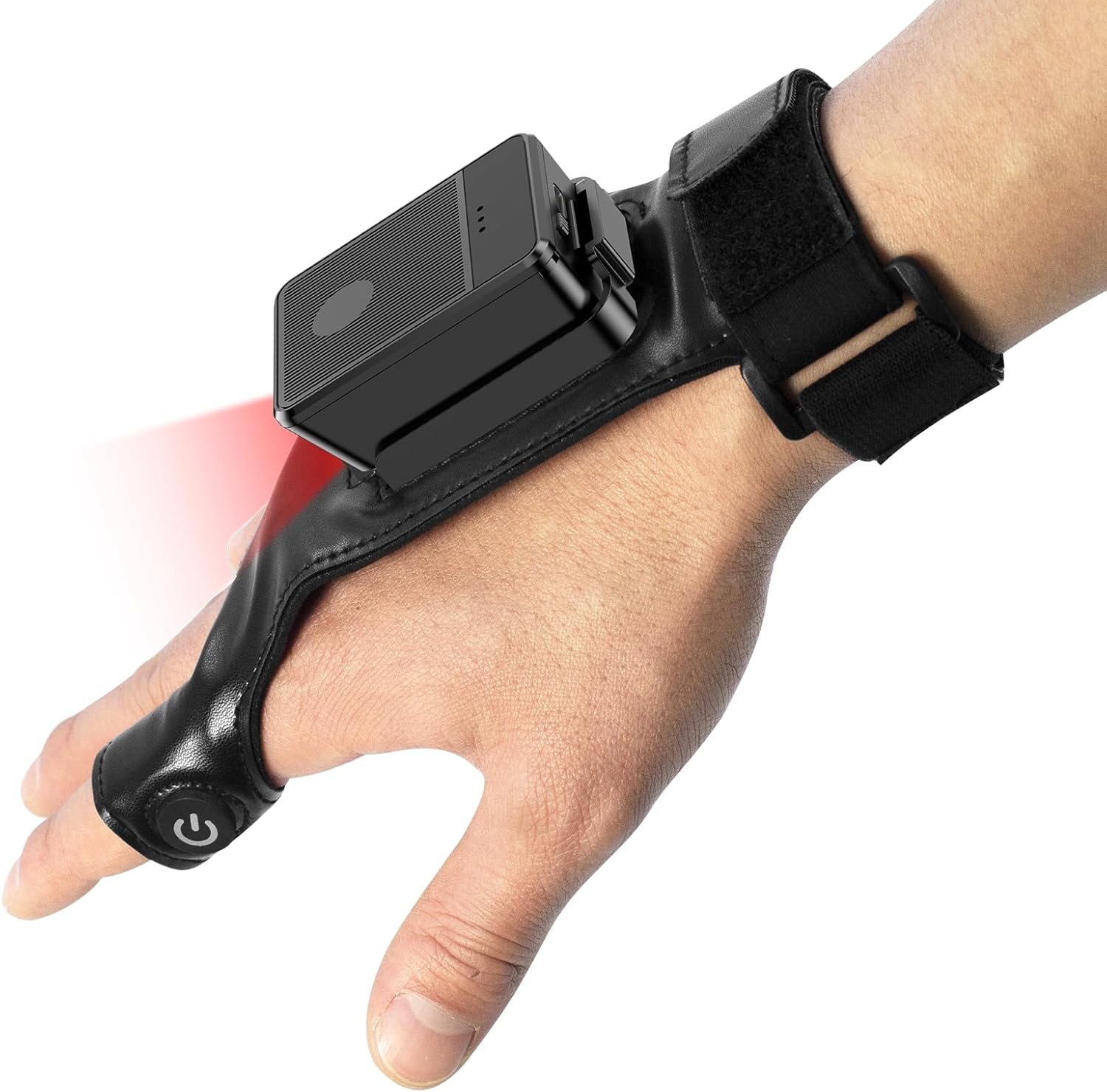
This image shows the Symcode Wearable Glove Barcode Scanner attached to a user's hand, demonstrating its ergonomic, hands-free design. The scanner unit is positioned on the back of the hand, with the scanning beam visible.
2. Sicherheitshinweise
- Setzen Sie das Gerät keinen extremen Temperaturen, Feuchtigkeit oder korrosiven Substanzen aus.
- Avoid direct eye exposure to the scanning light.
- Versuchen Sie nicht, das Gerät selbst zu zerlegen oder zu reparieren. Wenden Sie sich zur Reparatur an qualifiziertes Fachpersonal.
- Verwenden Sie ausschließlich das mitgelieferte Ladekabel und den Adapter, um Beschädigungen zu vermeiden.
3. Packungsinhalt
Bitte überprüfen Sie den Paketinhalt nach Erhalt. Sollten Artikel fehlen oder beschädigt sein, kontaktieren Sie bitte Ihren Händler.
- Symcode Wearable Glove Barcode Scanner
- USB-Ladekabel
- 2.4-GHz-Funkdongle
- Bedienungsanleitung
4. Produktüberschreitungview
The Symcode Wearable Glove Barcode Scanner consists of a compact scanning unit and an adjustable glove-style strap. The scanning unit features a durable trigger button, indicator lights, and a charging port. The glove is designed for comfort and secure fit, allowing for hands-free operation.

Eine Nahaufnahme view of the scanner on a hand, highlighting the red scanning beam and the durable resin material of the trigger button located on the index finger. The image also shows a roll of barcode labels, indicating its primary function.
5. Einrichtung
5.1 Aufladen des Geräts
Before first use, fully charge the scanner. Connect the USB charging cable to the scanner's charging port and to a power source (e.g., computer USB port or USB wall adapter). The charging indicator light will show charging status. A full charge takes approximately 5 hours.
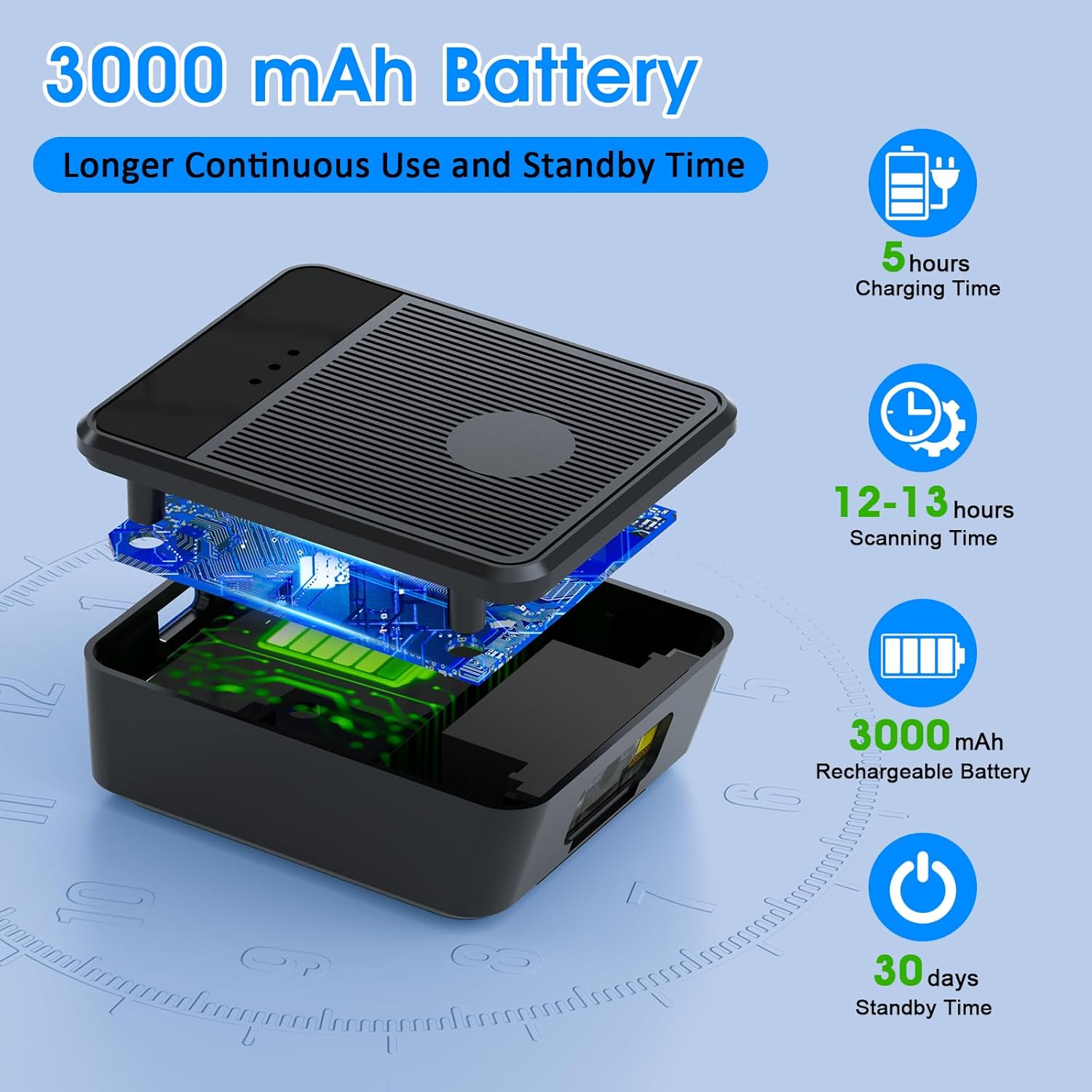
Ein explodiert view diagram of the scanner unit, emphasizing its 3000 mAh rechargeable battery. Accompanying text indicates a 5-hour charging time, 12-13 hours of continuous scanning, and 30 days of standby time.
5.2 Tragen des Scanners
Slide your hand into the glove, ensuring the scanner unit is positioned comfortably on the back of your hand. Adjust the strap for a secure fit. The trigger button should align with your index finger for easy access.

Two workers are shown in a warehouse environment, handling boxes. One worker is actively using the wearable barcode scanner on their hand to scan a package, demonstrating the hands-free benefit of the device during logistics operations.
5.3 Mit einem Gerät verbinden
The scanner supports two wireless connection methods:
5.3.1 2.4G Wireless Dongle Connection
- Plug the 2.4G wireless dongle into a USB port on your computer or compatible device.
- Turn on the scanner. It should automatically pair with the dongle.
- A successful connection is indicated by a specific light pattern or sound (refer to device indicators).
5.3.2 Bluetooth 6.0-Verbindung
- Schalten Sie den Scanner ein.
- Aktivieren Sie Bluetooth auf Ihrem Hostgerät (z. B. Smartphone, Tablet, Computer).
- Suchen nach available Bluetooth devices and select the Symcode scanner from the list.
- Pairing may require a confirmation or a default PIN (check device documentation for specific PIN if required).
6. Bedienungsanleitung
6.1 Grundlegendes Scannen
To scan a barcode, point the scanner's beam at the barcode and press the trigger button located on your index finger. A successful scan will typically be indicated by a beep, a vibration, or a change in the indicator light.
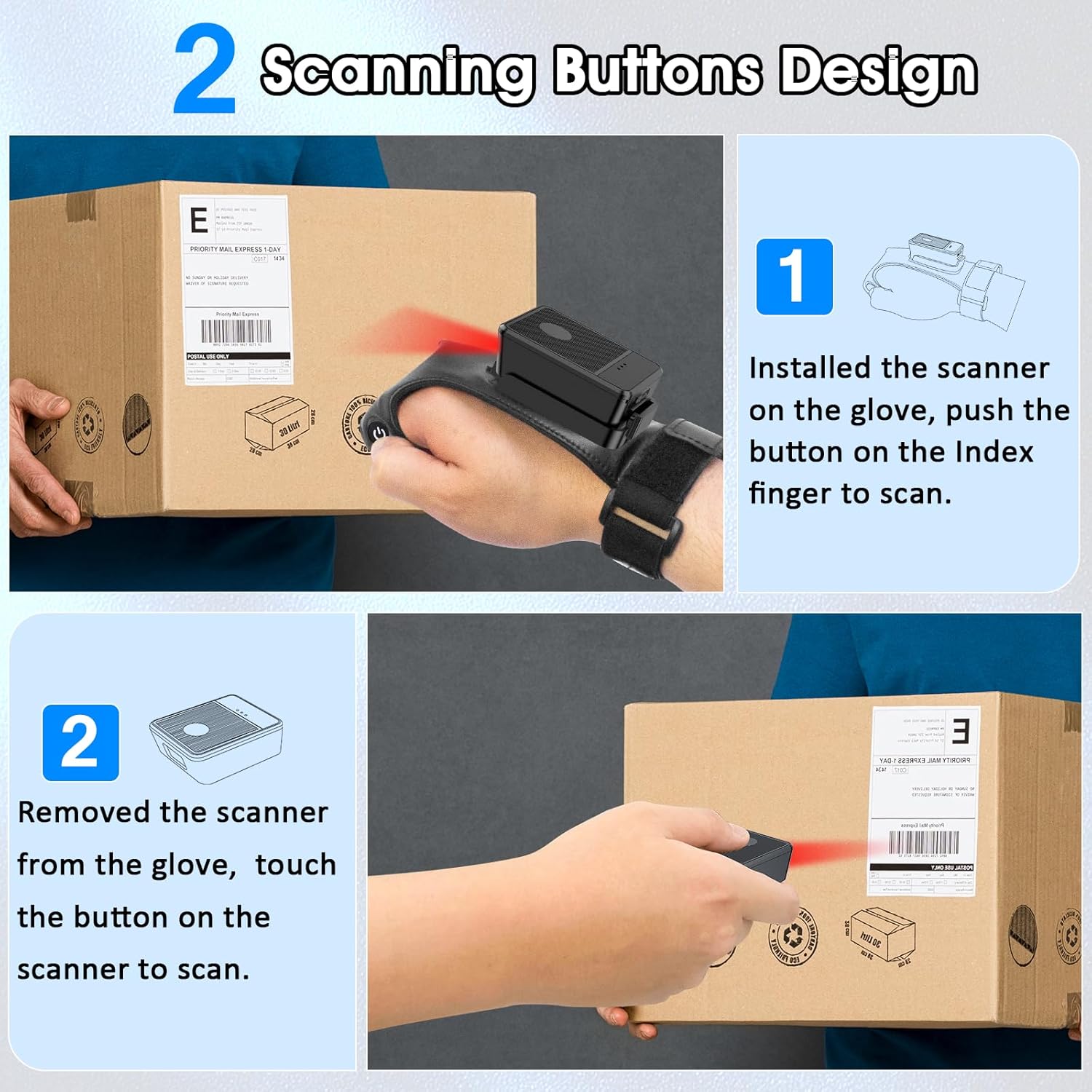
This diagram illustrates two ways to use the scanner: 1) installed on the glove, scanning with the index finger button, and 2) removed from the glove, scanning by touching the button directly on the scanner unit. Both methods are shown with the scanner pointed at a package.
6.2 Arbeitsmodi
The scanner supports two operational modes:
6.2.1 Instant Upload Mode
In this mode, scanned barcode data is immediately transmitted to the connected host device. This is ideal for real-time inventory updates or point-of-sale transactions.
6.2.2 Offline Storage Mode
This mode allows the scanner to store up to 50,000 barcodes internally when not connected to a host device or when connectivity is intermittent. Data can then be uploaded to a computer or POS system at a later time.
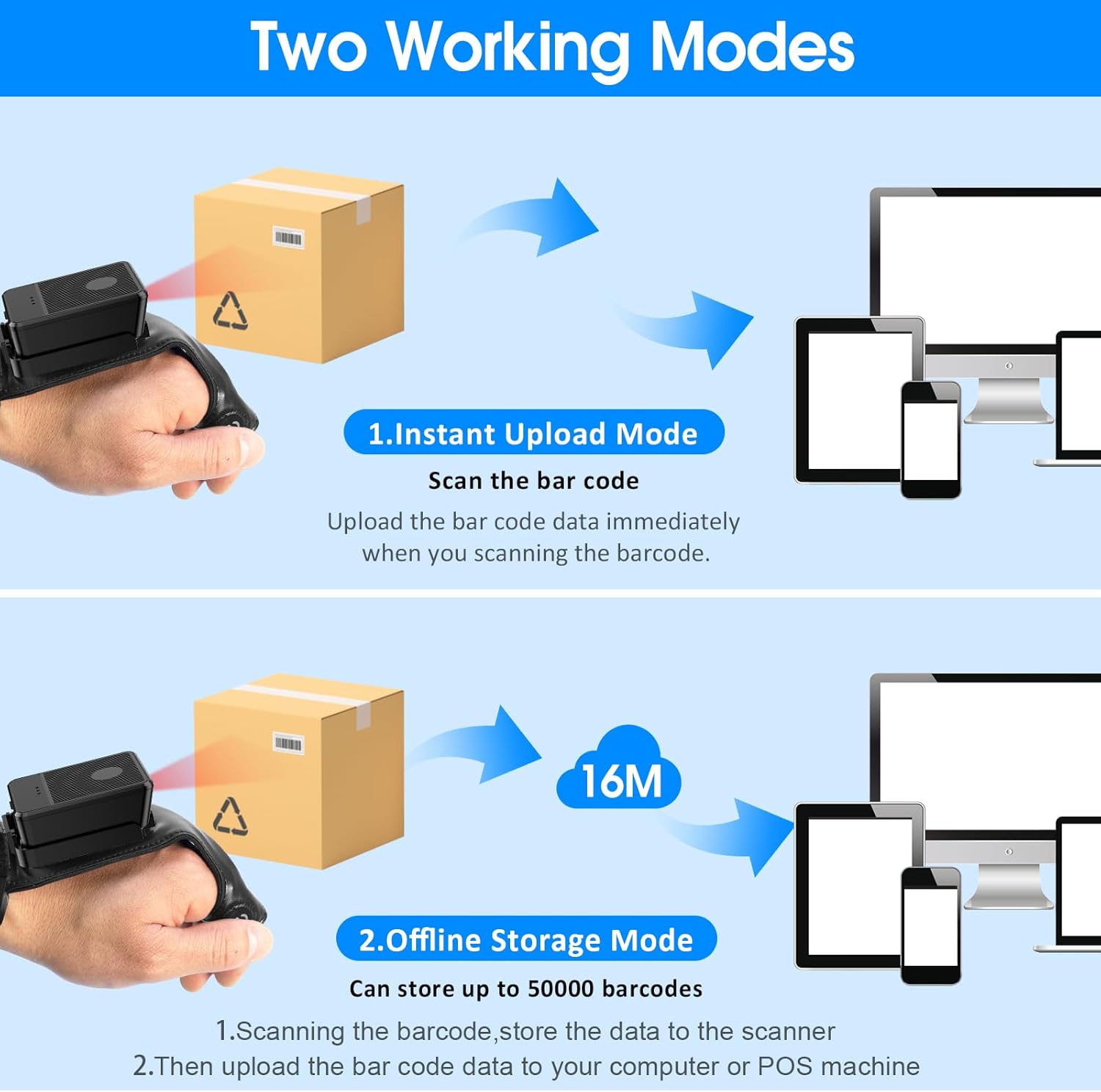
This image explains the two operational modes: Instant Upload Mode, where scanned data is immediately sent to a connected device, and Offline Storage Mode, which allows storing up to 50,000 barcodes internally before uploading them to a computer or POS system.
6.3 Anpassen der Einstellungen
The scanner allows for customization of various settings, including:
- Klang: Enable or disable the audible beep for successful scans.
- Vibration: Enable or disable vibration alerts for successful scans, useful in quiet environments.
- Tastaturfunktionen: Add keyboard functions such as TAB or Enter after each scan for seamless data entry into applications.
Refer to the quick setup guide or manufacturer's website for specific programming barcodes to adjust these settings.
7. Wartung
- Reinigung: Use a soft, dry cloth to clean the scanner's exterior. For stubborn dirt, slightly dampBefeuchten Sie das Tuch mit Wasser. Verwenden Sie keine scharfen Chemikalien oder Scheuermittel.
- Lagerung: Bewahren Sie den Scanner bei Nichtgebrauch an einem kühlen, trockenen Ort fern von direkter Sonneneinstrahlung und extremen Temperaturen auf.
- Batteriepflege: Um die Akkulaufzeit zu verlängern, vermeiden Sie häufiges vollständiges Entladen des Akkus. Laden Sie das Gerät regelmäßig auf, auch wenn Sie es nicht ständig benutzen.
8. Fehlerbehebung
8.1 Scanner schaltet sich nicht ein
- Stellen Sie sicher, dass der Akku geladen ist. Schließen Sie den Scanner an eine Stromquelle an und lassen Sie ihn mindestens 30 Minuten lang aufladen, bevor Sie versuchen, ihn wieder einzuschalten.
8.2 Unable to Connect Wirelessly
- 2.4G-Verbindung: Verify the 2.4G dongle is securely plugged into the host device. Try plugging it into a different USB port. Ensure the scanner is within range of the dongle.
- Bluetooth Verbindung: Ensure Bluetooth is enabled on your host device. Delete any previous pairings for the scanner and attempt to pair again. Ensure the scanner is in pairing mode (refer to device indicators).
- Starten Sie sowohl den Scanner als auch das Host-Gerät neu.
8.3 Scanner liest keine Barcodes
- Stellen Sie sicher, dass der Barcode sauber, unbeschädigt und deutlich gedruckt ist.
- Passen Sie Abstand und Winkel zwischen Scanner und Barcode an.
- Check if the scanner is in the correct working mode (Instant Upload or Offline Storage).
- Verify that the barcode type is supported by the scanner (1D, 2D, QR codes are supported).
9. Spezifikationen
| Marke | Symcode |
| Modell | Wearable Glove Barcode Scanner (B0F1FSMWCD) |
| Konnektivitätstechnologie | 2.4G, Bluetooth 6.0 |
| Kompatible Geräte | Desktop, Laptop, Tablet, Smartphone (Windows XP/7/8/10, Android, iOS) |
| Stromquelle | Batteriebetrieben |
| Akku-Typ | 1 Lithium-Polymer-Akku (im Lieferumfang enthalten) |
| Batteriekapazität | 1100mAh (Product Description) / 3000mAh (Image) - Note: Discrepancy in source data, refer to product packaging for accurate capacity. |
| Kontinuierliche Betriebszeit | Up to 10 hours (Product Description) / 12-13 hours (Image) - Note: Discrepancy in source data, refer to product packaging for accurate time. |
| Ladezeit | Ca. 5 Stunden |
| Standby-Zeit | Bis zu 30 Tage |
| Scangeschwindigkeit | Bis zu 300 Scans pro Sekunde |
| Scanbereich | 2 bis 4.9 Fuß |
| Offline Storage Capacity | Bis zu 50,000 Barcodes |
| Artikelgewicht | 5 Unzen |
| Verpackungsabmessungen | 7.48 x 3.74 x 2.44 Zoll |
10. Garantieinformationen
This Symcode product is covered by a manufacturer's warranty. For specific warranty terms, duration, and conditions, please refer to the warranty card included with your product or visit the official Symcode webBewahren Sie Ihren Kaufbeleg für Garantieansprüche auf.
11. Kundendienst
If you encounter any issues or have questions regarding your Symcode Wearable Glove Barcode Scanner, please contact Symcode customer support. Contact details can typically be found on the product packaging, the official Symcode webWebsite oder über Ihren Händler.