
1. Produktüberschreitungview
The Hisense 65E7Q QLED Smart TV offers a premium viewing experience with its 65-inch QLED display. This television integrates advanced technologies such as Dolby Vision and Dolby Atmos for immersive audio-visuals, AI Smooth Motion for fluid images, and dedicated modes for gaming and sports. Powered by the VIDAA operating system, it provides easy access to a wide range of streaming content and smart features, including voice control.

Front view of the Hisense 65E7Q QLED Smart TV.
Hauptmerkmale:
- QLED Farbe: Experience rich, vibrant, and realistic colors.
- KI-gestützte, flüssige Bewegung: Advanced MEMC and 3D Noise Reduction for fluid, blur-free images.
- Dolby Vision und Dolby Atmos: Cinematic picture and immersive sound for an enhanced entertainment experience.
- Spielmodus Plus: Reduces input lag to 16ms, with 60Hz VRR and ALLM for ultra-fluid gaming.
- KI-Sportmodus: Optimizes picture and sound for sports content, reducing motion blur and enhancing stadium-like audio.
- KI-4K-Upscaler: Enhances blurry images to near-4K quality.
- VIDAA Smart TV OS: Fast, secure, and intuitive operating system with access to popular streaming applications.
- Sprachsteuerung: Integrated Alexa and VIDAA Voice for convenient operation.
2. Sicherheitshinweise
Please read all safety instructions carefully before using your TV. Keep this manual for future reference. Always ensure the TV is placed on a stable surface to prevent tipping. Do not expose the TV to rain or moisture. Refer to the full safety guidelines in the included safety manual.
3. Packungsinhalt
Prüfen Sie, ob alle Artikel in der Box vorhanden sind:
- Hisense 65E7Q QLED Smart TV
- Stromkabel
- Remote Control (with 1 AAAA battery included)
- TV-Ständer (2-teilig)
- Schrauben für die Ständermontage
- Benutzerhandbuch (dieses Dokument)
- Garantiekarte
4. Einrichtung
4.1 Montage des Ständers
- Legen Sie den Fernseher vorsichtig mit dem Bildschirm nach unten auf eine weiche, ebene Unterlage, um Beschädigungen zu vermeiden.
- Richten Sie die Standfußteile an den entsprechenden Schlitzen an der Unterseite des Fernsehers aus.
- Befestigen Sie die Ständerteile mit den mitgelieferten Schrauben. Achten Sie darauf, dass diese fest angezogen sind.

Diagram illustrating TV dimensions and stand installation points.
4.2 Wandmontage
If you plan to wall mount your TV, ensure you use a VESA-compatible wall mount kit (not included). The Hisense 65E7Q supports a VESA mounting standard of 600 x 400 mm. Follow the instructions provided with your wall mount kit for safe installation.
4.3 Anschließen von Peripheriegeräten
Connect your external devices to the TV's ports as needed. Refer to the port diagram below:

Hinteren view showing available ports and connections.
- HDMI-Anschlüsse (x3): Connect Blu-ray players, game consoles, and other HDMI devices. One port supports eARC for enhanced audio return.
- USB-Anschlüsse (x2): Connect USB flash drives for media playback. (1x USB 3.0, 1x USB 2.0)
- Antenneneingänge (x2): Schließen Sie Ihre terrestrische oder Kabelantenne an.
- Ethernet (LAN): Für kabelgebundene Netzwerkverbindung.
- Optischer Audioausgang: Schließen Sie eine Soundbar oder einen Audio-Receiver für digitale Audioausgabe an.
- Kopfhöreranschluss: Zum privaten Hören.
- AV-Eingänge: Zum Anschluss älterer Geräte über Composite-Video- und Stereo-Audiokabel.
4.4 Erstes Einschalten
- Schließen Sie das Netzkabel an den Fernseher und anschließend an eine Steckdose an.
- Drücken Sie den Ein-/Ausschalter auf der Fernbedienung oder am Fernseher.
- Folgen Sie den Anweisungen auf dem Bildschirm, um die Ersteinrichtung abzuschließen, einschließlich Sprachauswahl, Netzwerkverbindung und Kanalsuche.
5. Bedienung Ihres Fernsehgeräts
5.1-Fernbedienung
The included remote control allows you to navigate the TV's features. Insert the provided AAAA battery into the remote. The remote supports voice control for convenient operation.
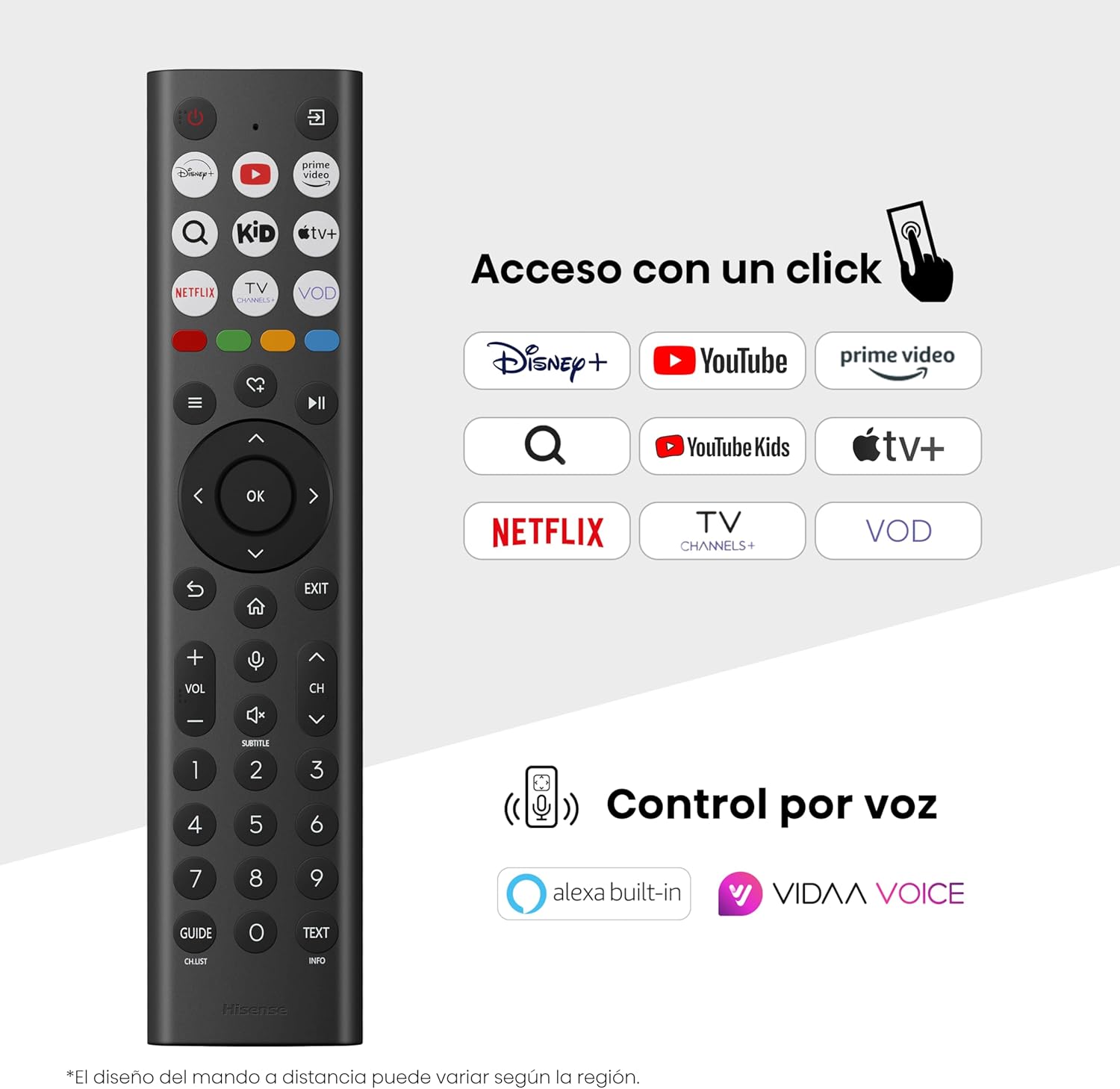
Hisense Smart TV remote control with dedicated app buttons and voice control.
5.2 Smart-TV-Funktionen (VIDAA OS)
Your Hisense TV runs on the VIDAA operating system, offering a user-friendly interface for accessing various applications and services.

The VIDAA Smart TV interface with popular streaming applications.
- Anwendungen: Access pre-installed apps like Netflix, YouTube, Prime Video, and more.
- Sprachsteuerung: Use the remote's voice function to search for content, adjust settings, or interact with Alexa built-in and VIDAA Voice.
- Screen Mirroring (AirPlay): Share content from your Apple devices directly to the TV.
- Auf TV teilen: Easily send content from your mobile devices to the TV.
5.3 Bildeinstellungen
Optimieren Sie Ihre viewing experience with various picture enhancement technologies:
- QLED Farbe: Delivers over a billion shades of vibrant, lifelike colors.
- KI-4K-Upscaler: Verbessert automatisch Inhalte mit niedrigerer Auflösung auf nahezu 4K-Qualität.
- KI-gestützte, flüssige Bewegung: Reduces motion blur in fast-paced scenes, ensuring clear and fluid visuals.
- Dolby Vision: Provides stunning brightness, contrast, and color for a dramatic visual experience.
- Filmemacher-Modus: Preserves the original aspect ratio, colors, and frame rates to display movies as intended by the director.
- KI-Lichtsensor: Intelligently adjusts screen brightness based on ambient light for optimal viewund Energieeffizienz.
- Augenschonmodus: Reduziert die Blaulichtemission, um die Augenbelastung zu minimieren.
- Energiesparmodus: Optimizes power consumption without significantly compromising picture quality.

QLED technology delivers over a billion vibrant color tones.

AI 4K Upscaler enhances lower resolution content to near 4K clarity.

AI Smooth Motion ensures fluid images without blur, especially in fast-moving scenes.

Filmmaker Mode presents content exactly as the director intended.
5.4 Toneinstellungen
Verbessern Sie Ihr Audioerlebnis mit:
- Dolby Atmos: Immersive, multi-dimensional sound that fills your room.
- Integrierter Lautsprecher: Built-in speakers with a maximum output of 1 Watt per channel.
- EzPlay: Seamlessly control compatible Hisense soundbars directly from your TV screen.

Dolby Vision and Dolby Atmos combine for a spectacular audio-visual experience.
5.5 Gaming-Funktionen
Für Gamer bietet der Fernseher Folgendes:
- Spielmodus Plus: Reduces input lag to 16ms, ensuring responsive gameplay.
- 60 Hz VRR (Variable Refresh Rate): Synchronizes the TV's refresh rate with the game console's output to prevent screen tearing.
- ALLM (Auto Low Latency Mode): Automatically switches the TV to low-latency mode when a game is detected.
- Spielleiste: An integrated control center for quick access to game settings and real-time performance monitoring.

Game Mode Plus provides ultra-fluid, lag-free gaming.

The Game Bar offers centralized control for game settings.
5.6 Sportfunktionen
- KI-Sportmodus: Automatically detects sports content and optimizes picture and sound settings for a stadium-like experience, enhancing clarity and audio effects.
6. Wartung
6.1 Reinigung des Fernsehers
- Vor der Reinigung immer den Netzstecker des Fernsehers ziehen.
- Verwenden Sie ein weiches, trockenes, fusselfreies Tuch, um den Bildschirm und das Fernsehgehäuse vorsichtig abzuwischen.
- Bei hartnäckigen Flecken leicht andrücken.ampBefeuchten Sie das Tuch mit Wasser oder einem speziellen Bildschirmreiniger (sprühen Sie nicht direkt auf den Bildschirm).
- Vermeiden Sie die Verwendung von Scheuermitteln, Alkohol, Benzol oder Verdünnern, da diese die Oberfläche des Fernsehers beschädigen können.
6.2 Softwareaktualisierungen
Ihr Fernseher erhält möglicherweise regelmäßig Software-Updates, um die Leistung zu verbessern und neue Funktionen hinzuzufügen. Stellen Sie sicher, dass Ihr Fernseher mit dem Internet verbunden ist, um diese Updates zu erhalten. Sie können in der Regel manuell im Einstellungsmenü Ihres Fernsehers nach Updates suchen.
7. Fehlerbehebung
Sollten Sie Probleme mit Ihrem Fernseher haben, beachten Sie bitte die folgenden gängigen Lösungsansätze:
- Kein Strom: Prüfen Sie, ob das Netzkabel fest angeschlossen ist und die Steckdose funktioniert. Versuchen Sie es mit einer anderen Steckdose.
- Kein Bild/Ton: Stellen Sie sicher, dass die richtige Eingangsquelle ausgewählt ist. Überprüfen Sie alle Kabelverbindungen (HDMI, Antenne).
- Fernbedienung funktioniert nicht: Check the battery (1 AAAA battery). Ensure there are no obstructions between the remote and the TV.
- Netzwerkverbindungsprobleme: Überprüfen Sie Ihr WLAN-Passwort oder Ihre Ethernet-Kabelverbindung. Starten Sie Ihren Router neu.
- Schlechte Bildqualität: Passen Sie die Bildeinstellungen (Helligkeit, Kontrast, Schärfe) an. Stellen Sie sicher, dass die Eingangsquelle ein qualitativ hochwertiges Signal liefert.
- Klangverzerrung: Check audio settings. If using external speakers, ensure they are connected correctly.
For more detailed troubleshooting, consult the full electronic user manual or contact Hisense customer support.
8. Spezifikationen
Detaillierte technische Spezifikationen für den Hisense 65E7Q QLED Smart TV:
| Besonderheit | Spezifikation |
|---|---|
| Modellnummer | 65E7Q |
| Bildschirmgröße | 65 Zoll |
| Display-Technologie | QLED |
| Auflösung | 4K (3840 x 2160) |
| Bildwiederholrate | 60 Hz |
| HDR-Format-Unterstützung | Dolby Vision |
| Motion Enhancement Technology | AI Smooth Motion |
| Verbesserung der Bildqualität | AI 4K Upscaler, AI Smooth Motion, QLED Colour |
| Ansprechzeit | 100 Millisekunden |
| Konfiguration der Hintergrundbeleuchtung | Direct Illumination, Dimming |
| Beschreibung des Sprechers | Integrated speaker with Dolby Atmos |
| Maximale Lautsprecherausgangsleistung | 1 Watt |
| Audio-Kanäle | Mehrkanal |
| Surround Sound Format | Dolby Atmos |
| Betriebssystem | VIDAA |
| Speicherkapazität | 1 GB |
| Kontrollmethode | Stimme |
| Konnektivitätstechnologie | Bluetooth, HDMI, WLAN |
| Internet Applications | Netflix, YouTube, Prime Video, AirPlay 2 |
| HDMI-Anschlüsse | 3 (including HDMI 2.1 with eARC) |
| USB-Anschlüsse | 2 (1x USB 3.0, 1x USB 2.0) |
| Wireless-Technologie | W-lan |
| Screen Mirroring Technology | AirPlay |
| VESA-Montagestandard | 600 x 400 mm |
| Produktabmessungen (TxBxH) | 7.6 x 145.3 x 83.8 cm |
| Produktgewicht | 15.2 kg (mit Ständer) |
| Energieeffizienzklasse | E |
| Jährlicher Energieverbrauch | 84 kWh/1000 h (SDR), 160 kWh/1000 h (HDR) |
| Leistung | 1 Watt (Standby) |
| Bandtage | 100-240 VCA 50-60 Hz |
| Im Lieferumfang enthaltene Komponenten | Netzkabel, Fernbedienung, Ständer |
| Modelljahr | 2025 |
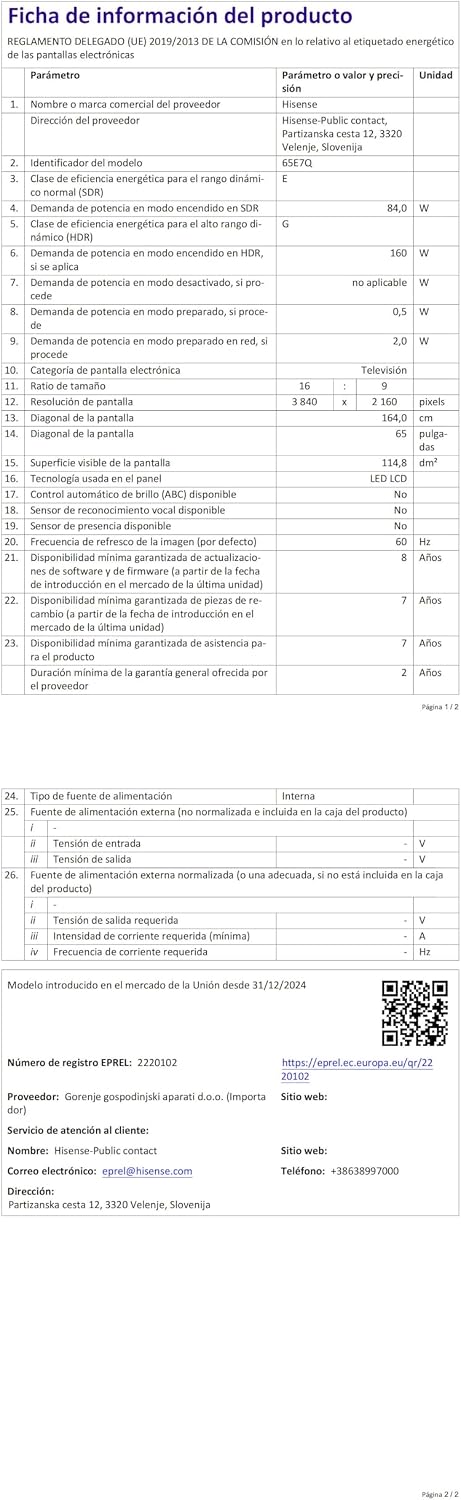
Energy label for the Hisense 65E7Q TV.
Für detailliertere Produktinformationen konsultieren Sie bitte die EPREL-Datenbank: https://eprel.ec.europa.eu/qr/2220102
9. Garantie und Support
9.1 Produktgarantie
This Hisense TV comes with a 3 Jahre ProduktgarantieBitte bewahren Sie Ihren Kaufbeleg für Garantieansprüche auf.
9.2 Verfügbarkeit von Ersatzteilen
Spare parts for this model are guaranteed to be available in the EU for a duration of 10 Jahre from the product's market introduction.
9.3 Kundendienst
For technical assistance, troubleshooting, or warranty service, please contact Hisense customer support. Refer to the contact information provided in your warranty card or visit the official Hisense webWebsite für Ihre Region.