
Einführung
Thank you for choosing the zelotes T80 Ergonomic Gaming Mouse. This wired optical mouse is designed for both gaming and office use, offering adjustable DPI, customizable LED lighting, and a comfortable ergonomic design for extended use. Please read this manual carefully to ensure proper setup and operation of your new mouse.
Produkteigenschaften
- 7 Buttons & Quick Fire Button: Includes forward, backward, and a rapid fire (double click) button for enhanced control in gaming and productivity.
- 5 einstellbare DPI-Stufen: Easily switch between 1000/1600/2400/3200/7200 DPI to match your speed and precision needs.
- 7 LED Backlit Modes: Personalize your setup with various lighting effects.
- Ergonomisches Design: Crafted for comfort with skin-friendly material, sweat-resistant, and anti-slip features to prevent fatigue during long sessions.
- Breite Kompatibilität: Compatible with Windows 11/10/8/7 and Mac OS, suitable for various applications including MMD, FPS games, and office tasks.
Packungsinhalt
- 1 x zelotes T80 Wired Gaming Mouse
- 1 x Bedienungsanleitung (evtl. nicht in deutscher Sprache).
Aufstellen
- Auspacken: Carefully remove the mouse and its accessories from the packaging.
- Schutzfolie entfernen: Before use, please remove the protective film from the mouse's foot pads.
- Verbinden: Plug the USB cable of the zelotes T80 Gaming Mouse into an available USB port on your computer (PC or Laptop).
- Treiberinstallation: Die Maus ist sofort einsatzbereit (Plug-and-Play). Ihr Betriebssystem erkennt und installiert die benötigten Treiber automatisch. Für die grundlegende Funktionalität ist in der Regel keine zusätzliche Softwareinstallation erforderlich.
Bedienungsanleitung
Schaltflächenerklärungen
The zelotes T80 mouse features 7 buttons for versatile control:
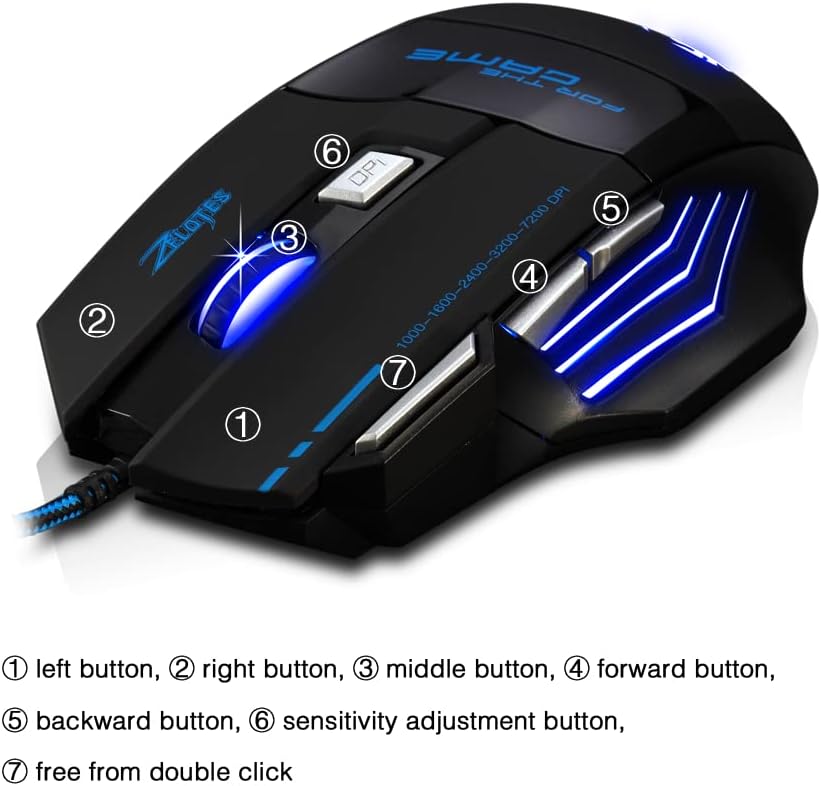
- Linke Taste (1): Standardmäßige Linksklick-Funktion.
- Rechter Knopf (2): Standardmäßige Rechtsklick-Funktion.
- Middle Button / Scroll Wheel (3): Scrolls up/down. Pressing it acts as a middle-click.
- Weiter-Taste (4): Navigiert vorwärts in web Browser bzw file Entdecker.
- Zurück-Taste (5): Navigiert rückwärts in web Browser bzw file Entdecker.
- DPI-Taste (6): Adjusts mouse sensitivity (DPI) and changes LED colors.
- Rapid Fire Button (7): Functions as a double-click of the left button, useful for continuous firing in games.
DPI-Anpassung
Die Maus bietet 5 einstellbare DPI-Stufen für unterschiedliche Aufgaben und Vorlieben:
- 1000 DPI
- 1600 DPI
- 2400 DPI
- 3200 DPI
- 7200 DPI
Drücken Sie die DPI-Taste (6) to cycle through these sensitivity levels. Each change will be indicated by a corresponding LED color change.
LED-Beleuchtungssteuerung
The mouse features 7 LED lighting modes. To change the LED color, long press the DPI button (6). The LED will flash rapidly 7 times and then remain constant on the selected color.

Wartung
- Reinigung: Reinigen Sie die Mausoberfläche mit einem weichen, trockenen Tuch. Bei hartnäckigem Schmutz kann ein leicht trocknendes Tuch hilfreich sein.amp Man kann ein Tuch verwenden, um sicherzustellen, dass keine Flüssigkeit in die Maus eindringt.
- Kabelpflege: Um Beschädigungen zu vermeiden, sollten Sie das USB-Kabel nicht scharf biegen oder übermäßig daran ziehen.
- Lagerung: Bewahren Sie die Maus an einem trockenen, kühlen Ort fern von direkter Sonneneinstrahlung und extremen Temperaturen auf.
Fehlerbehebung
Maus reagiert nicht
- Stellen Sie sicher, dass das USB-Kabel fest an einen funktionierenden USB-Anschluss angeschlossen ist.
- Versuchen Sie, die Maus an einen anderen USB-Anschluss Ihres Computers anzuschließen.
- Testen Sie die Maus an einem anderen Computer, um festzustellen, ob das Problem an der Maus oder am Computer liegt.
LED Lights Not Working/Changing
- Überprüfen Sie, ob die Maus ordnungsgemäß an den Computer angeschlossen ist.
- Ensure you are long-pressing the DPI button to cycle through colors. A short press changes DPI.
DPI Not Changing
- Ensure you are short-pressing the DPI button to cycle through DPI levels.
- If the issue persists, try reconnecting the mouse.
Technische Daten
| Besonderheit | Detail |
|---|---|
| Modellnummer | T80 |
| Schaltflächen | 7 (with scroll wheel) |
| Einstellbare DPI | 1000/1600/2400/3200/7200 DPI |
| LED-Beleuchtung | 7 Beleuchtungsmodi |
| Konnektivität | USB verkabelt |
| Ortungssystem | Optisch |
| Ergonomisches Design | Ja |
| Schalter Leben | 5 Millionen Zyklen |
| Maße | 130x105x45mm |
| Gewicht | 160 ± 5g |
| USB-Kabellänge | 1.5 m |
| Kompatibilität | Win11, Win10, Win8, Win7, Mac OS |
Garantie und Support
For warranty information and technical support, please refer to the product packaging or contact zelotes customer service through the retailer where the product was purchased. Keep your purchase receipt for warranty claims.