
1. Einleitung
Thank you for choosing the FIMEI 3-in-1 Bright Floor Lamp. This modern standing light is designed to provide versatile illumination for various activities and moods. It features three distinct light sources: an upward-facing ambient light, a multi-angle rotatable ring light, and a small reading light. Each light can be independently controlled for color temperature and brightness, offering a customizable lighting experience. This manual provides essential information for safe assembly, operation, maintenance, and troubleshooting.

Image 1.1: FIMEI 3-in-1 Bright Floor Lamp in a modern living space, showcasing its central round lamp, outer ring lamp, and small reading light.
2. Sicherheitshinweise
- Lesen Sie alle Anweisungen vor der Montage und Verwendung.
- Stellen Sie sicher, dass die Stromversorgungslautstärketage entspricht dem lampAnforderungen (110 Volt).
- Betreiben Sie das l . nichtamp with a damaged cord or plug. If damaged, contact customer support.
- Behalte das lamp weg von Wasser oder damp environments. This product is for indoor use only.
- Versuchen Sie nicht, das Gerät zu zerlegen oder zu modifizierenamp. Es befinden sich keine vom Benutzer zu wartenden Teile im Inneren.
- Platzieren Sie das lamp auf einer stabilen, ebenen Fläche, um ein Umkippen zu verhindern.
- Ziehen Sie den Stecker aus deramp Vor der Reinigung oder Durchführung von Wartungsarbeiten die Steckdose entfernen.
- Vermeiden Sie es, über längere Zeit direkt in die LED-Lichtquelle zu schauen, da dies zu Augenbelastung führen kann.
3. Packungsinhalt
Prüfen Sie beim Auspacken, ob alle Komponenten vorhanden und in einwandfreiem Zustand sind.
- Etage Lamp Base
- Lamp Mastsegmente (typischerweise 3-4 Segmente)
- Lamp Head Assembly (with central, ring, and reading lights)
- Netzteil
- Fernbedienung
- Benutzerhandbuch (dieses Dokument)
4. Produktüberschreitungview
The FIMEI 3-in-1 Bright Floor Lamp integrates multiple lighting solutions into a single, sleek design. It features:
- Central Round Lamp: Provides ambient, reflected lighting for a soft glow.
- Outer Ring Lamp: Offers multi-angle illumination, ideal for broader area lighting.
- Small Reading Light: A focused light source for tasks such as reading or crafting.
- Unabhängige Steuerung: Each light can be controlled separately for brightness and color temperature.
- Flexible and Adjustable Lamp Köpfe: The rotatable heads allow you to direct light precisely where needed.
- Stufenlose Einstellung: Seamlessly adjust color temperature from 3000K to 6000K and brightness from dim to bright.
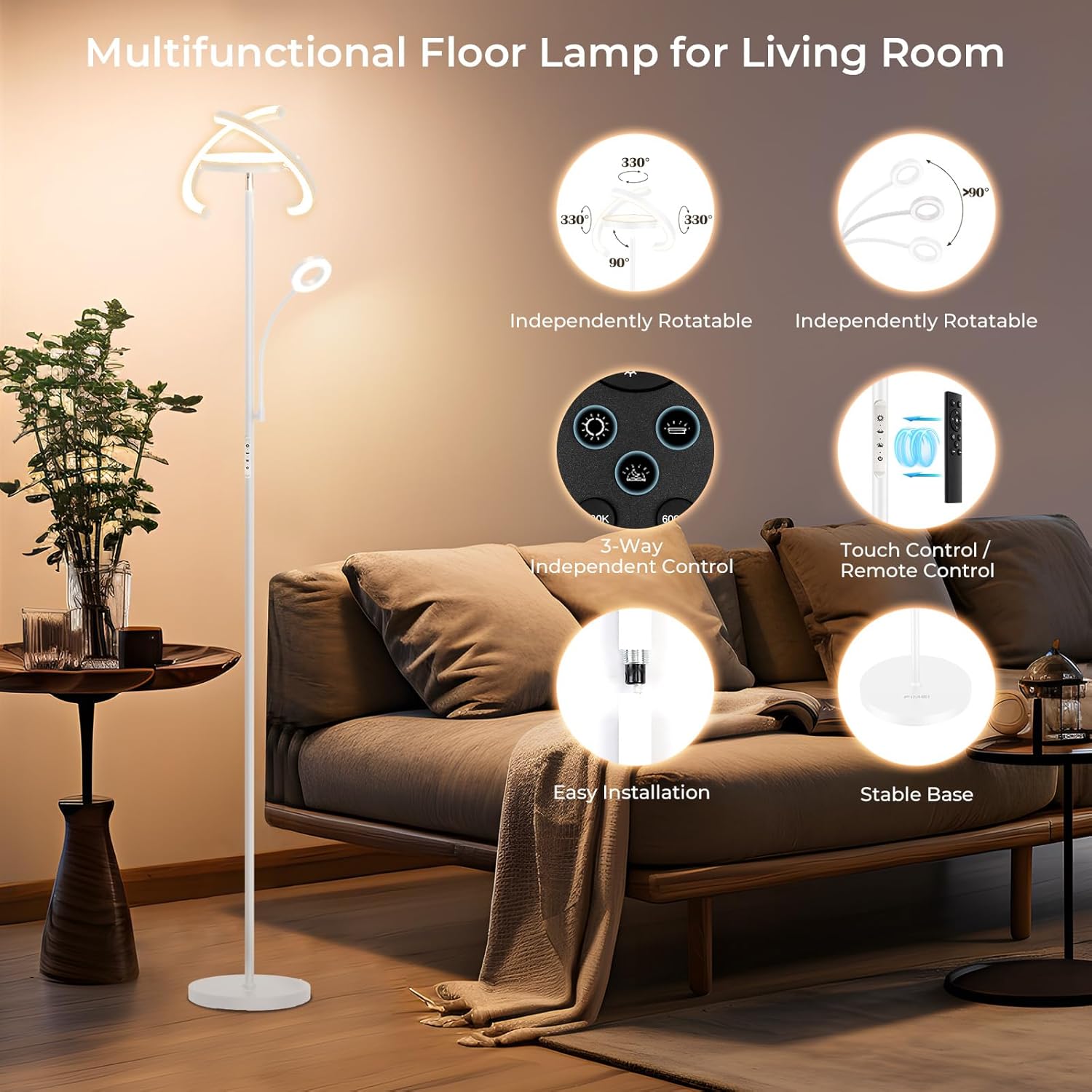
Image 4.1: Diagram highlighting the FIMEI floor lamp's features: independently rotatable lights, 3-way independent control, touch/remote control, easy installation, and stable base.
5. Montageanleitung
The FIMEI 3-in-1 Bright Floor Lamp is designed for quick and tool-free assembly. Follow these steps:
- Komponenten auspacken: Nehmen Sie alle Teile vorsichtig aus der Verpackung und legen Sie sie auf eine saubere, ebene Fläche.
- Zusammenbau der Stange: Scheiß auf das Lamp pole sections together clockwise until secure. Ensure the wires inside are not pinched.
- An der Basis befestigen: Schrauben Sie die zusammengebaute Lamp pole into the heavy base clockwise until it is firmly attached and stable.
- L verbindenamp Kopf: Befestigen Sie das lamp head assembly to the top of the pole, ensuring the electrical connector is properly seated and secured.
- Einstecken: Insert the power adapter into a standard 110V AC outlet.

Image 5.1: Dimensional diagram of the FIMEI floor lamp, showing its height (68.3 inches), base diameter (10 inches), and the vertical and horizontal rotation capabilities of its light heads.
6. Bedienungsanleitung
The FIMEI floor lamp offers both touch control on the lamp pole and a magnetic remote control for convenient operation.
6.1 Berührungssteuerung
The touch panel on the lamp pole allows for direct control:
- Netzschalter: Zum Drehen des Lichts berührenamp EIN/AUS.
- Light Source Selection: Separate icons for the Outer Ring Light, Central Upward Light, and Reading Light. Touch to activate or deactivate each light.
- Anpassung der Farbtemperatur: Light-touch the color temperature icon to cycle through 3000K (Warm Yellow), 4000K (Warm White), 5000K (Natural White), and 6000K (Cold White).
- Helligkeitsanpassung: Touch and hold the brightness icon to adjust the light intensity steplessly from dim to bright.
6.2-Fernbedienung
The included remote control provides convenient access to all functions from a distance of up to 25 feet (7.62m). The remote has a magnetic design for easy storage.
- Netzschalter: Macht das lamp EIN/AUS.
- Helligkeit +/-: Adjusts brightness steplessly.
- Farbtemperatur-Tasten: Dedicated buttons for 3000K, 4000K, 5000K, 6000K.
- Light Source Buttons: Individual buttons to control the Central, Ring, and Reading lights.
- 1H-Timer: Activates a one-hour timer, after which the lamp wird automatisch ausgeschaltet.

Image 6.1: Close-up of the FIMEI floor lamp's touch control panel on the pole and the magnetic remote control, detailing their functions for power, color temperature, and brightness.
6.3 Farbtemperatur- und Helligkeitsanpassung
Die lamp offers a wide range of lighting options:
- Farbtemperaturen: Choose from Warm Yellow (3000K), Warm White (4000K), Natural White (5000K), and Cold White (6000K) to suit your preference or activity.
- Stufenloses Dimmen: Adjust the brightness level smoothly from 5% to 100% for precise control over illumination.
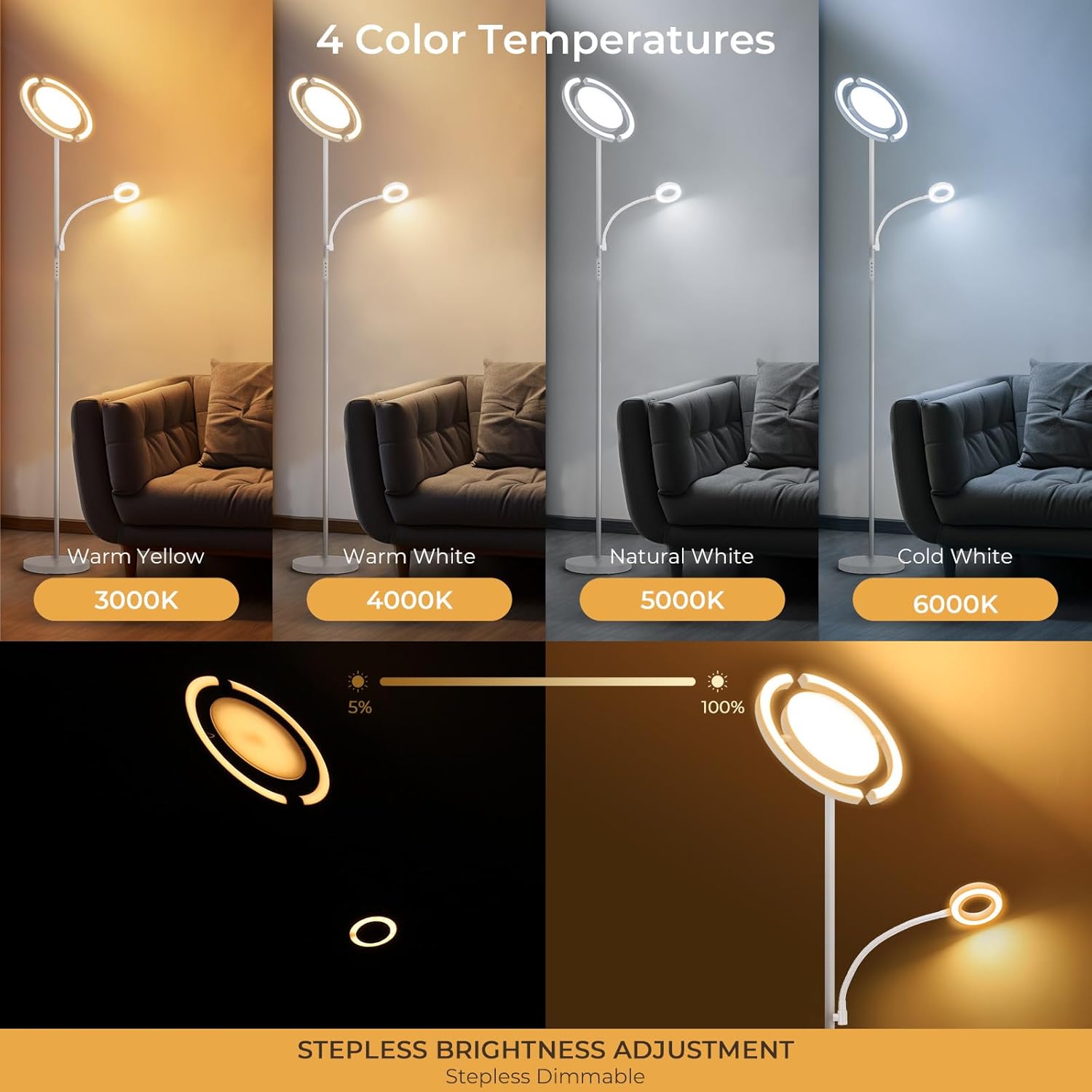
Image 6.2: Illustration of the FIMEI floor lamp's 4 color temperatures (3000K Warm Yellow, 4000K Warm White, 5000K Natural White, 6000K Cold White) and stepless brightness adjustment from 5% to 100%.
6.4 Speicherfunktion
Die lamp features a memory function that retains your last used brightness and color temperature settings when turned off and on again, providing convenience and consistency.

Image 6.3: FIMEI floor lamp providing soft, eye-caring light for reading, demonstrating its memory function in a bedroom setting with children.
7. Wartung
To ensure the longevity and optimal performance of your FIMEI floor lampBeachten Sie bitte diese Wartungsrichtlinien:
- Reinigung: Ziehen Sie den Stecker aus deramp Vor der Reinigung. Wischen Sie die Oberfläche mit einem weichen, trockenen Tuch ab.amp pole, base, and light heads. Do not use abrasive cleaners, solvents, or harsh chemicals, as these can damage the finish or electrical components.
- Staubentfernung: Stauben Sie das l regelmäßig abamp um Ablagerungen zu vermeiden, die die Lichtausbeute und die Ästhetik beeinträchtigen können.
- Inspektion: Überprüfen Sie regelmäßig das Netzkabel und den Stecker auf Beschädigungen. Sollten Sie Beschädigungen feststellen, stellen Sie die Nutzung ein und kontaktieren Sie den Kundendienst.
- Lagerung: Bei der Lagerung des lamp Bei längerer Lagerung sollte das Gerät vorsichtig auseinandergenommen und in der Originalverpackung an einem trockenen, kühlen Ort aufbewahrt werden.
8. Fehlerbehebung
If you encounter issues with your FIMEI floor lampBeachten Sie die folgenden häufigen Probleme und Lösungen:
| Problem | Mögliche Ursache | Lösung |
|---|---|---|
| Lamp geht nicht an. | Kein Strom, Wackelkontakt, defekte Steckdose. | Ensure the power cord is securely plugged into a working outlet. Check if the wall switch (if applicable) is on. Try plugging another device into the outlet to confirm it has power. |
| Die Fernbedienung funktioniert nicht. | Remote battery depleted, remote not paired, obstruction. | Ersetzen Sie die Batterie der Fernbedienung. Stellen Sie sicher, dass sich zwischen der Fernbedienung und dem Gerät keine Hindernisse befindenamp. If the issue persists, try re-pairing the remote (refer to specific instructions if provided with the lamp, typically involves unplugging/replugging and pressing a button on the remote within a few seconds). |
| Das Licht flackert oder ist instabil. | Wackelkontakt, Stromschwankungen. | Check all connections, including the power plug. Ensure the lamp is not connected to a circuit with other high-power appliances causing fluctuations. |
| Helligkeit und Farbtemperatur können nicht angepasst werden. | Incorrect control method, temporary software glitch. | Ensure you are using the correct buttons on the touch panel or remote. Try unplugging the lamp 30 Sekunden lang warten und dann wieder einstecken, um das Gerät zurückzusetzen. |
If these solutions do not resolve the issue, please contact FIMEI customer support for further assistance.
9. Spezifikationen
| Besonderheit | Spezifikation |
|---|---|
| Marke | FIMEI |
| Modell | B0F26CY4ML |
| Technische Daten | 12.2"T x 12.2"B x 68.3"H (31 cm T x 31 cm B x 173.5 cm H) |
| Artikelgewicht | 11.3 Pfund |
| Material | Metall |
| Ausführung | Beschichtet |
| Lichtquellentyp | LED |
| Anzahl der Lichtquellen | 3 |
| Wastage | 35 Watt |
| Helligkeit | 2280 Lumen (Maximal) |
| Farbtemperatur | 3000K - 6000K (einstellbar) |
| Kontrollmethode | Fernbedienung, berühren |
| Stromquelle | Kabelgebundene Elektrik |
| Bandtage | 110 Volt |
| Besondere Merkmale | 3-in-1 Design, Easy Setup, Flexible Heads, Independent Control, Stepless Adjustment, Memory Function |
| Verwendung im Innen- und Außenbereich | Innenbereich |
| Montage erforderlich | Ja |
10. Garantie und Kundendienst
FIMEI is committed to providing high-quality products. While specific warranty details are not provided in this manual, please retain your proof of purchase for any warranty claims.
For technical support, troubleshooting assistance, or inquiries regarding your product, please contact FIMEI customer service through the retailer where the product was purchased or visit the official FIMEI webWebsite für Kontaktinformationen.
Please have your model number (B0F26CY4ML) and purchase date ready when contacting support.