
1. Produktüberschreitungview
The DWEII 3.12 inch 256x64 OLED Display Module is a high-resolution graphic display featuring the SSD1322 controller. This module is designed for various embedded applications, including those with Arduino platforms, offering clear visual output with a wide viewing-Winkel.
The display operates on a voltage range of 3.3V to 5.0V and supports multiple interface modes including SPI, 6800, and 8080. Its compact design and robust performance make it suitable for projects requiring a crisp, high-contrast display.

Abbildung 1: Vorderseite view of the DWEII 3.12 inch 256x64 OLED Display Module.
2. Spezifikationen
| Besonderheit | Beschreibung |
|---|---|
| Anzeigegröße | 3.12 Zoll |
| Auflösung | 256 x 64 Pixel |
| Controller-IC | SSD1322 |
| Betriebslautstärketage | 3.3 V - 5.0 V |
| Schnittstellenoptionen | SPI, 6800, 8080 |
| Betriebstemperatur | -40°C bis 80°C |
| Viewing-Winkel | +/- 175 Grad |
| Material | Plastik |
| Pin-Anzahl | 16-polig |
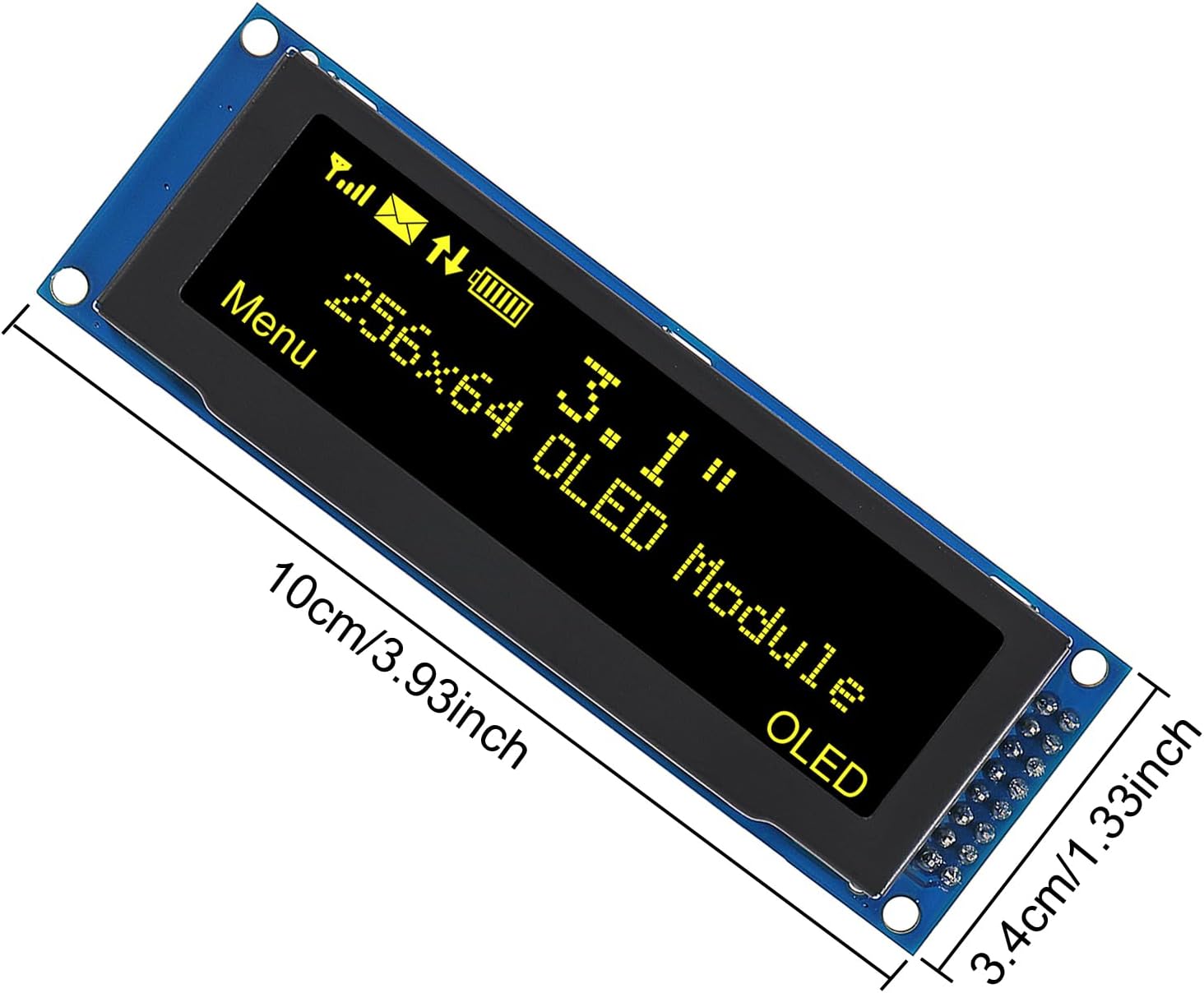
Figure 2: Dimensions of the DWEII 3.12 inch OLED Display Module.
3. Einrichtung und Verbindung
This OLED display module can be connected to microcontrollers like Arduino using either SPI, 6800, or 8080 parallel interfaces. The specific wiring will depend on the chosen interface and your microcontroller's capabilities.
3.1 Pinbelegungsbeschreibung
The module features a 16-pin header. Refer to the module's silkscreen or specific datasheet for the exact pin assignments for your chosen interface mode (SPI, 6800, or 8080). Common pins include VCC, GND, CS (Chip Select), DC (Data/Command), RES (Reset), CLK (Clock), and MOSI/SDA (Data).
3.2 Connection Steps (General SPI Example)
- Stromversorgung: Connect the VCC pin to your microcontroller's 3.3V or 5V power supply and GND to ground. Ensure the voltage matches the module's operating range.
- SPI-Schnittstelle:
- Connect CLK (SCK) to your microcontroller's SPI clock pin.
- Connect MOSI (SDA) to your microcontroller's SPI data output pin.
- Connect CS (Chip Select) to a digital output pin on your microcontroller.
- Connect DC (Data/Command) to another digital output pin on your microcontroller.
- Connect RES (Reset) to a digital output pin on your microcontroller, or to the microcontroller's reset line if applicable.
- Softwarebibliothek: Install a compatible SSD1322 OLED display library for your development environment (e.g., Adafruit GFX and SSD1322 libraries for Arduino).
- Initialisierung: Use the library functions to initialize the display with the correct interface and pin assignments in your code.
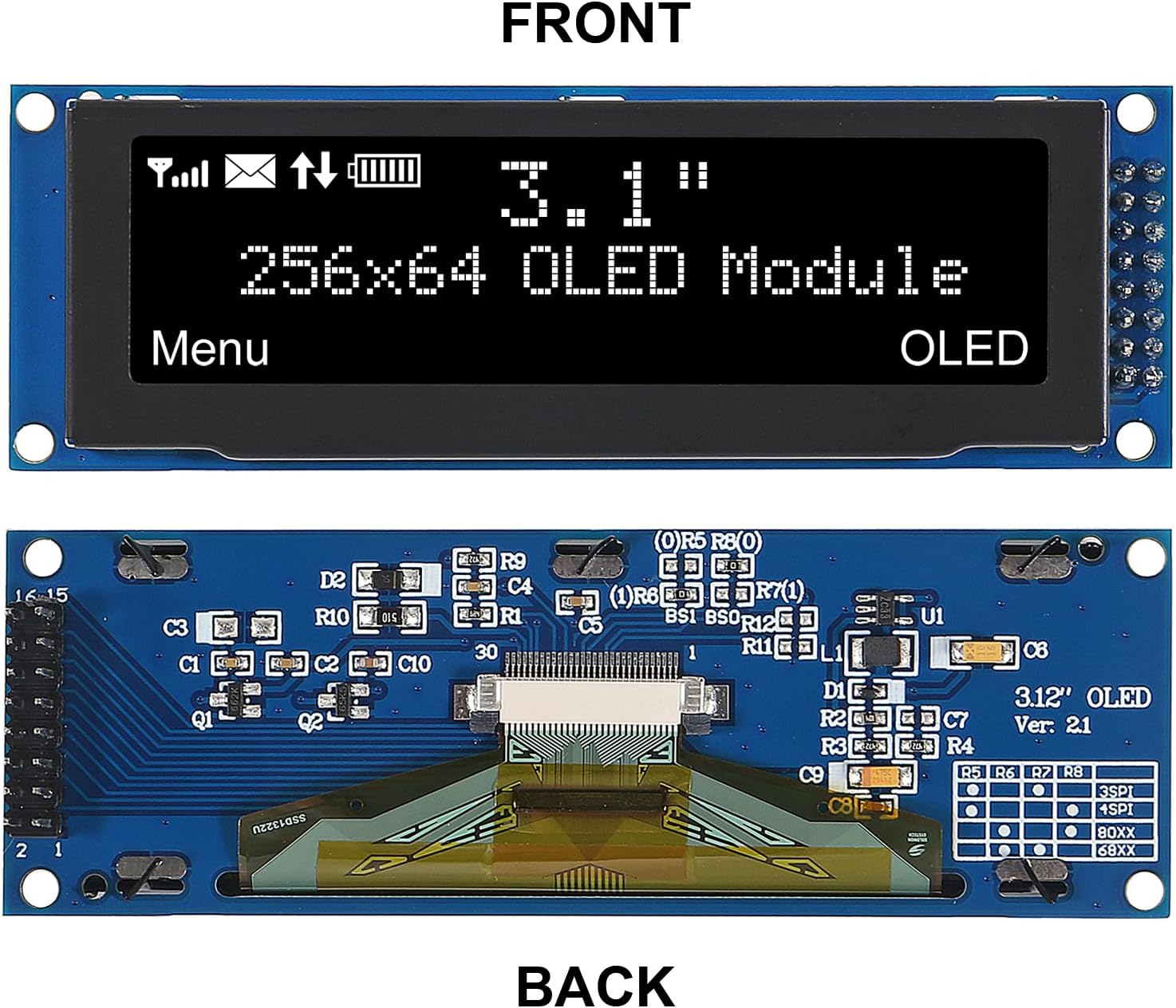
Abbildung 3: Vorder- und Rückseite views of the OLED Display Module.
4. Bedienungsanleitung
Once the module is correctly wired and the necessary software libraries are installed, you can begin programming to display content.
4.1 Grundlegende Anzeigefunktionen
- Initialisierung: Call the display's initialization function in your setup code. This typically involves setting up the communication interface and basic display parameters.
- Klare Anzeige: Use a function to clear the display buffer before drawing new content.
- Drawing Primitives: Libraries usually provide functions for drawing pixels, lines, rectangles, circles, and text.
- Textdarstellung: Set font size, color, and cursor position, then print text strings.
- Bildanzeige: Convert images into a compatible format (e.g., bitmap arrays) and use library functions to draw them.
- Update Display: After drawing to the buffer, a `display()` or `update()` function is often required to push the buffer content to the physical OLED screen.
4.2 Example Usage (Conceptual)
A typical program loop might involve:
- Clear the display.
- Draw desired graphics or text.
- Update the display to show the new content.
- Introduce a delay if continuous updates are not needed, or proceed with other program logic.
Refer to the documentation and examples provided with your chosen SSD1322 library for detailed programming instructions and code examples.
5. Wartung
The DWEII OLED display module is a sensitive electronic component. Proper handling and care will ensure its longevity.
- Handhabung: Always handle the module by its edges to avoid touching the display surface or sensitive electronic components on the PCB.
- Reinigung: If necessary, gently clean the display surface with a soft, lint-free cloth. Do not use abrasive cleaners or excessive moisture.
- Lagerung: Store the module in an anti-static bag in a dry, cool environment when not in use.
- Stromversorgung: Stellen Sie sicher, dass die Stromversorgungslautstärketage is within the specified range (3.3V-5.0V) to prevent damage.
- ESD-Schutz: Take precautions against electrostatic discharge (ESD) when handling the module.
6. Fehlerbehebung
If you encounter issues with your OLED display module, consider the following troubleshooting steps:
- Keine Anzeigeausgabe:
- Prüfen Sie, ob alle Strom- und Erdungsanschlüsse sicher und korrekt sind.
- Prüfen Sie das Betriebsvoltage (3.3V-5.0V).
- Ensure the interface connections (SPI/Parallel) are correctly wired according to the pinout.
- Confirm that the display initialization code is correct and matches your hardware setup.
- Check if the `display()` or `update()` function is being called after drawing.
- Fehlerhafte oder fehlerhafte Anzeige:
- Double-check your wiring for loose connections or incorrect pin assignments.
- Ensure the correct SSD1322 library is being used and properly configured for your interface.
- Verify that the display resolution (256x64) is correctly set in your software.
- Check for potential conflicts with other components on the same bus.
- Displayflackern:
- Sorgen Sie für eine stabile Stromversorgung.
- Überprüfen Sie, ob die Erdung ordnungsgemäß ist.
- Review your code for rapid, unnecessary display updates.
- Modul nicht erkannt:
- Confirm the module is receiving power.
- Check the Chip Select (CS) line and ensure it is being correctly toggled by your microcontroller.
- Verify the communication protocol (SPI/Parallel) settings in your code match the module's configuration.
If problems persist, consult online forums, community resources for SSD1322 displays, or the specific library documentation you are using.
7. Garantieinformationen
This DWEII 3.12 inch 256x64 OLED Display Module comes with a 1-year limited warranty from the date of purchase. The warranty covers manufacturing defects under normal use. It does not cover damage caused by misuse, improper installation, accidents, modifications, or unauthorized repairs.
Bitte bewahren Sie Ihren Kaufbeleg für Garantieansprüche auf.
8. Unterstützung
For technical assistance, further documentation, or inquiries regarding the DWEII 3.12 inch 256x64 OLED Display SSD1322 Module, please refer to the seller's support channels or the DWEII brand website. Online communities and forums dedicated to Arduino and OLED displays can also be valuable resources for project-specific questions.