
Einführung
Thank you for choosing the FLEXISPOT 71x32 Inch Dual Motor Electric Standing Desk. This manual provides essential information for the safe and efficient assembly, operation, and maintenance of your new standing desk. Please read all instructions carefully before use and retain this manual for future reference.
This electric standing desk is designed to provide a versatile and ergonomic workspace, allowing seamless transitions between sitting and standing positions. Its dual-motor system ensures stable and quiet height adjustments, supporting a heavy-duty capacity suitable for various professional and creative setups.
Sicherheitshinweise
- Befolgen Sie die Montageanleitung immer sorgfältig.
- Ensure the desk is properly anchored to the floor to prevent tipping, especially when fully extended.
- Do not exceed the maximum weight capacity of 198 pounds (90 kg) to maintain stability and safety.
- Keep the work surface clear of items that could fall or cause obstruction during height adjustment.
- Halten Sie Kinder und Haustiere während des Betriebs vom Schreibtisch fern.
- Vermeiden Sie es, Flüssigkeiten direkt auf das Bedienfeld oder in die Nähe von elektrischen Bauteilen zu bringen.
- Do not attempt to disassemble or repair the motor or control system yourself. Contact qualified service personnel if issues arise.
Warning: Anti-Collision System
The desk is equipped with an anti-collision system. If the desk encounters an obstacle during height adjustment, it will stop and reverse slightly to prevent damage. Ensure the area around the desk is clear before operation.

This image illustrates the desk's quiet operation (less than 50dB) and anti-collision system, showing the desk stopping and reversing when an obstacle (a pet) is detected.
Einrichtung und Montage
The FLEXISPOT 71x32 Inch Dual Motor Electric Standing Desk requires assembly. While some tools may be included, an electric drill can expedite the process. It is recommended to have two people for assembly due to the size and weight of the components.
Auspacken und Vorbereitung:
- Packen Sie alle Komponenten sorgfältig aus und überprüfen Sie sie anhand der Teileliste in der beiliegenden Bedienungsanleitung.
- Place the desktop upside down on a soft, clean surface (e.g., carpet or packaging foam) to prevent scratches.
- Ensure all cables and electrical components are free from damage before proceeding.
Montageschritte (Allgemein)view):
- Befestigen Sie die Hubsäulen mit den mitgelieferten Schrauben an der Tischplatte.
- Connect the foot supports to the lifting columns.
- Install the control box and connect all motor and control panel cables. Ensure cables are neatly managed to avoid interference with desk movement.
- Klappen Sie den Schreibtisch vorsichtig wieder aufrecht.
- Stecken Sie das Netzkabel in eine geerdete Steckdose.
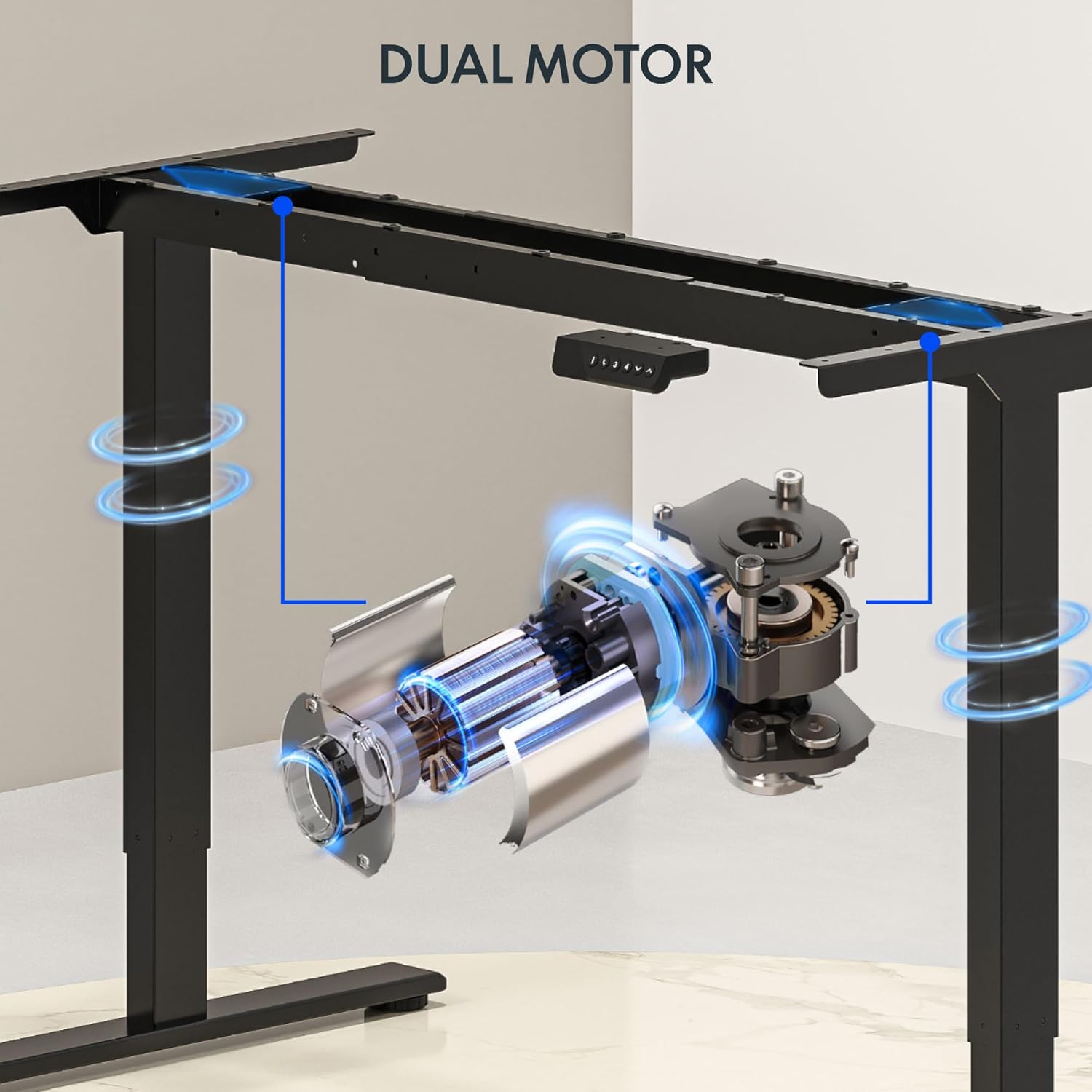
This image illustrates the dual motor system integrated into the desk frame, highlighting its robust design for stable lifting.
Tipp:
Consider using cable management accessories (not included) to keep wires organized and prevent them from snagging during height adjustments.
Bedienungsanleitung
The FLEXISPOT standing desk features an intuitive control panel for easy height adjustment and memory presets.
Systemsteuerung überview:

This image displays the desk's control panel, featuring an LED display, up/down arrows, and four programmable memory preset buttons.
- Aufwärts-/Abwärtspfeile (▲ / ▼): Zum manuellen Einstellen der Schreibtischhöhe gedrückt halten. Loslassen, um die gewünschte Höhe zu erreichen.
- LED-Anzeige: Zeigt die aktuelle Schreibtischhöhe in Zoll an.
- Speichervoreinstellungen (1, 2, 3, 4): Speichern und rufen Sie Ihre bevorzugten Sitz- und Stehhöhen ab.
- 'i' Button: Information or settings button (refer to detailed manual for specific functions).
Voreinstellungen für Speicherplätze festlegen:
- Stellen Sie den Schreibtisch mithilfe der Auf-/Ab-Pfeile auf die gewünschte Höhe ein.
- Press the 'i' button (or 'M' button if present) once. The display may flash.
- Within 3 seconds, press one of the number buttons (1, 2, 3, or 4) to save the current height to that preset. The display will confirm the setting.
Voreinstellungen abrufen:
- Drücken Sie einfach die gewünschte Zifferntaste (1, 2, 3 oder 4). Der Schreibtisch fährt automatisch auf die gespeicherte Höhe.
Video: FLEXISPOT Dual-Motor Strength. More Space to Create.
This video demonstrates the smooth and stable operation of the FLEXISPOT dual-motor system, highlighting its capacity and the ample workspace it provides for various setups.
Wartung
- Reinigung: Wischen Sie die Tischplatte und den Rahmen mit einem weichen, fusselfreien Tuch ab.amp Tuch. Vermeiden Sie aggressive Chemikalien oder Scheuermittel.
- Kabelmanagement: Periodically check and reorganize cables to ensure they do not interfere with the desk's movement or become pinched.
- Befestigungsmaterial: Überprüfen Sie gelegentlich alle Schrauben und Bolzen auf festen Sitz. Ziehen Sie sie gegebenenfalls nach.
- Motorinspektion: Listen for any unusual noises during operation. If you hear grinding or straining, discontinue use and contact support.
Fehlerbehebung
| Problem | Mögliche Ursache | Lösung |
|---|---|---|
| Der Schreibtisch bewegt sich nicht. | Power cord unplugged; circuit breaker tripped; control panel not connected. | Check power connection; reset circuit breaker; ensure all cables are securely connected. |
| Desk moves unevenly or makes noise | Overload; loose fasteners; obstruction. | Reduce weight on desk (ensure it's below 198 lbs); check and tighten all fasteners; remove any obstructions. |
| Anti-collision system frequently activates | Empfindlichkeit zu hoch; häufige Verstopfungen. | Ensure clear path for desk movement; consult the full manual for adjusting anti-collision sensitivity if available. |
| Speichervoreinstellungen funktionieren nicht | Voreinstellungen wurden nicht korrekt gespeichert. | Speichern Sie Ihre gewünschten Höhen erneut gemäß den Anweisungen unter „Speichervoreinstellungen festlegen“. |
If you encounter issues not listed here or if solutions do not resolve the problem, please contact FLEXISPOT customer support.
Technische Daten
- Marke: FLEXISPOT
- Modell: 71x32 (Black Top + Black Frame)
- Desktop-Abmessungen: 71 Zoll Breite x 32 Zoll Tiefe (180.34 cm x 81.28 cm)
- Höhenbereich: 28.3" bis 47.6" (71.9 cm bis 120.9 cm)
- Maximale Gewichtskapazität: 198 kg
- Motortyp: Doppelmotor
- Lift Speed: Up to 1 inch per second (2.54 cm/s)
- Bedienfeld: Memory Controller with 4 programmable presets, LED display, Up/Down arrows.
- Rahmenmaterial: Legierter Stahl
- Obermaterial: Wood (Painted Wood Finish)
- Besondere Merkmale: Dual Motor, Heavy-Duty Capacity, Memory Controller, Anti-Collision System.
- Montage: Required (Assembly tools not fully included, electric drill recommended).

This image provides a visual representation of the desk's key dimensions and performance specifications, including its adjustable height range, maximum speed, and load capacity.
Garantieinformationen
The FLEXISPOT 71x32 Inch Dual Motor Electric Standing Desk comes with a limited warranty:
- Frame and Motor: 5 Jahre eingeschränkte Garantie.
- Elektronik: 2 Jahre eingeschränkte Garantie.
Please retain your proof of purchase for warranty claims. For detailed terms and conditions, refer to the official FLEXISPOT webWebsite oder wenden Sie sich an den Kundendienst.
Kundenservice
For any questions, technical assistance, or warranty claims regarding your FLEXISPOT standing desk, please visit the official FLEXISPOT webBesuchen Sie die Website oder wenden Sie sich an den Kundendienst. Die Kontaktinformationen finden Sie in der Regel auf der Produktverpackung oder der offiziellen Website der Marke. webWebsite.
Online-Ressourcen: www.flexispot.com