
1. Einleitung
The HUAWEI WATCH FIT 4 is a versatile smartwatch designed for fitness tracking and daily convenience. It features an ultra-thin design, a vibrant 1.82-inch AMOLED display, and comprehensive health monitoring capabilities. This manual provides essential information for setting up, operating, and maintaining your device.
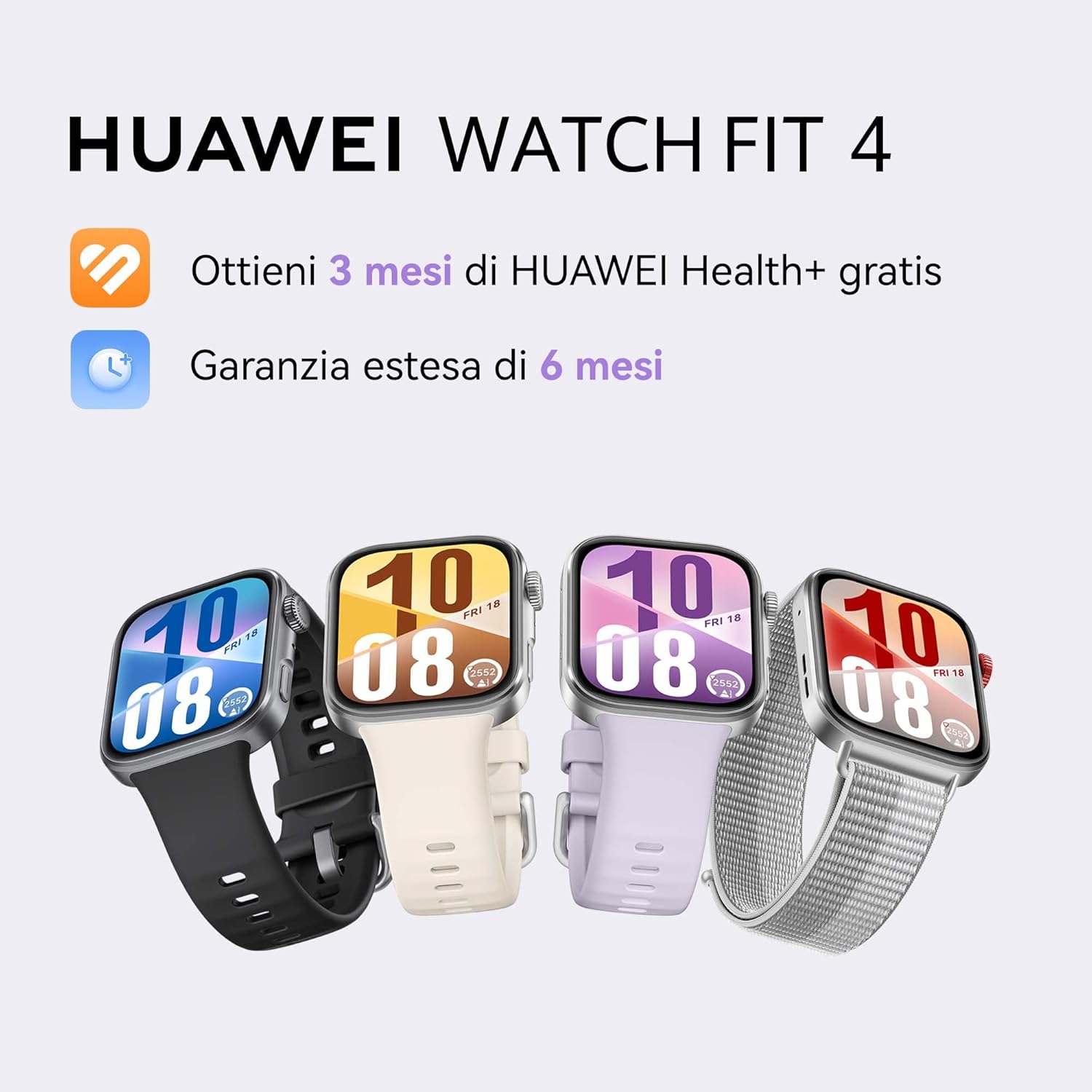
Image: HUAWEI WATCH FIT 4 smartwatches in various colors.
2. Einrichtung
2.1 Auspacken und erste Inspektion
Carefully unbox your HUAWEI WATCH FIT 4. Ensure all components are present:
- HUAWEI WATCH FIT 4 Smartwatch
- Ladekabel
- Kurzanleitung
- Garantiekarte
Video: Unboxing and initial setup of the HUAWEI WATCH FIT 4. This video demonstrates opening the box, removing the watch, and showing the included accessories.
2.2 Aufladen des Geräts
Before first use, fully charge your smartwatch. Connect the charging cable to the watch and a power source. A full charge takes approximately 75 minutes. A 10-minute charge can provide up to one day of typical use.
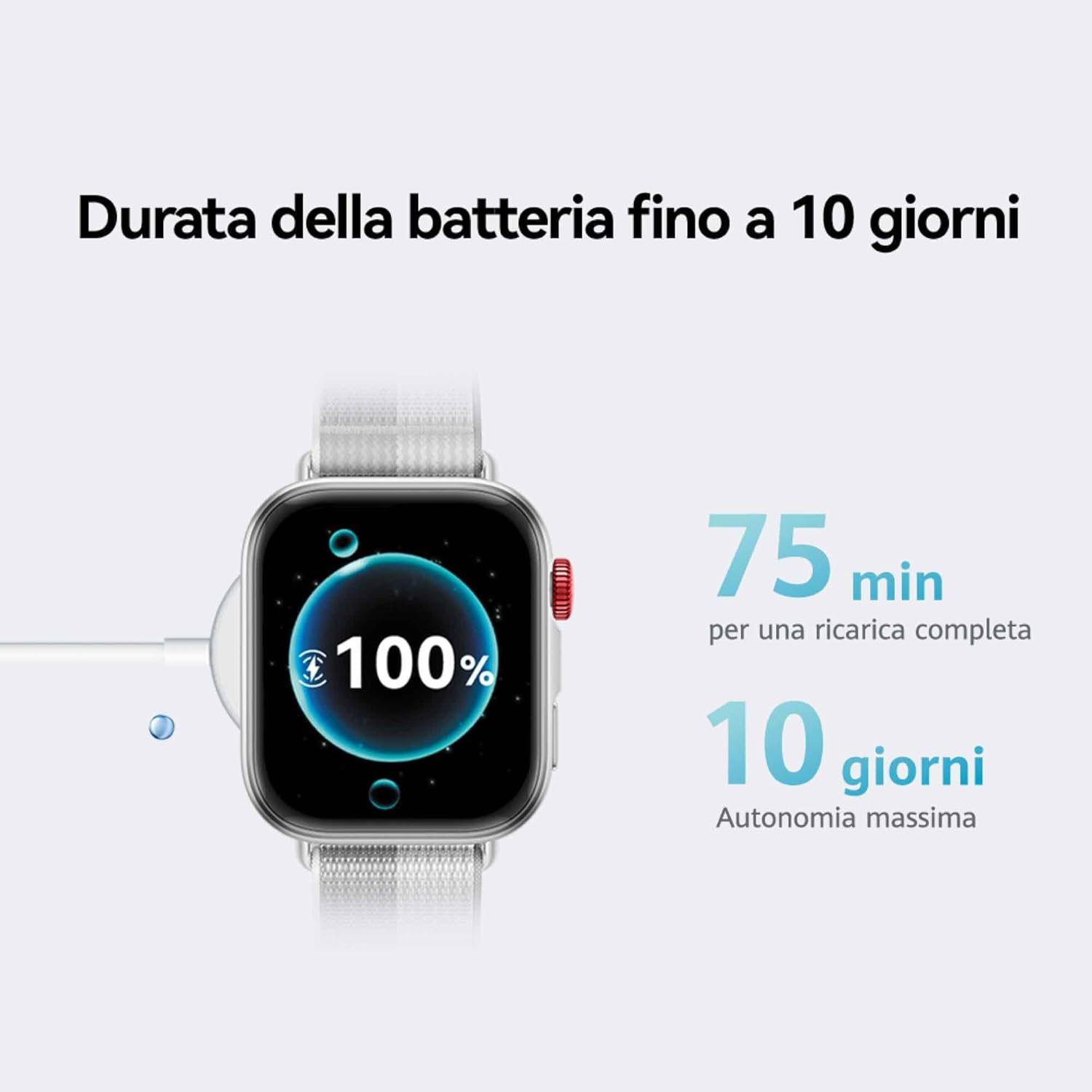
Image: The HUAWEI WATCH FIT 4 connected to its charging cable, displaying a full battery.
2.3 Koppeln mit Ihrem Smartphone
The HUAWEI WATCH FIT 4 is compatible with both iOS and Android devices. To pair your watch:
- Schritt 1: Herunterladen the HUAWEI Health app from your device's app store.
- Schritt 2: Koppeln Öffnen Sie die HUAWEI Health-App und navigieren Sie zu Devices > Add > Smartwatchund wählen Sie Ihr Gerät aus.
- Schritt 3: Update In the HUAWEI Health app, go to Personal > Check for Updates to ensure your watch has the latest software.
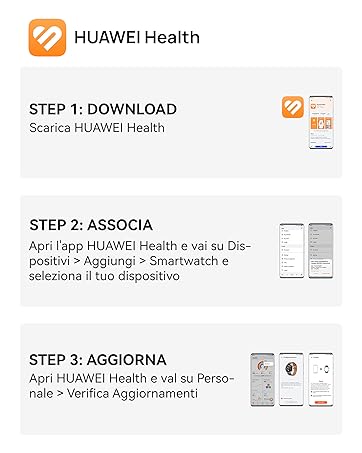
Image: Visual guide for connecting the HUAWEI WATCH FIT 4 to your smartphone using the HUAWEI Health app.

Image: HUAWEI WATCH FIT 4 successfully paired with a smartphone running the HUAWEI Health app.
3. Bedienung
3.1 Anzeige und Navigation
The HUAWEI WATCH FIT 4 features a 1.82-inch AMOLED display with a maximum brightness of 2000 nits, ensuring clear visibility in various lighting conditions. Navigate the watch using its touchscreen and physical buttons.

Image: The bright 1.82-inch AMOLED display of the HUAWEI WATCH FIT 4.
3.2 Anpassen von Zifferblättern
Personalize your watch with a variety of watch faces available through the HUAWEI Health app. You can choose from different styles including personalized, geometric, animal, and emoji themes.
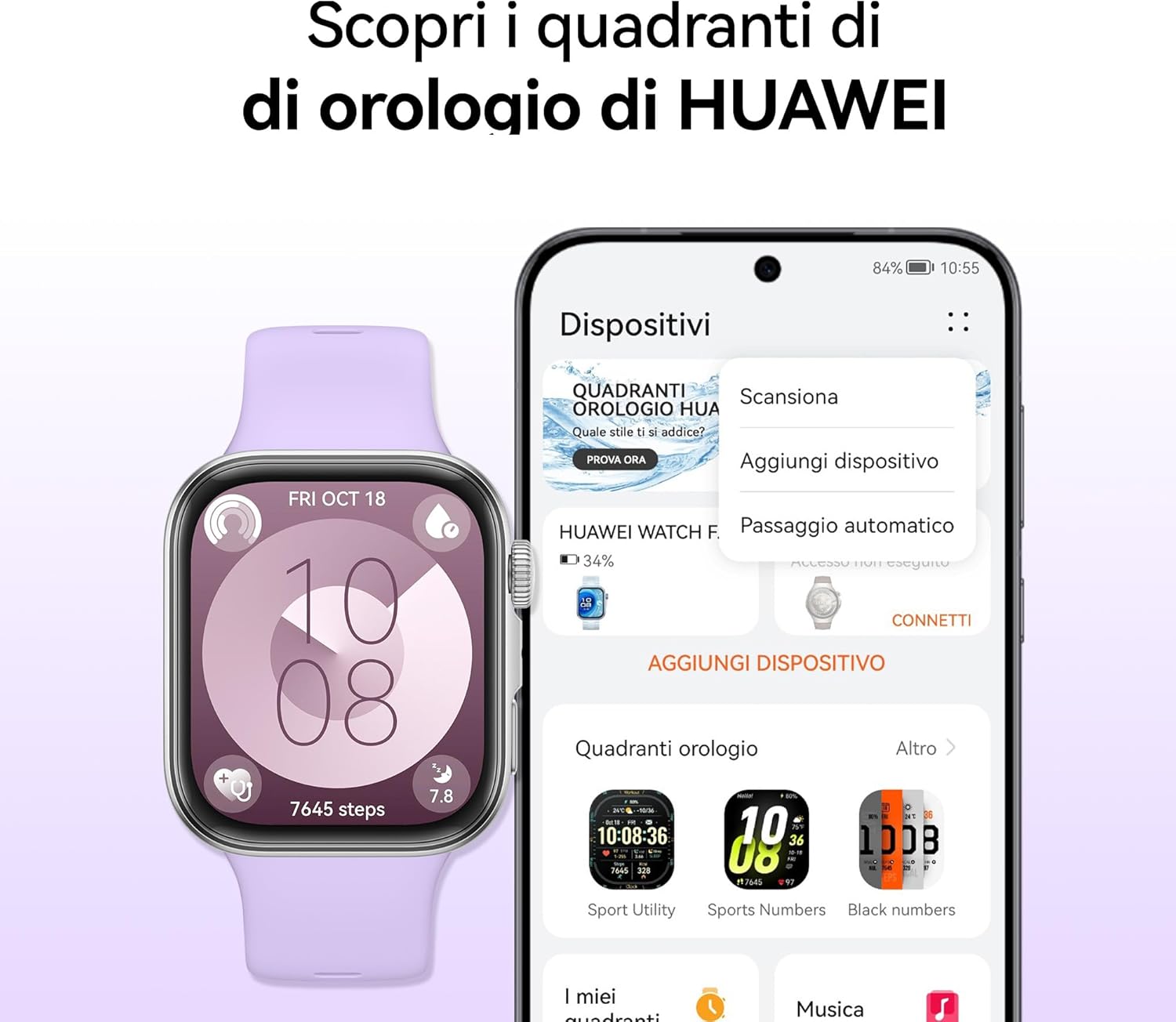
Image: Customizing watch faces on the HUAWEI WATCH FIT 4 via the HUAWEI Health app.
3.3 Sportmodi und GPS-Tracking
The watch supports over 100 workout modes, including mountaineering, hiking, skiing, climbing, trail running, walking, running, and cycling. It provides high-level data such as altitude, accumulated ascent, and air pressure, supported by a powerful barometer. The HUAWEI Sunflower positioning system offers precise location tracking for outdoor activities.

Image: HUAWEI WATCH FIT 4 tracking outdoor cycling activity with GPS.

Image: Various sports modes available on the HUAWEI WATCH FIT 4.
3.4 Gesundheitsüberwachung
The Health Insights app provides guidance for a healthier lifestyle, including stress management, sleep improvement, and workout optimization. The watch tracks sleep levels, fatigue, and stress, utilizing HRV metrics and abnormal breathing alerts. It also includes a cycle calendar feature.
- Schlaf-Tracking: Überwacht den Schlaftages und Qualität.
- Herzfrequenz-Überwachung: Kontinuierliche Herzfrequenzmessung.
- SpO2-Überwachung: Sauerstoffsättigung im Blut.
- Stressbewältigung: Provides insights and guidance.
- Zykluskalender: Hilft dabei, den Menstruationszyklus zu verfolgen.

Image: Health Insights app on HUAWEI WATCH FIT 4 showing sleep score and other health data.

Image: Cycle calendar feature on the HUAWEI WATCH FIT 4.
3.5 Daily Utility Features
The smartwatch offers several features for daily convenience:
- Sprachnotizen: Record quick voice memos.
- Schnellnachrichten-Antworten: Respond to messages directly from your wrist.
- Bluetooth-Anrufe: Make and receive calls when connected to your phone.
- Fernauslöser: Steuern Sie die Kamera Ihres Telefons aus der Ferne.

Bild: Überview of daily utility features on the HUAWEI WATCH FIT 4.
4. Wartung
4.1 Batteriemanagement
The HUAWEI WATCH FIT 4 offers up to 10 days of battery life with typical usage. To maximize battery longevity, avoid extreme temperatures and use the provided charging cable.

Image: Battery life and charging details for the HUAWEI WATCH FIT 4.
4.2 Wasserbeständigkeit
The watch is water-resistant up to 50 meters. It is suitable for shallow-water activities like swimming in a pool or ocean. Avoid using it for diving, hot showers, or high-pressure water activities.
4.3 Reinigung und Pflege
Reinigen Sie Ihre Uhr und Ihr Armband regelmäßig, um Hautirritationen vorzubeugen und die Funktion zu erhalten. Verwenden Sie dazu ein weiches, fusselfreies Tuch.amp cloth to wipe the device. Ensure the watch is dry before charging.
5. Fehlerbehebung
If you encounter issues with your HUAWEI WATCH FIT 4, try the following common solutions:
- Gerät lässt sich nicht einschalten: Stellen Sie sicher, dass die Uhr vollständig aufgeladen ist.
- Kopplungsprobleme: Check Bluetooth on your phone, restart both devices, and ensure the HUAWEI Health app is updated.
- Ungenaue Daten: Ensure the watch is worn correctly and the sensors are clean. Update the app and watch firmware.
- Kurze Akkulaufzeit: Reduce screen brightness, disable unnecessary notifications, and close background apps on the watch.
- App synchronisiert nicht: Check your phone's internet connection and ensure the HUAWEI Health app has all necessary permissions.
For further assistance, refer to the official HUAWEI support webWebsite oder wenden Sie sich an den Kundendienst.
6. Spezifikationen
| Besonderheit | Detail |
|---|---|
| Modellname | Seiya-B19F |
| Betriebssystem | HarmonyOS |
| Anzeigegröße | 1.82 Zoll |
| Anzeigetyp | OLED (AMOLED) |
| Auflösung | 360 x 360 |
| Max Display Brightness | 2000-Nissen |
| Speicherkapazität | 4 GB |
| Batteriekapazität | 400 mAh |
| Durchschnittliche Akkulaufzeit | 10 Tage |
| Ladezeit | 10 Minutes (for a day's use), 75 Minutes (full charge) |
| Konnektivitätstechnologie | Bluetooth |
| GPS | Integriertes GPS |
| Wasserbeständigkeit | 50 Meter |
| Gehäusematerial | Aluminium |
| Armbandmaterial | Silikon |
| Abmessungen (TxBxH) | 43P x 38l x 10H mm |
| Kompatible Geräte | Smartphones, Tablets (iOS & Android) |
7. Garantie und Support
7.1 Produktgarantie
The HUAWEI WATCH FIT 4 comes with a 2 Jahr Herstellergarantie. Additionally, you may be eligible for an extended 30-month warranty through HUAWEI WATCH FIT 4 promotions.
7.2 HUAWEI Health+ Subscription
Kaufasing a HUAWEI WATCH FIT 4 may include a 3-month subscription to HUAWEI Health+. This subscription provides access to exclusive benefits such as beginner and expert workouts, guided meditations, Stay Fit Plans, and breathing exercises. Terms and conditions apply.
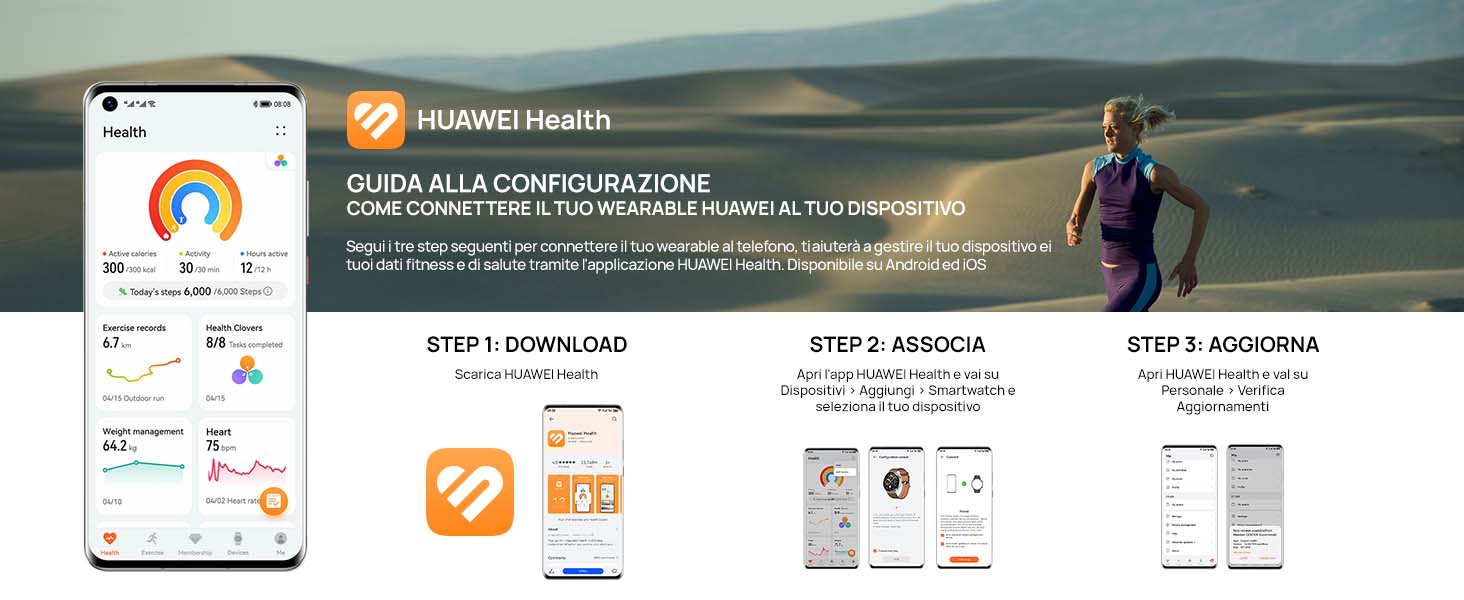
Image: Features of the HUAWEI Health+ app.
7.3 Kundendienst
For detailed support, FAQs, and contact information, please visit the official HUAWEI support webWebsite.