
Einführung
Thank you for choosing the Billboard Soul Advance True Wireless Stereo (TWS) Earbuds. These earbuds are designed to provide a superior audio experience with Active Noise Cancellation (ANC), Environmental Noise Cancellation (ENC), and a comfortable, splash-resistant design. This manual will guide you through the setup, operation, and maintenance of your new earbuds.
Sicherheitshinweise
- Do not expose the earbuds or charging case to extreme temperatures or direct sunlight for extended periods.
- Vermeiden Sie das Fallenlassen des Geräts und die Anwendung übermäßiger Kraft auf das Gerät.
- Keep the earbuds and charging case away from water and liquids, except for light splashes as per IPX4 rating. Do not submerge.
- Versuchen Sie nicht, das Produkt zu zerlegen oder zu verändern. Dadurch erlischt die Garantie.
- Verwenden Sie ausschließlich das mitgelieferte Ladekabel oder ein zertifiziertes gleichwertiges Kabel.
- Listening at high volumes for prolonged periods can cause hearing damage. Adjust volume to a safe level.
Packungsinhalt
- Billboard Soul Advance TWS Earbuds (Left and Right)
- Ladeetui
- USB-Ladekabel
- Bedienungsanleitung
Produkt überview
Familiarize yourself with the components of your Billboard Soul Advance TWS Earbuds and charging case.
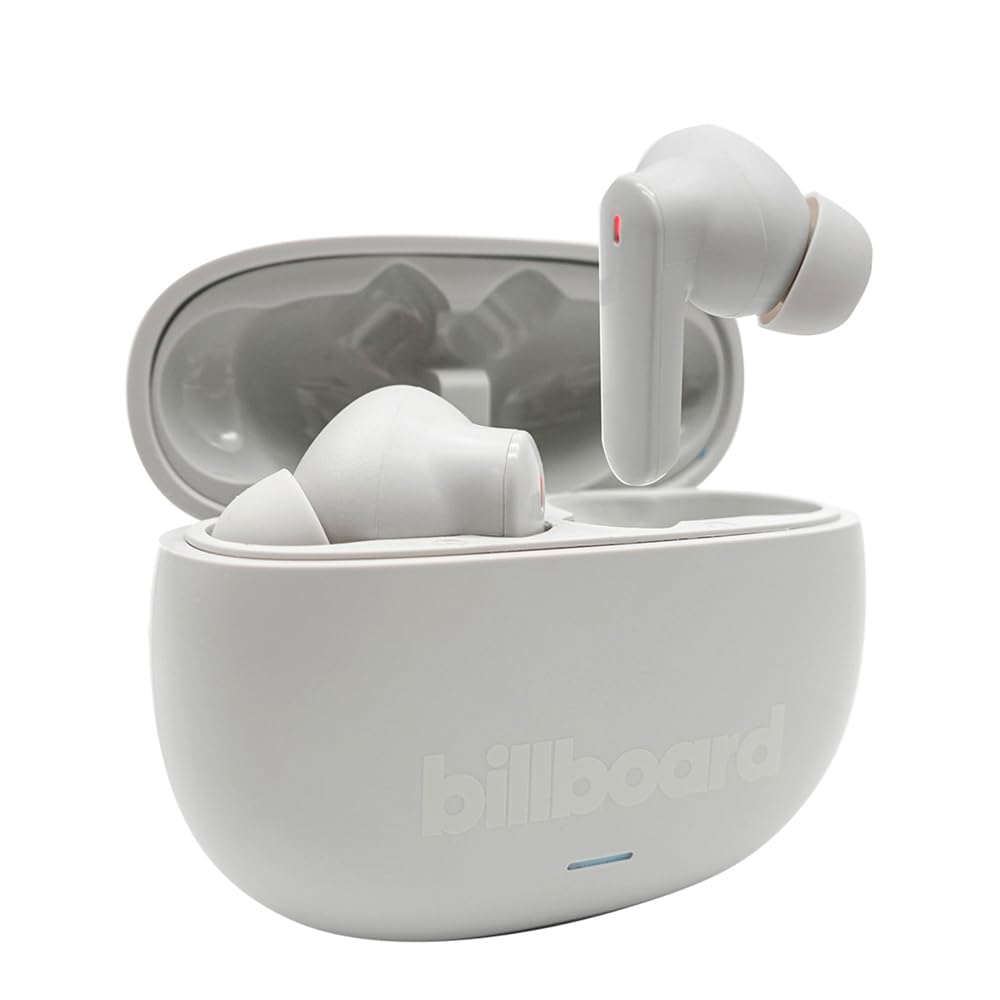
Image: The Billboard Soul Advance TWS Earbuds resting inside their open charging case. The earbuds are grey with red indicator lights visible, and the case is also grey with the 'billboard' logo embossed on the front.

Image: The Billboard Soul Advance TWS Earbuds charging case in a closed position. The case is grey with the 'billboard' logo embossed on the front and a small indicator light at the bottom.
Image: A person holding a single Billboard Soul Advance TWS earbud and the open charging case, demonstrating the compact size and design.
Aufstellen
1. Aufladen der Ohrhörer und des Ladecase
Vor dem ersten Gebrauch die Ohrhörer und das Ladecase vollständig aufladen.
- Legen Sie die Ohrhörer in das Ladecase. Achten Sie darauf, dass sie richtig in ihren jeweiligen Fächern sitzen.
- Verbinden Sie das USB-Ladekabel mit dem Ladeanschluss am Gehäuse und mit einer USB-Stromquelle (z. B. Computer, Netzteil).
- The indicator light on the case will show charging status. Once fully charged, the indicator will change or turn off. A full charge takes approximately 5 hours for the case and earbuds.
2. Koppeln mit einem Gerät
So verbinden Sie Ihre Ohrhörer mit einem Smartphone oder einem anderen Bluetooth-fähigen Gerät:
- Open the charging case. The earbuds will automatically enter pairing mode, indicated by flashing lights on the earbuds.
- Gehen Sie auf Ihrem Gerät zu den Bluetooth-Einstellungen und vergewissern Sie sich, dass Bluetooth aktiviert ist.
- Suchen nach available devices and select "Billboard Soul Advance" from the list.
- Sobald die Verbindung hergestellt ist, hören die Kontrollleuchten am Ohrhörer auf zu blinken.
- Die Ohrhörer verbinden sich beim Herausnehmen aus dem Ladecase automatisch wieder mit dem zuletzt gekoppelten Gerät, sofern Bluetooth auf dem Gerät aktiviert ist.
Betrieb
Touch-Bedienelemente
The earbuds feature touch-sensitive controls on their outer surface. Specific functions may vary slightly by device or app.
| Aktion | Funktion |
|---|---|
| Einmaliges Tippen (Links/Rechts) | Musik abspielen/anhalten, Anruf annehmen/beenden |
| Doppeltippen (rechts) | Nächstes Stück |
| Doppeltippen (links) | Voriges Lied |
| Dreifachtippen (Links/Rechts) | Sprachassistent aktivieren |
| Langes Drücken (Links/Rechts) | ANC-/Transparenzmodus umschalten |
| Incoming Call Long Press | Anruf ablehnen |
Active Noise Cancellation (ANC) & Environmental Noise Cancellation (ENC)
The Soul Advance earbuds feature both ANC and ENC for an optimized listening and calling experience.
- Aktive Geräuschunterdrückung (ANC): Reduces external ambient noise, allowing for a more immersive audio experience. Activate/deactivate by long-pressing an earbud.
- Umgebungsgeräuschunterdrückung (ENC): Utilizes 4 built-in microphones to filter out background noise during calls, ensuring clearer conversations for both you and the listener. This feature is active automatically during calls.

Image: A graphic illustrating the concept of Ultra ANC (Active Noise Cancellation), showing sound waves being blocked by headphones, emphasizing a quiet listening experience.
Wartung
Reinigung
- Wischen Sie die Ohrhörer und das Ladecase vorsichtig mit einem weichen, trockenen, fusselfreien Tuch ab.
- Verwenden Sie keine Scheuermittel, Alkohol oder chemische Lösungsmittel.
- Für einen optimalen Ladevorgang stellen Sie sicher, dass die Ladekontakte an beiden Ohrhörern und am Ladecase sauber und trocken sind.
Lagerung
Bewahren Sie die Ohrhörer bei Nichtgebrauch in ihrem Ladeetui auf, um sie zu schützen und geladen zu halten.
Fehlerbehebung
| Problem | Lösung |
|---|---|
| Ohrhörer lassen sich nicht koppeln | Stellen Sie sicher, dass Ihre Ohrhörer geladen sind. Schalten Sie Bluetooth an Ihrem Gerät aus und wieder ein. Entfernen Sie das Gerät aus den Bluetooth-Einstellungen und koppeln Sie es erneut. |
| Nur ein Ohrhörer funktioniert | Place both earbuds back in the case, close it, then open again. Ensure both are charged. |
| Kein Ton | Überprüfen Sie die Lautstärke des Geräts. Stellen Sie sicher, dass die Ohrhörer angeschlossen sind. Versuchen Sie, eine andere Audioquelle abzuspielen. |
| Ladeprobleme | Ensure charging cable is securely connected. Clean charging contacts. Try a different USB port or cable. |
Technische Daten
- Modellname: Soul Advance
- Konnektivitätstechnologie: Kabellos
- Enthaltene Komponenten: Ladestation
- Spezifische Verwendungen: Outdoor activities, Sports
- Ladezeit: Ungefähr 5 Stunden
- Kompatible Geräte: Handys, Tablets
- Wasserbeständigkeit: IPX4 (spritzwassergeschützt)
- Durchschnittliche Akkulaufzeit: 27 Stunden (mit Ladeetui)
- Ohrplatzierung: In-Ear
- Formfaktor: In-Ear
- Geräuschpegelkontrolle: Aktive Geräuschunterdrückung

Image: A graphic highlighting long battery life, showing headphones with '40H' and earbuds with '42H*' (battery + case), indicating extended usage times.
Offizielle Produktvideos
Video: Product demonstration video (0:49 duration).
Video: Product feature overview (0:44 duration).
Video: Additional product details (0:44 duration).
Video: Short product highlight (0:24 duration).
Video: Product feature showcase (0:24 duration).
Video: Detailed product review/demonstration (1:57 duration).
Video: Quick product overview (0:34 duration).
Video: Comprehensive product guide (2:00 duration).
Garantie und Support
Your Billboard Soul Advance TWS Earbuds come with a standard manufacturer's warranty. For detailed warranty information, please refer to the warranty card included in your package or visit the official Billboard website. For technical support or customer service, please contact the retailer or manufacturer directly.
For returns, a 30-day free return policy is available from the purchase date.