
BACKWIN 3,5mm Jack
User Manual: In-Ear Wired Earphones
Model: 3,5mm Jack | Brand: BACKWIN
1. Produktüberschreitungview
Thank you for choosing the BACKWIN In-Ear Wired Earphones. These earphones are designed to provide a high-quality audio experience with deep bass, comfort, and noise isolation. They feature a standard 3.5mm jack for broad compatibility and an integrated microphone for convenient communication.
Hauptmerkmale:
- Premium-Sound: Dynamic subwoofer unit delivers immersive, high-quality audio.
- Komfort fit: Includes three types of ear hooks and S/M/L ear pads for a secure and comfortable fit.
- Breite Kompatibilität: Standard 3.5mm audio jack connects seamlessly to various devices.
- Haltbarkeit: Features durable, fold-resistant wires and enhanced metallic design.
- Hochauflösendes Mikrofon: Equipped with an HD microphone for clear voice and calls.
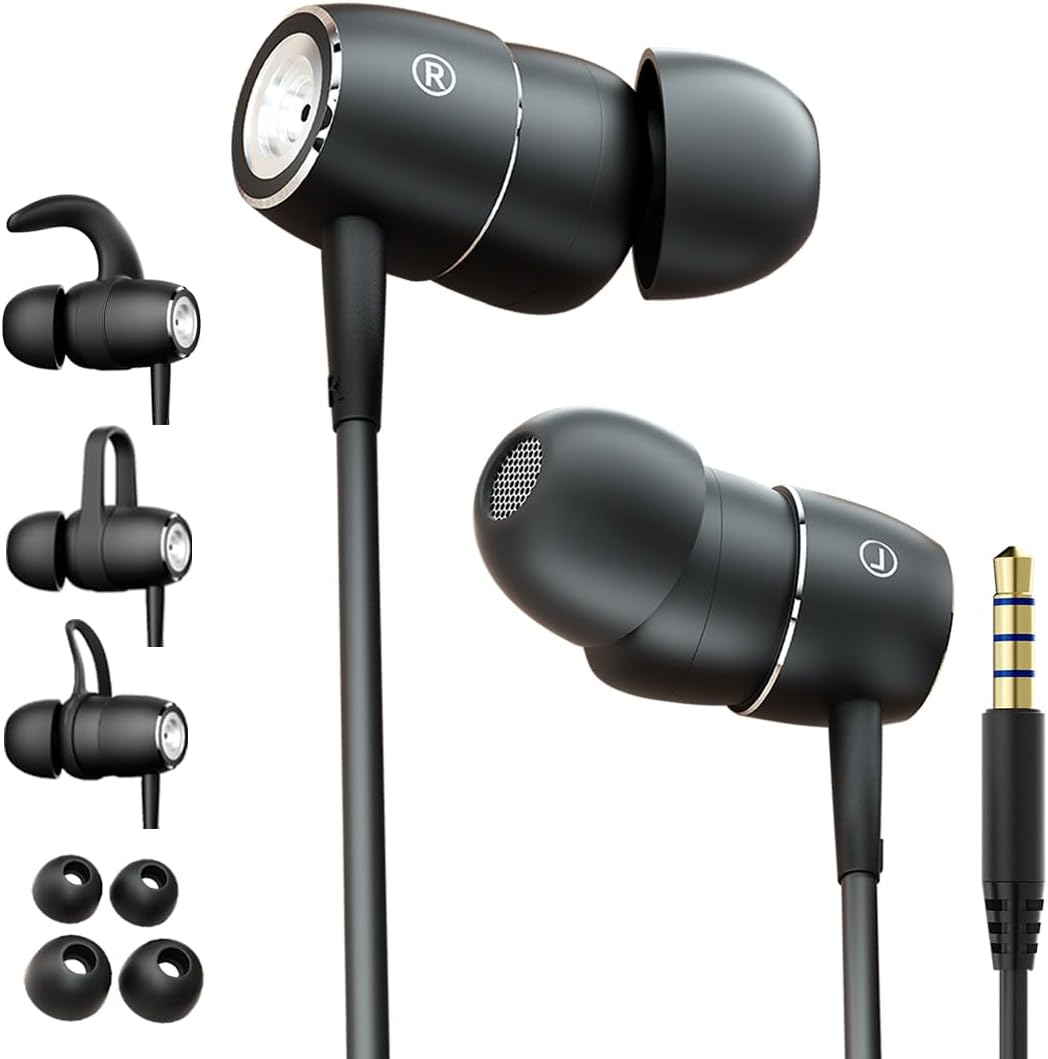
Figure 1: BACKWIN In-Ear Wired Earphones. This image displays the BACKWIN In-Ear Wired Earphones, highlighting their sleek black design, the 3.5mm audio jack, and the various ear hooks and ear tips provided for a customized fit.
2. Einrichtung und Installation
2.1 Choosing the Right Ear Tips and Ear Hooks
For optimal sound quality and comfort, select the ear tips and ear hooks that best fit your ears. Experiment with the different sizes (S/M/L ear pads) and styles of ear hooks provided.
- Ohrtipps: Gently pull off the pre-installed ear tips. Select a size that creates a good seal in your ear canal without causing discomfort. Push the new ear tip firmly onto the earphone nozzle.
- Ohrhaken: The ear hooks provide additional stability, especially during physical activity. Choose a hook style that comfortably secures the earphone in your outer ear. Attach the ear hook to the designated slot on the earphone body.

Figure 2: Earphones with interchangeable ear hooks and ear tips. A close-up view of the BACKWIN earphones alongside their interchangeable ear hooks and ear tips, demonstrating the customization options for comfort and secure fit.

Figure 3: Three types of ear hooks. This image provides a detailed look at the earphone unit and the three distinct styles of ear hooks, illustrating how they can be attached to secure the earphone in place.
2.2 Verbindung zu Ihrem Gerät herstellen
The earphones feature a standard 3.5mm audio jack for universal compatibility.
- Locate the 3.5mm audio port on your smartphone, tablet, laptop, or other audio device.
- Insert the 3.5mm jack of the earphones firmly into the device's audio port until it clicks into place.
- Stellen Sie sicher, dass die Verbindung sicher ist, um Audiounterbrechungen zu vermeiden.

Figure 4: Earphones with 3.5mm jack and inline controls. The earphones are shown with their 3.5mm jack and the integrated inline remote control, which includes buttons for volume adjustment and playback.
2.3 Tragen der Kopfhörer
Proper placement ensures comfort and optimal sound isolation.
- Identifizieren Sie den linken (L) und den rechten (R) Ohrhörer.
- Gently insert each earphone into the corresponding ear canal.
- Adjust the earphone and ear hook (if used) until it feels secure and comfortable. The ear tip should form a gentle seal in your ear canal.

Figure 5: Proper earphone placement. A young man wearing the BACKWIN In-Ear Wired Earphones, demonstrating their discreet and comfortable fit during use.

Figure 6: Secure fit with ear hooks. A young woman wearing the BACKWIN In-Ear Wired Earphones, illustrating how the ear hooks provide a secure and stable fit, ideal for active use.
3. Bedienungsanleitung
3.1 Audiowiedergabe
Once connected, audio from your device will automatically play through the earphones. Adjust the volume using your device's controls or the inline remote control.
3.2 Inline Remote Control Functions
The earphones are equipped with an inline remote for convenient control of audio and calls.
- Abspielen/Pause: Drücken Sie die mittlere Taste einmal, um die Audiowiedergabe zu starten oder zu pausieren.
- Nächster Titel: Drücken Sie die mittlere Taste zweimal schnell hintereinander, um zum nächsten Titel zu springen.
- Vorheriges Lied: Press the center button three times quickly to go back to the previous track.
- Lautstärke erhöhen: Drücken Sie die Taste „+“, um die Lautstärke zu erhöhen.
- Lautstärke runter: Drücken Sie die Taste „-“, um die Lautstärke zu verringern.
3.3 Anrufe tätigen und entgegennehmen
The integrated high-definition microphone allows for hands-free calls.
- Anruf annehmen/beenden: Drücken Sie einmal die mittlere Taste, um einen eingehenden Anruf anzunehmen oder einen laufenden Anruf zu beenden.
- Anruf ablehnen: Um einen eingehenden Anruf abzuweisen, halten Sie die mittlere Taste etwa 2 Sekunden lang gedrückt.
4. Wartung und Pflege
Proper maintenance will extend the lifespan of your earphones and ensure optimal performance.
- Reinigung der Ohrstöpsel: Regularly remove the ear tips and clean them with a soft, damp cloth. For deeper cleaning, they can be washed with mild soap and water, then thoroughly dried before reattaching.
- Reinigung von Kopfhörern: Reinigen Sie die Ohrhörer und das Kabel mit einem trockenen, weichen Tuch. Vermeiden Sie die Verwendung von scharfen Chemikalien oder scheuernden Materialien.
- Lagerung: When not in use, store the earphones in a clean, dry place, preferably in a small pouch or case to prevent tangling and damage to the wires.
- Vermeiden Sie extreme Bedingungen: Die Kopfhörer dürfen keinen extremen Temperaturen, hoher Luftfeuchtigkeit oder direkter Sonneneinstrahlung ausgesetzt werden.
- Vorsichtig handhaben: While the wires are designed to be fold-resistant, avoid excessive bending or pulling on the cable, especially near the connectors.
5. Fehlerbehebung
Sollten Sie Probleme mit Ihren Kopfhörern haben, beachten Sie bitte die folgenden gängigen Lösungsansätze:
- Kein Ton:
- Stellen Sie sicher, dass der 3.5-mm-Klinkenstecker vollständig in den Audioanschluss Ihres Geräts eingesteckt ist.
- Check the volume level on your device and using the inline remote.
- Test the earphones with another device to rule out a device-specific issue.
- Ensure the audio output is directed to the headphone jack on your device settings.
- Schlechte Klangqualität (Verzerrungen, geringe Lautstärke):
- Stellen Sie sicher, dass die Ohrstöpsel richtig in Ihrem Gehörgang sitzen. Probieren Sie Ohrstöpsel unterschiedlicher Größe aus.
- Entfernen Sie jeglichen Schmutz von den Ohrhörerdüsen und Ohrstöpseln.
- Check if the audio source is of good quality.
- Mikrofon funktioniert nicht:
- Ensure the 3.5mm jack is fully inserted. Some devices require a TRRS (4-pole) jack for microphone functionality, which these earphones provide.
- Überprüfen Sie die Audioeingangseinstellungen Ihres Geräts, um sicherzustellen, dass das externe Mikrofon ausgewählt ist.
- Testen Sie das Mikrofon mit einer anderen Anwendung oder einem anderen Gerät.
- Earphones Keep Falling Out:
- Experiment with different ear tip sizes and ear hook styles to find the most secure fit for your ears.
- Ensure the ear hooks are correctly attached and positioned.
6. Spezifikationen
| Besonderheit | Spezifikation |
|---|---|
| Modellname | B220 |
| Konnektivitätstechnologie | Verdrahtet |
| Kopfhöreranschluss | 3.5 mm Klinke |
| Empfindlichkeit | 106 dB |
| Frequenzgang | 2000 KHz |
| Impedanz | 16 Ohm |
| Lärmschutz | Schallisolierung |
| Formfaktor | Im Ohr |
| Platzierung des Ohrs | Im Ohr |
| Farbe | Schwarz |
| Material | Metall |
| Hersteller | backwin |
| Kompatible Geräte | Laptops, Mobile phones |
| Steuerungstyp | Lautstärkeregelung |
| Im Lieferumfang enthaltene Komponenten | Kuppel |
7. Garantie und Support
For warranty information and customer support, please refer to the documentation included with your purchase or contact the manufacturer directly. You can typically find contact details on the product packaging or the manufacturer's official webWebsite.
Hersteller: backwin
Ask a question about this manual
Ask about setup, troubleshooting, compatibility, parts, safety, or missing instructions. Manuals+ will review the question and use this page’s manual context to help answer it.