
1. Einleitung
Thank you for choosing the HomeTro HM3 Walking Pad Treadmill. This compact and versatile fitness machine is designed for walking, jogging, and light running in various home or office environments. Please read this manual thoroughly before initial use to ensure safe operation and optimal performance.
2. Sicherheitshinweise
Ihre Sicherheit hat oberste Priorität. Bitte beachten Sie folgende Vorsichtsmaßnahmen:
- Konsultieren Sie vor Beginn eines neuen Trainingsprogramms immer einen Arzt oder eine andere medizinische Fachkraft.
- Stellen Sie sicher, dass das Laufband auf einer ebenen, stabilen Fläche mit ausreichendem Freiraum um das Laufband herum aufgestellt ist.
- Halten Sie Kinder und Haustiere während des Betriebs vom Laufband fern.
- Tragen Sie geeignete Sportschuhe.
- Das Laufband darf nicht in Betrieb genommen werden, wenn es beschädigt ist oder Fehlfunktionen aufweist.
- Ziehen Sie den Netzstecker des Laufbands aus der Steckdose, wenn es nicht benutzt wird oder bevor Sie es reinigen/warten.
- Die maximale Benutzergewichtskapazität für dieses Laufband beträgt 120 kg. Überschreiten Sie diese Grenze nicht.
3. Einrichtung
3.1 Auspacken und Aufstellen
The HomeTro HM3 Walking Pad Treadmill requires no assembly and is ready for use directly out of the box. Carefully remove all packaging materials.

Image: The packing list includes the treadmill, remote control, 5mm hex wrench, front foot pads, 20ml silicone oil, user manual, and power cord.
Place the treadmill on a firm, level surface. Ensure there is at least 0.6 meters (2 feet) of clear space behind the treadmill and 0.3 meters (1 foot) on each side for safe operation.
3.2 Stromversorgung anschließen
Connect the power cord to the treadmill's power input and then plug it into a standard electrical outlet. Ensure the power switch on the treadmill is in the 'OFF' position before plugging it in.
4. Bedienungsanleitung
4.1 Grundlegende Betriebsarten
The HomeTro HM3 offers three primary modes, adjustable via the remote control or the smart app:
- Arbeitsmodus: 0.6 - 1.6 MPH (for light activity while working or standing)
- Gehmodus: 1.6 - 3.0 MPH (for brisk walking)
- Laufmodus: 3.0 - 5.0 MPH (for jogging or light running)
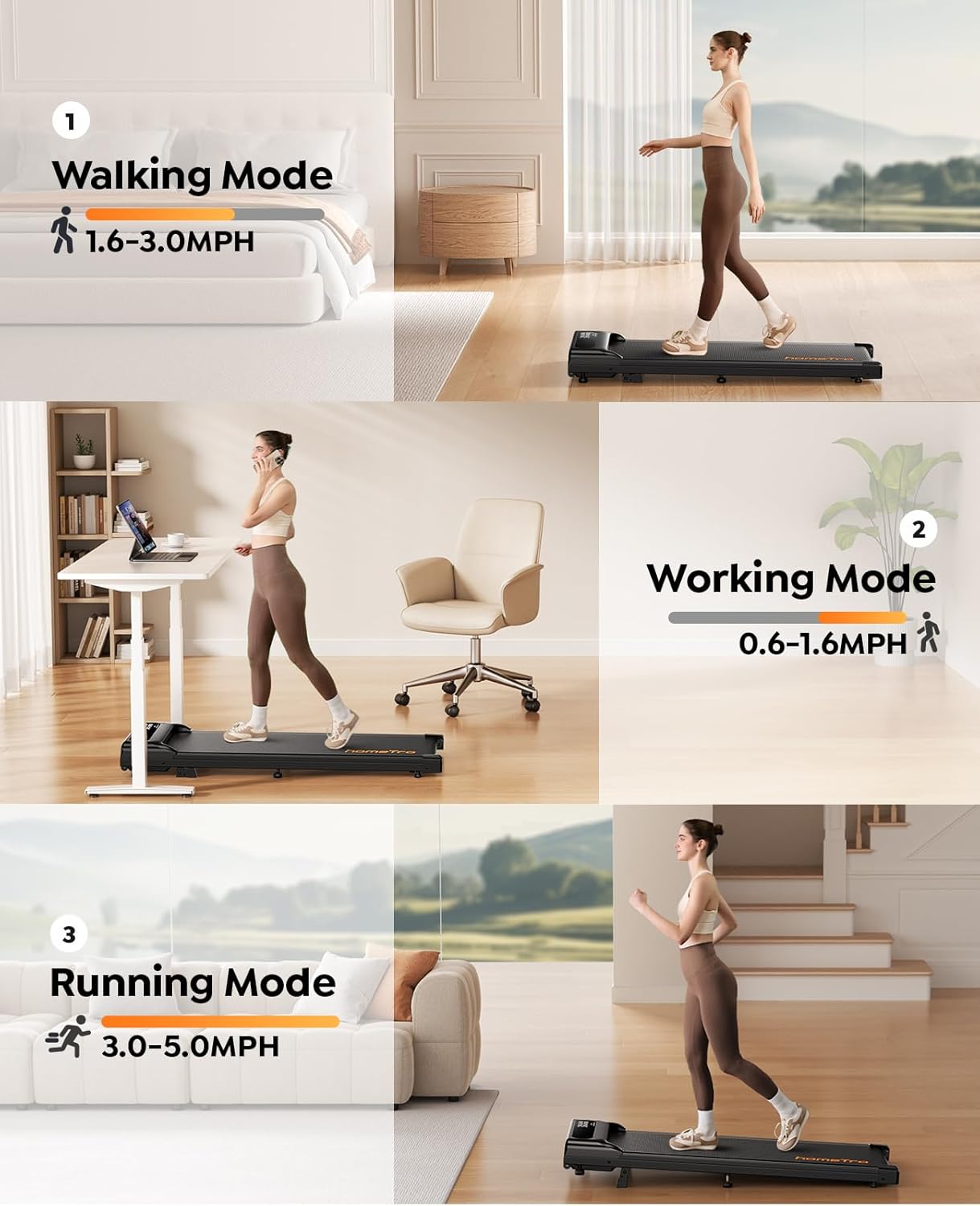
Image: Visual representation of the Walking Mode (1.6-3.0MPH), Working Mode (0.6-1.6MPH), and Running Mode (3.0-5.0MPH) with individuals using the treadmill in different settings.
4.2-Fernbedienung
Use the provided remote control to start/stop the treadmill, adjust speed, and change incline settings. The remote also features a convenient pause and resume function, allowing you to temporarily stop your workout without losing your progress data.
4.3 Intelligente App-Konnektivität
The HomeTro HM3 Walking Pad Treadmill supports Bluetooth 5.0 connectivity for integration with smart fitness applications. This allows for advanced control, tracking of workout data (time, speed, distance, calories), and access to interactive training programs.

Image: A user interacting with the smart app on a phone while using the treadmill, showing various workout metrics and control options, alongside the physical remote control.
Mit der App verbinden:
To connect your treadmill to a compatible fitness app, ensure Bluetooth is enabled on your device. Follow the app's instructions to add new equipment. You may need to select 'Treadmill' and search for 'FTMS' or 'ESANGLINKER' as the brand/model for connection.
Video: This video demonstrates the process of connecting the HomeTro HM3 Walking Pad Treadmill to a fitness application via Bluetooth 5.0. It shows how to select 'Treadmill' and search for 'FTMS' or 'ESANGLINKER' to establish a connection and begin tracking your workout data.
4.4 Verstellbare Neigung
The treadmill features an adjustable incline of up to 9%, allowing you to simulate uphill walking or running for a more challenging workout. Adjust the incline using the remote control or the smart app.

Image: A person running on the HomeTro HM3 Walking Pad Treadmill, highlighting the 9% adjustable incline feature and its benefits for calorie burning.
5. Wartung
Regelmäßige Wartung gewährleistet die Langlebigkeit und den sicheren Betrieb Ihres Laufbands.
5.1 Reinigung
Wischen Sie die Laufbandoberfläche mit einem Tuch ab.amp cloth after each use. Avoid using abrasive cleaners or solvents that could damage the finish.
5.2 Schmierung
The running belt requires periodic lubrication to reduce friction and extend its lifespan. The treadmill features a unique lubrication hole design for convenient application. Refer to the included user manual for specific lubrication intervals and instructions. Use only the provided silicone oil or a recommended treadmill lubricant.
5.3 Laufbandeinstellung
Over time, the running belt may shift or become loose. Use the included tool kit (hex wrench) to adjust the belt tension and alignment as needed. Consult the detailed instructions in the full user manual for proper adjustment procedures.

Abbildung: Eine Schnittzeichnung view illustrating the 5-layer anti-slip and wear-resistant running belt, designed for cushioning and shock absorption to reduce impact on joints.
6. Fehlerbehebung
If you encounter issues with your HomeTro HM3 Walking Pad Treadmill, please refer to the following common solutions:
- Das Laufband lässt sich nicht einschalten: Vergewissern Sie sich, dass das Netzkabel fest mit dem Laufband und einer funktionierenden Steckdose verbunden ist. Überprüfen Sie den Netzschalter am Laufband.
- Fernbedienung reagiert nicht: Check the remote control's battery. Ensure there are no obstructions between the remote and the treadmill's receiver.
- rutschendes oder unebenes Laufband: The running belt may require adjustment. Refer to the 'Running Belt Adjustment' section in the full user manual for detailed instructions.
- Ungewöhnliche Geräusche während des Betriebs: Stoppen Sie das Laufband sofort. Prüfen Sie, ob sich Fremdkörper im Laufband oder im Motorbereich befinden. Sollte das Geräusch weiterhin bestehen, wenden Sie sich bitte an den Kundendienst.
For more complex issues, please consult the comprehensive user manual or contact HomeTro customer support.
7. Spezifikationen
| Besonderheit | Detail |
|---|---|
| Modellnummer | HM3 |
| Produktabmessungen (L x B x H) | 116 x 48.5 x 18 cm (45.7 x 19.1 x 7.1 Zoll) |
| Artikelgewicht | 18.7 kg |
| Maximales Benutzergewicht | 120 kg |
| Motorleistung | 3.0 PS |
| Höchstgeschwindigkeit | 5 Meilen pro Stunde |
| Neigung | Up to 9% adjustable |
| Konnektivität | Bluetooth 5.0 (FTMS compatible) |
| Material | Legierter Stahl |
| Stromquelle | Kabelgebundene Elektrik |
| Farbe | Schwarz |
8. Garantie und Support
8.1 Garantieinformationen
Please refer to the warranty card included with your purchase or visit the official HomeTro webDie detaillierten Garantiebedingungen finden Sie auf der Website. Bewahren Sie Ihren Kaufbeleg für Garantieansprüche auf.
8.2 Kundendienst
For technical assistance, spare parts, or any questions regarding your HomeTro HM3 Walking Pad Treadmill, please contact HomeTro customer support. Contact details can typically be found on the HomeTro webauf der Website oder in Ihren Kaufunterlagen.