
1. Einleitung
This manual provides detailed instructions for the installation, operation, and maintenance of your SIXWIN 4+64G Android 15 Car Radio. This unit is specifically designed for FIAT 500 models manufactured between 2007 and 2015, offering advanced features such as Wireless CarPlay, Android Auto, GPS navigation, and a high-definition touchscreen display.
Bitte lesen Sie diese Bedienungsanleitung vor der Installation und Inbetriebnahme sorgfältig durch, um eine einwandfreie Funktion zu gewährleisten und Ihr Fahrerlebnis zu maximieren.
2. Packungsinhalt
Bitte überprüfen Sie, ob alle unten aufgeführten Artikel in Ihrem Paket enthalten sind:
- 1 x Autoradio
- 1 x Canbus-Decoder
- 1 x Stromkabel
- 1 x RCA Kabel
- 1 x Rückfahrkamera-Eingangskabel
- 2 x USB Kabel
- 1 x GPS-Antenne
- 1 x Mikrofon
- 1 x Hinten View Kamera (AHD)
- 1 x Befestigungswinkel
- 1 x Schraubendreher
- 1 x Benutzerhandbuch

Bild: Überview of the SIXWIN car radio unit, its dimensions, rear connections, and included accessories such as the AHD rear camera, power cable, Canbus, installation tool, microphone, GPS antenna, USB cables, and user manual.
3. Installationsanleitung
Eine Installation durch einen Fachmann wird empfohlen. Stellen Sie sicher, dass die Stromversorgung des Fahrzeugs vor Beginn der Installation unterbrochen ist.
3.1 Kabelverbindungen
Refer to the wiring diagram for correct connections. Ensure all cables are securely connected to their respective ports on the car radio and the vehicle's harness.
- Stromkabel: An die Stromversorgung des Fahrzeugs anschließen.
- RCA-Kabel: Für Audio-/Video-Ein-/Ausgangsanschlüsse.
- USB-Kabel: Zum Anschließen von USB-Geräten.
- Kameraeingang: Schließen Sie den AHD-Rücklautsprecher an. View Kamera.
- Funkantenne: Schließen Sie die Radioantenne des Fahrzeugs an.
- GPS-Antenne: Positionieren Sie sich an einem Ort mit klarem Himmel view für optimalen Signalempfang.
Bild: Detailliert view of the rear panel of the SIXWIN car radio, showing labeled ports for power, RCA, USB, camera input, radio antenna, and GPS antenna.
3.2 Montage der Einheit
Use the provided mounting bracket and screwdriver to secure the car radio into the dashboard opening. Ensure a snug fit without excessive force.

Image: A comparison showing the dashboard of a FIAT 500 before and after the installation of the SIXWIN car radio, highlighting the integrated display.
3.3 Initial Setup and Dashboard Flickering Solution
After installation, follow these steps to configure the unit and address potential dashboard flickering:
- Select the correct protocol: Gehe zu Einstellungen → Werkseinstellungen (Password: 8888) → CAN Settings → Hiword → Fiat → Select the corresponding model year (e.g., 2007-2015).
- Configure the vehicle model: Gehe zu Fahrzeugeinstellungen → Andere Einstellungen → Fahrzeugkonfiguration → Modell 1.
- Perform power cycle: After selecting the model, switch off the ignition, turn off the vehicle, and remove the key. Close all doors and wait for 10 minutes. After 10 minutes, restart the vehicle and switch on the radio.
- If flickering persists: Switch the model to 'Model 2' or 'Model 3', then switch off the radio, remove the key, switch off the ignition, wait 10 minutes, and restart the radio.
If the issue remains unresolved, please contact customer service for assistance.

Image: Screenshot detailing the steps to resolve dashboard flickering issues after installation, including protocol selection and vehicle model configuration.
4. Bedienungsanleitung
4.1 Grundlegende Bedienung
The unit features a 9-inch HD touchscreen display. Power on the unit by turning the vehicle's ignition to the ACC or ON position. Navigate through menus and applications by touching the screen icons.

Image: Close-up of the SIXWIN car radio's IPS display screen, highlighting its 2.5D touch glass and anti-blue light features, with a car interior displayed on screen.
4.2 Kabelloses CarPlay & Android Auto
Connect your iPhone or Android smartphone wirelessly to access CarPlay or Android Auto. This allows for voice control or touchscreen operation for calls, messages, music, and navigation, enhancing driving safety.
- Stellen Sie sicher, dass Bluetooth und WLAN auf Ihrem Smartphone aktiviert sind.
- Wählen Sie im Autoradio die CarPlay- oder Android Auto-Anwendung aus.
- Folgen Sie den Anweisungen auf dem Bildschirm, um Ihr Gerät zu koppeln.

Image: Display showing the Wireless CarPlay and Android Auto interfaces with various app icons like Music, WhatsApp, Spotify, and navigation.
4.3 Mirror-Link-Funktion
The Mirror Link function allows you to cast your smartphone's screen content directly to the car radio display.
- For iOS devices, Mirror Link supports Wi-Fi connection.
- For Android devices, Mirror Link supports Wi-Fi or USB connection.
- Access the Mirror Link app on the car radio and follow the pairing instructions.

Image: A smartphone screen mirrored onto the car radio display, demonstrating the Mirror Link feature.
4.4 GPS-Navigation
The integrated GPS module for precise navigation. It supports both online and offline maps.
- Pre-installed maps are available (e.g., "Here We Go").
- Supports other online navigation applications like Google Maps when connected to Wi-Fi.
- Stellen Sie sicher, dass die GPS-Antenne für ein optimales Signal ordnungsgemäß installiert ist.

Image: The car radio display showing a GPS navigation map with route information and various navigation icons.
4.5 WLAN-Konnektivität
Connect the car radio to the internet via a Wi-Fi hotspot from your smartphone or a dedicated mobile network connection. This enables web browsing, streaming, and downloading applications directly on the device.
- Die WLAN-Einstellungen finden Sie im Hauptmenü.
- Wählen Sie das gewünschte Netzwerk aus und geben Sie das Passwort ein.

Image: The car radio display showing Wi-Fi and Bluetooth connectivity options, with a woman driving and a phone dialer interface.
4.6Bluetooth 5.0
The integrated Bluetooth 5.0 module allows for high-fidelity audio streaming, hands-free calling, and phone book synchronization.
- Pair your mobile phone or other compatible devices via Bluetooth settings.
- Enjoy music playback and make/receive calls directly from the car radio.
4.7 FM/RDS-Radio
The built-in FM/RDS radio receiver provides clear audio quality and real-time station information.
- Die Radio-Anwendung ist über das Hauptmenü erreichbar.
- Tune to your desired stations. The unit supports 18 preset stations and FM(3*6) channels.
- RDS (Radio Data System) displays information such as station name and traffic updates.
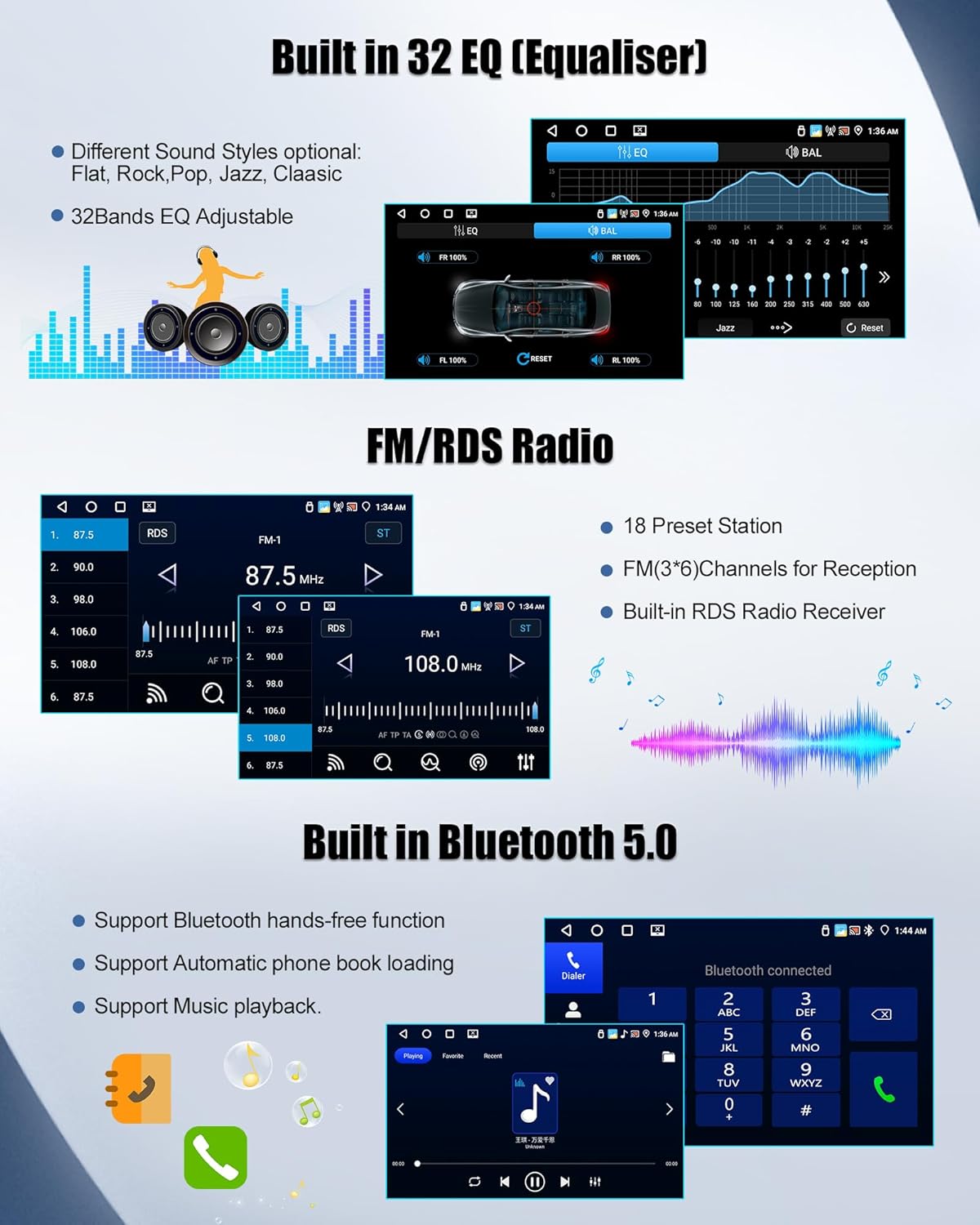
Image: The car radio display showing the FM/RDS radio interface with frequency tuning and preset options, alongside the 32-band equalizer settings.
4.8 32-Band Equalizer (EQ)
Customize your audio experience with the professional 32-band equalizer. It includes presets for various music genres like Jazz, Classical, and Rock, allowing for personalized sound effects.
- Die EQ-Einstellungen sind über das Audiomenü zugänglich.
- Select a preset or manually adjust frequency bands for a tailored sound.
4.9 Lenkradsteuerung
The unit supports steering wheel controls, allowing you to manage radio functions without taking your hands off the wheel. This includes switching songs, changing channels, and adjusting volume.
- Ensure the CANbus decoder is correctly installed and configured for your vehicle model.
- Access the steering wheel control settings to map functions to your vehicle's buttons.

Image: The car radio display showing the interface for configuring steering wheel controls, with options for various functions like volume, track skip, and mode selection.
4.10 Split-Screen-Funktion
Nutzen Sie die Split-Screen-Funktion, um zwei Anwendungen gleichzeitig auszuführen, z. B. die Navigation auf der einen Seite und die Musikwiedergabe auf der anderen.
- Long-press the recent apps button or follow specific gestures (refer to on-screen prompts) to activate split screen.
- Select the two applications you wish to display.

Image: The car radio display demonstrating the split-screen function, showing a navigation map on one side and a music player on the other.
4.11 Rückseite View Kamera
Die mitgelieferte AHD-Rückleuchte view Die Kamera liefert ein klares Weitwinkelbild. view for safer parking and reversing. It automatically activates when the vehicle is shifted into reverse gear.
- Ensure the rear camera is properly connected to the "Camera Input" port.
- The camera features HD resolution, night vision, wide-angle view, and IP67 waterproofing.

Abbildung: Das Autoradiodisplay zeigt die view from the rear camera with parking guidelines, illustrating its high definition and wide-angle capabilities.
5. Wartung
To ensure the longevity and optimal performance of your SIXWIN car radio, follow these maintenance guidelines:
- Bildschirmreinigung: Verwenden Sie ein weiches, fusselfreies Tuch, um den Touchscreen vorsichtig abzuwischen. Vermeiden Sie scheuernde Reiniger oder Lösungsmittel, die das Display beschädigen könnten.
- Software-Updates: Periodically check for available software updates through the system settings. Updates can improve performance, add new features, and fix bugs. Connect to a stable Wi-Fi network for updates.
- Temperaturkontrolle: Avoid exposing the unit to extreme temperatures. While designed for automotive use, prolonged exposure to direct sunlight in a parked car can affect performance.
- Kabelverbindungen: Überprüfen Sie gelegentlich alle Kabelverbindungen an der Rückseite des Geräts, um sicherzustellen, dass sie fest sitzen und frei von Korrosion sind.
6. Fehlerbehebung
If you encounter issues with your SIXWIN car radio, refer to the following common troubleshooting steps:
- Kein Strom: Check all power cable connections. Ensure the vehicle's ignition is on. Verify the fuse in the vehicle's fuse box related to the car radio.
- Kein Ton: Check speaker connections. Ensure volume is not muted or set to minimum. Verify audio output settings in the system menu.
- Dashboard Flickering: Refer to Section 3.3 "Initial Setup and Dashboard Flickering Solution" for detailed steps.
- GPS-Signalverlust: Stellen Sie sicher, dass die GPS-Antenne korrekt installiert ist und eine freie Sicht hat. view des Himmels. Überprüfen Sie die GPS-Einstellungen im Systemmenü.
- Probleme mit der Bluetooth-Verbindung: Ensure Bluetooth is enabled on both the car radio and your smartphone. Delete previous pairings and attempt to re-pair the devices.
- Touchscreen reagiert nicht: Perform a system reset (refer to the device's reset button, usually a small pinhole). If the issue persists, contact support.
- App Installation Issues (e.g., Waze): Ensure the unit is connected to a stable internet connection. Check available storage space. Some apps may require specific Android versions or permissions.
- Radio Signal Weakness: Ensure the radio antenna is securely connected. Check for obstructions or interference.
If these steps do not resolve the issue, please contact SIXWIN customer support.
7. Spezifikationen
| Besonderheit | Spezifikation |
|---|---|
| Marke | SIXWIN |
| Modellnummer | 4+64 GB |
| Betriebssystem | Android 15 |
| RAM | 4 GB |
| Interner Speicher (ROM) | 64 GB |
| Anzeigegröße | 9 Zoll |
| Anzeigetyp | HD TouchScreen (IPS with 2.5D Glass) |
| Konnektivität | Bluetooth 5.0, USB, WLAN |
| Besondere Merkmale | Wireless CarPlay, Wireless Android Auto, Mirror Link, Built-in GPS, FM/RDS Radio, 32-Band EQ, Steering Wheel Control Support, Split Screen Function, AHD Rear Camera Support |
| Audioausgabemodus | Stereo, Surround (5.1 channels) |
| Leistungsabgabe | 180 Watt |
| Produktabmessungen (L x B x H) | 32 cm (Breite) x 22.5 cm (Länge) x 9.5 cm (Höhe) |
| Kompatible Fahrzeuge | FIAT 500 (2007-2015) |
8. Garantie und Support
Your SIXWIN car radio comes with comprehensive support and warranty coverage:
- Garantie: 2 years product warranty.
- Widerrufsfolgen: 30-day voluntary return guarantee.
- Kundendienst: 24-hour customer support and lifetime technical support.
For any inquiries, technical assistance, or warranty claims, please contact us directly:
E-Mail: SIXWINVIP@126.com

Image: Diagram showing steps to contact customer service, including finding the seller and using the "Contact Seller" option.

Image: Icons representing 24-hour customer support, 30-day return policy, 24-month quality guarantee, and lifetime customer & technical support.