Produkt überview
The WAYXIN R6S is a motorcycle headset designed for clear and reliable communication while riding. It supports full-duplex communication for up to 6 riders, with a communication range of up to 1200 meters. Featuring an advanced Qualcomm chip and Bluetooth 5.1, it ensures stable connections and high-definition stereo audio. Integrated DSP and CVC noise reduction technologies effectively filter environmental noise, providing a pure high-fidelity sound experience. The R6S also includes voice assistant compatibility and is IP67 waterproof and dustproof.

Image: The WAYXIN R6S headset mounted on a motorcycle helmet, illustrating its core features and capabilities.
Packungsinhalt
Bitte überprüfen Sie vor der Installation, ob alle Komponenten in Ihrem Paket vorhanden sind:
- 1 x Bluetooth-Gegensprechanlage
- 1 x austauschbare Farbfolien
- 1 x Headphone Set with 3.5mm Port and Two Microphones (boom and soft wire mic)
- 1 x Befestigungswinkel
- 1 x Fixed Iron Plate
- 1 x Typ-C Ladekabel
- 1 x Installationswerkzeug
- 1 x Benutzerhandbuch

Image: A visual representation of the R6S unit's buttons and the complete list of items included in the product package.
Setup und Installation
Montage der Gegensprechanlage
Attach the mounting bracket to the side of your helmet using either the clip or adhesive method. Ensure the unit is securely fastened and does not obstruct your vision or helmet functionality. The fixed iron plate can be used for additional stability if needed.
Installing Speakers and Microphone
Place the speakers inside the helmet's ear pockets, ensuring they are aligned with your ears for optimal sound. Connect the microphone to the unit. Choose between the boom microphone for open-face helmets or the soft wire microphone for full-face helmets, positioning it close to your mouth for clear voice pickup.
Aufladen des Geräts
Connect the Type-C charging cable to the intercom unit and a power source. A full charge takes approximately 2.5 hours. The device indicates charging status via an LED indicator.

Image: The R6S unit highlighting its battery capacity and performance metrics.
Bedienungsanleitung
Ein-/Ausschalten und Koppeln
Refer to the 'Knopf Funktion & Packliste' image for button identification. To power on, press and hold the Power/Intercom button. To power off, press and hold the Power/Intercom button again. For initial pairing, ensure the device is in pairing mode (usually indicated by a flashing LED) and connect via your phone's Bluetooth settings. The R6S supports connecting to two Bluetooth devices simultaneously.
Intercom-Kommunikation
The R6S supports communication between 2 to 6 riders over a distance of up to 1200 meters. To initiate or join an intercom conversation, use the dedicated Intercom buttons (B, C, D, E) as per the pairing instructions in the full manual. The system allows for real-time, full-duplex conversation.

Image: Multiple riders demonstrating the 6-device networking and 1200m communication range of the R6S headset.
Phone Calls and Voice Assistant
Once paired with your smartphone, you can answer calls hands-free using the Phone button. The R6S also supports voice assistants like Siri, Google Assistant, and Bixby. Double-click the designated button (refer to the manual for specific button) to activate your phone's voice assistant for navigation, calls, or other commands.

Image: The R6S headset's voice assistant functionality and IP67 waterproof rating in action.
Musikwiedergabe
Enjoy high-fidelity stereo music through the R6S headset. Use the Volume + and Volume - buttons to adjust the audio level. The advanced DSP and CVC noise reduction technologies ensure clear sound quality even at high speeds.

Bild: Eine explodierte view of the speaker components, emphasizing the graphene diaphragm for superior sound quality.
Wartung
The WAYXIN R6S headset is designed with IP67 water and dust resistance, making it suitable for various weather conditions. To ensure longevity and proper function:
- Always ensure all connectors are dry before charging or connecting accessories.
- Reinigen Sie das Gerät mit einem weichen, damp Tuch. Vermeiden Sie die Verwendung aggressiver Chemikalien oder scheuernder Materialien.
- Bewahren Sie das Headset an einem trockenen Ort auf, wenn es nicht benutzt wird.
- The internal 600mAh battery provides approximately 15 hours of music playback, 10 hours of continuous conversation, and 360 hours of standby time. For optimal battery life, avoid extreme temperatures during charging and storage.
Fehlerbehebung
Kein Strom
- Ensure the battery is charged. Connect the unit to a power source using the Type-C cable.
- Verify the power button is pressed and held for the correct duration to turn on the device.
Cannot Pair with Phone/Other Intercoms
- Ensure the R6S is in pairing mode (refer to the manual for specific LED indicators).
- Make sure Bluetooth is enabled on your phone or the other intercom device.
- Keep devices within close range during pairing.
- If connecting to a third-party intercom, ensure it supports universal pairing.
Schlechte Audioqualität / Rauschen
- Check microphone placement; ensure it is close to your mouth and not obstructed.
- Verify speaker placement inside the helmet for optimal sound delivery.
- The R6S features DSP/CVC noise reduction. Ensure the microphone is not exposed to excessive direct wind.
- Different helmets may have varying noise reduction effects.
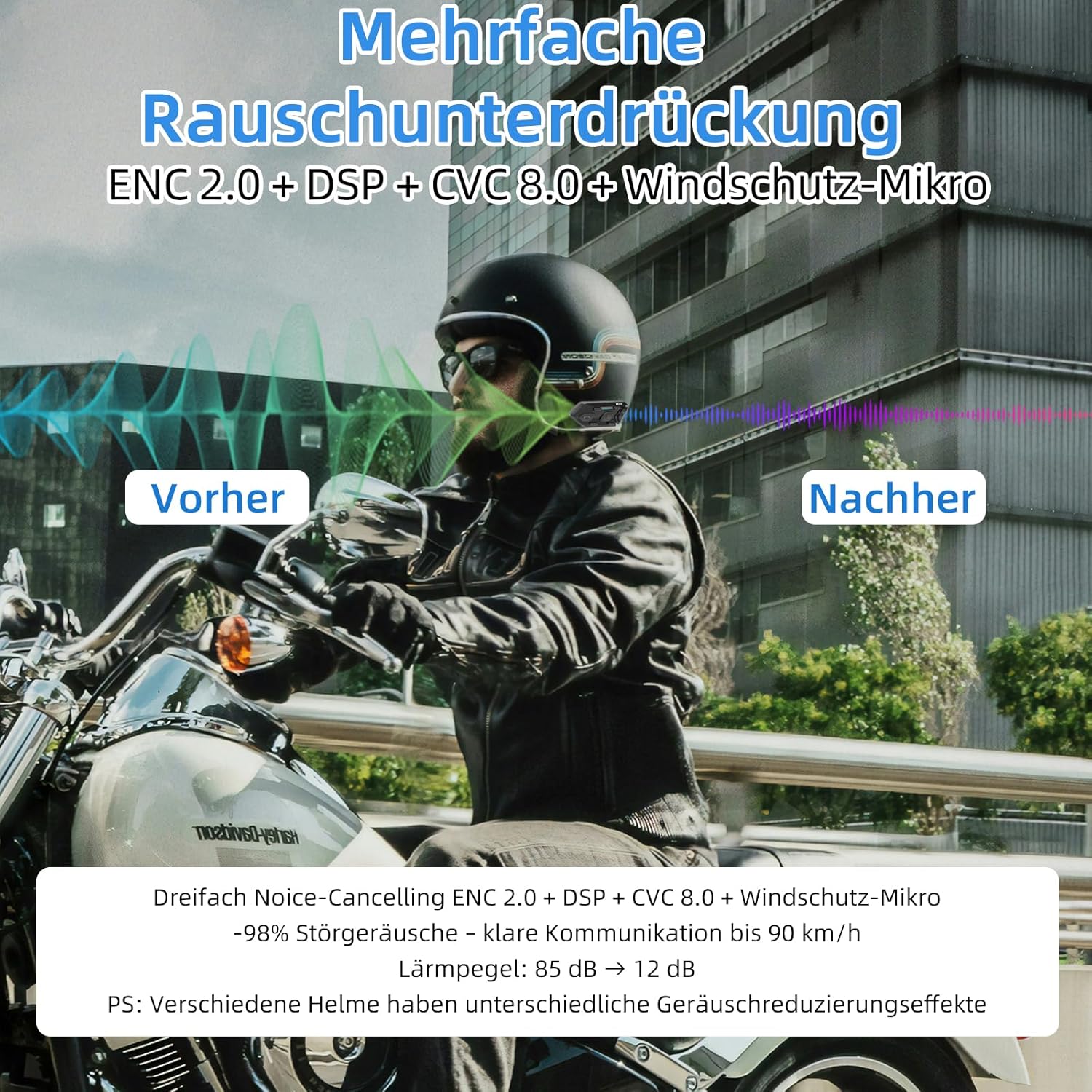
Image: Visual representation of the R6S's advanced noise reduction capabilities.
Technische Daten
| Modell | R6S |
| Bluetooth-Version | 5.1 |
| Intercom-Reichweite | Bis zu 1200 Meter |
| Maximale Anzahl an Nutzern für Intercom | 6 (2-person full-duplex simultaneous talk) |
| Batteriekapazität | 600 mAh |
| Musikwiedergabezeit | Ca. 15 Stunden |
| Gesprächszeit | Ca. 10 Stunden |
| Standby-Zeit | Ca. 360 Stunden |
| Ladezeit | Ca. 2.5 Stunden |
| Wasserbeständigkeit | IP67 |
| Lärmschutz | DSP, CVC, Active Noise Cancellation |
| Kontrollmethode | Sprache, Tasten |
| Material | Acrylnitril-Butadien-Styrol (ABS) |
| Kompatible Geräte | Motorcycles, Smartphones |
Garantie und Support
The WAYXIN R6S Motorcycle Headset comes with a 2-year manufacturer's warranty from the date of purchase. This warranty covers defects in materials and workmanship under normal use.
For any product issues or assistance, please contact the seller directly through your Amazon account. Navigate to Account Service → Bestellverlauf → Verkäufer kontaktieren für direkte Unterstützung.