
CAMECHO 2G+64G
CAMECHO Android 13 Autoradio-Benutzerhandbuch
Model: 2G+64G for Chevrolet Chevy Sonic Aveo 2012-2015
1. Produktüberschreitungview
This manual provides detailed instructions for the installation, operation, and maintenance of your CAMECHO Android 13 Car Stereo. This unit features a 9-inch touch screen, wireless CarPlay and Android Auto, GPS navigation, Bluetooth, WiFi, FM radio, and supports an AHD backup camera. It is designed for specific Chevrolet Chevy Sonic (2012-2015) and Aveo (2011-2015) models.
2. Kompatibilität
Dieses Autoradio ist mit folgenden Fahrzeugmodellen kompatibel:
- Chevrolet Chevy Sonic: 2012, 2013, 2014, 2015
- Chevrolet Chevy Aveo: 2011, 2012, 2013, 2014, 2015
Ensure your vehicle's dashboard matches the compatible configuration shown below. Incorrect center console or CD backplate types may prevent proper installation.

Image: Compatible and incompatible car models for installation. Verify your vehicle's dashboard and original radio unit against these examples.
3. Lieferumfang
Bitte überprüfen Sie den Inhalt Ihres Pakets anhand der folgenden Liste:
- 1 x Android-Autoradio
- 1 x AHD-Rückfahrkamera
- 1 x externes Mikrofon
- 1 x Canbus-Decoder
- 1 x GPS-Antenne
- 1 x Radioantenne
- 1 x Stromkabel
- 1 x Rückfahrkamera-Eingangskabel
- 1 x RCA-Kabelset
- 2 x USB Kabel
- 1 x Original-USB-Kabel
- 1 x Installationswerkzeugsatz
- 1 x Benutzerhandbuch (dieses Dokument)

Image: Complete packing list and dimensions of the head unit.
4. Einrichtung und Installation
4.1 Erforderliches Werkzeug
- Hebelwerkzeug
- Schraubendreher
- Wire strippers/crimpers (if custom wiring is needed)
4.2 Demontage der Originaleinheit
- Use a pry tool to carefully open and remove the outer frame of the original radio.
- Lösen Sie die vier Schrauben, mit denen das Radio auf beiden Seiten befestigt ist.
- Remove the original radio and disconnect all cables.
- Zum Schluss entfernen Sie die Lüftungsschlitze auf beiden Seiten vom ursprünglichen Fahrzeugrahmen.
4.3 Installation der neuen Einheit
Wichtig: If the wiring harness does not match your vehicle, please contact customer service for the correct wiring harness before proceeding.
- Montieren Sie die Lüftungsschlitze auf beiden Seiten des neuen Radiopanels.
- Secure the new radio to the panel.
- Tighten the five screws.
- Connect the wires of the new radio to the original car harness.
- Attach the Canbus protocol box.
- Reinstall the new radio into the car dashboard, completing the installation.

Image: Disassembly and installation steps for the car stereo.
4.4 Canbus Connection and Steering Wheel Control Setup
Ensure the Canbus box is connected. Plug the 8-pin cable into the head unit's connector for steering wheel control functionality.

Image: Canbus and steering wheel control wiring diagram.
Notiz: After connecting the Canbus, you need to set the Protocol correctly for steering wheel controls to work. Follow these steps:
- Go to "Car Settings" > "Factory Setting".
- Passwort eingeben: 1234.
- Select "Protocol Settings".
- Choose "Raise - Chevrolet" for your car model.
4.5 Installation der Rückfahrkamera
Der Rückfahrkameraeingang muss auch dann angeschlossen sein, wenn die Rückfahrkamera nicht verwendet wird.
- Connect the positive pole of the power supply of the car's reversing light to the camera's positive wire.
- Connect the negative pole of the power supply of the car's reversing light to the camera's negative wire.
- The reversing trigger is controlled by the stereo, so a separate trigger wire connection is not required.

Image: Reversing camera wiring diagram.
Notiz: If the backup camera does not work, adjust the resolution via: Settings > Factory Settings > Password: 1234 > Video Source.
5. Bedienungsanleitung
5.1 Kabelloses CarPlay & Android Auto
The unit supports wireless Apple CarPlay and Android Auto, allowing seamless integration with your smartphone for navigation, music, calls, and messages.

Image: Wireless Apple CarPlay and Android Auto interfaces.
Drahtlose Verbindung von Apple CarPlay:
- Connect the car radio Bluetooth (Bluetooth name: "Car BT0", Bluetooth PIN: 1234). Ensure "phone audio, music audio" is successfully connected.
- Klicken Sie am Autoradio auf „SpeedPlay“.
- Kontakte und Favoriten synchronisieren zulassen.
- Select "Use CarPlay with SpeedPlay".
- Bitte warten Sie auf die Verbindung. Die erste Verbindung kann länger dauern.
Drahtloses Verbinden von Android Auto:
- Klicken Sie am Autoradio auf „SpeedPlay“.
- Connect your phone to the rear 4-pin USB port using the original data cable.
- Aktivieren Sie das USB-Debugging auf Ihrem Telefon.
- Bitte warten Sie auf die Verbindung. Die erste Verbindung kann länger dauern.
5.2 GPS-Navigation
The unit has a built-in GPS navigation system with a pre-loaded "Here Wego" offline map app. You can use both online and offline navigation.

Image: GPS Navigation interface and WiFi connection options.
5.3 WiFi-Verbindung
Built-in Wi-Fi allows you to connect to a hotspot for online browsing, streaming media, and using online applications.
5.4 Zoll Bluetooth-Freisprecheinrichtung und Musikstreaming
Connect your phone via Bluetooth for hands-free calling and wireless music streaming, enhancing driving safety.

Image: Bluetooth hands-free calling and music streaming features.
5.5 FM/RDS-Radio
The unit supports FM RDS radio, allowing you to preset up to 18 radio stations and receive news and traffic information.

Abbildung: FM/RDS-Radioschnittstelle.
5.6 Lenkradsteuerung
After proper Canbus configuration, you can use your original steering wheel controls to manage music, calls, and navigation.

Image: Steering Wheel Control interface for programming functions.
5.7 Equalizer-Einstellung
The built-in preset EQ allows you to choose from various EQ curves (e.g., Rock, Pop, Jazz) to customize your audio experience.
5.8 Mehrere UI-Designs
Customize the appearance of your multimedia system by selecting from multiple UI desktop themes.
5.9 Spiegel-Link
Cast your smartphone's screen to the car radio touchscreen for viewing content directly on the larger display.

Abbildung: Mirror-Link-Funktionalität.
6. AHD-Rückfahrkamera
Die mitgelieferte AHD-Rückleuchte view camera provides a clear and sharp reverse image, enhancing safety during parking and reversing maneuvers. It features night vision and IP68 waterproof rating.
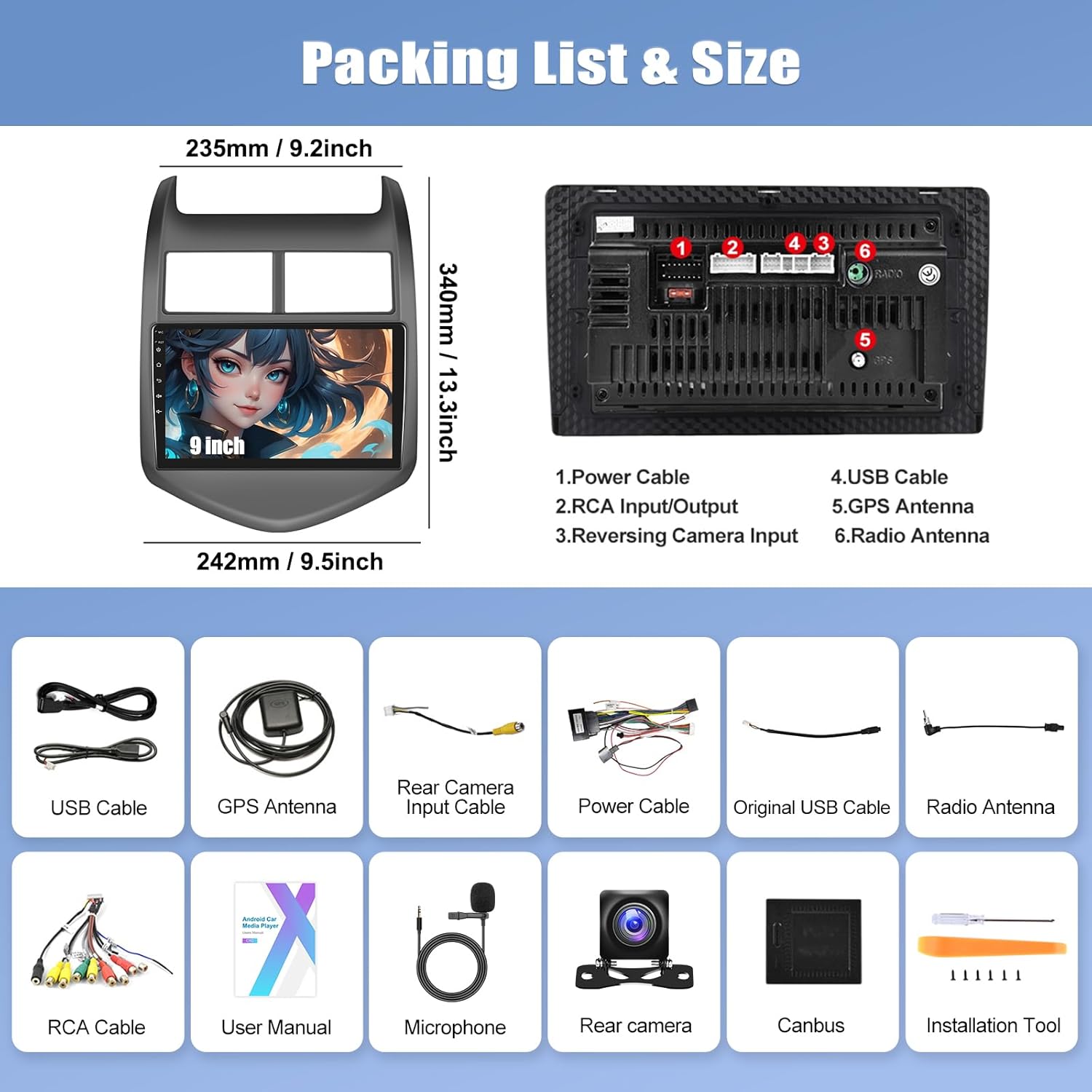
Image: AHD Reverse Camera features and view.
To activate the reverse image, shift your vehicle into reverse gear. The stereo will automatically display the camera feed.
7. Wartung
Um die Langlebigkeit und optimale Leistung Ihres Autoradios zu gewährleisten, beachten Sie bitte folgende Wartungshinweise:
- Reinigung: Reinigen Sie den Bildschirm und das Gehäuse mit einem weichen, trockenen Tuch. Vermeiden Sie Scheuermittel oder Lösungsmittel.
- Temperatur: Vermeiden Sie es, das Gerät über längere Zeiträume extremen Temperaturen, sowohl Hitze als auch Kälte, auszusetzen.
- Software-Updates: Prüfen Sie regelmäßig, ob Software-Updates verfügbar sind, um sicherzustellen, dass das System effizient läuft und über die neuesten Funktionen verfügt.
- Kabelverbindungen: Stellen Sie sicher, dass alle Kabel fest angeschlossen sind. Lose Verbindungen können zu zeitweiligen Problemen führen.
8. Fehlerbehebung
Sollten Sie Probleme mit Ihrem Autoradio haben, beachten Sie bitte die folgenden häufigen Probleme und Lösungen:
| Problem | Mögliche Ursache | Lösung |
|---|---|---|
| Gerät lässt sich nicht einschalten | Lose Stromverbindung, durchgebrannte Sicherung, Problem mit der Fahrzeugbatterie. | Check power cable connections. Inspect vehicle fuses. Verify car battery voltage. |
| Keine Tonausgabe | Lautstärke zu niedrig, Stummschaltung aktiviert, falsche Audioeinstellungen, lose Lautsprecherkabel. | Increase volume. Check mute status. Verify audio output settings. Inspect speaker wire connections. |
| Bluetooth not connecting or no audio | Incorrect pairing, Bluetooth disabled, phone compatibility, software glitch. | Ensure Bluetooth is enabled on both devices. Re-pair the device. Check Bluetooth PIN (1234). Restart both devices. Verify "phone audio, music audio" is selected during pairing. |
| Lenkradbedienelemente funktionieren nicht | Canbus not connected, incorrect protocol settings. | Ensure Canbus is properly connected. Follow instructions in Section 4.4 to set the correct protocol. |
| Rückfahrkamera zeigt kein Bild an | Incorrect wiring, camera malfunction, video source setting. | Verify camera wiring (Section 4.5). Check camera power. Adjust video source settings (Settings > Factory Settings > 1234 > Video Source). |
| GPS-Signalprobleme | Die GPS-Antenne ist nicht ordnungsgemäß installiert oder verdeckt. | Stellen Sie sicher, dass die GPS-Antenne sicher angeschlossen und an einem freien Ort (z. B. auf dem Armaturenbrett) angebracht ist. |
| Touchscreen reagiert nicht | Software freeze, temporary glitch. | Starten Sie das Gerät neu. Sollte das Problem weiterhin bestehen, wenden Sie sich bitte an den Support. |
9. Spezifikationen
| Besonderheit | Detail |
|---|---|
| Marke | KAMECHO |
| Modellnummer | 2G + 64G |
| Betriebssystem | Android 13 |
| RAM | 2 GB |
| ROM (Interner Speicher) | 64 GB |
| Bildschirmgröße | 9 Zoll |
| Controllertyp | Touch-Screen |
| Konnektivitätstechnologie | Bluetooth, WLAN, USB, RCA |
| Besondere Merkmale | Wireless Apple CarPlay, Wireless Android Auto, GPS Navigation, FM RDS Radio, Mirror Link, Steering Wheel Control Support, EQ Adjustable |
| Audioausgabemodus | Stereo |
| Ausgangsleistung | 45 Watt |
| Unterstützung für Videocodierung | H.264, H.265/HEVC, MPEG-4 |
| Kompatible Geräte | Chevrolet Chevy Aveo 2011-2015, Chevrolet Chevy Sonic 2012-2015 |
| Artikelabmessungen (T x B x H) | 2.8"T x 9.5"B x 13.4"H |
10. Garantieinformationen
This CAMECHO car stereo unit comes with a 1 Jahr Garantie from the date of purchase. This warranty covers manufacturing defects and malfunctions under normal use. It does not cover damage caused by improper installation, accident, misuse, abuse, unauthorized modifications, or natural disasters.
Bitte bewahren Sie Ihren Kaufbeleg für Garantieansprüche auf.
11. Kundendienst
For technical assistance, installation queries, or warranty claims, please contact CAMECHO customer support. We are committed to providing high-quality support to ensure your satisfaction.
E-Mail: CAMECHOVIP@126.com
Please include your product model number and a detailed description of your issue when contacting support to facilitate a quicker resolution.

Image: CAMECHO Customer Support.