
ALLPOWERS S300LUS Tragbare Stromstation – Benutzerhandbuch
Modell: AP-SS-005
Thank you for choosing ALLPOWERS. Please read this manual carefully before use and retain it for future reference.
1. Sicherheitshinweise
To ensure safe operation and prolong the lifespan of your ALLPOWERS S300LUS Portable Power Station, please observe the following safety guidelines:
- Das Gerät darf nicht zerlegt, repariert oder verändert werden. Eine unsachgemäße Montage kann zu Bränden oder Verletzungen führen.
- Do not expose the unit to fire or extreme temperatures (above 60°C / 140°F).
- Das Gerät darf nicht in einem Badezimmer oder in Bereichen, die Wasser oder hoher Luftfeuchtigkeit ausgesetzt sind, verwendet oder gelagert werden.
- Do not use or store the unit near heat sources such as stoves or heaters.
- Avoid dropping, heavy impacts, or strong vibrations.
- Außerhalb der Reichweite von Kindern und Haustieren aufbewahren.
- Verwenden Sie ausschließlich Originalzubehör oder zertifiziertes Zubehör.
- If the unit emits unusual odors, generates heat, or shows any other abnormality, discontinue use immediately and contact customer support.
- Entsorgen Sie das Produkt gemäß den örtlichen Vorschriften. Nicht im Hausmüll entsorgen.
2. Produktüberschreitungview
The ALLPOWERS S300LUS is a compact and portable power station designed to provide reliable power for various devices. It features multiple output ports, wireless charging, and several recharging options.
Packungsinhalt:
- 1 x ALLPOWERS Portable Power Station (S300LUS)
- 1 x AC Adapter and Charging Cable
- 1 x Benutzerhandbuch
Hauptmerkmale:
- Kapazität: 288 Wh / 78000 mAh
- Wechselstromausgang: 300 W (Reine Sinuswelle, Spitzenleistung 600 W)
- Mehrere Ausgänge: AC, USB-A, USB-C, 12V Car Charger, Wireless Charging
- Ladeoptionen: AC, Solar, Car Charger, AC + Solar, AC + Car Charger
- Kompaktes Design: 8.1 x 6.5 x 4.3 inches, 8.8 pounds with built-in handle
- Notlicht: Integriertes LED-Licht
- Intelligente Steuerung: Bluetooth app compatibility (iOS 9.0+, Android 4.3+)
- Sicherheit: Built-in Battery Management System (BMS) for protection against overcurrent, overload, overheating, and short circuits.
Komponentenidentifikation:

Bild: Vorderseite view of the ALLPOWERS S300LUS Portable Power Station, showing the display, AC outlet, USB ports, DC input, and handle.
- AC Output Port (US Standard)
- Kabelloses Ladepad
- LCD-Bildschirm
- AC-Netzschalter
- DC/USB-Netzschalter
- USB-A-Ausgangsanschlüsse (2x)
- USB-C-Ausgangsport (PD 100 W)
- 12V Car Charger Output
- Notfall-LED-Licht
- Handhaben
3. Einrichtung und Erstgebrauch
Auspacken:
Carefully remove the power station and all accessories from the packaging. Inspect for any damage. If any components are missing or damaged, contact customer support immediately.
Erstladung:
Before first use, it is recommended to fully charge the ALLPOWERS S300LUS. This ensures optimal battery performance and calibration.
- Connect the provided AC adapter to the DC Input Port (9) on the power station.
- Stecken Sie das Netzteil in eine normale Wandsteckdose.
- The LCD display (3) will show the charging status. The battery icon will animate, and the percentage wird zunehmen.
- Charging is complete when the battery icon is full and the display shows 100%.
Initial AC charging typically takes approximately 1.5 hours (Max. 200W).
4. Bedienungsanleitung
Ein-/Ausschalten:
- To turn on the unit, press and hold the AC Power Button (4) or DC/USB Power Button (5) for 3 seconds. The LCD display will illuminate.
- To turn off the unit, press and hold the respective power button (AC or DC/USB) for 3 seconds.
- If no output is detected, the unit will automatically shut down after a period of inactivity to conserve power.
Verwendung des AC-Ausgangs:
- Press the AC Power Button (4) to activate the AC output. The AC icon will appear on the LCD display.
- Plug your AC device into the AC Output Port (1).
- Ensure your device's power consumption does not exceed 300W (or 600W peak). Overloading will trigger protection and shut down the AC output.
- When finished, press the AC Power Button (4) again to turn off the AC output.
Verwendung der DC/USB-Ausgänge:
- Press the DC/USB Power Button (5) to activate the DC and USB outputs. The DC and USB icons will appear on the LCD display.
- Connect your devices to the USB-A Ports (6), USB-C Port (7), or 12V Car Charger Output (8).
- The USB-C port supports Power Delivery (PD) up to 100W.
- When finished, press the DC/USB Power Button (5) again to turn off these outputs.
Kabelloses Laden:
- Press the DC/USB Power Button (5) to activate the wireless charging function.
- Place your Qi-compatible device on the Wireless Charging Pad (2).
- Achten Sie darauf, dass das Gerät mittig auf dem Ladepad platziert ist, um ein optimales Ladeergebnis zu erzielen.
- When finished, press the DC/USB Power Button (5) again to turn off wireless charging.

Image: Visual representation of the six output options available on the power station, including AC, USB-C, USB-A, wireless charging, and car charger, with examples of devices being powered.
LED-Notleuchte:
- To turn on the LED light, short press the LED Light button (usually integrated with the DC/USB button or a separate button, refer to unit for exact location).
- Press again to cycle through brightness levels or SOS mode (if available).
- Press and hold to turn off the LED light.
Aufladen der Power Station:
The S300LUS offers multiple ways to recharge:

Image: Infographic detailing the five different ways to recharge the power station: AC, Solar, Car Charger, AC+Solar, and AC+Car Charger, along with estimated charging times.
- AC Wall Outlet (Max. 200W): Connect the provided AC adapter to the DC Input Port (9) and a wall outlet. Approximately 1.5 hours.
- Solar Panel (Max. 100W MPPT): Connect a compatible solar panel (sold separately) to the DC Input Port (9). Ensure the solar panel is placed in direct sunlight. Approximately 3-4 hours (depending on sunlight intensity).
- Car Charger (Max. 100W): Connect a car charger adapter (not included, typically) to the DC Input Port (9) and your vehicle's 12V cigarette lighter socket. Approximately 3-4 hours.
- AC + Solar (Max. 300W): Combine AC wall charging and solar panel charging for faster recharge. Approximately 1 hour.
- AC + Car Charger (Max. 300W): Combine AC wall charging and car charger for faster recharge. Approximately 1 hour.
Note: Charging times are estimates and may vary based on environmental conditions and power source.
Bluetooth-App-Steuerung:
The ALLPOWERS S300LUS can be controlled remotely via the ALLPOWERS app.
- Download the "ALLPOWERS" app from the App Store (iOS 9.0+) or Google Play Store (Android 4.3+).
- Stellen Sie sicher, dass Bluetooth auf Ihrem Smartphone aktiviert ist.
- Open the app and follow the on-screen instructions to pair with your S300LUS power station.
- Once connected, you can monitor battery status, control outputs, and adjust settings within a 10-meter range.
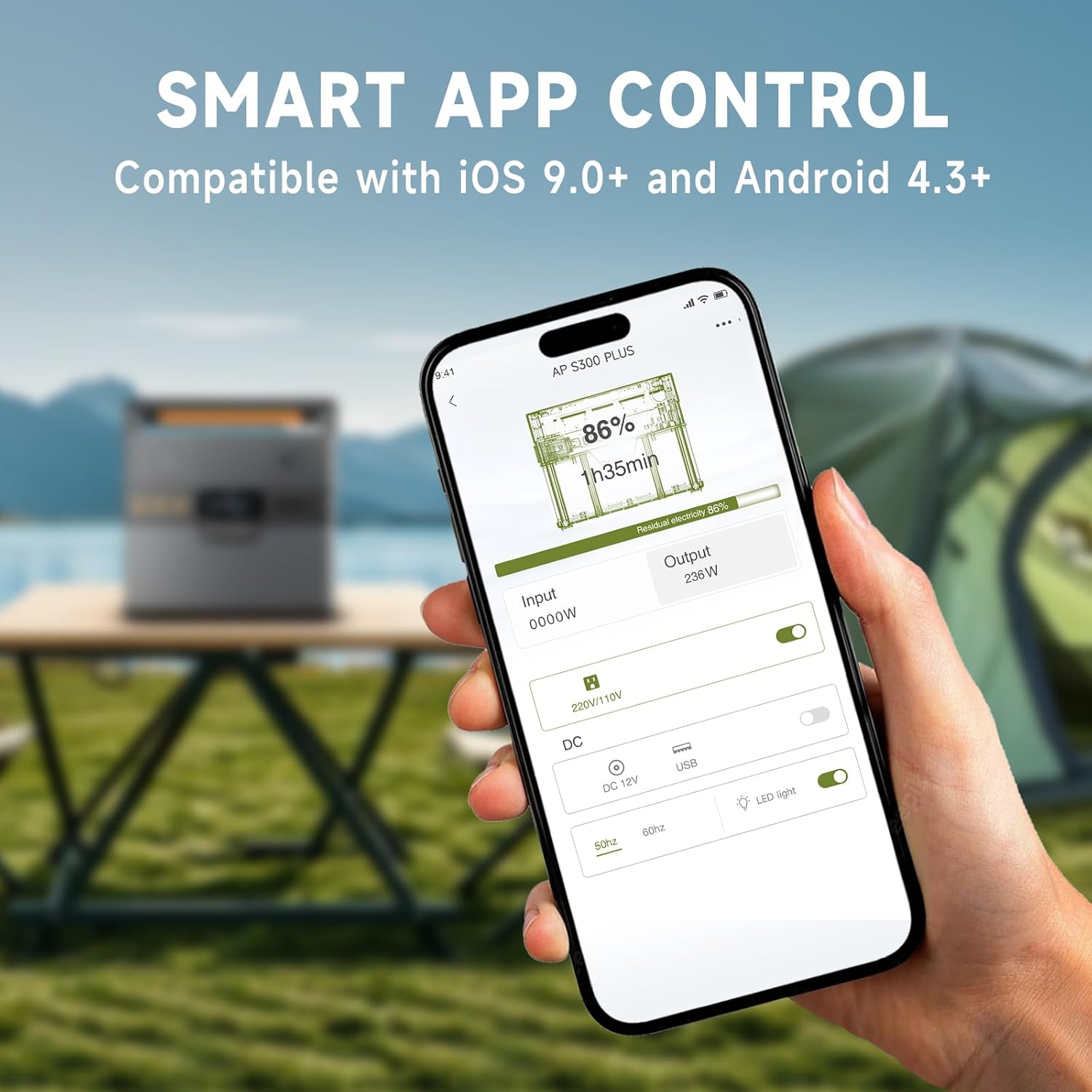
Image: A hand holding a smartphone showing the ALLPOWERS app interface, demonstrating remote control capabilities for the power station.
5. Wartung
Lagerung:
- Lagern Sie das Kraftwerk an einem kühlen, trockenen Ort, fern von direkter Sonneneinstrahlung und korrosiven Materialien.
- Laden Sie das Gerät bei längerer Lagerung alle 50–80 Monate auf 3–6 % auf, um die Batterieleistung zu erhalten.
- Avoid storing in extreme temperatures (below -10°C / 14°F or above 45°C / 113°F).
Reinigung:
- Wischen Sie die Außenseite mit einem weichen, trockenen Tuch ab.
- Keine Scheuer- oder Lösungsmittel verwenden.
- Stellen Sie sicher, dass alle Anschlüsse frei von Staub und Schmutz sind.
6. Fehlerbehebung
| Problem | Mögliche Ursache | Lösung |
|---|---|---|
| Gerät lässt sich nicht einschalten. | Batterie ist leer. | Charge the power station using the AC adapter. |
| Wechselstromausgang funktioniert nicht. | AC output not activated; device exceeds 300W. | Press the AC Power Button. Reduce load or use a lower-power device. |
| USB/DC-Ausgang funktioniert nicht. | DC/USB output not activated. | Press the DC/USB Power Button. |
| Kabelloses Laden funktioniert nicht. | Device not Qi-compatible; device not centered; DC/USB output not activated. | Ensure device is Qi-compatible and correctly placed. Activate DC/USB output. |
| Langsames Laden über Solarenergie. | Insufficient sunlight; panel not correctly angled; panel not compatible. | Adjust panel angle for direct sunlight. Ensure panel is compatible and clean. |
| Probleme mit der Bluetooth-Verbindung. | Bluetooth off on phone; app not updated; unit too far. | Ensure phone Bluetooth is on. Update app. Move phone closer to unit (within 10m). |
If the problem persists, please contact ALLPOWERS customer support.
7. Spezifikationen
| Besonderheit | Detail |
|---|---|
| Modellname | AP-SS-005 |
| Batteriekapazität | 288 Wh / 78000 mAh |
| AC-Ausgang | 300 W (Reine Sinuswelle, Spitzenleistung 600 W) |
| USB-A-Ausgang | 2 x 18W |
| USB-C-Ausgang | 1 x 100W (QC3.0) |
| 12V Car Charger Output | 1 x 12V/10A |
| Kabelloses Laden | 1 x 5V/1A |
| AC-Ladeeingang | Max. 200W |
| Solarladeeingang | Max. 100W (MPPT) |
| Technische Daten | 8.1"L x 6.5"B x 4.3"H (20.5 cm x 16.5 cm x 10.9 cm) |
| Artikelgewicht | 8.8 kg |
| Akku-Typ | Lithium Polymer |
8. Garantie und Support
Garantieinformationen:
The ALLPOWERS S300LUS Portable Power Station comes with a 10-year ALLPOWERS warranty. This warranty covers manufacturing defects and workmanship under normal use. Please retain your proof of purchase for warranty claims.
Die Garantie deckt keine Schäden ab, die durch Missbrauch, Unfälle, unbefugte Änderungen oder Naturkatastrophen verursacht wurden.
Kundendienst:
For technical assistance, warranty claims, or any questions regarding your ALLPOWERS S300LUS, please contact ALLPOWERS customer support through their official webWebsite oder die Kontaktinformationen, die Sie bei Ihrem Kauf erhalten haben.
Besuchen Sie auch die ALLPOWERS Store on Amazon Für weitere Produktinformationen und Support-Ressourcen.