
1. Einleitung
The KKB G110S 4G LTE Cellular Security Camera is a solar-powered, wireless outdoor surveillance solution designed for locations without Wi-Fi access. This camera offers 2K resolution, color night vision, PIR motion detection, and a 355° pan and 90° tilt (PTZ) view, ensuring comprehensive monitoring and two-way communication capabilities. It comes with a built-in SIM card and a 64GB SD card for immediate use.

Image 1.1: The KKB G110S 4G LTE Cellular Security Camera with its solar panel, designed for outdoor use.
2. Lieferumfang
Bitte überprüfen Sie nach Erhalt den Paketinhalt, um sicherzustellen, dass alle Artikel vorhanden sind:
- KKB 4G LTE Security Camera
- Solarpanel
- 64-GB-SD-Karte (vorinstalliert)
- Bedienungsanleitung
- Installation Accessories (screws, wall plugs, mounting bracket)
3. Hauptmerkmale
- 4G LTE Network & No Wi-Fi: This camera operates on a 4G LTE cellular network, making it suitable for remote areas without Wi-Fi. It does not support Wi-Fi connectivity.
- Built-in SIM Card & Data Plans: The camera includes a non-replaceable SIM card compatible with Verizon, T-Mobile, and AT&T 4G networks. It comes with 300MB of prepaid data. Additional data plans are available for purchase within the mobile application.
- Solarbetrieben und kabellos: Equipped with a 10400 mAh battery and a 5W high-conversion rate solar panel, the camera provides continuous power, reducing the need for manual recharging.
- PIR Detection & 2K Color Night Vision: A sensitive PIR sensor accurately detects human and animal movement, sending instant notifications to your mobile app. Enjoy clear 2K image quality and colorful night vision, with infrared night vision for low-light conditions.
- 2-Way Audio & 360° View (PTZ): Engage in real-time conversations with visitors using the two-way audio feature. The camera offers a 355° pan and 90° tilt view, allowing you to remotely adjust the viewing angle for comprehensive coverage via the app.
- IP66 Wasserdicht: The camera is rated IP66 waterproof, ensuring reliable operation in various weather conditions, including rain, snow, and extreme temperatures.
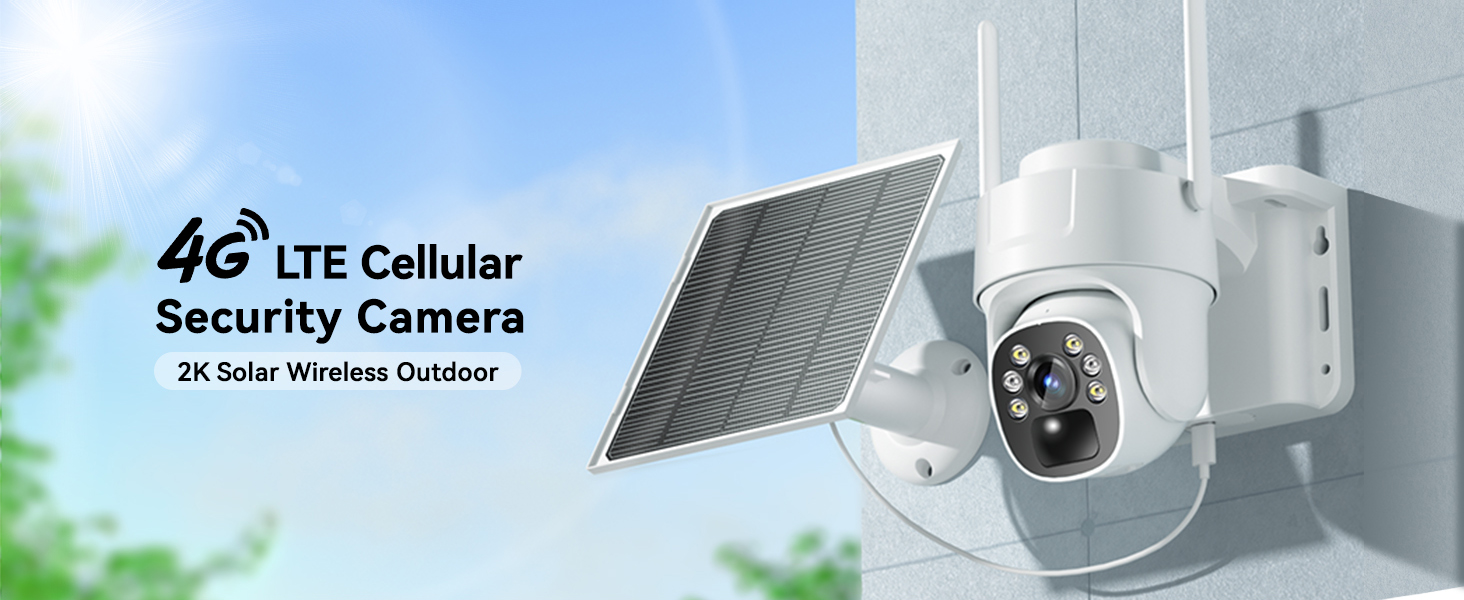
Image 3.1: The camera connects via 4G LTE, eliminating the need for Wi-Fi.

Image 3.2: The camera features a built-in SIM card for cellular connectivity and offers various data plan options.

Image 3.3: The solar panel continuously charges the camera's internal battery, ensuring uninterrupted operation.

Image 3.4: The camera provides both vivid color night vision and standard infrared night vision for optimal visibility in darkness.

Image 3.5: The two-way audio function allows for remote communication through the camera.

Image 3.6: The IP66 waterproof design ensures the camera functions reliably in all weather conditions.
4. Installationsanleitung
4.1 Erstaufladung
Before first use, fully charge the camera's internal battery using a standard USB charger (not included) for optimal performance, especially if solar charging conditions are initially poor.
4.2 App-Download und Kontoerstellung
- Scan the QR code provided in the Quick Start Guide or search for the "iCam365" app in your smartphone's app store (iOS or Android).
- Laden Sie die App herunter und installieren Sie sie.
- Öffnen Sie die App und folgen Sie den Anweisungen auf dem Bildschirm, um ein neues Konto zu erstellen und sich anzumelden.
4.3 Camera Activation and Pairing
- Stellen Sie sicher, dass die Kamera eingeschaltet ist.
- In the iCam365 app, tap the "+" icon to add a new device.
- Select the option for a 4G cellular camera.
- Follow the app's instructions to scan the QR code located on the camera or its packaging.
- The app will guide you through the remaining pairing steps. Once connected, you will see the live feed from your camera.
4.4 SIM-Karte und SD-Karte
The camera comes with a built-in, non-replaceable SIM card and a pre-installed 64GB Micro SD card. The SD card is used for local storage of recordings. Ensure the SD card is properly seated if you encounter storage issues.

Image 4.1: The camera includes a pre-installed 64GB Micro SD card for local video storage.
4.5 Montage der Kamera und des Solarpanels
Use the provided installation accessories to securely mount the camera and solar panel. Choose a location where the solar panel receives direct sunlight for most of the day to maximize charging efficiency. The camera can be wall-mounted.

Image 4.2: The camera and solar panel are designed for easy wall mounting.
5. Bedienungsanleitung
5.1 Live View und PTZ-Steuerung
Open the iCam365 app to access the live video feed from your camera. Use the on-screen controls to pan (355°) and tilt (90°) the camera lens to adjust the viewing angle as needed. The app also supports digital zoom.

Image 5.1: Control the camera's pan, tilt, and zoom functions directly from the mobile app.
5.2 Zwei-Wege-Audio
Um die Zwei-Wege-Audiofunktion zu nutzen, tippen Sie auf das Mikrofonsymbol im Live-Chat. view interface of the app. You can then speak through your phone, and your voice will be transmitted through the camera's speaker. Release the icon to listen.
5.3 Bewegungserkennung und Benachrichtigungen
The camera's PIR motion sensor detects movement and sends instant push notifications to your smartphone. You can customize motion detection sensitivity and alert settings within the iCam365 app.

Image 5.2: Receive immediate alerts on your phone when motion is detected by the camera.
5.4 Nachtsichtmodi
The camera automatically switches between day and night vision modes. It offers both full-color night vision (when sufficient ambient light or spotlight is available) and infrared night vision for clear black-and-white images in complete darkness.
5.5 Videowiedergabe und -speicherung
Recorded videos are stored on the pre-installed 64GB SD card. You can access and review these recordings through the iCam365 app. Cloud storage options may also be available via subscription within the app.
6. Wartung
- Reinigung von Solarmodulen: Reinigen Sie die Oberfläche des Solarmoduls regelmäßig mit einem weichen, fusselfreien Tuch.amp Stoff, um maximale Sonnenlichtabsorption und Ladeeffizienz zu gewährleisten.
- Linsenreinigung: Gently wipe the camera lens with a microfiber cloth to remove dust or smudges that may affect image clarity.
- Firmware-Updates: Check the iCam365 app periodically for available firmware updates to ensure your camera has the latest features and security enhancements.
- Batteriezustand: While solar-powered, extreme weather or prolonged periods of low sunlight may impact battery levels. Monitor battery status via the app and manually charge if necessary.
7. Fehlerbehebung
7.1 Camera Not Connecting to 4G Network
- Ensure the camera is in an area with good 4G cellular coverage.
- Check the data plan status in the iCam365 app. You may need to renew or purchase a new data plan.
- Starten Sie die Kamera neu, indem Sie sie aus- und wieder einschalten.
7.2 Schlechte Bildqualität
- Clean the camera lens to remove any dirt or obstructions.
- Ensure there are no physical obstructions in the camera's field of view.
- Check the network signal strength in the app; a weak 4G signal can affect streaming quality.
7.3 Akku wird nicht geladen
- Vergewissern Sie sich, dass das Solarpanel so ausgerichtet ist, dass es täglich mehrere Stunden direktes Sonnenlicht empfängt.
- Reinigen Sie die Oberfläche des Solarpanels.
- Ensure the connection cable between the solar panel and the camera is secure.
7.4 Keine Benachrichtigungen durch Bewegungserkennung empfangen
- Check the motion detection settings in the iCam365 app to ensure they are enabled and configured correctly.
- Verify your phone's notification settings for the iCam365 app are enabled.
- Ensure the camera has sufficient battery power and 4G data.
8. Spezifikationen
| Besonderheit | Detail |
|---|---|
| Modellname | G110S |
| Konnektivitätstechnologie | Drahtlos (4G LTE Mobilfunk) |
| Auflösung der Videoaufnahme | 2K (3 MP Photo Sensor Resolution) |
| Viewing-Winkel | 355° Schwenken, 90° Neigen |
| Nachtsicht | Color Night Vision, Infrared Night Vision (50 Feet Range) |
| Audio | 2-Wege-Audio |
| Bewegungserkennung | PIR Sensor (Motion Only Alert Type) |
| Stromquelle | Solar Powered (5W), 10400 mAh Battery |
| Lagerung | 64-GB-Micro-SD-Karte (im Lieferumfang enthalten), unterstützt bis zu 128 GB |
| Wasserbeständigkeit | IP66 Wasserdicht |
| Kompatible Geräte | Smartphone (Android, iOS) |
| Installationstyp | Wandmontage, freistehend |
| Artikelabmessungen | 7.87 x 7.87 x 5.51 Zoll |
| Material | Acrylnitril-Butadien-Styrol (ABS) |
9. Garantie und Support
KKB is committed to providing reliable home security solutions. For any technical assistance or inquiries, please utilize our support channels:
- Technischer Support rund um die Uhr: Access professional technical support at any time.
- Multi-channel Service: Contact support via the iCam365 app's online contact feature or through email.
Please refer to the product packaging or the official KKB webSpezifische Garantiedetails und -bedingungen finden Sie auf der Website.
10. Produktvideo
Video 10.1: Ein offizielles Produktvideoasing the KKB 4G LTE Cellular Solar Security Camera's features and applications, including its wireless operation, solar charging, and smart detection capabilities.