
Einführung
This user manual provides detailed instructions for the FJFJOPK 4K Video Camera Camcorder, Model HDV-3051L. Please read this manual thoroughly before operating the device to ensure proper usage and to maximize its performance. Keep this manual for future reference.

Figure 1: FJFJOPK 4K Video Camera Camcorder with included accessories like external microphone, handheld stabilizer, and remote control.
Packungsinhalt
Bitte prüfen Sie, ob alle unten aufgeführten Artikel in Ihrem Paket enthalten sind. Sollten Artikel fehlen oder beschädigt sein, kontaktieren Sie bitte unseren Kundenservice.
- 4K-Videokamera
- Hand Stabilizer
- Fernbedienung
- Mikrofon
- Gegenlichtblende
- 32 GB SD-Karte
- 2 x Wiederaufladbare Batterien
- Ladekabel
- Bedienungsanleitung
- Kamera Tasche
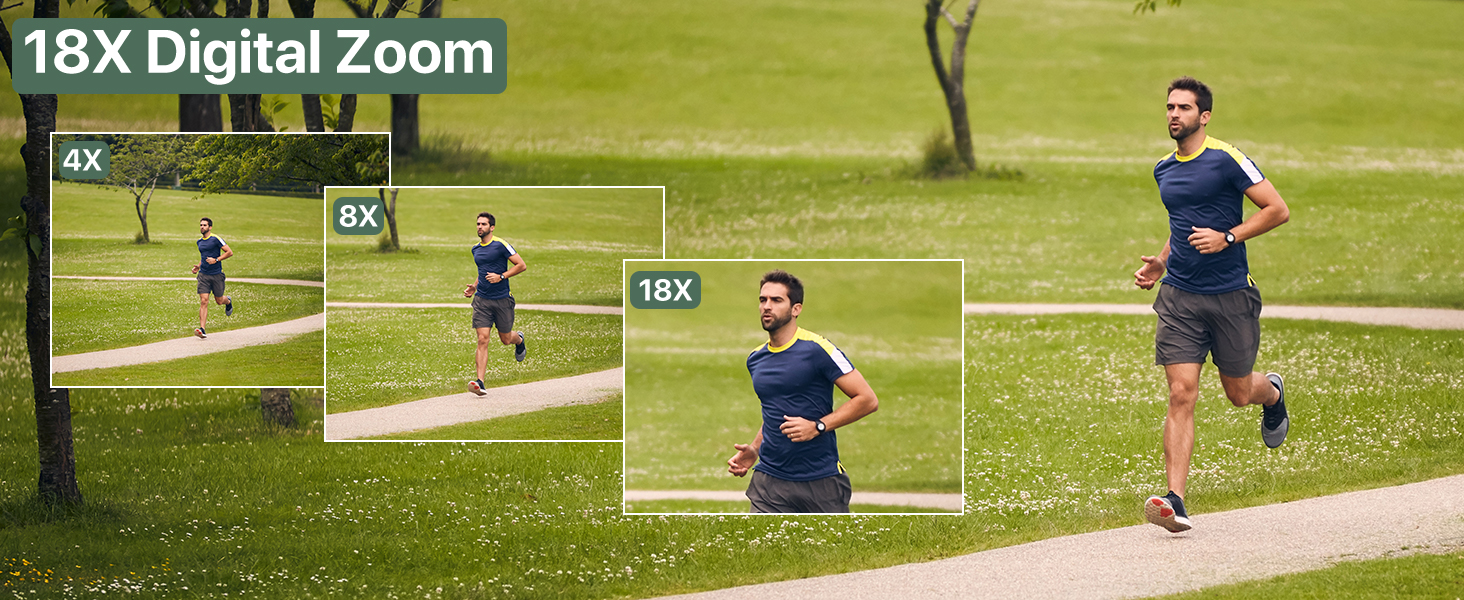
Figure 2: Visual representation of the complete packing list for the camcorder.
Installationshandbuch
1. Einlegen der Batterie
The camcorder uses two long-lasting rechargeable batteries. Ensure batteries are fully charged before first use.
- Suchen Sie das Batteriefach am Camcorder.
- Öffnen Sie die Abdeckung des Batteriefachs.
- Insert the charged batteries according to the polarity indicators inside the compartment.
- Schließen Sie den Batteriefachdeckel fest.

Figure 3: Proper insertion of batteries into the camcorder.
2. Installation der SD-Karte
A 32GB SD card is included for immediate use. The camcorder supports SD cards for storing your videos and photos.
- Suchen Sie den SD-Kartensteckplatz, der sich normalerweise in der Nähe des Batteriefachs befindet.
- Setzen Sie die SD-Karte so ein, dass die Metallkontakte nach unten zeigen, bis sie einrastet.
- Zum Herausnehmen die Karte vorsichtig drücken, bis sie herausspringt.
3. Anbringen von Zubehör
Enhance your recording experience by attaching the included accessories.
- External Stereo Microphone: Attach the microphone to the hot shoe mount on top of the camcorder. Connect the microphone cable to the designated audio input port. This ensures clear audio capture.
- Handstabilisator: The anti-shake handheld stabilizer can be attached to the bottom tripod mount of the camcorder. This accessory helps in achieving smooth and steady shots, especially during movement.
- Gegenlichtblende: Screw the lens hood onto the front of the camcorder's lens. The lens hood is designed to reduce glare and lens flare, improving image quality in bright outdoor conditions.

Figure 4: Handheld stabilizer attached for improved stability.

Figure 5: External microphone for enhanced audio recording.

Figure 6: The lens hood reduces glare for clearer outdoor shots.
Bedienungsanleitung
1. Ein-/Ausschalten
Zum Einschalten des Camcorders den LCD-Bildschirm öffnen. Zum Ausschalten den LCD-Bildschirm schließen oder die Ein-/Aus-Taste gedrückt halten.
2. Verwendung des 3.0-Zoll-Touchscreens
The camcorder features a 3.0-inch IPS touch screen that is 270° rotatable, allowing for versatile viewing angles, including selfie-angle recording.
- Navigation: Tap on-screen icons to navigate menus and settings.
- Drehung: Gently rotate the screen to your desired angle for comfortable viewing or self-recording.

Figure 7: The 270° rotatable touch screen provides flexible viewing and recording options.
3. Videos aufnehmen und Fotos machen
The camcorder supports 4K Ultra HD video recording and 64MP still image capture.
- Videoaufnahme: Press the Record button to start and stop video recording. The camcorder captures every detail with stunning clarity.
- Fotoaufnahme: Switch to photo mode and press the Shutter button to take 64MP high-definition photos.
- 18-facher Digitalzoom: Use the zoom controls to magnify your subject up to 18 times. This feature allows for clear footage even from a distance.
- IR Nachtsicht: Activate IR Night Vision mode for clear recording in low-light conditions or complete darkness.

Figure 8: Experience superior image and video quality with 4K UHD and 64MP resolution.

Figure 9: The 18X digital zoom allows for detailed capture of distant subjects.

Figure 10: IR Night Vision provides clear visibility in low-light or dark environments.
4. Erweiterte Funktionen
- Anti-Shake: The built-in anti-shake function, complemented by the handheld stabilizer, ensures smooth and stable footagselbst bei dynamischen Bewegungen.
- Zeitraffer Fotografie: Capture stunning time-lapse videos by setting the desired interval in the camera settings.
- Gesichtserkennung: The camcorder can detect faces in the frame, optimizing focus and exposure for portraits and group shots.
- One-Click Live Streaming: Schließen Sie den Camcorder über USB an Ihren Computer an, um ihn als solchen zu verwenden. webKamera für Live-Streaming.
- Aufnahme während des Ladevorgangs: The camcorder supports recording while connected to a power source, ideal for extended shooting sessions.
- Drahtlose Fernbedienung: Use the included remote control for convenient wireless operation, perfect for self-recording or group shots.

Figure 11: Explore various shooting modes including anti-shake, slow motion, and time-lapse.

Figure 12: Continuous recording is possible while the camcorder is charging.
Wartung
- Reinigung: Reinigen Sie das Kameragehäuse mit einem weichen, trockenen Tuch. Verwenden Sie für das Objektiv ein spezielles Objektivreinigungstuch und eine entsprechende Reinigungslösung. Vermeiden Sie scheuernde Materialien.
- Lagerung: Bewahren Sie den Camcorder an einem kühlen, trockenen Ort, geschützt vor direkter Sonneneinstrahlung und extremen Temperaturen, auf. Entfernen Sie die Batterien, wenn Sie den Camcorder längere Zeit lagern.
- Batteriepflege: Fully charge batteries before storage and recharge them every few months to maintain their lifespan.
Fehlerbehebung
Sollten Sie Probleme mit Ihrem Camcorder haben, beachten Sie bitte die folgenden gängigen Lösungsansätze:
| Problem | Mögliche Ursache | Lösung |
|---|---|---|
| Die Kamera lässt sich nicht einschalten. | Niedriger Batteriestand oder entladen; Batterie falsch eingelegt. | Laden Sie die Batterien vollständig auf. Stellen Sie sicher, dass die Batterien richtig eingelegt sind. |
| Schlechte Bild-/Videoqualität. | Verschmutzte Linse; unzureichende Beleuchtung; falsche Einstellungen. | Clean the lens. Use IR Night Vision in low light. Adjust exposure settings. |
| SD-Kartenfehler. | SD card full; incorrectly inserted; incompatible card. | Löschen files or use a new SD card. Reinsert card correctly. Ensure card is compatible (up to 32GB). |
| Keine Audioaufnahme. | External microphone not connected properly or turned off. | Check microphone connection and ensure it is powered on if applicable. |
Technische Daten
| Besonderheit | Detail |
|---|---|
| Marke | FJFJOPK |
| Modellnummer | HDV-3051L |
| Auflösung der Videoaufnahme | 4K |
| Fotosensor-Technologie | CMOS |
| Maximale Brennweite | 64 Millimeter |
| Maximale Blendenöffnung | 7.36 f |
| Flash-Speichertyp | SD (32 GB enthalten) |
| Videoaufnahmeformat | AVI |
| Bildschirmgröße | 3 Inches (270° Rotatable IPS Touch Screen) |
| Besondere Merkmale | Anti-Shake, Image Stabilization, IR Night Vision, 18X Digital Zoom, External Microphone Support, Webcam Function, Time-Lapse, Face Detection, Recording While Charging, Wireless Remote Control |
| Artikelgewicht | 2.05 Pfund |
| Verpackungsabmessungen | 7.48 x 5.87 x 4.21 Zoll |
Garantie und Support
For warranty information and customer support, please refer to the warranty card included in your package or contact FJFJOPK customer service directly. Optional protection plans are available for purchase to extend coverage beyond the standard manufacturer's warranty.
- 2-Jahres-Schutzplan: Verfügbar für erweiterte Abdeckung.
- 3-Jahres-Schutzplan: Verfügbar für erweiterte Abdeckung.
- Rundumschutz: Monatlicher Plan, der berechtigte vergangene und zukünftige Käufe abdeckt.