
1. Sicherheitshinweise
Bitte lesen und verstehen Sie alle Anweisungen, bevor Sie dieses Produkt installieren oder in Betrieb nehmen. Die Nichtbeachtung dieser Anweisungen kann zu Stromschlägen, Bränden oder anderen Gefahren führen, die Sachschäden oder Personenschäden verursachen können.
- Vor Installation oder Wartung muss immer die Stromzufuhr am Sicherungsautomaten unterbrochen werden.
- Wenn Sie hinsichtlich des Installationsvorgangs unsicher sind, wenden Sie sich an einen qualifizierten Elektriker.
- Stellen Sie sicher, dass alle elektrischen Anschlüsse sicher sind und den örtlichen Vorschriften und Verordnungen entsprechen.
- Do not install on a dimmer switch.
- This fixture is rated for outdoor use and is water resistant.
2. Packungsinhalt
Vergewissern Sie sich vor Beginn der Installation, dass alle Komponenten vorhanden sind.
- LED Outdoor Flood Wall Light (1 unit)
- Montagezubehör (Schrauben, Drahtverbinder)
- Dichtung
- Bedienungsanleitung

Figure 2.1: Product components and adjustable parts.
3. Produktmerkmale
The Maxxima LED Outdoor Flood Wall Light is designed for reliable outdoor security and illumination.
- Leistungsstarke Beleuchtung: Delivers 950 lumens of 3000K warm white light with an energy-efficient 13W design.
- Erweiterte Bewegungserkennung: PIR motion sensor with up to a 70 ft range.
- Einstellbare Timer: Choose from 1, 5, or 10 minutes for how long the light stays on after motion detection.
- Dämmerungssensor: Photocell sensor automatically operates at night and conserves energy during the day.
- Verstellbarer Kopf: Easily direct the light beam with a 180° vertical tilt.
- Adjustable Arm and Sensor: 90° vertical arm tilt and 180° vertical tilt & horizontal swivel for the motion sensor, with 360° sensor rotation.
- Langlebige Konstruktion: Built with aluminum, rated for 50,000 lifetime hours, ETL listed.
Video 3.1: Endeview of Maxxima LED Outdoor Flood Light features and adjustability.
4. Installation
4.1 Montage des Geräts
- Schalten Sie den Leistungsschalter aus, bevor Sie mit der Installation beginnen.
- Remove the existing fixture (if any) and disconnect wiring.
- Attach the mounting plate to the junction box using the provided screws. Ensure the gasket is properly seated between the fixture and the mounting surface for a weather-tight seal.
- Führen Sie die elektrischen Drähte von der Anschlussdose durch das mittlere Loch der Montageplatte.
4.2 Kabelverbindungen
Schließen Sie die Kabel wie folgt an:
- Verbinden Sie Schwarz Kabel von der Leuchte zum Schwarz (Live/Hot) wire from the junction box.
- Verbinden Sie Weiß Kabel von der Leuchte zum Weiß (Neutralleiter) von der Anschlussdose.
- Verbinden Sie Grün (Ground) wire from the fixture to the Grün or bare copper (Ground) wire from the junction box.
- Sichern Sie alle Verbindungen mit den mitgelieferten Drahtverbindern.

Figure 4.1: Wiring connections for the flood light.
4.3 Endmontage
- Stecken Sie alle Drähte vorsichtig in die Anschlussdose.
- Richten Sie die Halterung an der Montageplatte aus und befestigen Sie sie mit den restlichen Schrauben.
- Stellen Sie die Stromversorgung am Leistungsschalter wieder her.
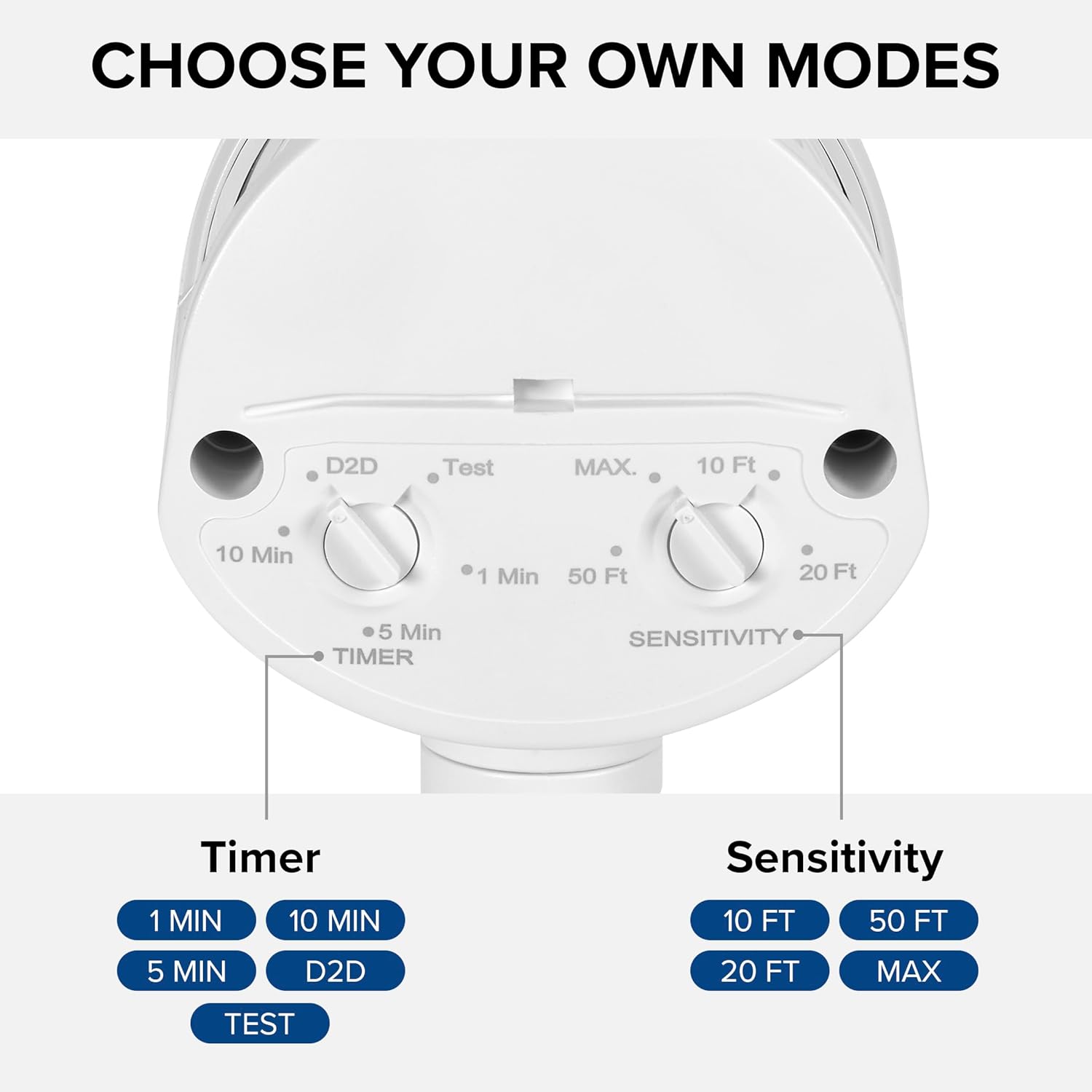
Figure 4.2: Installed flood light on an exterior wall.
5. Einrichtung und Anpassungen
The flood light features adjustable settings for the motion sensor and timer.
5.1 Adjusting the Sensor and Timer
The sensor unit has two adjustable dials located on its underside:
- TIMER Dial: Controls how long the light stays on after motion is detected. Options include 1 minute, 5 minutes, 10 minutes, or Dusk-to-Dawn (D2D).
- SENSITIVITY Dial: Adjusts the motion detection range. Options include 10 ft, 20 ft, 50 ft, or MAX (up to 70 ft).
To adjust, gently rotate the dials to your desired setting. The 'Test' mode on the TIMER dial allows for quick testing of motion detection during daylight hours.
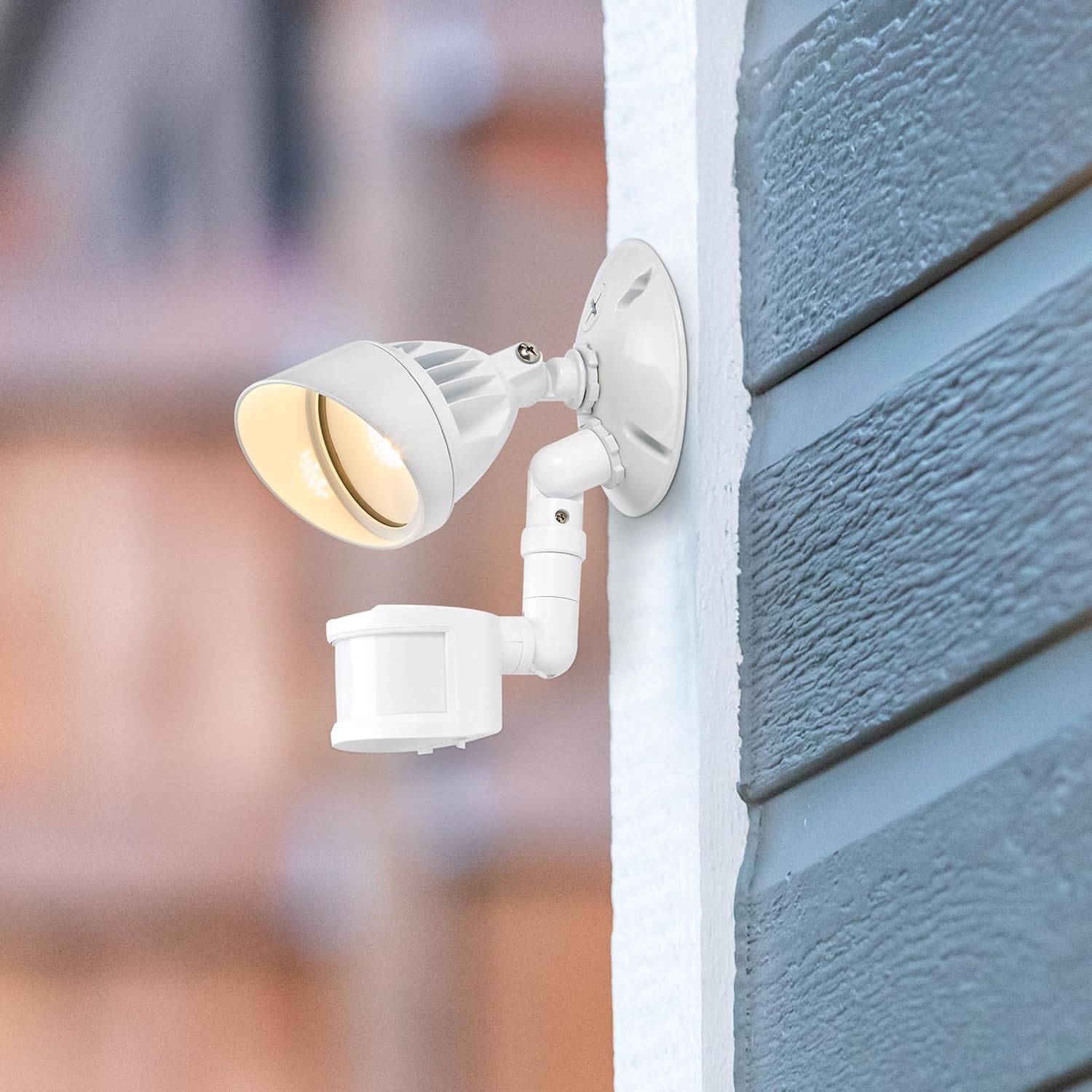
Figure 5.1: Timer and Sensitivity adjustment dials.
5.2 Adjusting Light Head and Sensor Position
The light head and motion sensor can be adjusted to cover specific areas:
- The light head can be tilted up to 180° vertically.
- The arm connecting the sensor to the base can tilt 90° vertically.
- The motion sensor itself can tilt 180° vertically and swivel 180° horizontally, with a full 360° rotation capability.

Figure 5.2: Adjustable light head and motion sensor.
6. Bedienungsanleitung
Once installed and configured, the Maxxima LED Outdoor Flood Wall Light operates automatically based on its sensor settings.
- Dusk-to-Dawn Mode (D2D): When the TIMER dial is set to D2D, the light will automatically turn on at dusk and remain on until dawn, regardless of motion.
- Bewegungssensor-Modus: When the TIMER dial is set to 1, 5, or 10 minutes, the light will activate when motion is detected within the set sensitivity range and ambient light conditions (typically at night). The light will remain on for the selected duration after the last motion is detected, then turn off.
- Testmodus: Setting the TIMER dial to 'Test' allows you to verify motion detection during daylight. The light will turn on for a few seconds when motion is detected, then turn off. This mode is useful for positioning the sensor.
7. Wartung
This LED flood light requires minimal maintenance.
- Reinigung: Wischen Sie die Armatur regelmäßig mit einem weichen, fusselfreien Tuch ab.amp Mit einem Tuch Schmutz und Ablagerungen entfernen. Keine Scheuermittel oder Lösungsmittel verwenden.
- Inspektion: Regularly check for any loose connections or damage to the wiring or housing.
- Die integrierte LED-Lichtquelle ist nicht vom Benutzer austauschbar.
8. Fehlerbehebung
If you experience issues with your flood light, refer to the following table for common problems and solutions.
| Problem | Mögliche Ursache | Lösung |
|---|---|---|
| Licht geht nicht an. | Keine Stromversorgung; falsche Verkabelung; falsche Sensoreinstellungen. | Check circuit breaker. Verify wiring connections. Adjust sensor to 'Test' mode to confirm functionality. Ensure ambient light is low enough for operation (if not in D2D). |
| Licht bleibt dauerhaft an. | Sensor in D2D mode; constant motion detected; faulty sensor. | Check if TIMER dial is set to D2D. Ensure no objects are causing continuous motion detection. If problem persists, contact support. |
| Das Licht schaltet sich entweder zu oft oder zu selten ein. | Sensitivity setting; sensor obstruction. | Adjust SENSITIVITY dial. Clear any obstructions from the sensor's field of view. |
| Licht flackert. | Loose wiring; power fluctuations. | Turn off power and check all wiring connections. Consult an electrician if power fluctuations are suspected. |
9. Spezifikationen
| Attribut | Wert |
|---|---|
| Modellname | MEL-S1013100W |
| Marke | Maxima |
| Lichtleistung | 950 Lumen |
| Wastage | 13 Watt |
| Farbtemperatur | 3000 Kelvin (Warmweiß) |
| Bandtage | 120 Volt |
| Material | Aluminium |
| Ausführung | Lackiert |
| Reichweite des Bewegungssensors | Bis zu 70 Fuß |
| Strahlaufweitung | 220° |
| Lebensdauerbewertung | 50,000 Stunden |
| Zertifizierung | ETL-gelistet |
| Technische Daten | 4.4 Zoll L x 6 Zoll B x 6 Zoll H |
| Artikelgewicht | 11.2 Unzen (0.7 Pfund) |
10. Gewährleistung
This Maxxima LED Outdoor Flood Wall Light is backed by a 3 Jahr Garantie Diese Garantie gilt ab Kaufdatum und deckt Material- und Verarbeitungsfehler bei normalem Gebrauch ab. Bitte bewahren Sie Ihren Kaufbeleg für Garantieansprüche auf.
11. Unterstützung
For technical assistance, troubleshooting, or warranty inquiries, please contact Maxxima customer service.
Visit the Maxxima Store: MaxximaLEDLighting on Amazon
Maxxima is an American company with USA-based offices and customer service.