
Einführung
The SONRU B110 is a versatile 2-in-1 Bluetooth 5.3 audio adapter designed to transform your audio experience. It functions as both a Bluetooth transmitter (TX mode) and a Bluetooth receiver (RX mode), allowing you to wirelessly stream audio to and from various devices. Enjoy high-fidelity sound, low latency, and extended battery life for home entertainment, travel, and on-the-go use.
Packungsinhalt
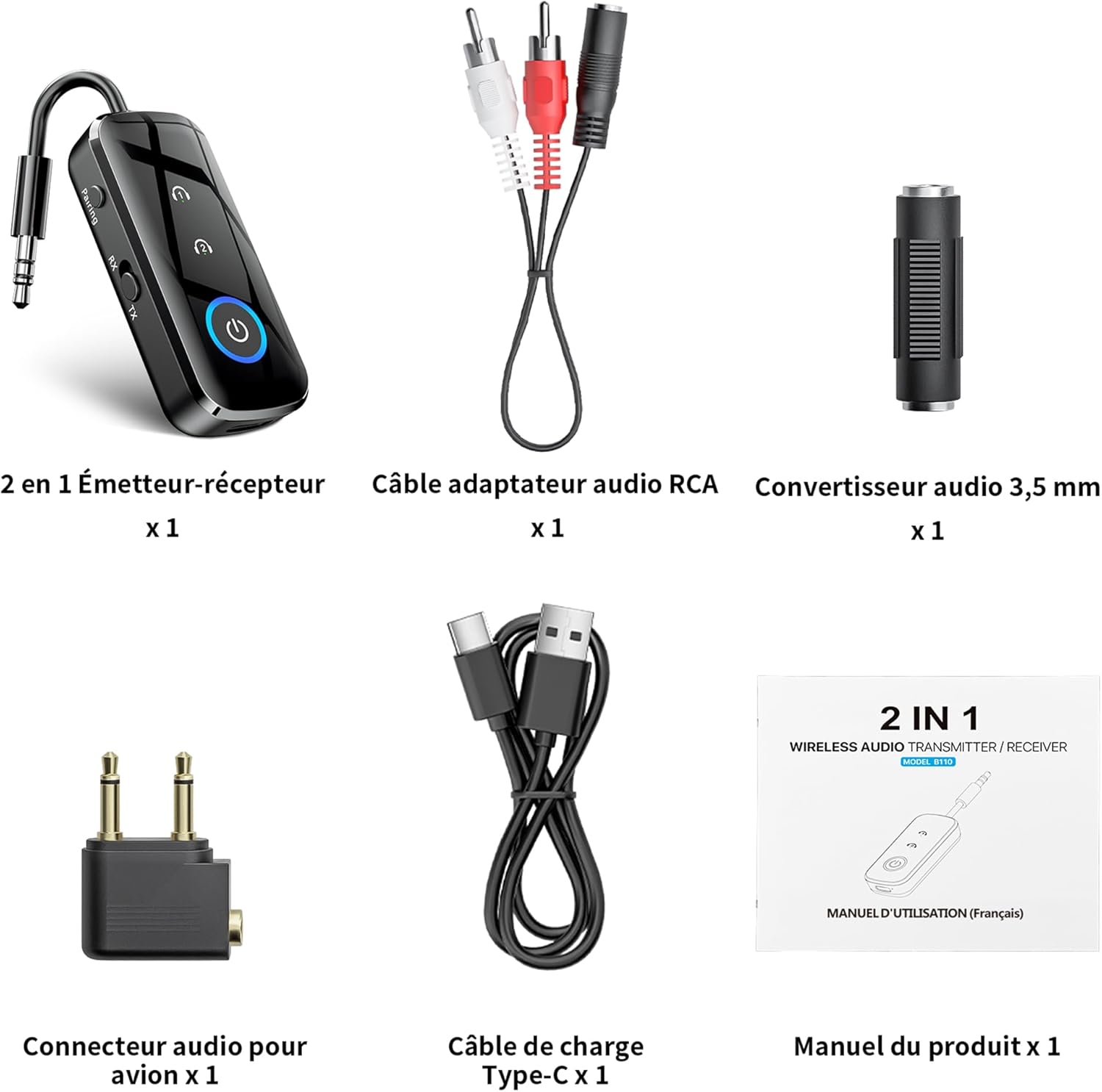
Abbildung 1: Packungsinhalt
- 1 x SONRU B110 2-in-1 Bluetooth Transmitter/Receiver
- 1 x RCA Audio Adapter Cable
- 1 x 3.5mm Audio Converter
- 1 x Airplane Audio Connector
- 1 x USB Type-C-Ladekabel
- 1 x Benutzerhandbuch
Produkt überview

Figure 2: Device Features and Controls
The SONRU B110 features a compact design with essential controls for easy operation. It includes a 3.5mm audio jack, a mode switch (RX/TX), power button, and volume/track control buttons. The device also has a USB-C charging port.
Technische Daten
| Besonderheit | Detail |
|---|---|
| Modell | B110 |
| Bluetooth-Version | 5.3 |
| Bluetooth-Protokolle | A2DP/AVRCP (Reception), A2DP (Emission) |
| Betriebsbereich | >10 meters (open space) |
| Audio-Schnittstelle | Universal 3.5 mm audio input/output |
| Batteriekapazität | 250 mAh |
| Ladezeit | Ungefähr 1.5 Stunden (USB-C) |
| Akkulaufzeit (TX-Modus) | Bis zu 15 Stunden |
| Akkulaufzeit (RX-Modus) | Bis zu 12 Stunden |
| Maße | 13.9 x 11.6 x 2 cm |
| Gewicht | 110 Gramm |
| Besondere Merkmale | Automatic connection memory, Dual connection, Fast Charging, Hands-Free Calls, Low Latency |
Aufstellen
1. Aufladen des Geräts
Before first use, fully charge your SONRU B110.
- Schließen Sie das mitgelieferte USB-Typ-C-Ladekabel an den Ladeanschluss des Geräts an.
- Verbinden Sie das andere Ende des Kabels mit einem USB-Netzteil (nicht im Lieferumfang enthalten) oder einem USB-Anschluss Ihres Computers.
- Die Ladeanzeigeleuchte zeigt den Ladestatus an. Eine vollständige Ladung dauert etwa 1.5 Stunden.
- Once fully charged, the device offers up to 15 hours of use in Transmitter (TX) mode and 12 hours in Receiver (RX) mode.

Abbildung 3: Ladevorgang und Akkulaufzeit
2. Pairing in Transmitter (TX) Mode
TX mode allows you to transmit audio from non-Bluetooth devices (e.g., TV, PC, airplane entertainment system) to Bluetooth headphones or speakers.
- Switch the device to TX mode.
- Connect the SONRU B110 to your audio source (e.g., TV, PC, MP3 player) using the 3.5mm audio cable. For airplane entertainment systems, use the provided airplane audio connector.
- Schalten Sie Ihre Bluetooth-Kopfhörer oder Ihren Lautsprecher ein und versetzen Sie sie in den Kopplungsmodus.
- The SONRU B110 will automatically search for and connect to nearby Bluetooth devices. The indicator light will confirm a successful connection.
- Doppelte Verbindung: The device supports connecting to two Bluetooth headphones/speakers simultaneously. After connecting the first device, put the second device into pairing mode. The B110 will automatically connect to it.

Figure 4: TX Mode in an Airplane

Figure 5: Dual Connection in TX Mode
3. Pairing in Receiver (RX) Mode
RX mode allows you to receive audio from your Bluetooth-enabled smartphone, tablet, or computer and play it through non-Bluetooth devices like car stereos, wired headphones, or home speaker systems.
- Switch the device to RX mode.
- Connect the SONRU B110 to your non-Bluetooth audio device (e.g., car stereo, wired speaker) using the 3.5mm audio cable.
- Enable Bluetooth on your smartphone, tablet, or computer and search for "SONRU B110" in the list of available devices.
- Select "SONRU B110" to pair. The indicator light will confirm a successful connection.
- Automatische Wiederverbindung: The device has an automatic connection memory function. After a successful connection, re-enabling Bluetooth on your phone will automatically connect to the B110.

Figure 6: RX Mode in a Car

Figure 7: TX and RX Mode Compatibility
Bedienungsanleitung
Ein-/Ausschalten
- Einschalten: Halten Sie den Ein-/Ausschalter gedrückt, bis die Kontrollleuchte aufleuchtet.
- Ausschalten: Halten Sie den Ein-/Ausschalter gedrückt, bis die Kontrollleuchte erlischt.
Moduswechsel
- Use the TX/RX switch on the side of the device to select the desired mode (Transmitter or Receiver).
Music Control (RX Mode)
- Abspielen/Pause: Drücken Sie einmal die Power-Taste.
- Nächster Titel: Die Taste "+" gedrückt halten.
- Vorheriges Lied: Drücken und halten Sie die Taste "-".
- Lautstärke erhöhen: Drücken Sie kurz die "+"-Taste.
- Lautstärke runter: Drücken Sie kurz die "-"-Taste.
Call Management (RX Mode)
The SONRU B110 features a built-in microphone for hands-free calls when in RX mode.
- Anruf annehmen/beenden: Drücken Sie einmal die Power-Taste.
- Anruf ablehnen: Halten Sie die Einschalttaste gedrückt.
- Wahlwiederholung letzte Nummer: Drücken Sie den Ein-/Ausschalter zweimal.
Wartung
- Halten Sie das Gerät trocken. Vermeiden Sie den Kontakt mit Feuchtigkeit oder Flüssigkeiten.
- Versuchen Sie nicht, das Gerät zu zerlegen oder zu modifizieren.
- Reinigen Sie das Gerät mit einem weichen, trockenen Tuch. Verwenden Sie keine scharfen Chemikalien oder Scheuermittel.
- Bewahren Sie das Gerät bei Nichtgebrauch an einem kühlen, trockenen Ort auf.
- Vermeiden Sie extreme Temperaturen.
Fehlerbehebung
- Das Gerät lässt sich nicht einschalten:
- Stellen Sie sicher, dass das Gerät vollständig aufgeladen ist. Schließen Sie es mit dem USB-C-Kabel an eine Stromquelle an und versuchen Sie es erneut.
- Kopplung mit einem Bluetooth-Gerät nicht möglich:
- Make sure the SONRU B110 is in the correct mode (TX for transmitting, RX for receiving).
- Ensure your target Bluetooth device (headphones, speaker, phone) is in pairing mode.
- Place the devices close to each other.
- Löschen Sie die vorherigen Kopplungsprotokolle auf beiden Geräten und versuchen Sie es erneut.
- Kein Ton oder schlechte Audioqualität:
- Check if the 3.5mm audio cable is securely connected to both the SONRU B110 and the audio source/receiver.
- Ensure the volume on both the SONRU B110 and the connected audio device is turned up.
- Vergewissern Sie sich, dass die richtige Eingangs-/Ausgangsquelle an Ihrem Audiosystem ausgewählt ist (z. B. AUX-Eingang am Autoradio).
- Reduce the distance between the B110 and the paired Bluetooth device, and remove any obstacles.
- Stellen Sie sicher, dass keine Störungen durch andere drahtlose Geräte auftreten.
- Dual connection not working:
- Ensure both target Bluetooth devices are in pairing mode when attempting to connect the second device.
- Device not compatible with musical instruments or hearing aids:
- As stated in the product features, this device is not designed for use with musical instruments or hearing aids.
Garantie und Support
SONRU products are designed for reliability and performance. For warranty information or technical support, please refer to the contact details provided on the product packaging or visit the official SONRU webBitte bewahren Sie Ihren Kaufbeleg für Garantieansprüche auf.