
1. Einleitung
Vielen Dank für Ihren Einkauf.asing the JVC XS-N3214PB Portable Bluetooth Party Speaker. This manual provides important information regarding the setup, operation, and maintenance of your speaker. Please read it thoroughly before using the product to ensure proper function and to maximize your listening experience. Keep this manual for future reference.
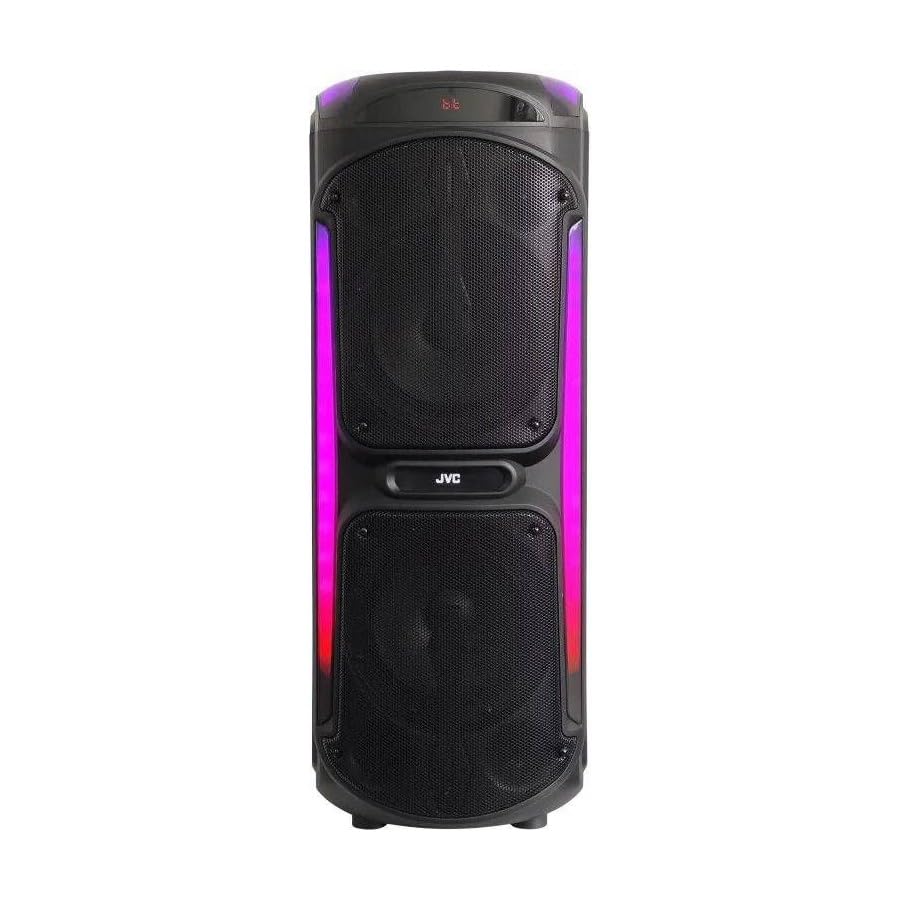
Image: The JVC XS-N3214PB Portable Bluetooth Party Speaker, shown with two microphones, highlighting its versatile connectivity options including Bluetooth, FM Radio, MP3 playback, AUX input, and USB input. The speaker features integrated LED lighting.
2. Sicherheitshinweise
Um einen sicheren Betrieb zu gewährleisten und Schäden zu vermeiden, beachten Sie bitte folgende Vorsichtsmaßnahmen:
- Der Lautsprecher darf weder Wasser, Feuchtigkeit noch extremen Temperaturen ausgesetzt werden.
- Versuchen Sie nicht, den Lautsprecher zu zerlegen oder zu verändern. Überlassen Sie alle Wartungsarbeiten qualifiziertem Fachpersonal.
- Halten Sie den Lautsprecher von Wärmequellen, direkter Sonneneinstrahlung und brennbaren Materialien fern.
- Use only the specified charging adapter.
- Stellen Sie keine schweren Gegenstände auf den Lautsprecher.
- Clean the speaker with a soft, dry cloth. Do not use liquid cleaners or aerosols.
- Sorgen Sie während des Gebrauchs für ausreichende Belüftung um den Lautsprecher herum.
3. Packungsinhalt
Überprüfen Sie, ob alle Artikel im Paket vorhanden sind:
- JVC XS-N3214PB Portable Bluetooth Party Speaker (1 unit)
- Power Adapter/Charging Cable (1 unit)
- Fernbedienung (1 Einheit)
- Benutzerhandbuch (dieses Dokument)
- (Optional: Microphone, if included with your specific purchase)
4. Produktüberschreitungview
4.1. Funktionen
- Powerful 800W Audio Output
- Bluetooth Wireless-Konnektivität
- Eingebauter wiederaufladbarer Akku für Mobilität
- Integrated LED Party Lights
- UKW-Radio-Tuner
- USB-Wiedergabe
- AUX-Eingang
- Mikrofoneingang für Karaoke
- Fernbedienungsbetrieb
- Deep Bass Performance
4.2. Bedienelemente und Anschlüsse
Familiarize yourself with the speaker's control panel and connection ports. (Refer to diagrams in the full printed manual for exact locations).
- Netzschalter: Schaltet den Lautsprecher ein/aus.
- Modus-Taste: Schaltet zwischen Bluetooth-, FM-, USB- und AUX-Modus um.
- Lautstärkeregelung: Stellt die Master-Lautstärke ein.
- Wiedergabe-/Pause-Taste: Steuert die Medienwiedergabe.
- Schaltflächen für vorherigen/nächsten Titel: Navigiert durch Musiktitel oder FM-Sender.
- LED-Lichttaste: Toggles LED lighting effects.
- Mikrofon-Lautstärke-/Echo-Regler: Adjusts microphone input and echo effect.
- USB-Anschluss: Zur Wiedergabe von USB-Laufwerken.
- AUX-Eingang (3.5 mm): Zum Anschluss externer Audiogeräte.
- Mikrofoneingang (6.35 mm): Zum Anschluss eines kabelgebundenen Mikrofons.
- DC-Eingangsanschluss: For connecting the power adapter to charge the speaker.
5. Einrichtung
5.1. Laden Sie den Lautsprecher auf
- Connect the power adapter to the DC IN port on the speaker.
- Stecken Sie das andere Ende des Netzteils in eine Steckdose.
- The charging indicator light will illuminate (color may vary) to show the speaker is charging.
- Allow approximately 4-6 hours for a full charge. The indicator light may change or turn off when fully charged.
- Disconnect the power adapter once charging is complete or when using the speaker on battery power.
5.2. Ein-/Ausschalten
- So schalten Sie das Gerät ein: Halten Sie den Ein-/Ausschalter einige Sekunden lang gedrückt, bis das Display aufleuchtet.
- So schalten Sie das Gerät aus: Press and hold the Power button again for a few seconds until the display turns off.
6. Bedienungsanleitung
6.1. Bluetooth-Kopplung
- Power on the speaker. It will automatically enter Bluetooth pairing mode, indicated by a flashing Bluetooth icon or voice prompt.
- Aktivieren Sie auf Ihrem Mobilgerät (Smartphone, Tablet usw.) Bluetooth und suchen Sie nach verfügbaren Geräten.
- Select "JVC XS-N3214PB" from the list of devices.
- Once paired, the speaker will confirm with an audible tone or a solid Bluetooth icon.
- Sie können nun Audio von Ihrem Gerät über den Lautsprecher abspielen.
6.2. UKW-Radio
- Press the Mode button until "FM" is displayed.
- Drücken Sie die Wiedergabe-/Pause-Taste, um automatisch verfügbare FM-Sender zu scannen und zu speichern.
- Verwenden Sie die Tasten „Vorheriger Titel“/„Nächster Titel“, um zwischen gespeicherten Sendern zu navigieren.
6.3. USB-Wiedergabe
- Stecken Sie einen USB-Stick (formatiert mit FAT32) mit MP3-Audiodateien ein. files in den USB-Port.
- The speaker will automatically switch to USB mode and begin playing the first track. If not, press the Mode button to select USB.
- Verwenden Sie die Wiedergabe-/Pause-Taste und die Tasten „Vorheriger/Nächster Titel“, um die Wiedergabe zu steuern.
6.4. AUX-Eingang
- Verbinden Sie ein Ende eines 3.5-mm-Audiokabels (nicht im Lieferumfang enthalten) mit dem AUX IN-Anschluss des Lautsprechers.
- Connect the other end of the cable to the audio output of your external device (e.g., MP3 player, laptop).
- Drücken Sie die Modus-Taste so lange, bis "AUX" angezeigt wird.
- Steuern Sie Wiedergabe und Lautstärke über Ihr externes Gerät.
6.5. Mikrofon- und Karaoke-Funktion
- Connect a wired microphone (not included) to the Microphone Input port.
- Adjust the microphone volume and echo effect using the dedicated controls on the speaker.
- Play music via Bluetooth, USB, or AUX, and sing along through the microphone.
6.6. LED-Partylichter
Press the LED Light button to cycle through different lighting modes or to turn the lights off.
6.7. Fernbedienung
The included remote control allows for convenient operation of the speaker from a distance. Functions include power on/off, mode selection, volume adjustment, track control, and LED light control. Ensure the remote control has working batteries and is pointed towards the speaker's sensor.
7. Wartung
- Reinigung: Wipe the speaker's exterior with a soft, dry, lint-free cloth. Do not use abrasive cleaners, waxes, or solvents.
- Lagerung: If storing the speaker for an extended period, ensure it is fully charged, then power it off. Store in a cool, dry place away from direct sunlight. Recharge the battery every few months to maintain its lifespan.
- Batteriepflege: To prolong battery life, avoid fully discharging the speaker frequently. Charge it before the battery is completely depleted.
8. Fehlerbehebung
| Problem | Mögliche Ursache | Lösung |
|---|---|---|
| Der Lautsprecher lässt sich nicht einschalten. | Batterie leer. Netzkabel nicht angeschlossen. | Charge the speaker. Ensure power cable is securely connected to both speaker and outlet. |
| Kein Ton. | Volume is too low. Incorrect mode selected. Device not paired (Bluetooth). AUX cable loose. | Increase volume on speaker and source device. Press Mode button to select correct input. Re-pair Bluetooth device. Check AUX cable connection. |
| Das Bluetooth-Gerät konnte nicht gekoppelt werden. | Lautsprecher nicht im Kopplungsmodus. Gerät zu weit entfernt. Störungen. | Ensure speaker is in Bluetooth mode and flashing. Move device closer to speaker. Turn off other Bluetooth devices. |
| USB-Wiedergabe funktioniert nicht. | USB drive not formatted correctly (FAT32). Unsupported file format. USB drive faulty. | Ensure USB drive is FAT32 and contains MP3 files. Versuchen Sie es mit einem anderen USB-Laufwerk. |
| Fernbedienung funktioniert nicht. | Batteries depleted. Obstruction between remote and speaker. | Replace remote control batteries. Ensure clear line of sight to speaker's IR sensor. |
9. Spezifikationen
| Modellnummer | XS-N3214PB |
| Marke | JVC |
| Ausgangsleistung | 800 W (Spitze) |
| Konnektivität | Bluetooth, USB, AUX (3.5mm), FM Radio, Microphone Input (6.35mm) |
| Audioausgabemodus | Stereo |
| Material | Plastik |
| Montagetyp | Bodenständig |
| Kontrollmethode | Fernbedienung, Knopf |
| Abmessungen (T x B x H) | 35T x 31B x 94H Zentimeter |
| Im Lieferumfang enthaltene Komponenten | 1 x JVC XS-N3214PB 800W Party Portable Bluetooth Speaker, Power Adapter, Remote Control, User Manual |
10. Garantie und Support
10.1. Garantieinformationen
This JVC XS-N3214PB speaker comes with a 1 Jahr Garantie Diese Garantie gilt ab Kaufdatum und deckt Herstellungs- und Verarbeitungsfehler bei normalem Gebrauch ab. Sie deckt keine Schäden ab, die durch Missbrauch, Unfälle, nicht autorisierte Änderungen oder normale Abnutzung verursacht wurden. Bitte bewahren Sie Ihren Kaufbeleg für Garantieansprüche auf.
10.2. Kundendienst
For technical assistance, warranty claims, or product inquiries, please contact JVC customer support through the retailer where the product was purchased or visit the official JVC webWebsite mit Kontaktinformationen speziell für Ihre Region.