
1. Einleitung
Vielen Dank für Ihren Einkauf.asing the JVC XS-N1154B Bluetooth Speaker. This manual provides essential information for the safe and efficient operation of your device. Please read it thoroughly before use and retain it for future reference.
2. Sicherheitshinweise
- Setzen Sie den Lautsprecher keinen extremen Temperaturen, direkter Sonneneinstrahlung oder hoher Luftfeuchtigkeit aus.
- Vermeiden Sie, den Lautsprecher fallen zu lassen oder starken Stößen auszusetzen.
- Versuchen Sie nicht, den Lautsprecher zu zerlegen oder zu verändern. Dadurch erlischt die Garantie.
- Halten Sie den Lautsprecher trotz seiner Wasserdichtigkeitsklasse von Wasser und anderen Flüssigkeiten fern, um Schäden an den internen Bauteilen zu vermeiden.
- Verwenden Sie ausschließlich das angegebene Ladekabel und Netzteil.
- Reinigen Sie den Lautsprecher mit einem weichen, trockenen Tuch. Verwenden Sie keine Scheuermittel oder Lösungsmittel.
3. Packungsinhalt
Stellen Sie sicher, dass alle Artikel im Paket vorhanden sind:
- JVC XS-N1154B Bluetooth Speaker
- Ladekabel
- Bedienungsanleitung
- Fernbedienung (falls im Lieferumfang enthalten)
4. Produktüberschreitungview
Machen Sie sich mit den Komponenten und Bedienelementen des Lautsprechers vertraut.
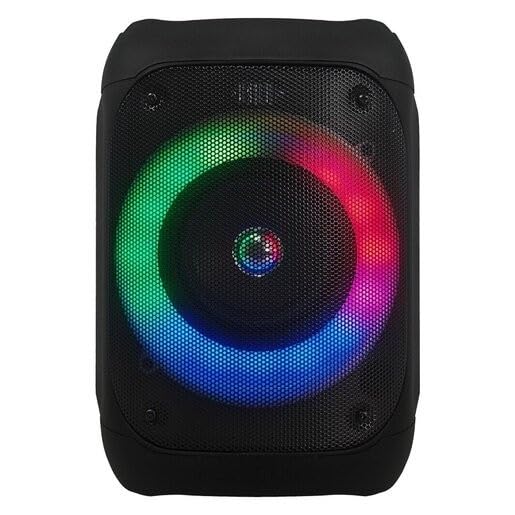
Abbildung 1: Front view of the JVC XS-N1154B Bluetooth Speaker, showcasing the speaker grille and integrated music-activated LED lights.
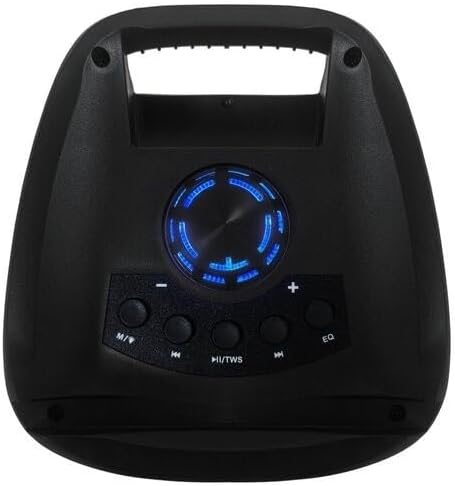
Abbildung 2: Spitze view of the JVC XS-N1154B Bluetooth Speaker, displaying the control panel with various buttons and the volume knob.
Funktionen des Bedienfelds:
- Netzschalter: Schaltet den Lautsprecher ein oder aus.
- Modus-Taste (M): Switches between Bluetooth, USB, SD Card, and FM Radio modes.
- Play/Pause (►||) / TWS Button: Plays or pauses audio. Long press for TWS (True Wireless Stereo) pairing.
- Previous Track (◀◀) Button: Skips to the previous track or tunes down in FM mode.
- Next Track (►►) Button: Skips to the next track or tunes up in FM mode.
- EQ-Taste: Durchläuft die Equalizer-Voreinstellungen.
- Lautstärkeregler: Rotates to adjust the volume level.
5. Einrichtung
5.1 Aufladen des Lautsprechers
- Schließen Sie das Ladekabel an den Ladeanschluss des Lautsprechers an.
- Plug the other end of the cable into a suitable USB power adapter (not included) or a powered USB port.
- Die Ladeanzeigeleuchte leuchtet während des Ladevorgangs auf, typischerweise rot.
- Once fully charged, the indicator light may change color (e.g., turn off or turn blue/green). Disconnect the speaker from the power source.
5.2 Ein-/Ausschalten
- So schalten Sie das Gerät ein: Press and hold the Power button until the speaker powers on and you hear an audible prompt.
- So schalten Sie das Gerät aus: Drücken und halten Sie den Ein-/Ausschalter erneut, bis sich der Lautsprecher ausschaltet.
6. Bedienungsanleitung
6.1 Bluetooth-Kopplung
- Ensure the speaker is powered on and in Bluetooth mode. If not, press the Mode (M) button to switch to Bluetooth mode. The speaker will indicate it is ready for pairing (e.g., a blinking LED or audible prompt).
- Aktivieren Sie auf Ihrem Mobilgerät (Smartphone, Tablet, Laptop) Bluetooth und suchen Sie nach verfügbaren Geräten.
- Select "JVC XS-N1154B" from the list of devices.
- Once paired, the speaker will provide an audible confirmation, and the Bluetooth indicator light will become solid.
- Sie können nun Audio von Ihrem Gerät über den Lautsprecher abspielen.
6.2 USB/SD-Karten-Wiedergabe
- Stecken Sie einen USB-Stick oder eine SD-Karte (mit unterstützter Audiofunktion) ein. files) in den entsprechenden Anschluss am Lautsprecher.
- The speaker will automatically switch to USB or SD card mode and begin playing audio. If not, press the Mode (M) button to select the correct input.
- Use the Previous Track (◀◀), Next Track (►►), and Play/Pause (►||) buttons to control playback.
6.3 FM-Radiobetrieb
- Press the Mode (M) button to switch to FM Radio mode.
- To auto-scan and save available stations, press and hold the Play/Pause (►||) button. The speaker will scan and store stations automatically.
- Use the Previous Track (◀◀) and Next Track (►►) buttons to navigate between saved FM stations.
6.4 LED-Lichtmodi
The speaker features music-activated LED lights. These lights typically synchronize with the audio playback. There may be an additional button or a combination of buttons to cycle through different light modes or to turn them off. Refer to the remote control section for specific controls if available.
6.5 Lautstärkeregelung
Rotate the Volume Knob on the top panel clockwise to increase volume and counter-clockwise to decrease volume.
6.6 Verwendung der Fernbedienung
If your package includes a remote control, it provides convenient access to various functions:
- Leistung: Ein / Aus
- Modus: Switch input sources (Bluetooth, USB, SD, FM)
- Lautstärke +/-: Lautstärke anpassen
- Abspielen/Pause: Steuern der Wiedergabe
- Vorherige Nächste: Skip tracks/stations
- EQ: Change equalizer presets
- LEDs: Control LED light modes (if applicable)
7. Wartung
7.1 Reinigung
Wipe the speaker's exterior with a soft, dry, lint-free cloth. Do not use liquid cleaners, sprays, or solvents, as these may damage the finish or internal components. Ensure all ports are dry before use, especially given its waterproof nature.
7.2 Speicherung
When not in use for extended periods, store the speaker in a cool, dry place, away from direct sunlight and extreme temperatures. It is recommended to charge the battery periodically to maintain its lifespan.
8. Fehlerbehebung
| Problem | Mögliche Ursache | Lösung |
|---|---|---|
| Der Lautsprecher lässt sich nicht einschalten. | Batterie ist leer. | Laden Sie den Lautsprecher vollständig auf. |
| Kein Ton. | Volume is too low or muted. Device not paired correctly. | Increase volume. Re-pair Bluetooth device. Check audio source. |
| Die Bluetooth-Kopplung schlägt fehl. | Der Lautsprecher befindet sich nicht im Kopplungsmodus. Das Gerät ist zu weit entfernt. Störungen. | Ensure speaker is in Bluetooth pairing mode. Move device closer. Turn off other Bluetooth devices. |
| USB-/SD-Karte wird nicht wiedergegeben. | Falsch file Format. Karte/Laufwerk nicht korrekt eingelegt. | Sicherstellen der Audioqualität files are in a supported format. Reinsert the USB drive/SD card. Press Mode button to select correct input. |
| Der FM-Radioempfang ist schlecht. | Schwaches Signal. | Stellen Sie den Lautsprecher an einem Ort mit besserem Empfang auf. |
9. Spezifikationen
- Modell: XS-N1154B
- Marke: JVC
- Konnektivität: Bluetooth, USB, SD-Karte
- Radio: Digitales FM-Radio
- Leistungsabgabe: 4 Watt
- Audioausgabemodus: Stereo
- Kontrollmethode: Fernbedienung
- Material: Plastik
- Wasserdicht: Ja
- Energiequelle: Batteriebetrieben
- Abmessungen: Ungefähr 18.6 cm (T) x 18.9 cm (B) x 25.5 cm (H)
- Gewicht: Ca. 1.2 kg
- Kompatible Geräte: Laptops, Smartphones
10. Garantie und Support
10.1 Garantieinformationen
This JVC XS-N1154B Bluetooth Speaker comes with a 1 Jahr Garantie Diese Garantie gilt ab Kaufdatum und deckt Herstellungs- und Verarbeitungsfehler bei normalem Gebrauch ab. Sie deckt keine Schäden ab, die durch Missbrauch, Unfälle, nicht autorisierte Änderungen oder normale Abnutzung verursacht wurden.
10.2 Kundendienst
For technical assistance, warranty claims, or further inquiries, please contact JVC customer support through their official website or the retailer where the product was purchased. Please have your product model number (XS-N1154B) and proof of purchase ready when contacting support.