
JOYING JY-UTD06N8
Joying Android 13 Double Din Car Stereo Receiver User Manual
Model: JY-UTD06N8
Marke: JOYING
Einführung
This manual provides detailed instructions for the installation, operation, and maintenance of your Joying Android 13 Double Din Car Stereo Receiver. Please read this manual thoroughly before using the product to ensure proper function and to prevent damage.
Sicherheitshinweise
- Um Schäden am Gerät oder Fahrzeug zu vermeiden, ist eine fachgerechte Installation erforderlich.
- Bedienen Sie das Gerät nicht so, dass Sie vom Fahren abgelenkt werden.
- Um Kurzschlüsse zu vermeiden, muss vor dem Einbau die Fahrzeugbatterie abgeklemmt werden.
- Verwenden Sie ausschließlich die dafür vorgesehenen Zubehörteile und Komponenten.
- Das Gerät sollte vor Wasser und übermäßiger Feuchtigkeit geschützt werden.
Packungsinhalt
Bitte überprüfen Sie, ob alle unten aufgeführten Artikel in Ihrem Paket enthalten sind:
- 8" Radio x 1
- Double Din Cage x 1
- Left & Right Bracket x 1
- Reinforced Shims x 1
- Installationshandbuch x 1
- WLAN-Antenne x 1
- GPS-Antenne x 1
- 4G-Antenne x 2
- External Mic x 1
- 2 x USB-Kabel
- AR Cable x 1
- Screen Ribbon Cable x 1
- ISO Cable x 1
- Benutzerhandbuch x 1

Image: All components included in the package, such as the radio, various cables, antennas, and mounting hardware.
Produkt überview
The Joying Android 13 Double Din Car Stereo Receiver is designed to enhance your in-car entertainment and navigation experience. It features an 8-inch display, Android 13 operating system, and supports various connectivity options.

Bild: Vorderseite view of the car stereo displaying a map and music player interface.
Hauptmerkmale:
- Android 13-Betriebssystem
- 8-inch 1280x800P IPS Display
- Integriertes kabelloses CarPlay & Android Auto
- 8 GB RAM + 128 GB interner Speicher
- Volume Knob for easy control
- Optical Fiber and Coaxial Digital Output for enhanced audio
- Built-in 4G Module (SIM card for internet access, no calls/SMS)
- GPS Navigation with offline map support
- Multitasking mit geteiltem Bildschirm
- HDMI Output for external displays
- Steering Wheel Control (additional CANbus cable may be required)
- Enhanced Cooling System
- Upgraded WiFi Signal with independent antenna

Bild: Überview of the unit's display and core specifications, including Android 13, 8-inch screen, Qualcomm Snapdragon 6125, Octa Core 2.0GHz, and IPS 1280x800P resolution.
Setup und Installation
Installation of this car stereo requires technical knowledge. It is highly recommended to have the unit installed by a qualified professional to ensure correct wiring and functionality, and to prevent damage to your vehicle or the unit.
Checkliste vor der Installation:
- Stellen Sie sicher, dass die Fahrzeugbatterie abgeklemmt ist.
- Confirm compatibility with your vehicle's dashboard opening (Double Din standard).
- Besorgen Sie sich die notwendigen Werkzeuge (Schraubendreher, Abisolierzange, Isolierband usw.).
- Obtain any required vehicle-specific installation frame kits, ISO harnesses, amplifier adapters, or CANbus decoders.
Kabelverbindungen:
Refer to the included "Installation Manual" for detailed wiring diagrams specific to your unit. Key connections typically include:
- Leistung: Anschluss an Dauerplus (12 V), Zubehörplus (12 V) und Masse.
- Referenten: Connect to vehicle's speaker wires.
- Antennen: Connect GPS, WiFi, and 4G antennas.
- USB: Connect USB cables for external devices.
- Externes Mikrofon: Connect the external microphone for clear calls.
- Optionale Verbindungen: HDMI Out, Optical/Coaxial Digital Out, RCA Audio/Video inputs/outputs, Reverse Camera input.

Image: Rear panel of the car stereo unit, illustrating the layout of ports for power, audio, video, USB, HDMI, and various antennas.
Adjustable Installation Structure:
The left and right mounting brackets are designed to be adjustable, allowing for extension or telescoping to achieve the optimal fixing position within your car's center console. This adaptability supports installation in a wider range of vehicles.

Image: Illustration demonstrating the adjustable nature of the mounting brackets, allowing for flexible installation in different vehicle dashboards.
Abmessungen:
Refer to the diagram below for the physical dimensions of the unit and its mounting cage.

Image: Detailed diagram showing the dimensions of the 8-inch display unit and the double din mounting cage.
Bedienungsanleitung
Power On/Off and Initial Boot:
Once the unit is correctly installed and the vehicle's ignition is turned on, the stereo will boot up. The first boot may take approximately 30-40 seconds. Subsequent boots will be faster, typically entering the user interface within 2 seconds after the car key is inserted.
Grundlegende Steuerelemente:
- Lautstärkeregler: Drehen Sie, um die Lautstärke anzupassen. Drücken Sie, um den Ton stummzuschalten/die Stummschaltung aufzuheben.
- Touch-Screen: Navigate the Android interface by tapping, swiping, and pinching.
Android 13 Interface:
The unit runs on Android 13, providing access to a wide range of applications and features. The main screen typically displays navigation, media playback, and other frequently used apps.

Image: Screenshot of the Android 13 launcher interface, showing various application icons and layout options for both Left-Hand Drive (LHD) and Right-Hand Drive (RHD) configurations.
CarPlay und Android Auto:
Connect your smartphone via USB cable or Bluetooth to utilize Apple CarPlay or Android Auto. This allows you to access navigation, make calls, send messages, and play music directly from your phone's interface on the stereo's larger screen.

Image: Visual representation of Apple CarPlay and Android Auto running on the car stereo, showing phone applications like maps, music, and messaging.
GPS Navigation:
The unit features precise GPS navigation. Ensure the GPS antenna is properly connected for optimal signal reception. You can use online navigation apps or download offline maps for use in areas without internet connectivity. Smartphone map data can also be synchronized via CarPlay/Android Auto.
Bluetooth-Konnektivität:
Pair your Bluetooth-enabled device for hands-free calling and audio streaming. Access the Bluetooth settings menu on the stereo to search for and connect to devices.
AM/FM-Radio:
Tune into your favorite AM and FM radio stations. The radio application allows for station scanning, saving presets, and displaying RDS information where available.
4G-Modul:
Insert a compatible SIM card into the designated slot to enable 4G internet access. This feature provides connectivity for online apps, streaming, and real-time traffic updates. Note that this module supports internet access only and does not support making phone calls or sending SMS messages directly from the unit.
Split-screen Multitasking:
The unit supports split-screen functionality, allowing you to run two applications simultaneously. For example, you can have navigation on one side and a media player on the other. To activate, tap the recent apps icon, find the desired app, and select the split-screen option. Then choose a second app from the recent apps list.

Image: A series of screenshots illustrating the steps to activate and use the split-screen multitasking feature, showing two applications running side-by-side.
HDMI-Ausgang:
The HDMI output allows you to connect external displays, such as headrest monitors, to mirror the content from the main unit. This provides passengers with a clear, synchronized display without delays. An HDMI cable is not included and must be purchased separately.

Image: Depiction of the car stereo's HDMI output feature, showing the main unit projecting its display to rear-seat monitors for passenger viewing.
Lenkradsteuerung (SWC):
The unit supports steering wheel controls, enabling you to manage audio playback, adjust volume, and switch radio channels without taking your hands off the wheel. For vehicles with a CANbus system, an additional CANbus cable may be required to enable this feature.

Image: An illustration showing a steering wheel with control buttons and the car stereo display, indicating the integration of steering wheel controls for audio and system functions.
Personalisierte Einstellungen:
Customize your stereo experience through various settings, including changing the car boot logo, selecting customizable wallpapers, and adjusting the button illumination colors to match your vehicle's interior or personal preference.
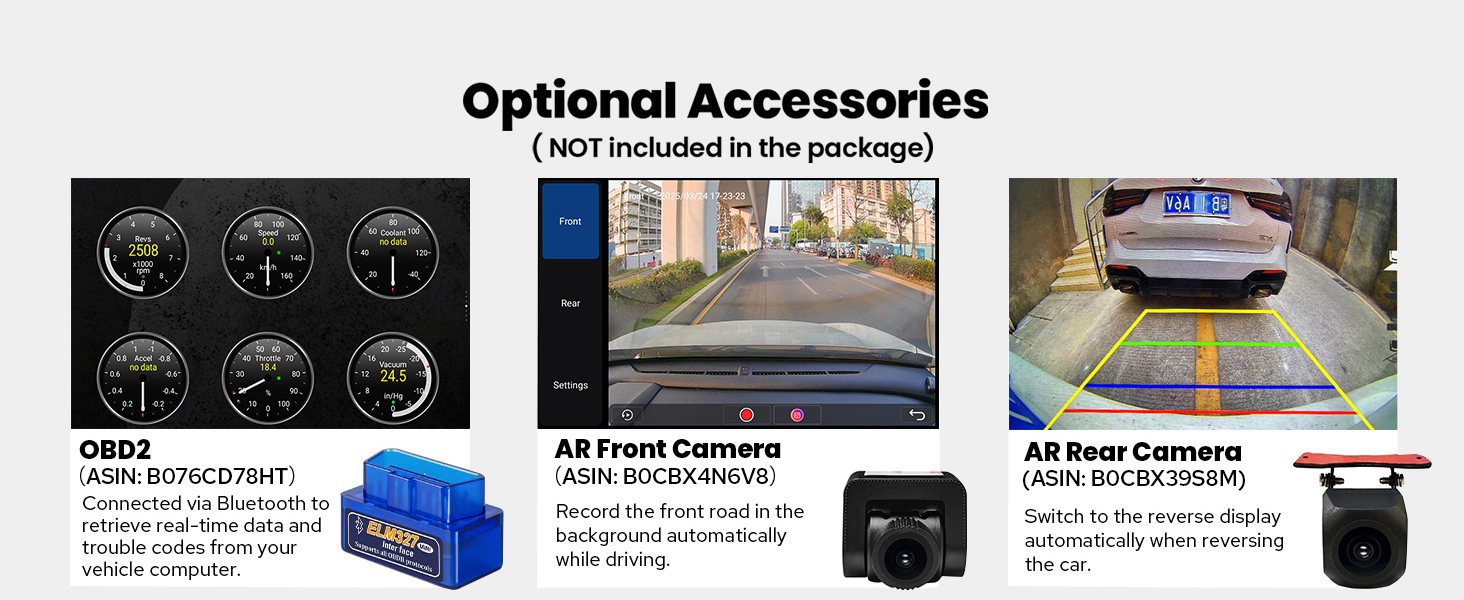
Image: Screenshots demonstrating various personalization options available on the car stereo, such as changing the boot logo, wallpapers, and button colors.
Wartung
- Reinigung: Reinigen Sie den Bildschirm und das Gehäuse mit einem weichen, trockenen Tuch. Vermeiden Sie Scheuermittel oder Lösungsmittel.
- Software-Updates: Überprüfen Sie regelmäßig die Herstellerangaben. webWebsite für Software-Updates, um optimale Leistung und Zugriff auf neue Funktionen zu gewährleisten.
- Temperatur: Avoid exposing the unit to extreme temperatures. The enhanced cooling system helps manage internal temperatures during operation.

Image: Diagram illustrating the dual heat sink design and cooling fan mechanism, which helps dissipate heat and maintain stable performance.
Wi-Fi-Signal:
The unit features an independent Wi-Fi antenna to ensure stable signal quality and provide fast, smooth internet access. Ensure the antenna is securely connected for optimal performance.

Image: Illustration of the independent Wi-Fi antenna and its connection point, highlighting the upgraded signal capability.
Fehlerbehebung
| Problem | Mögliche Ursache | Lösung |
|---|---|---|
| Gerät lässt sich nicht einschalten. | Falsche Verkabelung; durchgebrannte Sicherung; Fahrzeugbatterie abgeklemmt. | Check power connections (constant 12V, accessory 12V, ground). Inspect vehicle and unit fuses. Ensure battery is connected. |
| Kein Ton. | Volume muted or too low; Speaker wires disconnected; AmpLifier-Problem. | Increase volume. Check speaker wire connections. Verify external amplifier (if used) is powered and connected. |
| GPS-Signal schwach oder ungenau. | Die GPS-Antenne ist nicht ordnungsgemäß installiert oder verdeckt. | Stellen Sie sicher, dass die GPS-Antenne an einem freien Ort mit ungehinderter Sicht montiert ist. view des Himmels. Antennenanschluss prüfen. |
| CarPlay/Android Auto verbindet sich nicht. | Incorrect USB cable; Phone settings; App not installed. | Use a high-quality USB data cable. Ensure CarPlay/Android Auto is enabled on your phone. Check phone's compatibility. |
| Schlechtes WLAN-Signal. | Wi-Fi antenna not connected or obstructed. | Ensure the Wi-Fi antenna is securely connected and positioned for optimal reception. |
Technische Daten
| Besonderheit | Detail |
|---|---|
| Modellnummer | JY-UTD06N8 |
| Betriebssystem | Android 13 |
| Anzeigegröße | 8 Zoll |
| Bildschirmauflösung | 1280 x 800P |
| RAM | 8 GB |
| Interner Speicher | 128 GB |
| Prozessor | Qualcomm Snapdragon 6125 Octa Core 2.0GHz |
| Konnektivität | Bluetooth, Ethernet, HDMI, USB, WLAN, 4G |
| Besondere Merkmale | Android Auto, Apple CarPlay, DSP, Equalizer, RDS |
| Audioausgabemodus | Stereo, Optical Fiber, Coaxial Digital |
| Artikelgewicht | 2.65 Pfund |
| Verpackungsabmessungen | 12.2 x 7.87 x 5.91 Zoll |
Garantieinformationen
This Joying product comes with a 2 Jahr Garantie from the date of purchase. This warranty covers manufacturing defects and malfunctions under normal use. Please retain your proof of purchase for warranty claims. For detailed warranty terms and conditions, please refer to the official Joying webWebsite oder wenden Sie sich an den Kundendienst.
Kundenservice
For technical assistance, troubleshooting, or warranty inquiries, please contact Joying customer support. You can find contact information on the official Joying webWebsite oder über Ihre Einkaufsplattform.
Online-Ressourcen:
- Besuchen Sie die JOYING Store auf Amazon für Produktinformationen und Aktualisierungen.
- Refer to the included "Installation Manual" for specific wiring and mounting details.
Optionales Zubehör
The following accessories are not included in the standard package but can be purchased separately to enhance your car stereo's functionality:
- OBD2-Scanner: Connects via Bluetooth to retrieve real-time vehicle data and trouble codes.
- AR-Frontkamera: Records the road ahead automatically while driving.
- AR-Rückkamera: Provides a reverse display when backing up the vehicle.
- DVR: Digital Video Recorder for continuous recording.
- RDKS: Reifendruckkontrollsystem.

Image: Visuals of optional accessories such as an OBD2 scanner, AR front camera, and AR rear camera, which can be integrated with the car stereo.
Ask a question about this manual
Ask about setup, troubleshooting, compatibility, parts, safety, or missing instructions. Manuals+ will review the question and use this page’s manual context to help answer it.