
1. Einleitung
Thank you for choosing the Joying 7 Inch Double Din Car Stereo. This manual provides detailed instructions for the installation, operation, and maintenance of your new car audio receiver. Please read this manual thoroughly before use to ensure proper functionality and to maximize your user experience. Keep this manual for future reference.
2. Sicherheitshinweise
- Sicheres Fahren hat stets oberste Priorität. Bedienen Sie das Gerät nicht so, dass Sie vom Straßenverkehr abgelenkt werden.
- Stellen Sie sicher, dass alle Kabel korrekt angeschlossen sind, um Kurzschlüsse oder Schäden am elektrischen System des Fahrzeugs zu vermeiden.
- Wenn Sie sich bei einzelnen Installationsschritten unsicher sind, lassen Sie sich von einem Fachmann beraten.
- Vermeiden Sie es, das Gerät extremen Temperaturen, direkter Sonneneinstrahlung über längere Zeiträume oder übermäßiger Feuchtigkeit auszusetzen.
- Versuchen Sie nicht, das Gerät zu zerlegen oder zu verändern. Dies kann zum Erlöschen der Garantie und zu Schäden führen.
3. Packungsinhalt
Bitte überprüfen Sie, ob alle unten aufgeführten Artikel in Ihrem Paket enthalten sind:
- 7" Radio x 1
- Double Din Cage x 1
- Left & Right Bracket x 1
- Reinforced Shims x 1
- Benutzerhandbuch x 1
- Installationshandbuch x 1
- WLAN-Antenne x 1
- GPS-Antenne x 1
- 4G-Antenne x 2
- External Mic x 1
- 2 x USB-Kabel
- AR Cable x 1
- Screen Ribbon Cable x 1
- ISO Cable x 1

Bild: Überview of all included package contents.
4. Produktüberschreitungview
4.1 Frontplatte
The front panel features a 7-inch IPS touchscreen display for intuitive control and an integrated volume knob for easy audio adjustments. The Android 13 operating system provides a user-friendly interface for various applications.

Bild: Vorderseite view of the car stereo unit.
4.2 Rückseite und Anschlüsse
The rear panel provides various input and output ports for comprehensive connectivity with your vehicle's systems and external devices.
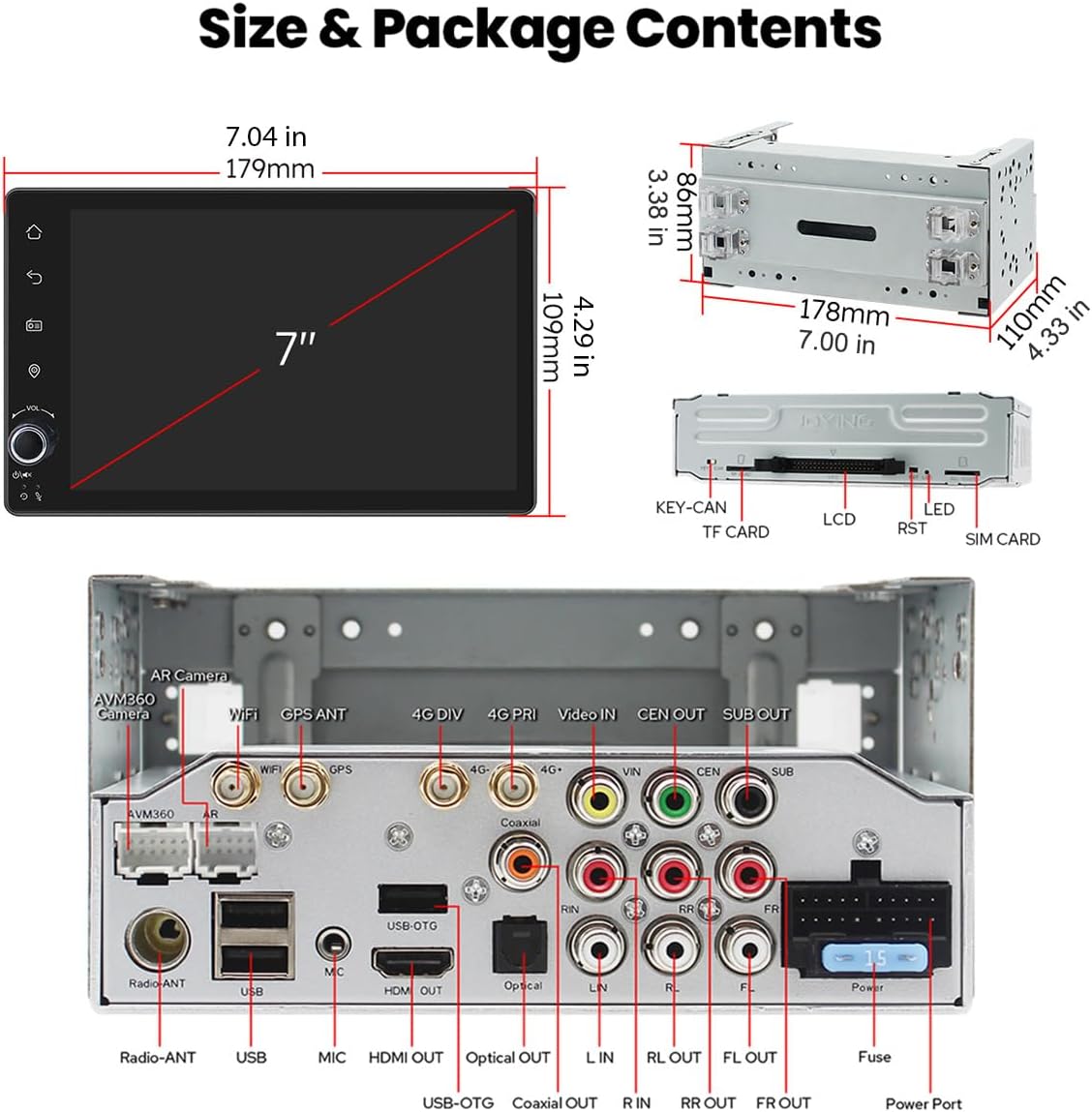
Image: Rear panel connections including USB, HDMI, Optical, Coaxial, and antenna ports.
4.3 Abmessungen
The unit is designed to fit standard double din openings. Refer to the diagram for precise measurements.
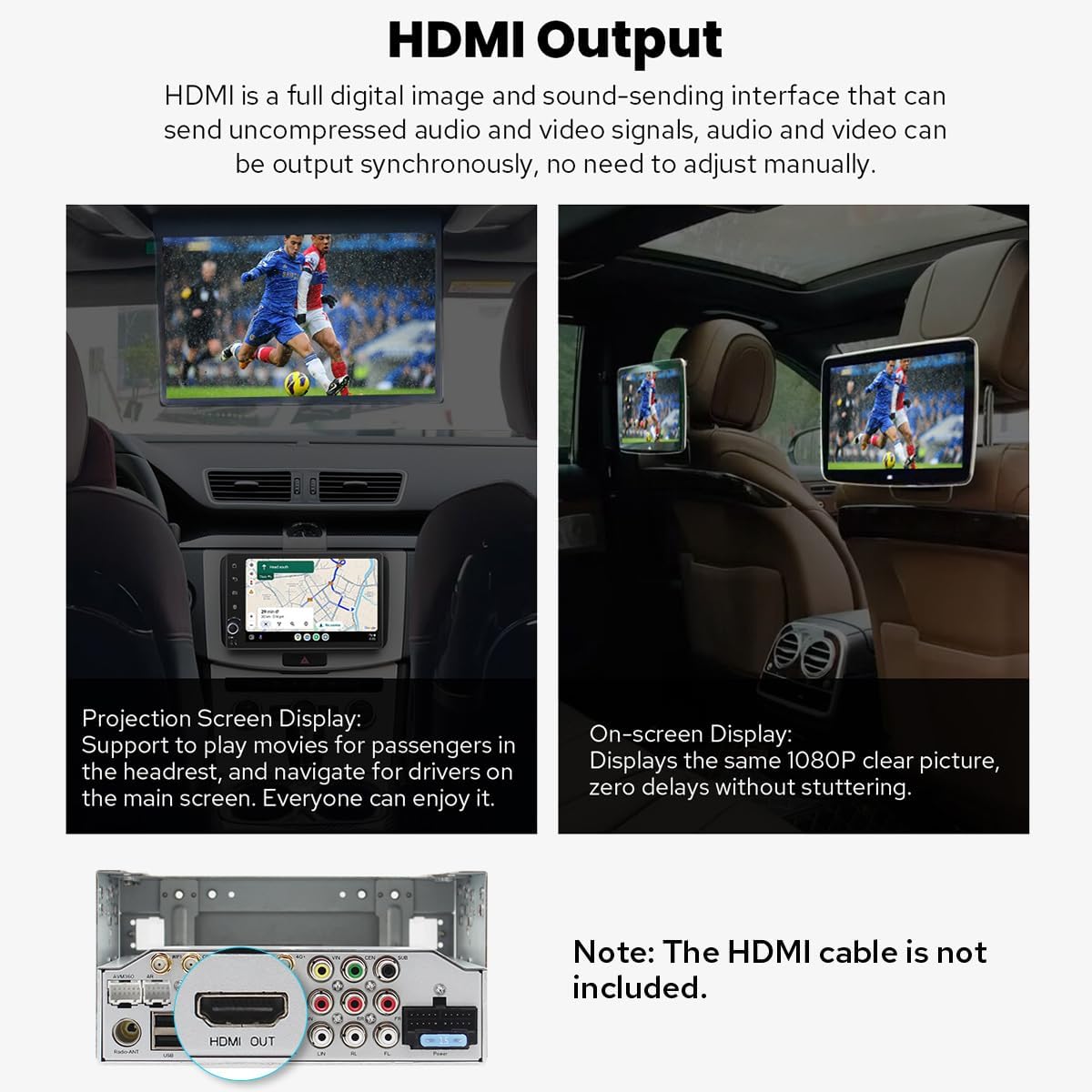
Abbildung: Produktabmessungen für die Installationsplanung.
5. Einrichtung und Installation
Proper installation is crucial for optimal performance. It is recommended to consult a professional installer if you are unfamiliar with car audio system wiring.
5.1 Allgemeine Installationshinweise
- An installation frame kit with an inner size of 178 x 102mm may be required.
- A special ISO harness, amplifier adapter, or CANbus decoder might be necessary depending on your car's specific configuration.
- This unit does not support factory car GPS antennas, backup cameras, Bluetooth, USB, or microphones. Only Joying accessories are compatible.
5.2 Installation Structure
The left and right brackets are adjustable, allowing for extension or telescoping to achieve the best fixing position within your car's center console. This design adapts to a wider range of vehicles.

Image: Adjustable installation brackets for flexible fitting.
Notiz: If your car is a Hyundai or Kia brand, please contact Joying for a different bracket.
5.3-Kühlsystem
The unit features a dual heat sink design for superior heat dissipation, improved temperature control, and enhanced performance stability. You can set a warning value for CPU temperature or radio volume. If these values are exceeded, the fan will automatically activate to prevent overheating.

Bild: Intern view of the upgraded cooling system.
5.4 WLAN-Antenne
An independent WiFi antenna ensures stable signal quality and provides fast, smooth internet access. It supports 802.11a/b/g/n/AC standards with 2.4GHz/5GHz spectral bands.

Image: Dedicated WiFi antenna for improved connectivity.
6. Bedienungsanleitung
6.1 Erster Startvorgang
After the first power-on, the system will take approximately 30-40 seconds to boot. Subsequent boot-ups will be significantly faster, entering the user interface in about 2 seconds once the car key is turned.
6.2 Benutzeroberfläche
The unit runs on Android 13, offering a customizable and intuitive interface. Navigate through apps and settings using the touchscreen.
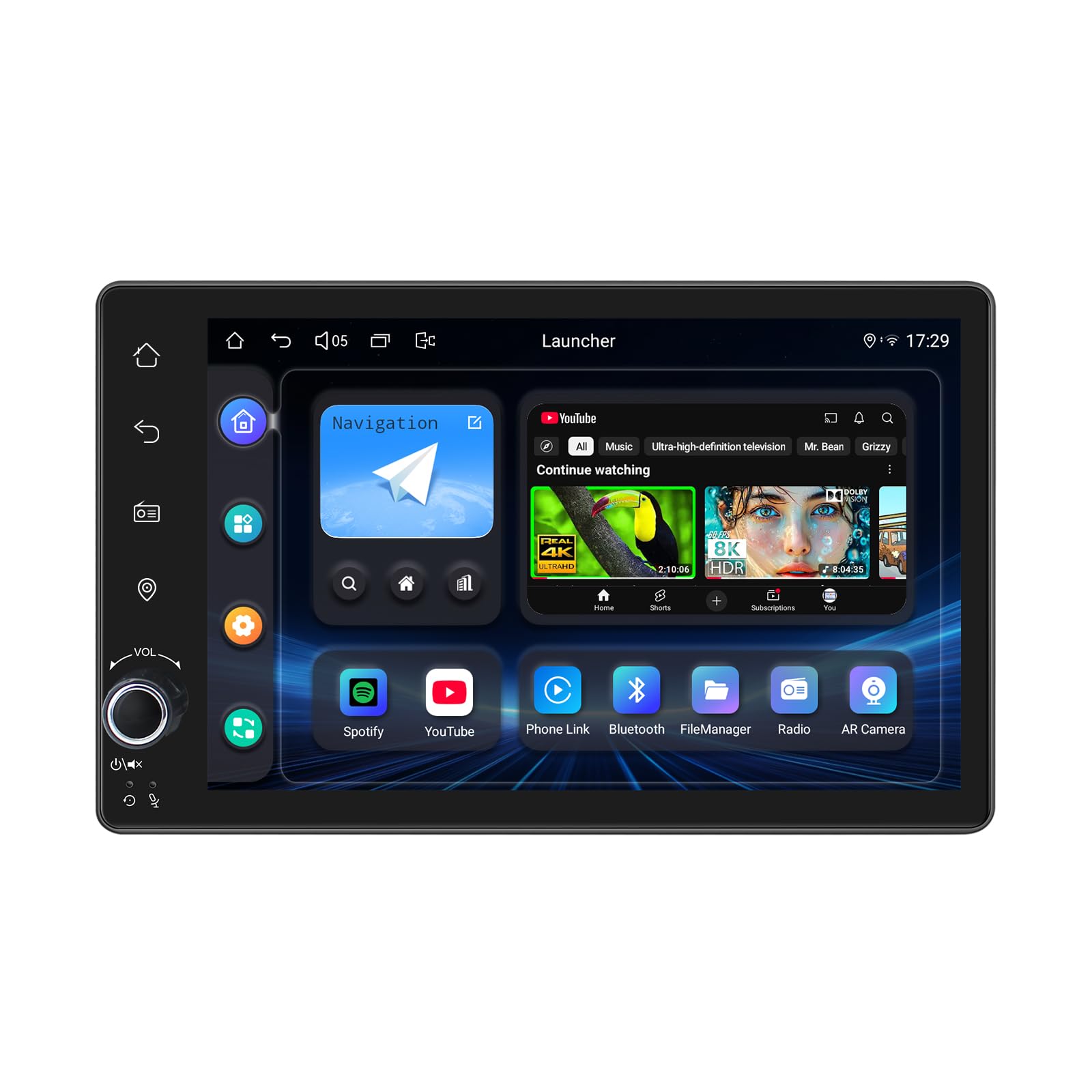
Image: Android 13 user interface with various application icons.
6.3 CarPlay & Android Auto
Connect your mobile phone via USB cable or Bluetooth to utilize Apple CarPlay or Android Auto. This allows you to access phone apps, navigation, make calls, and listen to music directly on the car stereo's screen.

Abbildung: Integration von CarPlay und Android Auto.
6.4 GPS-Navigation
The unit includes precise GPS engines and an antenna for accurate positioning and real-time navigation. It supports offline maps; you can download map data for specific areas and use it without an internet connection. Mobile phone map data can also be synchronized via CarPlay/Android Auto.
6.5 Audiofunktionen
Experience high-quality sound with the built-in TDA7851 DSP chip and 48-band graphic equalizer. The unit provides 4x50W maximum output power and supports aftermarket amplifiers with 4 audio outputs and 1 subwoofer output. For ultimate sound quality, utilize the optical fiber or coaxial digital output if your external amplifier unterstützt dies.

Image: High-quality sound features and ampVerstärkerunterstützung.
6.6 Built-in 4G Module
Insert a SIM card into the dedicated slot for internet access. The module supports FDD-LTE (B2/B4/B5/B7/B12/B13/B14/B17/B25/B26/B38/B66/B71) and TDD-LTE (B41) types. Note that it does not support making phone calls or sending SMS messages.
6.7 Lenkradsteuerung (SWC)
The unit supports steering wheel controls, allowing you to switch songs, change radio channels, and adjust volume safely while driving. For vehicles with a CAN system, an additional CANbus cable may be required to enable this feature.

Image: Steering wheel control functionality.
6.8 Freisprechen
Utilize Bluetooth connectivity for hands-free calling, enhancing safety and convenience while driving.
7. Erweiterte Funktionen
7.1 Multitasking im Splitscreen-Modus
The split-screen feature allows you to run two applications simultaneously on the display. To activate, tap the recent apps icon, find the desired app, and tap the split-screen button. The first app will display on the left, and you can select a second app from recent applications for the right side.
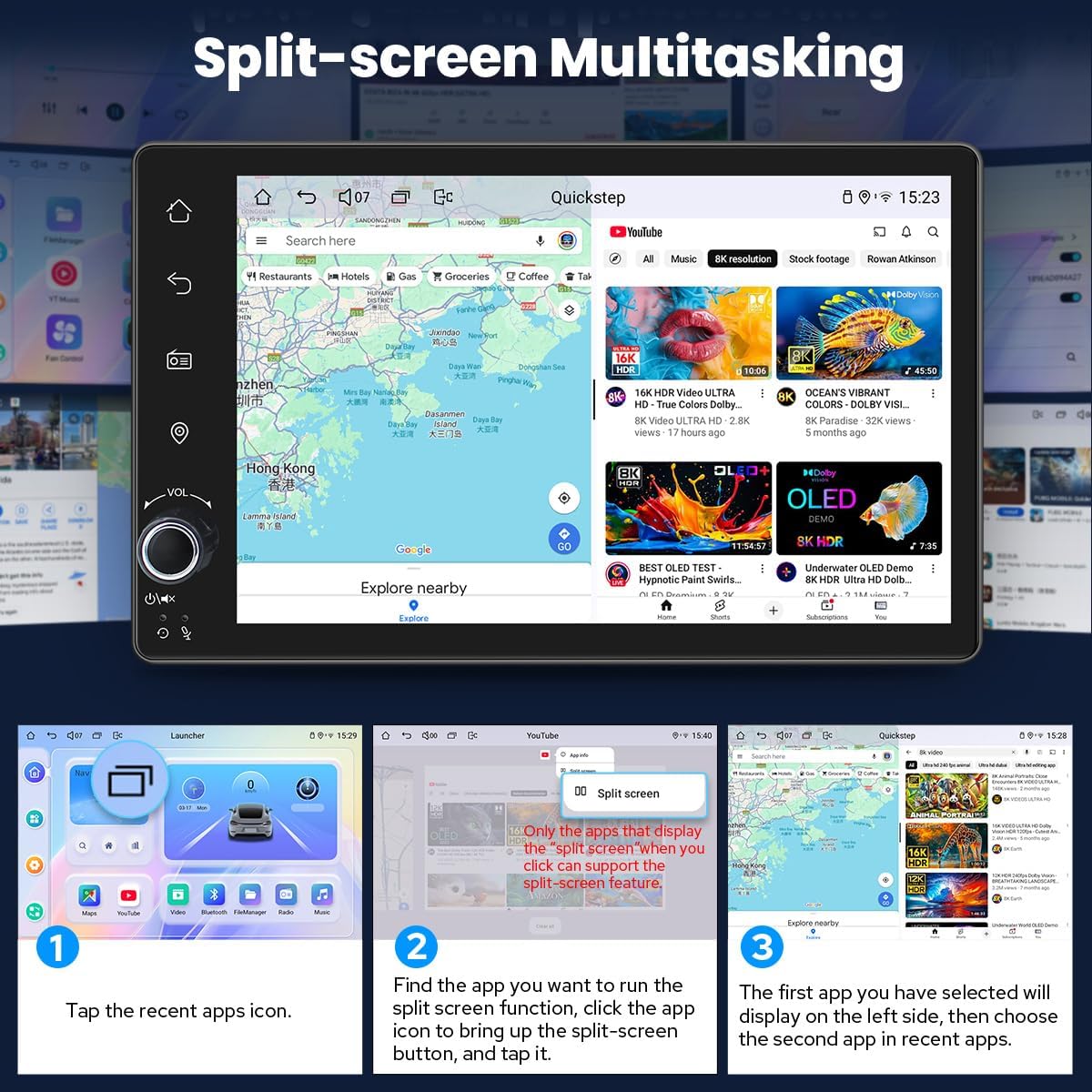
Image: Split-screen functionality for running two apps concurrently.
7.2 HDMI-Ausgang
The HDMI output provides a full digital image and sound-sending interface, allowing you to output uncompressed audio and video signals synchronously to external displays without manual adjustment. This is ideal for projection screen displays for passengers or on-screen displays with 1080p clarity and zero delays.
Image: HDMI output port and its application for external displays.
Notiz: Das HDMI-Kabel ist nicht im Lieferumfang enthalten.
7.3 Personalisierte Einstellungen
Customize your stereo's appearance and functionality:
- Logo für den Kofferraum: Set a custom logo to display during startup.
- Anpassbare Hintergrundbilder: Choose from various wallpapers or upload your own.
- Changeable Button Color: Adjust the color of the physical buttons to match your vehicle's interior lighting.
- Einstellbare Bildschirmhelligkeit: Optimize display visibility for different lighting conditions.
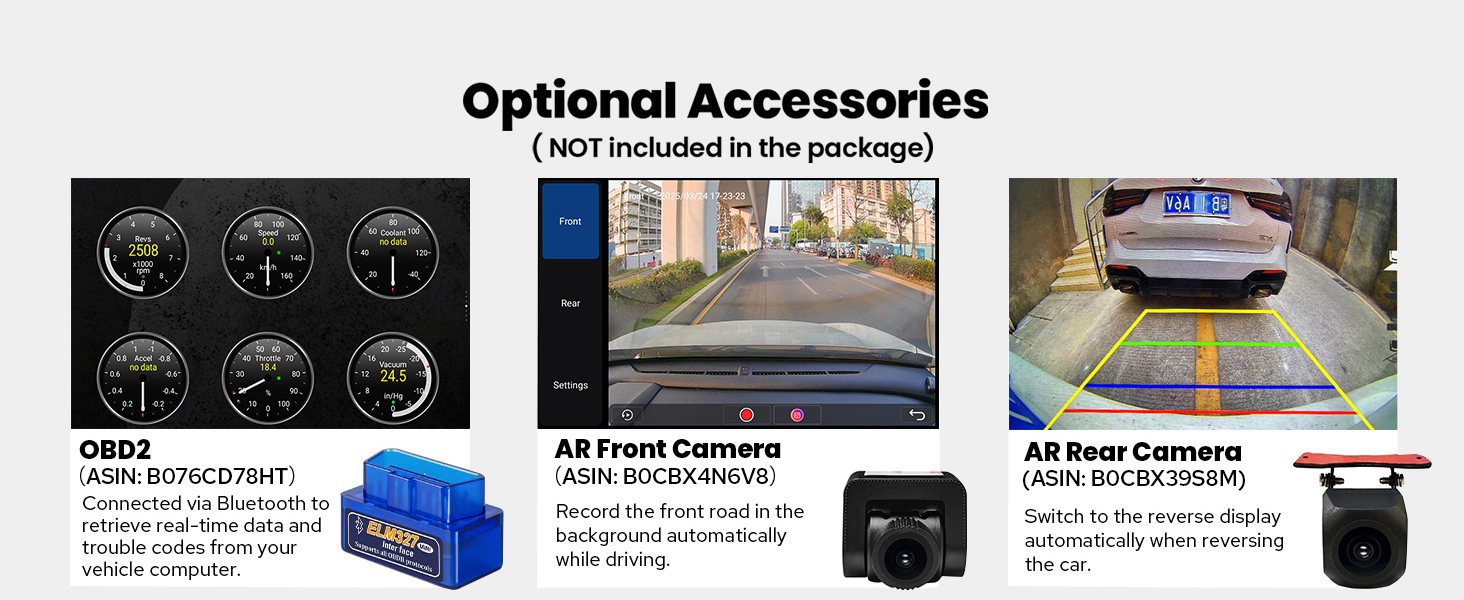
Image: Options for personalizing the car stereo's interface.
8. Wartung
- Reinigen des Bildschirms: Verwenden Sie ein weiches, fusselfreies Tuch, um den Touchscreen vorsichtig abzuwischen. Vermeiden Sie scheuernde Reiniger oder Lösungsmittel.
- Software-Updates: Periodically check the Joying official webBesuchen Sie die Website oder wenden Sie sich an den Support, um verfügbare Software-Updates zu erhalten und so eine optimale Leistung und den Zugriff auf neue Funktionen zu gewährleisten.
- Allgemeine Pflege: Halten Sie das Gerät frei von Staub und Schmutz. Sorgen Sie für ausreichende Belüftung um das Gerät herum, um eine Überhitzung zu vermeiden.
9. Fehlerbehebung
| Problem | Mögliche Ursache | Lösung |
|---|---|---|
| Gerät lässt sich nicht einschalten. | Falsche Verkabelung; durchgebrannte Sicherung; Problem mit der Stromversorgung. | Check power connections and fuse. Ensure proper grounding. Consult installation manual. |
| Keine Tonausgabe. | Speaker wires disconnected; Volume too low; AmpLifier-Problem. | Verify speaker connections. Increase volume. Check external ampVerstärkerstatus, falls verwendet. |
| Das GPS-Signal ist schwach oder ungenau. | Die GPS-Antenne ist unsachgemäß installiert oder verdeckt. | Stellen Sie sicher, dass die GPS-Antenne freie Sicht hat. view des Himmels und ist sicher verbunden. |
| Probleme mit der Bluetooth-Verbindung. | Gerät nicht im Kopplungsmodus; Störungen; Softwarefehler. | Ensure both devices are in pairing mode. Restart both devices. Clear Bluetooth cache on phone. |
| Langsame Leistung oder Einfrieren. | Too many apps running; Low storage; Software issue. | Close unnecessary applications. Clear cache. Perform a system reset if necessary (data will be lost). |
For further assistance, please refer to the detailed installation manual or contact Joying customer support.
10. Spezifikationen
- Produktabmessungen: 5.91 x 7.99 x 4.72 Zoll
- Artikelgewicht: 2.65 Pfund
- Artikelmodellnummer: JY-UTD03N4-B
- Konnektivitätstechnologie: Bluetooth, Ethernet, HDMI, USB, WLAN
- Controller-Typ: Android
- Besondere Merkmale: Android Auto, Apple CarPlay, DSP, Equalizer, RDS
- Kompatible Geräte: Amplifier, Camera, Speaker
- HDMI-Anschlüsse insgesamt: 1
- Steckertyp: Koaxial, optisch
- Audioausgabemodus: Stereo
- Konfiguration der Surround-Sound-Kanäle: 5.1
- Unterstützung für Videocodierung: H264/H265/MP4/AVI/MKV/FLV
11. Optionales Zubehör (nicht im Lieferumfang enthalten)
Enhance your car stereo's functionality with these compatible Joying accessories:
- OBD2-Scanner: Connects via Bluetooth to retrieve real-time vehicle data and trouble codes.
- AR-Frontkamera: Zeichnet während der Fahrt automatisch die Straße vor Ihnen auf.
- AR-Rückkamera: Provides a reverse display when backing up the car.

Image: Optional accessories for extended functionality.
12. Garantie und Support
For warranty information, technical support, or any inquiries regarding your Joying car stereo, please refer to the warranty card included with your product or visit the official Joying website. You may also contact Joying customer service directly for assistance.