
1. Einleitung
This manual provides essential information for the safe and efficient operation of your Voltcraft DOV704 Digital Oscilloscope. The DOV704 is a high-quality, innovative, and compact 4-channel digital storage oscilloscope featuring a 70 MHz bandwidth, 1.25 GSa/s maximum sampling rate, and a 12-bit analog-to-digital converter. It is equipped with a 7-inch touchscreen display supporting gesture control, USB, LAN, and HDMI interfaces. Please read this manual thoroughly before using the device.
2. Sicherheitshinweise
Beachten Sie stets die folgenden Sicherheitsvorkehrungen, um Verletzungen und Schäden am Gerät zu vermeiden:
- Stellen Sie sicher, dass die Stromversorgungslautstärketage den auf dem Gerät angegebenen Anforderungen entspricht.
- Betreiben Sie das Oszilloskop nicht in feuchter oder trockener Umgebung.amp Bedingungen.
- Vermeiden Sie es, das Gerät direkter Sonneneinstrahlung oder extremen Temperaturen auszusetzen.
- Verwenden Sie nur das mitgelieferte Netzteil und Zubehör.
- Versuchen Sie nicht, das Gerät zu öffnen oder zu verändern. Überlassen Sie alle Wartungsarbeiten qualifiziertem Fachpersonal.
- Before making any connections, ensure the device is powered off.
3. Packungsinhalt
Bitte überprüfen Sie, ob alle unten aufgeführten Artikel in Ihrem Paket enthalten sind:
- Voltcraft DOV704 Digital Oscilloscope
- USB-Typ-C-Netzteil
- USB-Kabel
- Four (4) Test Probes
- Two (2) Probe Adjustment Kits
- Software with English Manual (on CD)
- Kurzanleitung
- Produktdatenblatt
4. Produktüberschreitungview
The Voltcraft DOV704 is designed for precise signal analysis. Below are key features and a visual representation of the device.
4.1 Hauptmerkmale
- 70 MHz Bandbreite
- 4 Analog Input Channels
- 7-inch (17.78 cm) Touchscreen Display with Gesture Control (1024 x 600 pixels)
- 12-bit Analog-to-Digital Converter
- Maximum S.ampling Rate: 1.25 GSa/s
- Real-time Waveform Capture Rate: 50,000 wfms/s
- Segmented Waveform Capture Rate: 700,000 wfms/s
- Record Length: 50 Mpts
- Horizontal Scan Speed: 1 ns/div to 1000 s/div (1-2-5 steps)
- Vertical Sensitivity: 500 µV/div to 10 V/div
- Multiple Trigger Functions: Edge, Video, Pulse, Slope, Runt, Window, Timeout, Nth, Logic, RS232/UART, I2C, SPI, CAN, LIN
- Connectivity: USB, LAN, HDMI
4.2 Geräteaufbau
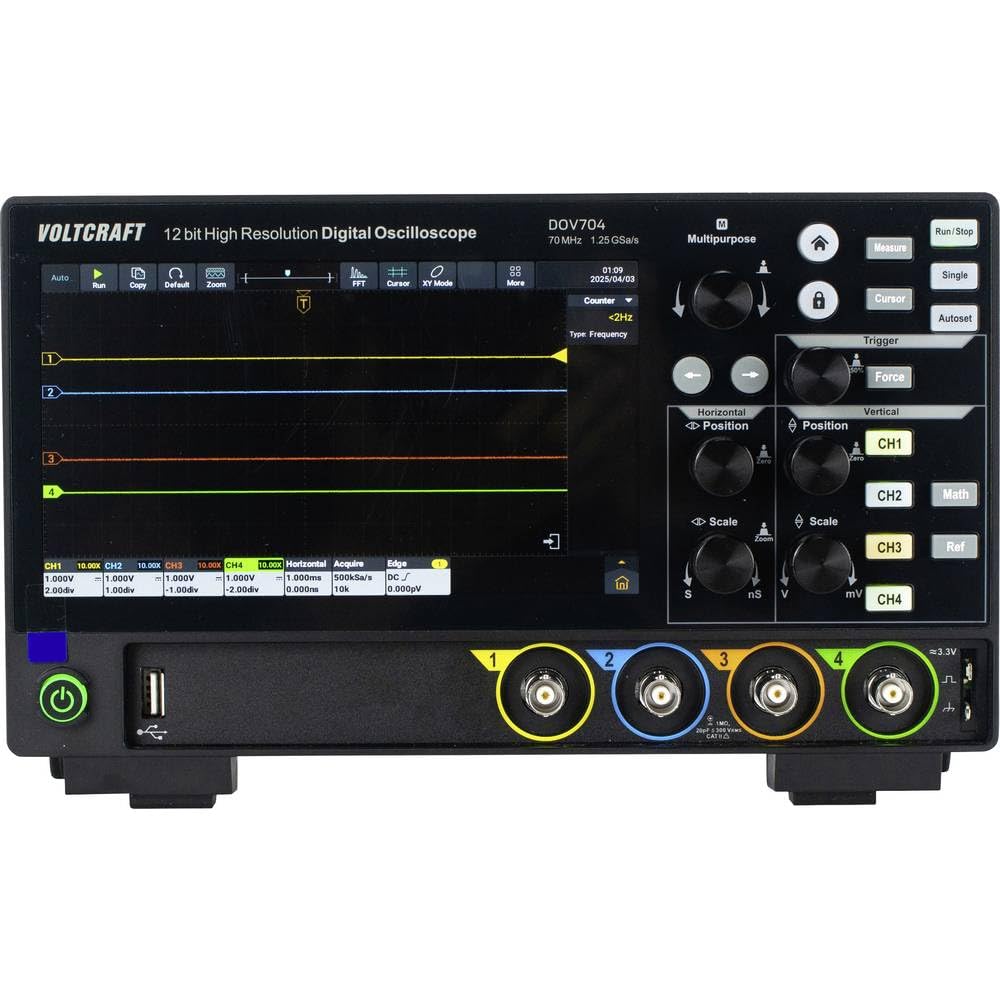
Abbildung 1: Front view of the Voltcraft DOV704 Digital Oscilloscope, showing the 7-inch touchscreen display, control knobs, buttons, and four BNC input connectors at the bottom. The power button and USB ports are also visible.

Abbildung 2: Abgewinkelte Vorderseite view of the Voltcraft DOV704 Digital Oscilloscope, providing a clearer perspective of the control panel and input ports. The screen displays a waveform.

Abbildung 3: Seite view of the Voltcraft DOV704 Digital Oscilloscope, illustrating its compact profile and ventilation grilles.
5. Einrichtung
5.1 Einschalten des Geräts
- Connect the USB Type-C power adapter to the oscilloscope's power input port.
- Stecken Sie das Netzteil in eine geeignete Steckdose.
- Press the power button located on the front panel to turn on the oscilloscope. The display will illuminate.
5.2 Sondenanschluss und Kompensation
- Connect a test probe to one of the BNC input channels (CH1-CH4) on the front panel.
- Attach the probe tip to the probe compensation output (usually a square wave signal output on the front or side).
- Adjust the probe compensation screw (located on the probe body) until the square wave displayed on the screen has flat tops and bottoms, without overshoot or undershoot.
- Repeat this process for all probes you intend to use.
6. Bedienungsanleitung
6.1 Grundlegende Wellenformanzeige
- Kanalauswahl: Press the CH1, CH2, CH3, or CH4 buttons to enable or disable a channel.
- Vertikale Skala: Verwenden Sie die Vertikale Skalierung knob to adjust the volts per division (V/div) for the selected channel.
- Vertikale Position: Verwenden Sie die Vertikale Position knob to move the waveform up or down on the screen.
- Horizontale Skala: Verwenden Sie die Horizontale Skalierung knob to adjust the time per division (s/div).
- Horizontale Position: Verwenden Sie die Horizontale Position knob to shift the waveform left or right.
6.2 Auslösefunktionen
The oscilloscope offers various trigger types to stabilize and capture specific parts of a waveform.
- Drücken Sie die Auslösen Schaltfläche zum Aufrufen der Trigger-Einstellungen.
- Select the desired trigger type (e.g., Edge, Pulse, Video) from the menu.
- Adjust the trigger level using the dedicated Trigger-Level knob or via the touchscreen.
- Choose the trigger source (CH1-CH4) as needed.
6.3 Touchscreen and Gesture Control
The 7-inch touchscreen allows for intuitive control.
- Klopfen: Select menu items, buttons, or adjust settings.
- Pinch-to-Zoom: Use two fingers to zoom in or out on waveforms (horizontal and vertical scaling).
- Ziehen: Move waveforms or menu elements across the screen.
6.4 Data Storage and Connectivity
The DOV704 supports various methods for data storage and external connectivity.
- USB: Connect a USB flash drive to save waveform data, screenshots, or settings. Use the USB cable to connect to a computer for data transfer.
- LAN: Connect the oscilloscope to a network for remote control and data access using the provided software.
- HDMI: Connect an external display via the HDMI port for larger viewing of waveforms.
7. Wartung
7.1 Reinigung
- Trennen Sie vor der Reinigung den Strom.
- Wischen Sie die Außenseite des Geräts mit einem weichen, trockenen Tuch ab.
- For the touchscreen, use a soft, lint-free cloth slightly dampened with a screen cleaner. Avoid abrasive cleaners.
- Lassen Sie keine Flüssigkeiten in das Gerät eindringen.
7.2 Speicherung
When not in use, store the oscilloscope in a clean, dry environment, away from direct sunlight and extreme temperatures.
8. Fehlerbehebung
| Problem | Mögliche Ursache | Lösung |
|---|---|---|
| Gerät lässt sich nicht einschalten. | Das Stromkabel ist nicht angeschlossen oder defekt. | Check power cable connection. Ensure power outlet is functional. Use the provided power adapter. |
| Es wird keine Wellenform angezeigt. | Channel disabled, probe not connected, or signal too weak/strong. | Ensure the desired channel is enabled. Check probe connection. Adjust vertical scale (V/div) and horizontal scale (s/div). Check trigger settings. |
| Die Wellenform ist instabil. | Falsche Trigger-Einstellungen. | Adjust trigger level and trigger type. Ensure trigger source is correctly selected. |
| Touchscreen reagiert nicht. | Vorübergehender Softwarefehler. | Restart the device. If the problem persists, contact support. |
9. Spezifikationen
| Parameter | Wert |
|---|---|
| Modellnummer | VC-16753910 |
| Bandbreite | 70 MHz |
| Analoge Kanäle | 4 |
| max. Sampling-Rate | 1.25 GSa/s |
| Datensatzlänge | 50 Mpts |
| ADC-Auflösung | 12 Bit |
| Waveform Capture Rate (Real-time) | 50,000 WFM/s |
| Waveform Capture Rate (Segmented) | 700,000 WFM/s |
| Anzeige | 7-inch Touchscreen (1024 x 600 pixels) |
| Horizontal Scan Speed | 1 ns/div to 1000 s/div |
| Vertikale Empfindlichkeit | 500 µV/div bis 10 V/div |
| Schnittstellen | USB, LAN, HDMI |
| Produktabmessungen (B x T x H) | 26 x 7.8 x 16 cm |
| Gewicht | 2.71 kg |
10. Garantie und Support
For warranty information, please refer to the product data sheet included in your package or visit the official VOLTCRAFT website. For technical support, troubleshooting assistance beyond this manual, or service inquiries, please contact VOLTCRAFT customer service. Contact details can typically be found on the manufacturer's webauf der Website oder in der mit Ihrem Produkt gelieferten Dokumentation.


