Einführung
Vielen Dank, dass Sie sich für Black entschieden habenview W50PRO Smartwatch. This manual provides essential information for setting up, operating, and maintaining your device. Please read it carefully to ensure optimal performance and a safe user experience. Keep this manual for future reference.
Packungsinhalt
Überprüfen Sie, ob alle Artikel in Ihrem Paket vorhanden sind:
- Schwarzview W50PRO Smartwatch
- Silikonarmband
- Replacement Nylon Braided Strap
- Magnetisches Ladekabel
- Benutzerhandbuch (dieses Dokument)

Abbildung: Packungsinhalt und Produktabmessungen.
Produkt überview
Das Schwarzeview W50PRO Smartwatch features a 1.45-inch HD touchscreen display, function buttons, a powerful flashlight, and a comfortable silicone strap. Its robust design is suitable for various activities.

Bild: Schwarzview W50PRO Smartwatch with its key features labeled.
Aufstellen
1. Aufladen des Geräts
Laden Sie Ihre Smartwatch vor der ersten Verwendung vollständig auf. Verbinden Sie das magnetische Ladekabel mit den Ladekontakten auf der Rückseite der Uhr und stecken Sie das USB-Ende in ein Netzteil (nicht im Lieferumfang enthalten) oder einen USB-Anschluss Ihres Computers. Die Uhr zeigt eine Ladeanzeige an.
- Eine vollständige Aufladung dauert in der Regel etwa 3 Stunden.
- The 960mAh battery provides up to 30 days of typical use and 100 days of standby time.

Abbildung: Batteriekapazität und Ladeinformationen.
2. App-Installation
Laden Sie die "Da Fit" application on your smartphone. You can find it in the App Store (iOS) or Google Play Store (Android).
3. Device Pairing and Bluetooth Calls
To connect your smartwatch and enable Bluetooth calling:
- Download the Da Fit app from your phone's app store.
- Aktivieren Sie Bluetooth auf Ihrem Smartphone.
- Open the Da Fit app and add your device.
- Confirm the pairing request on your phone and watch.
- Grant necessary notification permissions within the Da Fit app for calls and messages.
- Nach der Kopplung können Sie Anrufe direkt von Ihrer Uhr aus tätigen und empfangen.

Image: Connection and calling setup guide.
Bedienungsanleitung
1. Grundlegende Navigation
- Touch-Screen: Durch Wischen nach links/rechts oder oben/unten navigieren Sie durch Menüs und Funktionen. Zum Auswählen tippen.
- Funktionstasten: Verwenden Sie die physischen Tasten an der Seite der Uhr, um schnell auf bestimmte Funktionen zuzugreifen oder zum Startbildschirm zurückzukehren.
2. Flashlight and Compass
The W50PRO includes a built-in flashlight and compass for outdoor activities.
- Taschenlampe: Activate the flashlight feature from the watch's menu. It offers fixed and intermittent modes for various situations.
- Kompass: Access the compass feature from the watch's menu for accurate directional guidance.
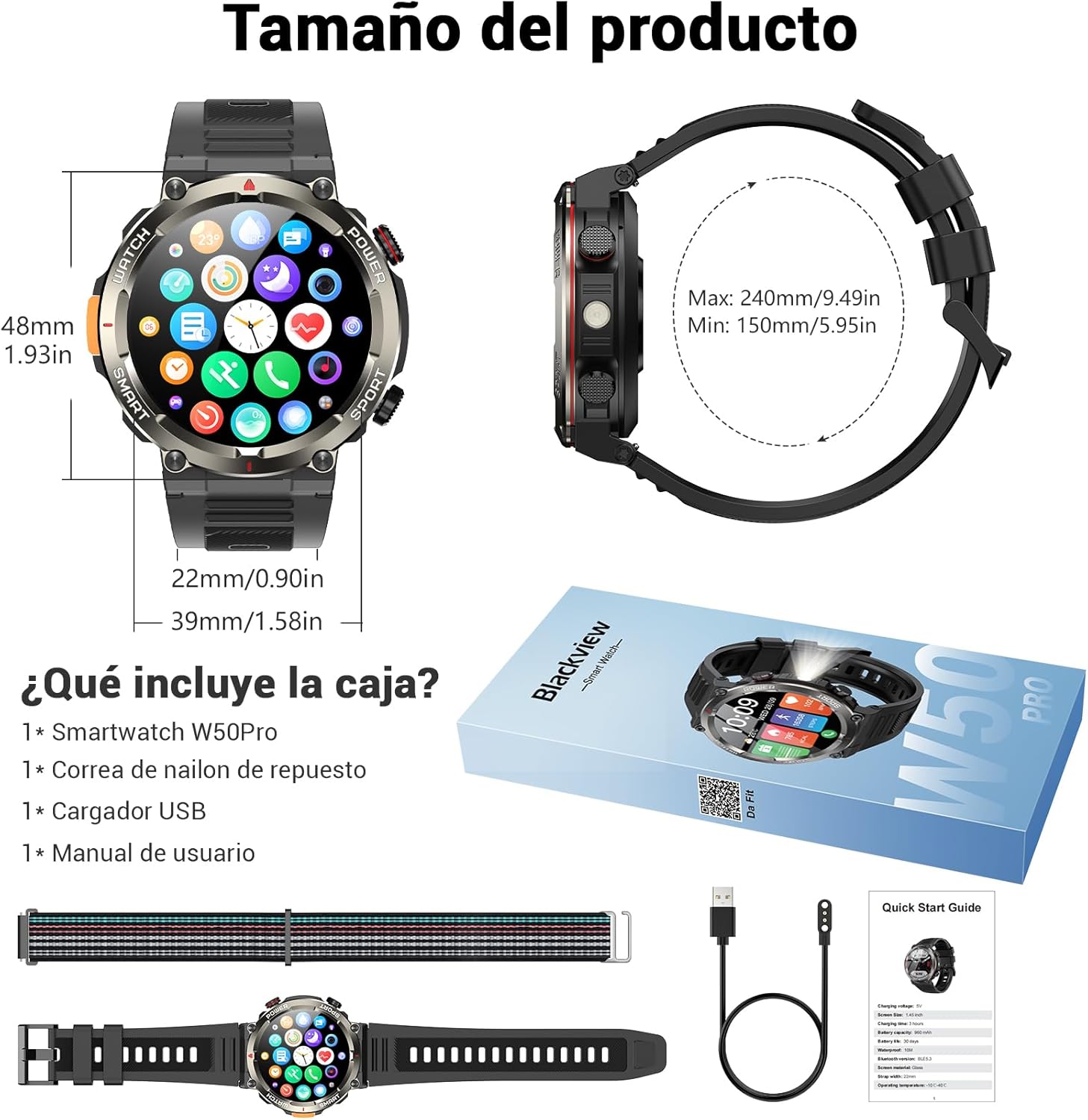
Image: Compass feature for outdoor navigation.

Image: Powerful LED flashlight in action.
3. Bluetooth-Anrufe und Benachrichtigungen
Once paired with your smartphone, the W50PRO allows you to manage calls and notifications directly from your wrist.
- Anrufe tätigen/empfangen: Use the integrated speaker and microphone to make or answer calls.
- Benachrichtigungen: Receive real-time alerts for text messages, emails, and social media apps.
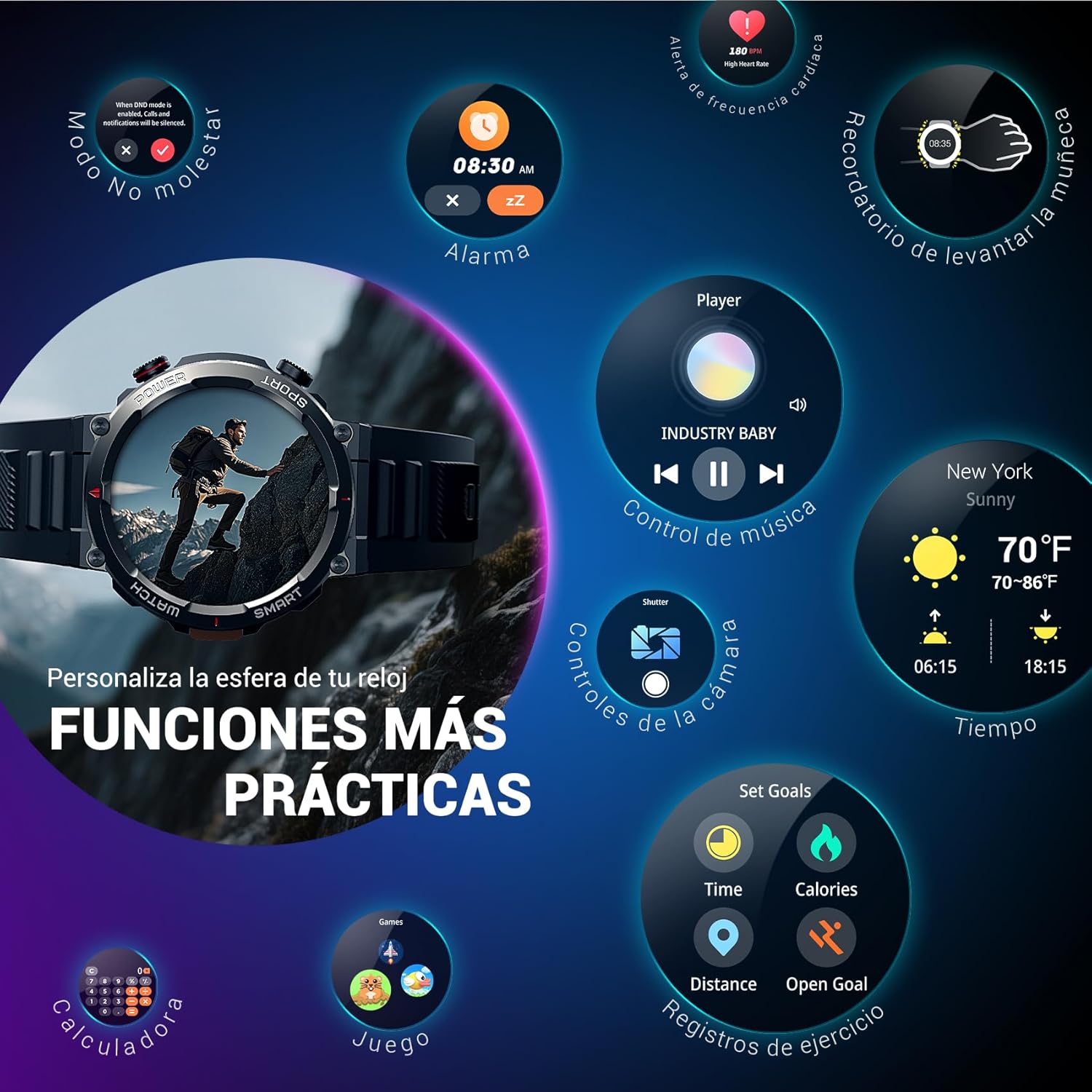
Image: Bluetooth calling and notification features.
4. Gesundheitsüberwachung
The smartwatch is equipped with high-precision sensors to monitor various health indicators:
- Herzfrequenz: Herzfrequenzüberwachung in Echtzeit.
- Blutsauerstoffsättigung (SpO2): Überwachen Sie Ihren Blutsauerstoffgehalt.
- Schlafmonitor: Erfasst Schlafqualität und Schlafmuster.
- Stressniveau: Liefert Einblicke in Ihren Stresspegel.
All health data synchronizes with the Da Fit app for detailed analysis and trend tracking.

Image: Real-time health monitoring features.
5. Sportmodi
The W50PRO offers over 100 integrated sports modes, including running, cycling, climbing, rope skipping, football, and basketball. It accurately records exercise time, distance, steps, calorie consumption, and heart rate changes, providing clear and intuitive performance data. Detailed data can be viewed in der Da Fit App.

Bild: Überview von über 100 Sportmodi.
6. Anpassen von Zifferblättern
The Da Fit app provides a wide selection of watch faces to suit various styles. You can also upload personal photos as wallpaper and adjust text color and widget layout to create a unique watch interface.

Image: Customizable watch faces.
7. Sonstige praktische Funktionen
Das Schwarzeview W50PRO includes additional features for daily convenience:
- Wettervorhersage
- Musiksteuerung
- Kamera-Fernbedienung
- Alarm
- Sitzende Erinnerung
- Wasser trinken Erinnerung
- Stoppuhr
- Countdown-Timer
- Finden Telefon
- Kalkulator
- Spiele
- Helligkeitsanpassung

Image: Multiple smart functions available on the smartwatch.
Wartung
1. Reinigung
Reinigen Sie Ihre Smartwatch und das Armband regelmäßig, um Hautirritationen vorzubeugen und die Funktionalität des Geräts zu erhalten. Verwenden Sie dazu ein weiches, fusselfreies Tuch.amp Tuch zum Abwischen des Bildschirms und casing. For the strap, follow the manufacturer's cleaning recommendations based on the material (silicone or nylon).
2. Wasserbeständigkeit
Das Schwarzeview W50PRO Smartwatch features an IP68 water resistance rating. This means it is protected against dust ingress and can withstand immersion in water up to 1.5 meters for up to 30 minutes. It is suitable for daily use, such as hand washing or light rain. Avoid using it in hot water, saunas, or during diving, as steam and high pressure can compromise the seals.

Image: Durability features including IP68 water resistance.
3. Batteriepflege
So verlängern Sie die Akkulaufzeit:
- Vermeiden Sie extreme Temperaturen.
- Lassen Sie den Akku nicht häufig vollständig entladen.
- Laden Sie das Gerät mit dem mitgelieferten magnetischen Ladekabel auf.
Fehlerbehebung
Sollten Sie Probleme mit Ihrem Schwarzen habenview W50PRO Smartwatch, try the following:
- Gerät lässt sich nicht einschalten: Stellen Sie sicher, dass die Uhr vollständig aufgeladen ist.
- Kopplung mit dem Telefon nicht möglich: Check if Bluetooth is enabled on both devices. Restart both the watch and phone. Ensure the Da Fit app has necessary permissions.
- Ungenaue Gesundheitsdaten: Achten Sie darauf, dass die Uhr eng am Handgelenk sitzt. Reinigen Sie die Sensoren regelmäßig.
- Benachrichtigungen nicht erhalten: Verify that notification permissions are granted in the Da Fit app and your phone's settings. Ensure the app is running in the background.
- Kurze Akkulaufzeit: Reduce screen brightness, disable unnecessary features, and limit frequent heart rate monitoring.
For persistent issues, refer to the Da Fit app's help section or contact customer support.
Technische Daten
| Besonderheit | Spezifikation |
|---|---|
| Marke | Schwarzview |
| Modell | W50PRO |
| Anzeigegröße | 1.45 Zoll |
| Anzeigetyp | LCD |
| Auflösung | 360 x 360 Pixel |
| Batteriekapazität | 960 mAh |
| Typische Akkulaufzeit | Bis zu 30 Tage |
| Standby-Zeit | Bis zu 100 Tage |
| Ladezeit | Ca. 3 Stunden |
| Konnektivität | Bluetooth |
| Eingabe der menschlichen Schnittstelle | Buttons, Microphone |
| Wasserbeständigkeit | IP68 |
| Kompatible Telefonmodelle | iOS und Android |
| Technische Daten | 8.8 x 2.2 x 18.1 cm |
| Produktgewicht | 136 g |
Garantie und Support
Informationen zur Garantie und zum technischen Support finden Sie in der Ihrer Bestellung beiliegenden Dokumentation oder auf der offiziellen Black-Website.view webBewahren Sie Ihren Kaufbeleg für Garantieansprüche auf.