
1. Zu Endeview
The VAIO SX-R Laptop is a high-performance portable computer designed for productivity and creative tasks. It features an Intel Core Ultra 7 processor, a vibrant 14-inch WQXGA touch display, ample memory, and fast storage, all running on Windows 11 Pro.

Figure 1: VAIO SX-R Laptop, open view.
2. Produktmerkmale
- Intel Core Ultra 7 Prozessor: Equipped with 16 cores and AI-enhanced performance for speed and intelligent task management.
- 14" WQXGA Touch Display (2560x1600): High-resolution screen with wide color gamut and touch capability.
- 32 GB LPDDR5 RAM: Provides superior multitasking capabilities with instant responsiveness.
- 1TB PCIe NVMe SSD: Offers massive storage with ultra-fast read/write speeds.
- Windows 11 Pro: Includes enterprise-grade security and productivity features.
- IR Camera & Fingerprint Reader: Enhanced security and convenient login options.
- Kohlefaser-Chassis: Leichte und langlebige Konstruktion.
- Water Resistant Keyboard: Designed to withstand accidental spills.

Figure 2: Key features of the VAIO SX-R Laptop.
3. Körperliche Übergriffeview
3.1 Anschlüsse und Steckverbinder
The VAIO SX-R Laptop is equipped with a variety of ports for connectivity. Refer to the diagram below for port locations and types.
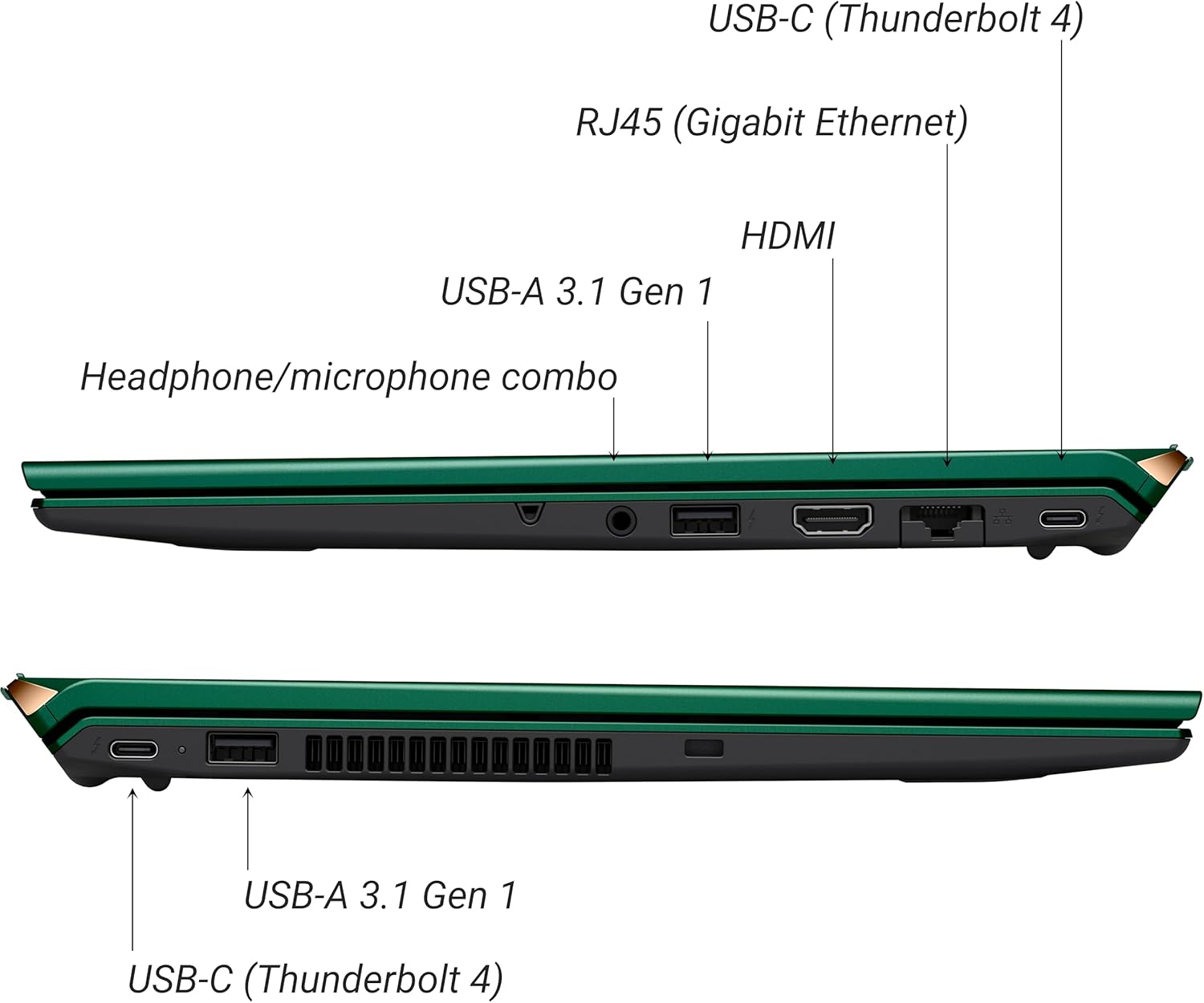
Abbildung 3: Seite view of VAIO SX-R Laptop ports.
- USB-C (Thunderbolt 4): High-speed data transfer, video output, and power delivery.
- RJ45 (Gigabit Ethernet): Für kabelgebundene Netzwerkverbindungen.
- HDMI: Zum Anschluss externer Displays.
- USB A 3.1 Gen 1: Zum Anschließen von USB-Geräten.
- Kombinierte Kopfhörer-/Mikrofonbuchse: Für Audio-Ein- und Ausgänge.
3.2 Tastatur und Touchpad
The laptop features a full-sized keyboard and a responsive touchpad for navigation and input.

Abbildung 4: Layout von Tastatur und Touchpad.
4. Einrichtung
4.1 Erstes Einschalten
- Unpack the VAIO SX-R laptop and all accessories.
- Schließen Sie das Netzteil an den Ladeanschluss des Laptops und anschließend an eine Steckdose an.
- Open the laptop lid. The system may power on automatically or you may need to press the power button located on the top right of the keyboard.
- Folgen Sie den Anweisungen auf dem Bildschirm, um die Einrichtung von Windows 11 Pro abzuschließen, einschließlich Sprache, Region, Netzwerkverbindung und Erstellung des Benutzerkontos.
4.2 Verbindung zu einem Netzwerk herstellen
- W-lan: During initial setup or via Windows settings, select your preferred Wi-Fi network and enter the password. The VAIO SX-R supports Wi-Fi 7 for fast and stable wireless connectivity.
- Kabelgebunden (Ethernet): Connect an Ethernet cable from your router or modem to the RJ45 port on the laptop.
5. Bedienungsanleitung
5.1 Ein-/Ausschalten und Schlafmodus
- Einschalten: Öffnen Sie den Deckel oder drücken Sie den Ein-/Ausschalter.
- Abschalten: Klicken Sie auf die Start-Taste, dann auf Ein/Aus > Ausschalten.
- Schlafen: Schließen Sie den Deckel oder drücken Sie die Starttaste und anschließend Ein/Aus > Ruhemodus.
5.2 Verwendung des Touchscreens
The 14-inch WQXGA display supports touch input. You can interact with the screen using gestures similar to a tablet or smartphone.
5.3 IR Camera and Fingerprint Reader
For enhanced security and convenience, the laptop includes an IR camera for Windows Hello face recognition and a fingerprint reader.
- Windows Hello Face Recognition: Configure this feature in Windows Settings > Accounts > Sign-in options. The IR camera will recognize your face to unlock the device.
- Fingerabdruckleser: Set up your fingerprint in Windows Settings > Accounts > Sign-in options for quick and secure access.
6. Wartung
6.1 Allgemeine Pflege
- Bewahren Sie den Laptop in einer sauberen, trockenen Umgebung auf.
- Vermeiden Sie es, den Laptop extremen Temperaturen oder direkter Sonneneinstrahlung auszusetzen.
- Stellen Sie keine schweren Gegenstände auf den Laptop.
6.2 Reinigung
- Verwenden Sie ein weiches, fusselfreies Tuch, um den Bildschirm und die Außenseite zu reinigen.
- Bei hartnäckigen Flecken leicht tupfen.ampDas Tuch mit Wasser oder einer Bildschirmreinigungslösung befeuchten.
- Reinigungsmittel dürfen nicht direkt auf den Laptop gesprüht werden.
6.3 Batteriepflege
- Um die Lebensdauer des Akkus zu verlängern, vermeiden Sie häufiges vollständiges Entladen des Akkus.
- Bewahren Sie den Laptop mit einem Teilladestand (etwa 50 %) auf, wenn er längere Zeit nicht benutzt wird.
7. Fehlerbehebung
7.1 Stromversorgungsprobleme
- Laptop lässt sich nicht einschalten: Vergewissern Sie sich, dass das Netzteil fest angeschlossen und die Steckdose funktionsfähig ist. Versuchen Sie es mit einer anderen Steckdose.
- Akku wird nicht aufgeladen: Check the power adapter and cable for damage. Ensure the charging port is clean.
7.2 Anzeigeprobleme
- Kein Bildschirm: Schließen Sie einen externen Monitor an, um zu überprüfen, ob das Problem am internen Display des Laptops liegt.
- Touchscreen reagiert nicht: Starten Sie den Laptop neu. Stellen Sie sicher, dass die Grafikkartentreiber auf dem neuesten Stand sind.
7.3 Verbindungsprobleme
- Keine WLAN-Verbindung: Check if Wi-Fi is enabled in Windows settings. Restart your router. Update wireless drivers.
- Bluetooth funktioniert nicht: Ensure Bluetooth is enabled and your device is discoverable.
8. Spezifikationen
| Besonderheit | Detail |
|---|---|
| Modellname | VAIO SX-R (VJS4R1X0811G) |
| Prozessor | Intel Core Ultra 7 (16-Core, AI-Boosted) |
| Betriebssystem | Windows 11 Pro |
| Anzeige | 14 Inches WQXGA Touch (2560x1600) |
| RAM | 32 GB LPDDR5 |
| Lagerung | 1 TB PCIe NVMe SSD |
| Grafik | Integrierte Intel Arc-Grafik |
| Kabellose Konnektivität | 802.11ax (Wi-Fi 7), Bluetooth |
| Häfen | USB-C (Thunderbolt 4) x2, USB-A 3.1 Gen 1 x3, HDMI x1, RJ45 (Gigabit Ethernet) x1, Headphone/microphone combo x1 |
| Kamera | IR Camera (Windows Hello compatible) |
| Sicherheitsfunktionen | Fingerprint Reader, IR Camera |
| Akkulaufzeit | Bis zu 10 Stunden (Durchschnitt) |
| Gewicht | 3.1 Pfund |
| Abmessungen (LxBxH) | 14.2 x 15 x 3.3 Zoll |
9. Durability and Testing
VAIO laptops are engineered with Japanese precision and undergo rigorous quality control to ensure reliability and performance. This includes various tests to withstand daily use.
9.1 Manufacturing and Quality Assurance
Video 1: VAIO Manufacturing and Durability Testing. This video demonstrates the quality control processes and durability tests performed on VAIO laptops, including keystroke testing, dust testing, LCD screen pressure testing, and opening/closure testing.
9.2 Key Durability Features
- Water Resistant Keyboard: The keyboard is designed to resist damage from accidental liquid spills.
- Bildschirmbeständigkeit: The display undergoes pressure testing to ensure resilience.
- Falltest: The laptop is tested to withstand drops from up to 3 feet.

Figure 5: Water resistant keyboard testing.

Figure 6: Screen durability test in progress.

Figure 7: 3-foot drop test for VAIO laptops.
10. Garantie und Support
Your VAIO SX-R Laptop comes with a standard manufacturer's warranty. For specific warranty terms and conditions, please refer to the documentation included with your product or visit the official VAIO support webWebsite.
For technical support, troubleshooting assistance, or service requests, please contact VAIO customer support. Information regarding support channels can be found on the VAIO webauf der Website oder in der Verpackung Ihres Produkts.
Protection plans are available for purchase to extend coverage beyond the standard warranty. Options include 2-Year and 4-Year Protection Plans, as well as a Complete Protect + Norton 360 monthly plan.