
GTRACING 114vc07
GTRACING Gaming-Schreibtisch Modell 114vc07 Bedienungsanleitung
Ausführliche Anleitung für Montage, Betrieb und Wartung.
1. Einleitung
Thank you for choosing the GTRACING Gaming Desk. This manual provides essential information for the safe and efficient assembly, operation, and maintenance of your new desk. Please read these instructions carefully before beginning assembly and retain them for future reference.
2. Wichtige Sicherheitshinweise
Always assemble the desk according to the provided instructions. Be cautious when moving the desk, as it can be heavy and may pose a risk of injury if not handled properly.
- Stellen Sie vor der Verwendung sicher, dass alle Verbindungen sicher sind.
- Do not overload the desk or monitor stand beyond the recommended weight capacity (300 lbs).
- Halten Sie Flüssigkeiten von elektrischen Bauteilen (Steckdosen, USB-Anschlüssen, LED-Leuchten) fern.
- Children should not climb on or play with the desk.
- Entsorgen Sie Verpackungsmaterialien ordnungsgemäß.
3. Packungsinhalt
Verify that all components are present before assembly. If any parts are missing or damaged, please contact GTRACING customer support.
- Desk components (desktop panels, legs, monitor stand parts)
- Integrated power strip (2 AC outlets, 2 USB ports)
- LED-Lichtleiste
- Extended mouse pad
- Headphone hooks (x2)
- Montagezubehör (Schrauben, Bolzen usw.)
- Montagewerkzeuge
- Bedienungsanleitung
4. Montageanleitung
Assembly is required. Please follow the detailed step-by-step instructions provided in the separate assembly guide included with your package. All necessary tools are included.
- Alle Komponenten auspacken und anhand der Packungsinhaltsliste überprüfen.
- Alle Hardware und Werkzeuge identifizieren.
- Assemble the desk frame and legs.
- Bringen Sie die Desktop-Panels an.
- Montieren Sie den Monitorständer.
- Mount the integrated power strip.
- Attach the LED light strip.
- Install the headphone hooks.
- Place the extended mouse pad.

Image: All components of the GTRACING Gaming Desk laid out, ready for assembly. This includes the desktop pieces, legs, monitor stand, and various hardware.

Image: A fully assembled GTRACING Gaming Desk, showcasing the monitor stand, LED lighting, and carbon fiber texture.
5. Bedienungsanleitung
5.1. LED-Beleuchtungssystem
The GTRACING Gaming Desk features an integrated LED light strip to enhance your gaming or work environment. The LED lights offer 16 color changes and 6 dynamic modes.
- Connect the LED light strip to the designated power source.
- Use the included remote control to power on/off, change colors, and select dynamic modes.
- Ensure the remote control has a working battery and is pointed towards the LED receiver for optimal functionality.
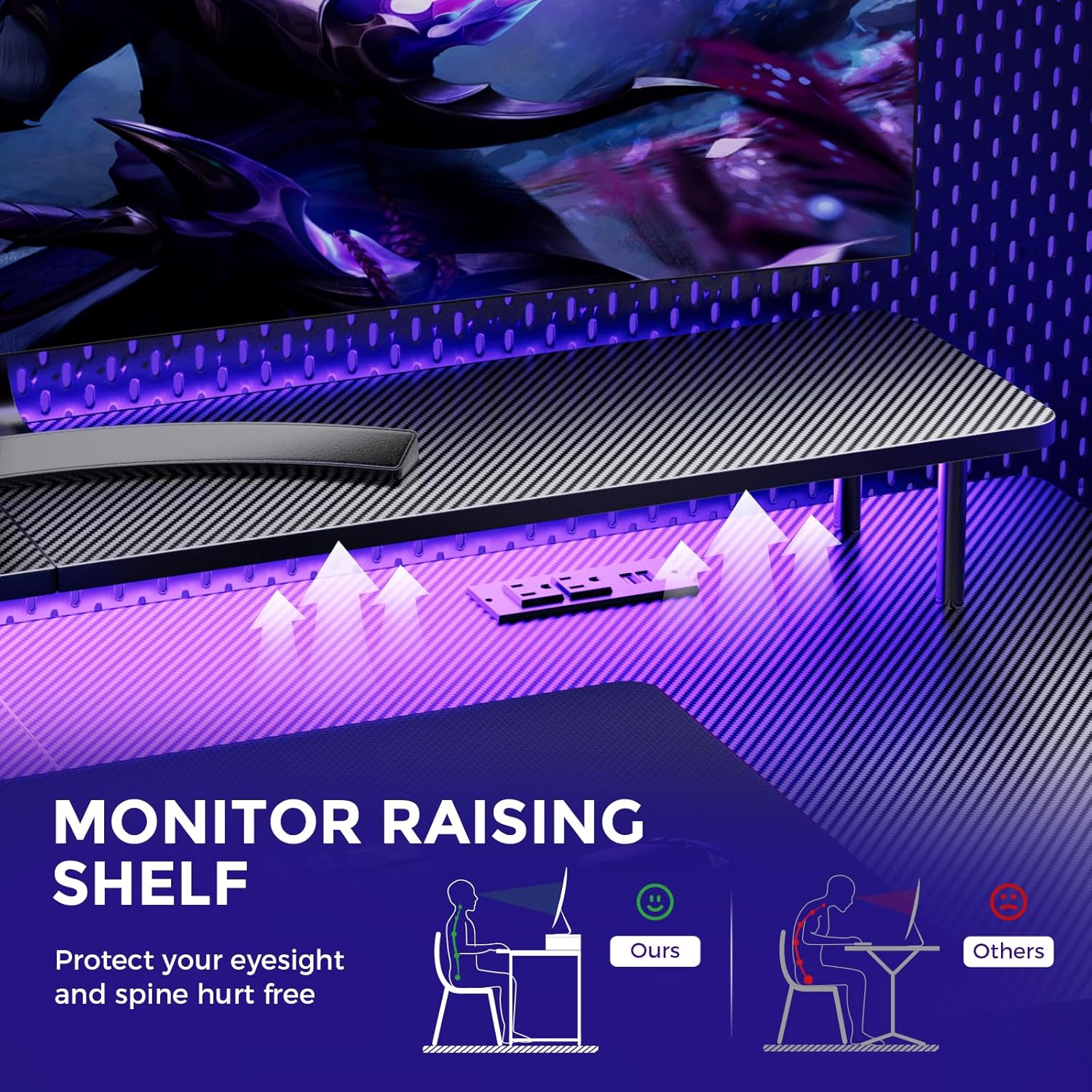
Image: A hand holding a remote control, demonstrating the control over the RGB LED light strip installed beneath the monitor stand of the desk.
Video: An official product video demonstrating the GTRACING 55 Inch Gaming Desk with LED Lights, showcasing its features and aesthetic appeal in a gaming setup.
5.2. Integrated Power Outlets & USB Ports
The desk includes a built-in power strip with 2 AC outlets (120V/12A) and 2 USB charging ports (5V/2A) for convenient device charging and power supply.
- Plug the desk's main power cord into a wall outlet.
- Schließen Sie Ihre Geräte je nach Bedarf an die Netzsteckdosen oder USB-Anschlüsse an.
- Avoid exceeding the maximum power rating of the outlets.

Bild: Eine Nahaufnahme view of the recessed power strip on the desk, showing two AC outlets and two USB charging ports in use, charging a phone and earbuds.
5.3. Ergonomischer Monitorständer
The raised monitor stand positions your screen at eye level, promoting better posture and reducing neck strain during extended use. It also provides additional storage space.

Image: A diagram comparing correct ergonomic posture achieved with the monitor stand to incorrect posture without it, highlighting benefits for eyesight and spine.
6. Wartung
- Reinigung: Wischen Sie die Kohlefaseroberfläche mit einem weichen, fusselfreien Tuch ab.amp Tuch. Vermeiden Sie aggressive Chemikalien, die die Oberfläche beschädigen könnten
- Hardware: Periodically check all screws and bolts to ensure they remain tight. Tighten if necessary.
- Elektrische Komponenten: Keep the power outlets and USB ports free from dust and debris. Do not attempt to repair electrical components yourself.
7. Fehlerbehebung
7.1. LED Lights Not Working or Remote Not Responding
- Überprüfen Sie den Stromanschluss: Ensure the LED light strip is securely plugged into the power source and the desk's main power cord is connected to a live wall outlet.
- Batterie der Fernbedienung: Verify that the remote control has a fresh battery and is inserted correctly.
- Sichtlinie: Ensure there is a clear line of sight between the remote control and the LED receiver. Obstructions can block the signal.
- Manuelle Kontrolle: If the remote is unresponsive, check if there's a manual button on the LED controller itself to cycle through modes or power on/off.
7.2. Instabilität des Schreibtisches
- Hardware festziehen: Alle Montageschrauben und -bolzen erneut prüfen und festziehen.
- Ebene Oberfläche: Stellen Sie sicher, dass der Schreibtisch auf einer ebenen, waagerechten Fläche steht.
8. Spezifikationen
| Besonderheit | Detail |
|---|---|
| Marke | GTRACING |
| Modellnummer | 114vc07 |
| Technische Daten | 24"T x 55"B x 30"H |
| Farbe | Ruß |
| Top-Materialtyp | Kohlefaser |
| Grundmaterial | Edelstahl |
| Maximalgewichtsempfehlung | 300 Pfund |
| Integrierte Steckdosenleiste | 2 AC-Steckdosen (120 V/12 A), 2 USB-Anschlüsse (5 V/2 A) |
| Besondere Merkmale | Built-In USB Outlet, Ergonomic, Monitor Stand, LED Lights, Headphone Hook |
| Montage erforderlich | Ja (Werkzeuge inklusive) |

Image: A detailed diagram illustrating the dimensions of the GTRACING Gaming Desk, including the main desktop and the monitor stand.
9. Garantie und Kundendienst
GTRACING is committed to providing high-quality products and customer satisfaction. For any questions, concerns, or missing parts, please contact our customer service team.
- Free Replacement/Refund: Innerhalb von 30 Tagen nach dem Kauf.
- Free Replacement/Repair: Within 1 year of purchase.
- Kontaktinformationen:
- E-Mail: info@gtracing.com
- Phone: 1-888-660-5669 (9:00-5:30 PST Mon-Fri)
- WebWebsite: www.gtracing.com

Image: GTRACING customer service representatives ready to assist with product inquiries and support.
Ask a question about this manual
Ask about setup, troubleshooting, compatibility, parts, safety, or missing instructions. Manuals+ will review the question and use this page’s manual context to help answer it.