
1. Einleitung
Thank you for choosing the TELESIN C03 Magnetic Phone Selfie Light. This device is designed to enhance your photography and videography with adjustable lighting and convenient features. Please read this manual carefully to ensure proper use and maintenance.
2. Packungsinhalt
- TELESIN C03 Magnetic Phone Selfie Light
- USB-Kabel Typ C.
- Metal Ring Adhesive Adapter (for non-MagSafe devices)
- Bedienungsanleitung
3. Produktüberschreitungview
The TELESIN C03 features a compact, foldable design with a magnetic attachment for easy use. It includes a built-in mirror and offers multiple lighting modes.
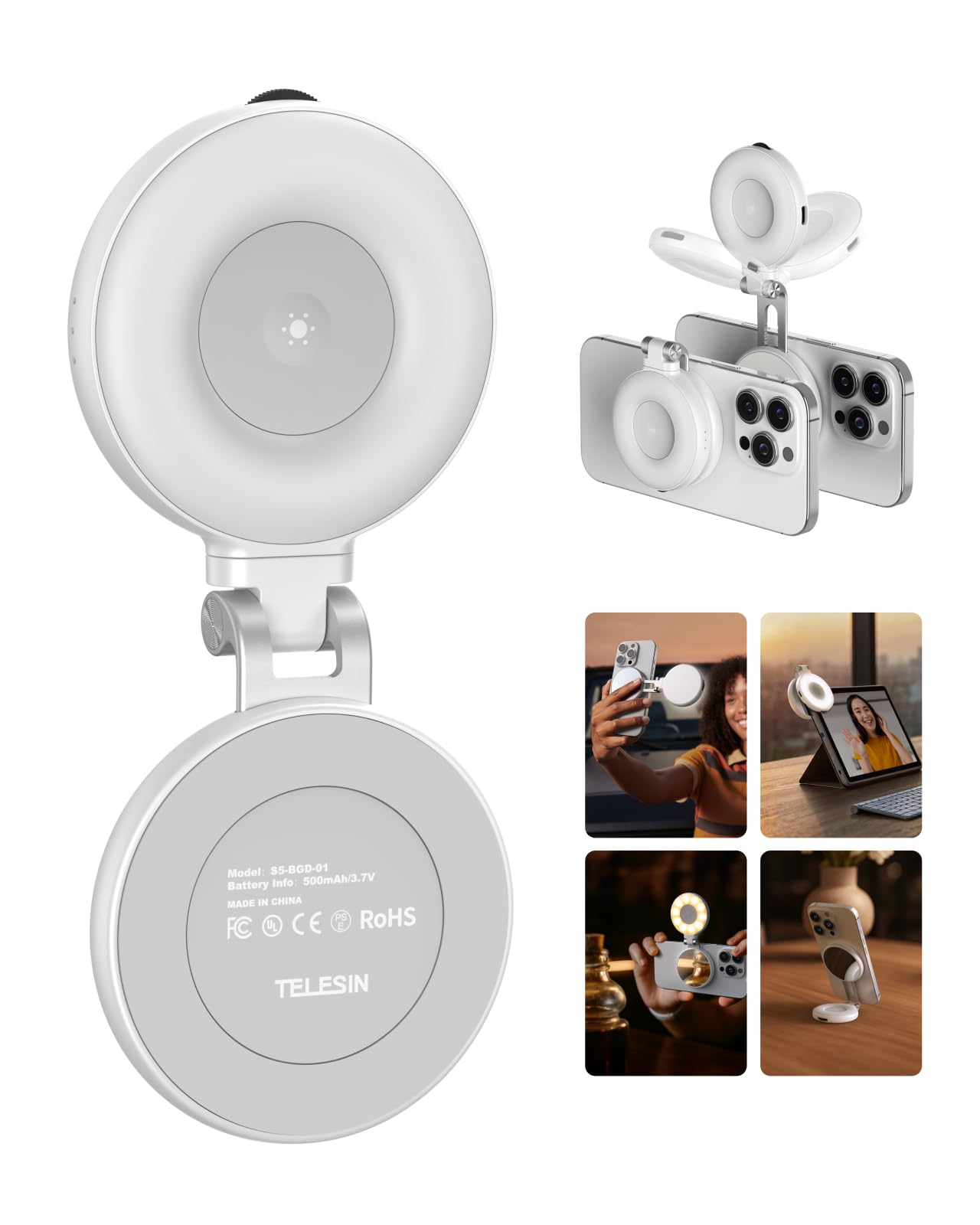
Figure 1: TELESIN C03 Magnetic Phone Selfie Light (folded)
4. Einrichtung und Installation
4.1 Aufladen des Geräts
Before first use, fully charge the selfie light. Connect the provided USB Type-C cable to the charging port on the device and to a compatible USB power source. The indicator light will show charging status.

Figure 2: Charging the Selfie Light
4.2 Attaching to Your Phone
The TELESIN C03 is designed for magnetic attachment. For MagSafe compatible iPhones (iPhone 12 series and newer), simply align the selfie light with the MagSafe area on the back of your phone until it snaps into place securely.

Abbildung 3: Magnetische Befestigung
For non-MagSafe phones, laptops, or other devices, use the included metal ring adhesive adapter. Peel off the protective film from the adhesive side of the metal ring and firmly attach it to the desired location on your device. Ensure the surface is clean and dry for optimal adhesion. Once the ring is attached, the selfie light can be magnetically connected to it.
5. Bedienungsanleitung
5.1 Ein-/Ausschalten und Helligkeitseinstellung
Press and hold the power button to turn the light on or off. Once on, rotate the wave wheel on the side of the device to adjust the brightness from 10% to 100% steplessly.
5.2 Farbtemperaturauswahl
Short press the power button to cycle through the three available color temperatures:
- Warmes Licht (2700K): For a cozy ambiance.
- Natürliches Licht (5600K): For a balanced, natural glow.
- Kaltes Licht (7500K): For a chic, bright illumination.

Figure 4: Light Modes and Brightness Control
5.3 360° Rotation and 180° Flip
The selfie light features a hinge that allows for 360° rotation and a 180° flip. This enables you to direct the light from various angles, whether for front-facing selfies, rear-camera photography, or as a small desktop stand.

Figure 5: Rotatable and Flippable Design
5.4 Using the Built-in Mirror
The device includes a 56mm high-definition makeup mirror. This mirror can be used for quick touch-ups or to assist with framing shots when using your phone's rear camera.
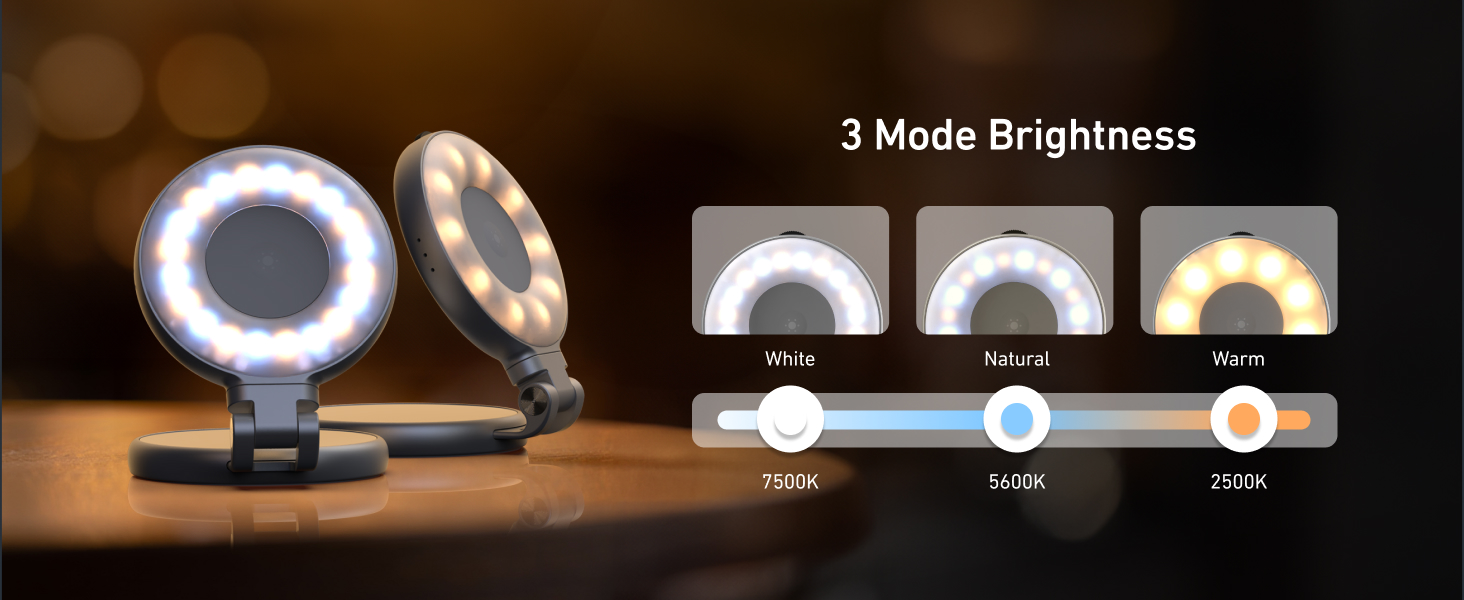
Figure 6: Built-in Makeup Mirror
6. Funktionen
- Magnetische Befestigung: Compatible with MagSafe iPhones and other devices via adhesive metal ring.
- Einstellbare Beleuchtung: 3 color temperatures (2700K, 5600K, 7500K) and 10-100% stepless brightness adjustment.
- 360° Rotation & 180° Flip: Flexible positioning for various shooting angles and use as a stand.
- Eingebauter Spiegel: 56mm high-definition mirror for convenience.
- Wiederaufladbar und tragbar: Compact pocket size with a built-in 500mAh battery, charged via USB Type-C.
7. Wartung
- Halten Sie das Gerät sauber, indem Sie es mit einem weichen, trockenen Tuch abwischen.
- Setzen Sie das Gerät keinen extremen Temperaturen, Feuchtigkeit oder direkter Sonneneinstrahlung aus.
- Versuchen Sie nicht, das Gerät selbst zu zerlegen oder zu reparieren, da dies zum Verlust der Garantie führen kann.
- Bei Nichtgebrauch an einem kühlen, trockenen Ort aufbewahren.
8. Fehlerbehebung
- Licht geht nicht an: Stellen Sie sicher, dass das Gerät vollständig aufgeladen ist. Verbinden Sie es mit dem USB-Typ-C-Kabel mit einer Stromquelle.
- Licht flackert oder ist schwach: Laden Sie das Gerät auf. Sollte das Problem weiterhin bestehen, wenden Sie sich bitte an den Kundendienst.
- Die magnetische Haftung ist schwach: Ensure the device is properly aligned with the MagSafe area or the metal ring adapter. Clean the surfaces to remove any debris.
- Gerät reagiert nicht: Versuchen Sie, das Gerät zurückzusetzen, indem Sie es vollständig entladen und anschließend wieder aufladen.
9. Spezifikationen
| Attribut | Detail |
|---|---|
| Marke | TELESIN |
| Modellname | TELESIN-SL-MAG-WHT-001 |
| Artikelgewicht | 80 Gramm |
| Konnektivitätstechnologie | USB |
| Hardware-Schnittstelle | USB Typ C |
| Durchschnittliche Batterielebensdauer | 272.5 Мinuten |
| Beschreibung der Blitzmodi | Adjustable brightness and color temperature (cold, natural, warm) for constant illumination |
| Wasserbeständigkeit | Nicht wasserfest |
| Kompatible Geräte | iPhone, Android phones, laptops, magnetic selfie stick tripod |
10. Offizielle Produktvideos
TELESIN C03 Magnetic Selfie Light Overview
Dieses Video bietet einen kurzen Überblick überview of the TELESIN C03 Magnetic Selfie Light, demonstrating its magnetic attachment and basic lighting functions.
TELESIN C03 Mirror Selfie Light Demonstration
This video showcases the mirror feature of the TELESIN C03 Selfie Light, highlighting its utility for self-monitoring during content creation.
TELESIN C03 Magnetic Phone Light Features
This video demonstrates various features of the TELESIN C03 Magnetic Phone Light, including its magnetic attachment and adjustable lighting.
11. Garantie und Support
The TELESIN C03 Magnetic Phone Selfie Light comes with a 2-year warranty. For warranty claims, technical support, or any product-related inquiries, please contact TELESIN customer service through their official webWebsite oder den Händler, bei dem das Produkt gekauft wurde.
Weitere Hilfe finden Sie unter TELESIN Store auf Amazon.