
1. Produktüberschreitungview
The Baseus Mini MagSafe Powerbank 5000 mAh is a compact, Qi2 certified portable charger designed for convenience and efficiency. It features a 5000 mAh capacity, 20W Power Delivery (PD) via USB-C, and 15W wireless charging. The integrated foldable stand allows for hands-free viewing while charging. Its strong magnetic attachment ensures secure connection to compatible devices.
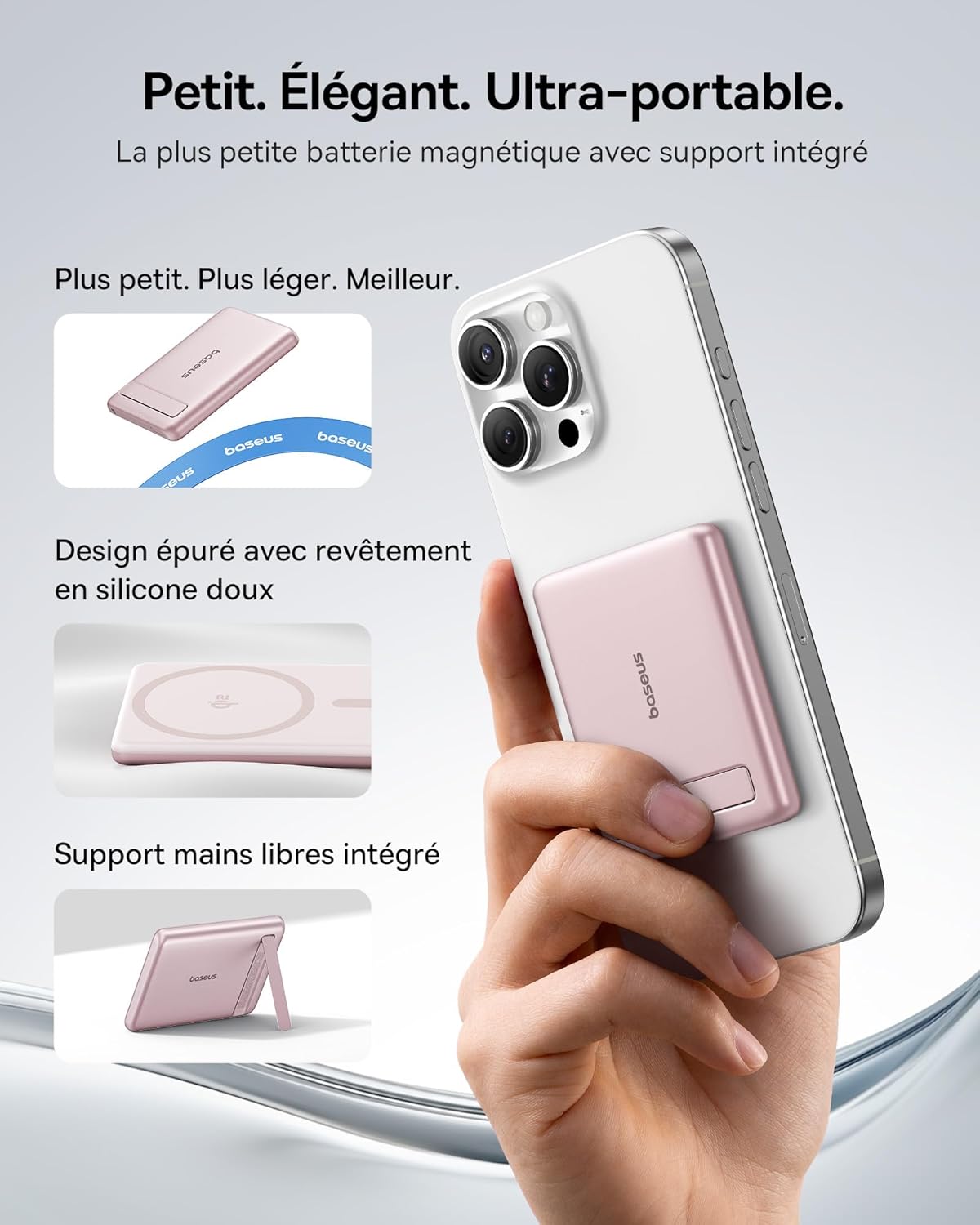
Image: The Baseus Mini MagSafe Powerbank securely attached to an iPhone, demonstrating its compact form factor and the convenience of the integrated kickstand for hands-free use.
2. Packungsinhalt
- Baseus Mini MagSafe Powerbank (Model: PPKPC-0520S)
- USB-C to USB-C Charging Cable (30 cm)
- Bedienungsanleitung

Image: The Baseus Mini MagSafe Powerbank and its accompanying USB-C charging cable, highlighting the included accessories.
3. Produktmerkmale
- Compact and Premium Design: Smaller than a credit card with a 5000 mAh capacity, featuring a thin aluminum casing and soft-touch silicone finish. Ergonomic curved edges enhance grip, and an LED display indicates battery status.
- Qi2 Fast Charging: Provides up to 15W wireless fast charging for iPhones and other Qi2-compatible devices. Qi2 technology ensures secure magnetic alignment for faster and more reliable power delivery.
- Integrierter, klappbarer Ständer: The built-in aluminum kickstand allows for hands-free viewing in both portrait and landscape modes while your phone charges wirelessly.
- Starke magnetische Befestigung: Equipped with N52 rubidium magnets offering 3500 GS magnetic power, ensuring a secure lock for instant charging without obstructing the camera lens.
- Wired and Wireless Charging with Advanced Cooling: Charge two devices simultaneously via wireless and USB-C. A three-layer cooling system maintains optimal temperature during extended use.

Image: An iPhone receiving 15W wireless fast charging from the Baseus MagSafe Powerbank, demonstrating the Qi2 certification and efficient power transfer.
4. Einrichtung
- Grundgebühr: Before first use, fully charge the power bank using the included USB-C cable and a compatible power adapter (not included). The LED indicators will show the charging progress.
- Einschalten: The power bank typically activates automatically when a device is attached or connected. Some models may have a power button to initiate charging.
5. Bedienungsanleitung
5.1 Aufladen der Powerbank
- Connect the included USB-C cable to the power bank's USB-C port.
- Connect the other end of the cable to a USB-C power adapter (e.g., 20W PD charger) or a computer's USB-C port.
- The LED indicators will illuminate to show the current battery level and charging status.
5.2 Kabelloses Laden (MagSafe/Qi2)
- Ensure your device is compatible with MagSafe or Qi2 wireless charging (e.g., iPhone 12 series and newer).
- Align the back of your compatible device with the magnetic surface of the power bank. The magnets will snap into place, ensuring proper alignment.
- Wireless charging will begin automatically. The LED indicators may show charging activity.
5.3 Kabelgebundenes Laden (USB-C)
- Connect your device to the power bank's USB-C port using a compatible USB-C to USB-C cable (or your device's charging cable).
- Wired charging will begin automatically, supporting up to 20W Power Delivery.
5.4 Verwendung des faltbaren Ständers
- Ziehen Sie den integrierten Ständer vorsichtig von der Rückseite der Powerbank heraus.
- Place your wirelessly charging device onto the power bank.
- Stellen Sie den Ständer auf die gewünschte viewing angle for portrait or landscape orientation.

Image: The Baseus MagSafe Powerbank simultaneously charging two iPhones, one via USB-C cable and another wirelessly, demonstrating its dual-charging capability.
6. Wartung
- Reinigung: Reinigen Sie die Powerbank mit einem weichen, trockenen Tuch. Vermeiden Sie die Verwendung von scharfen Chemikalien oder scheuernden Materialien.
- Lagerung: Bewahren Sie die Powerbank an einem kühlen, trockenen Ort fern von direkter Sonneneinstrahlung und extremen Temperaturen auf.
- Batteriepflege: Für eine optimale Batterielebensdauer sollte die Powerbank mindestens einmal alle drei Monate vollständig auf- und entladen werden, wenn sie nicht regelmäßig benutzt wird.
- Vermeiden Sie Tropfen: Schützen Sie das Gerät vor Stürzen und Stößen, da diese die internen Komponenten beschädigen können.
7. Fehlerbehebung
- Gerät lädt nicht:
- Stellen Sie sicher, dass die Powerbank ausreichend geladen ist.
- Prüfen Sie die Kabelverbindungen für kabelgebundenes Laden.
- For wireless charging, ensure proper alignment and that your device is Qi2/MagSafe compatible. Remove any thick phone cases that might interfere.
- Langsames Laden:
- Ensure you are using a compatible cable and power adapter for optimal charging speeds (e.g., PD 20W for wired, Qi2 for wireless).
- Das gleichzeitige Laden mehrerer Geräte kann die Ladegeschwindigkeit der einzelnen Geräte verringern.
- Die magnetische Haftung ist schwach:
- Ensure your phone or case has MagSafe compatibility.
- Remove any non-MagSafe compatible cases or accessories that might block the magnetic connection.
- Überhitzung der Powerbank:
- While the power bank has advanced cooling, prolonged high-power usage can generate heat. If it becomes excessively hot, disconnect it and allow it to cool down.
- Vermeiden Sie das Laden bei direkter Sonneneinstrahlung oder in geschlossenen Räumen.
8. Spezifikationen
| Modellnummer | PPKPC-0520S |
| Akku-Typ | Lithium Polymer |
| Kapazität | 5000 mAh |
| Kabelgebundener Ausgang (USB-C) | Leistungsabgabe (PD) bis zu 20 W |
| Drahtlose Ausgabe | Bis zu 15 W (Qi2-zertifiziert) |
| Eingangslautstärketage | 20 Volt (maximal) |
| Abmessungen (L x B x H) | 10 x 6.7 x 0.9 cm |
| Gewicht | 180 Gramm |
| Kompatible Geräte | Smartphones (iPhone 12-17 Pro/Pro Max, Android compatible) |
| Standard für kabelloses Laden | Qi |

Image: The Baseus Mini MagSafe Powerbank positioned next to an iPhone and a soda can, illustrating its ultra-compact and portable size.
9. Sicherheitshinweise
Bitte lesen und befolgen Sie diese Sicherheitsrichtlinien, um Schäden am Produkt oder Verletzungen zu vermeiden:
- Setzen Sie die Powerbank weder Wasser, Feuchtigkeit noch extremen Temperaturen aus.
- Avoid disassembling, puncturing, or modifying the device.
- Außerhalb der Reichweite von Kindern aufbewahren.
- Nicht verwenden, wenn die Powerbank sichtbar beschädigt oder aufgebläht ist.
- Entsorgen Sie das Produkt verantwortungsvoll gemäß den örtlichen Vorschriften.
10. Garantie und Support
This Baseus Mini MagSafe Powerbank comes with a 2 Jahr Garantie Ab Kaufdatum. Diese Garantie deckt Herstellungsfehler und Verarbeitungsfehler bei normalem Gebrauch ab.
For technical support, warranty claims, or any product-related inquiries, please contact Baseus customer service through the retailer where you purchased the product or visit the official Baseus webWebsite für Kontaktinformationen.

Image: A display of various iPhone models and Android devices, all compatible with the Baseus MagSafe Powerbank, highlighting its broad device compatibility.