
eufy Security T8E00
eufy PoE NVR Security Camera System S4 User Manual
Modell: T8E00
1. Einleitung
This manual provides detailed instructions for the installation, operation, and maintenance of your eufy PoE NVR Security Camera System S4. This system includes a Network Video Recorder (NVR), two Bullet-PTZ cameras, and two Turret cameras, designed for comprehensive 24/7 surveillance.
The system features 4K UHD resolution, 360° PTZ capabilities on Bullet-PTZ cameras, AI-powered auto-framing and tracking, smart video search, and color night vision. It is a wired Power over Ethernet (PoE) system, ensuring stable connectivity and continuous recording.

Bild 1.1: Überview of the eufy PoE NVR Security Camera System S4 components.
2. Packungsinhalt
Verify that all items listed below are included in your package. If any items are missing or damaged, please contact eufy support.
- 1 x Network Video Recorder S4
- 2 x PoE Cam S4 (Bullet-PTZ)
- 2 x PoE Cam E41 (Turret)
- 4 x 59ft/18m Ethernet Cable
- 1 x 3.3ft/1m Ethernet Cable
- 1 x HDMI-Kabel
- 1 x Netzteil
- 1 x USB Maus
- 4 x Waterproof Cover Pack
- 4 x Befestigungswinkel
- 4 x Schraubenpaket
- 1 x Kurzanleitung
3. Systemkomponenten im Überblickview
3.1 Network Video Recorder (NVR) S4
The NVR S4 is the central hub for your security system. It manages camera feeds, stores recordings on its pre-installed 2TB HDD (expandable up to 16TB), and provides connectivity for viewing und Kontrolle.

Image 3.1: The NVR S4 providing 24/7 local security with live view on a display.
3.2 Bullet-PTZ Camera S4
The Bullet-PTZ camera combines a fixed 4K UHD wide-angle lens with a 2K PTZ (Pan-Tilt-Zoom) lens. This dual-lens design allows for both a broad overview and detailed tracking of subjects. It features 360° pan, 70° tilt, and 8x hybrid zoom.
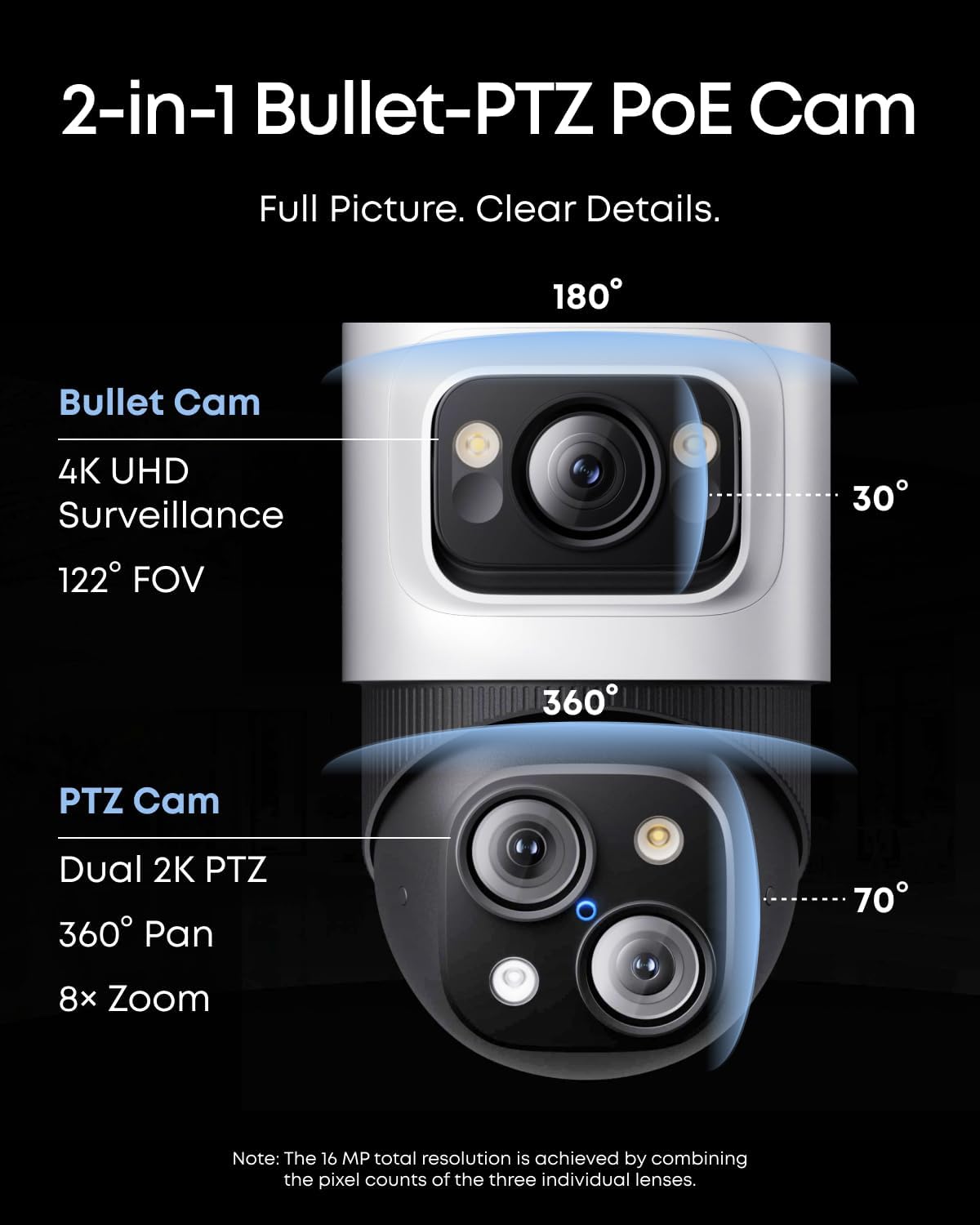
Abbildung 3.2: Detailansicht view of the 2-in-1 Bullet-PTZ PoE Camera capabilities.
3.3 Turret Camera E41
The Turret camera provides 4K Ultra HD resolution with a 122° field of view. It is designed for fixed zone monitoring and offers color night vision and AI detection. It is IP67 weatherproof for reliable outdoor use.

Image 3.3: Bullet-PTZ Cam and Turret Cam for versatile coverage.
4. Einrichtung und Installation
The eufy PoE NVR Security Camera System S4 is designed for plug-and-play installation. A single Ethernet cable provides both power and video transmission for each camera.
4.1 NVR-Verbindung
- Schließen Sie den NVR mithilfe des mitgelieferten Netzteils an eine Stromquelle an.
- Connect the NVR to your router using the included 3.3ft/1m Ethernet cable.
- Connect the NVR to a monitor or TV using the HDMI cable for initial setup and local viewing.
- Schließen Sie die USB-Maus zur Navigation an den NVR an.
4.2 Kamerainstallation
Before permanent installation, test camera placement by temporarily connecting them to the NVR.
- Choose suitable locations for your cameras. Bullet-PTZ cameras are ideal for front yards, backyards, and corners, while Turret cameras are suitable for indoor and backyard monitoring.
- Mount the cameras using the provided mounting brackets and screws. Ensure the mounting surface is stable.
- Connect each camera to the NVR using the 59ft/18m Ethernet cables. These cables provide both power and data.
- Use the waterproof cover packs for outdoor Ethernet connections to protect against weather elements.
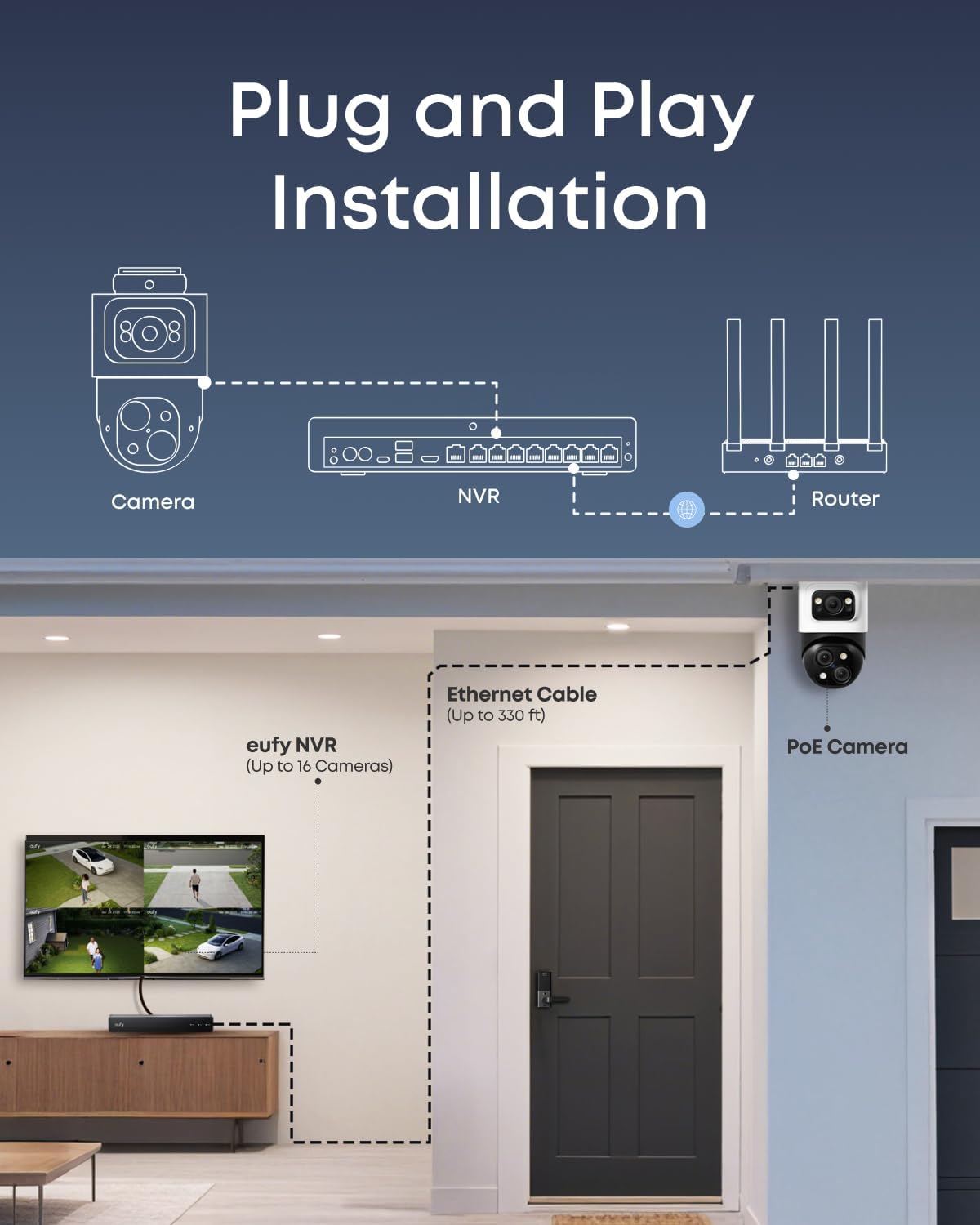
Image 4.1: Plug and Play Installation diagram showing camera, NVR, and router connections.
4.3 App-Einrichtung
To ensure smooth operation, update your eufy Security app to the latest version (iOS V5.0.70/Android V5.0.71 or above).
- Download the eufy Security app from your device's app store.
- Erstellen Sie ein Konto oder melden Sie sich an.
- Follow the in-app instructions to add your NVR system. This typically involves scanning a QR code on the NVR or entering its serial number.
- Once the NVR is added, the connected cameras will automatically appear in the app.
5. Bedienung Ihres Systems
5.1 Live View und Aufzeichnung
The system provides 24/7 continuous recording to the NVR's local storage. You can access live views und aufgezeichnetes Essentage via the eufy Security app, web interface, or a connected display.
- App /Web Schnittstelle: Open the eufy Security app or log in to the web Portal zu view live feeds from all cameras. You can switch between individual camera views or a multi-camera grid.
- Lokale Anzeige: Use the connected monitor/TV and USB mouse to navigate the NVR interface for live viewing, playback, and system settings.
- Aufnahmemodi: The system supports 24/7 recording, motion-activated recording, and scheduled recording. These settings can be configured via the NVR interface or the eufy Security app.
5.2 AI Features and Tracking
The Bullet-PTZ cameras offer advanced AI capabilities for enhanced surveillance.
- AI Auto-Framing and Tracking: When a subject is detected, the PTZ camera can automatically lock onto and track them, keeping them centered in the frame. This feature works up to 164 ft away and includes auto-zoom.
- Live Cross-Cam Tracking: Bullet-PTZ cameras can work in sync to provide continuous tracking. If a subject moves out of one camera's field of view, another Bullet-PTZ camera can seamlessly take over tracking.
- Local AI Agent: The NVR's local AI agent provides real-time analysis for threat identification. You can customize no-go zones and alerts to ensure accurate detection and tailored responses.

Image 5.1: Auto-Framing and Tracking in the eufy Security app.
5.3 Smart Video Search
The Smart Video Search feature allows you to quickly find specific events in your recorded footage.
- Instead of manually scrolling through hours of video, use keywords to search for events. For example, search for "person," "vehicle," or specific activities.
- This feature significantly reduces the time required to locate relevant footage.
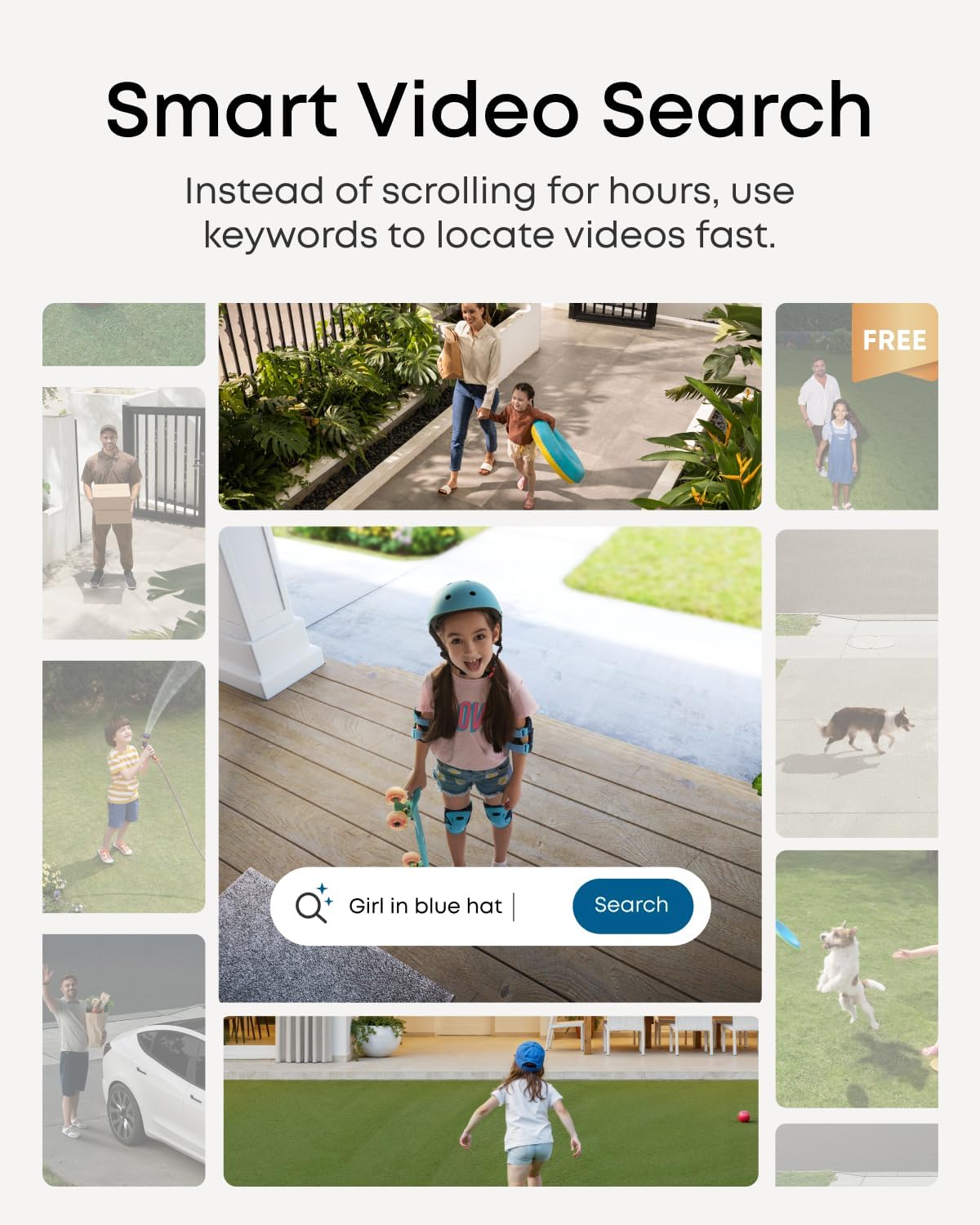
Image 5.2: Smart Video Search interface for quick event retrieval.
5.4 Nachtsicht
The system offers multiple night vision modes for clear visibility in low-light conditions.
- Farbnachtsicht: Utilizes built-in spotlights and advanced image processing (AI-ISP) to provide vivid color images even at night.
- Infrarot Nachtsicht: Delivers crisp black-and-white visuals in complete darkness.

Image 5.3: Various night vision modes for optimal clarity.
6. Wartung
Regular maintenance ensures optimal performance and longevity of your eufy security system.
- Saubere Linsen: Periodically clean camera lenses with a soft, dry cloth to remove dust, dirt, or smudges that may affect image quality.
- Kabel prüfen: Inspect all Ethernet cables and power connections for any signs of wear, damage, or loose connections. Ensure waterproof covers are securely in place for outdoor cables.
- Software-Updates: Regularly check for and install firmware updates for the NVR and cameras via the eufy Security app. Updates often include performance improvements, new features, and security enhancements.
- Speicherverwaltung: Monitor the NVR's storage capacity. The 2TB HDD provides ample space, but you can upgrade to a larger HDD (up to 16TB) if needed. The system typically overwrites the oldest footage wenn der Speicher voll ist.
- Umweltschutz: Ensure cameras are installed in locations that minimize direct exposure to extreme weather conditions, even though they are weatherproof.
7. Fehlerbehebung
This section addresses common issues you might encounter with your eufy PoE NVR Security Camera System S4.
7.1 No Video Feed from Camera
- Kabelverbindung prüfen: Stellen Sie sicher, dass das Ethernet-Kabel sowohl mit der Kamera als auch mit dem NVR fest verbunden ist.
- Verify NVR Port: Confirm the NVR port is active and functioning. Try connecting the camera to a different port.
- Aus- und Wiedereinschalten: Trennen Sie das Netzteil des NVR und schließen Sie es anschließend wieder an.
- App-Update: Ensure your eufy Security app is updated to the latest version.
7.2 Schlechte Bildqualität
- Linse reinigen: Reinigen Sie die Kameralinse, um Schmutz oder Flecken zu entfernen.
- Auflösungseinstellungen prüfen: Verify that the camera's resolution is set to 4K UHD in the NVR or app settings.
- Lichtverhältnisse: Ensure adequate lighting for optimal image quality, especially at night. Adjust night vision settings if necessary.
7.3 AI Tracking Not Working
- Firmware Update: Ensure both the NVR and camera firmware are up to date.
- Klar View: Confirm there are no obstructions blocking the camera's view des Verfolgungsbereichs.
- Erkennungszonen: Check that detection zones and sensitivity settings are correctly configured in the app.
7.4 NVR Not Connecting to Network
- Ethernet Kabel: Ensure the Ethernet cable connecting the NVR to the router is functional and securely connected.
- Routerstatus: Verify your router is powered on and has an active internet connection.
- Netzwerkeinstellungen: Check the NVR's network settings via the local display to ensure it's configured for your network (DHCP recommended).
8. Spezifikationen
| Besonderheit | Spezifikation |
|---|---|
| Marke | eufy Sicherheit |
| Modellnummer | T8E00 |
| Konnektivitätstechnologie | Kabelgebunden (PoE) |
| Auflösung der Videoaufnahme | 4K UHD |
| Anzahl der Kanäle | Bis zu 16 |
| Speicherkapazität | 2 TB HDD (expandable to 16 TB) |
| Stromquelle | Kabelgebundene Elektrik |
| Empfohlene Verwendung | Im Freien |
| Betriebssystem (App) | Android, iOS |
| Betriebssystem (Web) | Windows, macOS |
| Low-Light-Technologie | Streetlight Vision, Spotlight Vision, Infrared Vision |
| Nachtsichtbereich | 65 Fuß |
| Bildfrequenz | 15fps/20fps |
| Aufnahmemodus | 24/7 Recording, Motion Recording, Schedule Recording |
| Anzahl USB-Anschlüsse | 3 |
| Hardware-Schnittstelle | Ethernet |
| Objektivtyp | Fixed + Zoom |
| Videoeingang | RJ45 |
| Viewing-Winkel | 122 Grad |
| Wetterschutz | IP67 (Turret Cam), IP65 (Bullet-PTZ Cam) |
| Technische Daten | 13.5 x 7.13 x 17.4 Zoll |
| Artikelgewicht | 19.16 Pfund |
| UPC | 194644239794 |
9. Garantie und Support
eufy Security provides a 3-year after-sales service for this product. Our expert support team is available 24/7 to assist with any concerns or issues you may encounter.
For technical support, warranty claims, or further assistance, please visit the official eufy Security website or contact their customer service directly. Refer to the Quick Start Guide included in your package for specific contact information.
Besuchen Sie auch die eufy Security Store on Amazon für zusätzliche Produktinformationen und Ressourcen.
Ask a question about this manual
Ask about setup, troubleshooting, compatibility, parts, safety, or missing instructions. Manuals+ will review the question and use this page’s manual context to help answer it.