
1. Einleitung
Thank you for choosing the FLEXISPOT H5 Laptop Support Table. This manual provides essential information for the safe assembly, operation, and maintenance of your new adjustable mobile desk. Please read these instructions carefully before use and retain them for future reference.
The FLEXISPOT H5 is designed for versatile use, offering manual height adjustment and a tilting tabletop to enhance comfort while working, reading, or dining from your sofa, bed, or armchair.
2. Sicherheitshinweise
WARNUNG:
- Die maximale Tragfähigkeit darf nicht überschritten werden. 7 kgÜberlastung kann zu Instabilität und Schäden führen.
- Avoid placing heavy or unstable objects near the edge of the tabletop to prevent them from falling.
- Vor Gebrauch sicherstellen, dass alle Schrauben und Befestigungselemente fest angezogen sind. Regelmäßig auf lockere Verbindungen prüfen.
- Keep hands and fingers clear of moving parts during height adjustment and tabletop tilting to prevent pinching.
- Do not allow children to play with or climb on the table.
- Um ein Umkippen zu verhindern, stellen Sie den Tisch auf eine ebene, stabile Fläche.
3. Packungsinhalt
Bitte prüfen Sie vor Beginn der Montage, ob alle Komponenten vorhanden und unbeschädigt sind. Sollten Teile fehlen oder beschädigt sein, wenden Sie sich bitte an den Kundendienst.
- Tabletop (Maple + White Frame)
- Hauptstützsäule
- Base Feet (2 pieces)
- Safety Bar for Tilting Tabletop
- Montagezubehör (Schrauben, Schraubenschlüssel usw.)
- Bedienungsanleitung
4. Aufbau und Montage
The FLEXISPOT H5 table is designed for quick and easy assembly. A screwdriver is recommended, and all necessary tools are included.
- Attach the Base Feet: Securely attach the two base feet to the bottom of the main support column using the provided screws. Ensure they are oriented correctly for stability.
- Connect the Tabletop: Attach the tabletop to the top of the main support column. Align the pre-drilled holes and fasten with the appropriate screws.
- Install the Safety Bar: If desired, install the removable safety bar along the bottom edge of the tabletop. This prevents items from sliding off when the tabletop is tilted.
- Endkontrolle: Once assembled, gently shake the table to ensure all connections are secure and the table is stable.

Image: FLEXISPOT H5 table showing its dimensions (60 cm x 40 cm) and maximum load capacity (7 kg).
5. Bedienungsanleitung
5.1. Höhenverstellung
The table's height can be manually adjusted between 65 cm and 105 cm to suit various sitting or standing positions.
- Anheben: Pull the adjustment lever (handle) upwards. The tabletop will rise. Release the lever at the desired height.
- Zu senken: Pull the adjustment lever (handle) upwards and gently push the tabletop downwards. Release the lever at the desired height.

Image: Demonstrating the height adjustment feature, allowing use while sitting or standing. The table can be adjusted between 65 cm and 105 cm.
5.2. Tabletop Tilting
The tabletop can be tilted to provide an ergonomic angle for reading, writing, or using a laptop.
- Zum Neigen: Locate the tilting mechanism (often a lever or knob) beneath the tabletop. Engage the mechanism and adjust the tabletop to your preferred angle.
- Zum Sichern: Release the tilting mechanism to lock the tabletop in place.
- Using the Safety Bar: If you plan to tilt the tabletop, ensure the removable safety bar is installed to prevent items from sliding off.

Image: The tilting tabletop feature, demonstrating how to adjust the angle for ergonomic use. An inset shows the simple lever for angle adjustment.
5.3. Mobilität
The C-shaped design and hidden casters allow for easy movement and placement of the table, making it suitable for various locations like beside a sofa, bed, or as a mobile workstation.
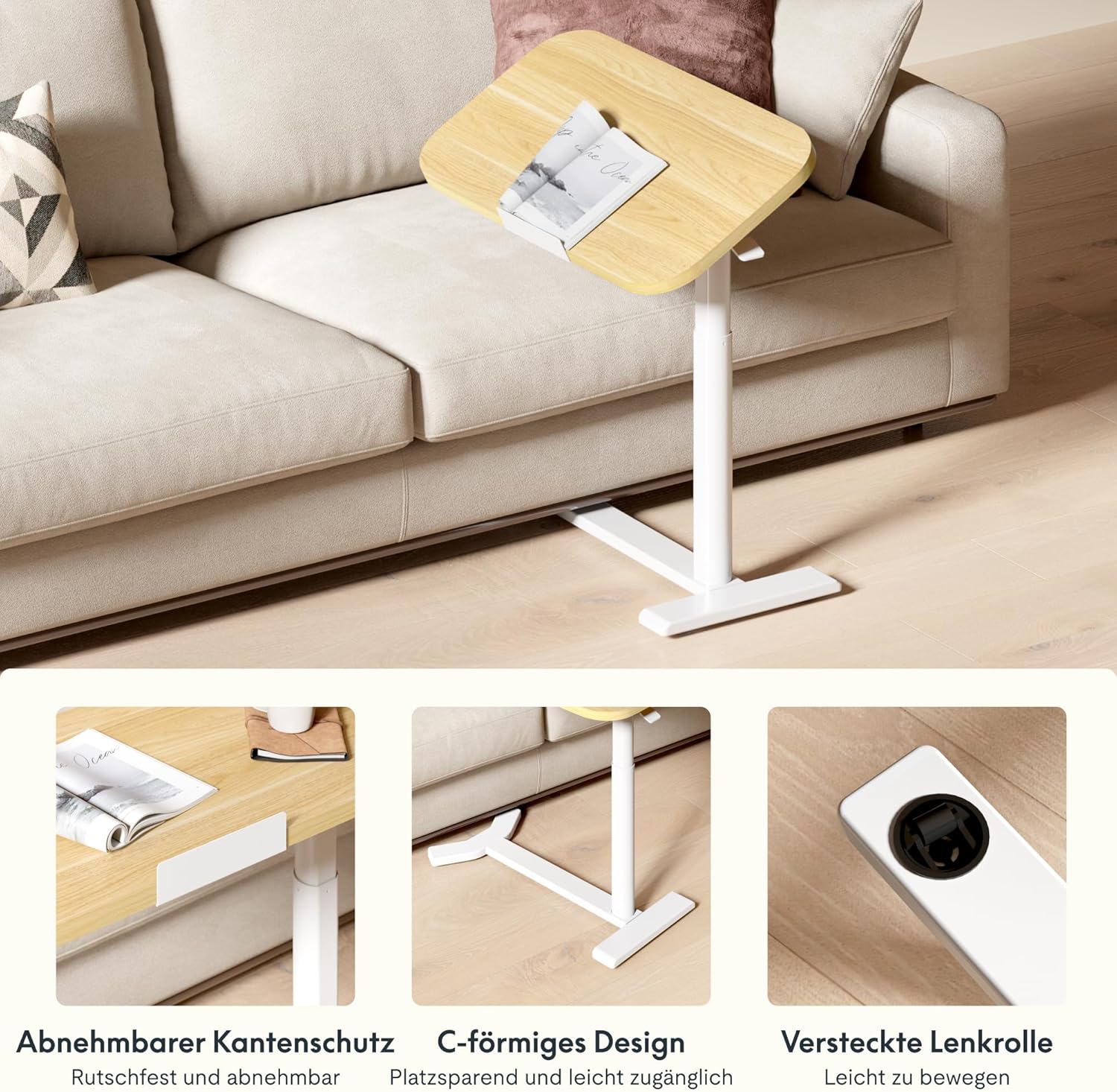
Image: Key design features including removable edge protection, the C-shaped base for easy access, and hidden casters for effortless movement.
6. Wartung
- Reinigung: Wischen Sie die Tischplatte und den Rahmen mit einem weichen, fusselfreien Tuch ab.amp cloth. Avoid abrasive cleaners or harsh chemicals that could damage the finish. The water-repellent surface allows for easy cleaning.
- Inspektionen: Überprüfen Sie regelmäßig alle Schrauben und Verbindungen, um sicherzustellen, dass sie fest sitzen. Ziehen Sie sie gegebenenfalls nach.
- Tragfähigkeit: Always adhere to the maximum load capacity of 7 kg to prevent structural damage.
- Lagerung: When not in use, store the table in a dry environment away from extreme temperatures or direct sunlight.

Image: The tabletop features rounded corners for safety and a water-repellent surface for easy cleaning.
7. Fehlerbehebung
| Problem | Mögliche Ursache | Lösung |
|---|---|---|
| Der Tisch ist wackelig oder instabil. | Loose assembly screws; uneven floor surface. | Check and tighten all assembly screws. Move the table to a flat, even surface. |
| Height adjustment is difficult or stuck. | Mechanism obstruction; excessive weight on tabletop. | Ensure no objects are obstructing the lifting mechanism. Reduce weight on the tabletop. If issues persist, contact support. |
| Die Tischplatte lässt sich nicht reibungslos neigen. | Tilting mechanism obstruction or damage. | Check for any debris or obstruction in the tilting mechanism. Do not force the tilt. Contact support if damaged. |
| Items slide off tilted tabletop. | Safety bar not installed or improperly installed. | Ensure the removable safety bar is correctly installed along the bottom edge of the tabletop when tilting. |
8. Spezifikationen
| Modellnummer: | H5-6040 |
| Marke: | FLEXISPOT |
| Abmessungen (L x B x H): | 60 x 40 x 65-105 cm (23.6 x 15.7 x 25.6-41.3 Zoll) |
| Einstellbarer Höhenbereich: | 65 cm - 105 cm (25.6 Zoll - 41.3 Zoll) |
| Abmessungen der Tischplatte: | 60 cm x 40 cm (23.6 Zoll x 15.7 Zoll) |
| Tischplattenstärke: | 16 mm (0.63 Zoll) |
| Gewicht: | 9 kg |
| Maximale Tragfähigkeit: | 7 kg |
| Materialien: | Engineered Wood (Tabletop), Wood (Frame), Metal (Base) |
| Farbe: | Maple + White Frame |
| Montage erforderlich: | Ja (Werkzeug inklusive) |
| GTIN/UPC: | 840460424028 |
9. Garantieinformationen
FLEXISPOT products typically come with a limited warranty covering manufacturing defects. Please refer to the warranty card included with your product or visit the official FLEXISPOT webAuf der Website finden Sie detaillierte Garantiebedingungen speziell für Ihre Region.
Bewahren Sie Ihren Kaufbeleg als Kaufnachweis für eventuelle Garantieansprüche auf.
10. Kundendienst
If you have any questions, require assistance with assembly, or encounter any issues with your FLEXISPOT H5 Laptop Support Table, please contact FLEXISPOT customer service.
- Online-Hilfe: Besuchen Sie die offizielle FLEXISPOT-Website. webWebsite mit FAQs, Hilfeartikeln und Kontaktformularen.
- E-Mail: Siehe Ihre Produktverpackung oder den FLEXISPOT webAuf der Website finden Sie die entsprechende E-Mail-Adresse des Kundendienstes.
- Telefon: Contact numbers for your region can be found on the FLEXISPOT official webWebsite.
When contacting support, please have your model number (H5-6040) and purchase information readily available.