
Einführung
This manual provides detailed instructions for the assembly, operation, and maintenance of your FLEXISPOT One-Piece Standing Desk with Rattan Drawers. Please read this manual thoroughly before installation and use to ensure proper function and safety. Keep this manual for future reference.

Image: The FLEXISPOT One-Piece Standing Desk in black with rattan drawers, featuring a monitor shelf and an integrated control panel.
Wichtige Sicherheitsinformationen
Um Verletzungen oder Schäden am Produkt zu vermeiden, beachten Sie bitte die folgenden Sicherheitsrichtlinien:
- Befolgen Sie die Montageanleitung immer sorgfältig.
- Halten Sie Kinder und Haustiere vom Versammlungsbereich fern.
- Use appropriate tools and safety gear during assembly.
- Stellen Sie sicher, dass alle Verbindungen sicher sind, bevor Sie den Schreibtisch in Betrieb nehmen.
- Do not overload the desk. The maximum weight capacity is 110 lbs.
- Halten Sie Hände und Gegenstände während der Höhenverstellung von beweglichen Teilen fern.
Packungsinhalt
Verify that all components are present before beginning assembly. The desk ships in two separate packages.
- Desktop with integrated monitor shelf and rattan drawers
- Desk frame and legs
- Bedienfeld
- Netzteil und Kabel
- Montagezubehör (Schrauben, Bolzen, Werkzeuge)
- Bedienungsanleitung

Image: A diagram illustrating the dimensions of the desk components and indicating that the product ships in two separate packages.
Montageanleitung
Assembly typically takes approximately one hour. Refer to the separate detailed assembly guide included in your package for step-by-step instructions and diagrams. Ensure all fasteners are correctly identified and used in their designated locations.
- Alle Komponenten auspacken und anhand der Packungsinhaltsliste überprüfen.
- Attach the desk legs to the desktop frame using the provided hardware.
- Schließen Sie das Bedienfeld und die Motorkabel gemäß Anleitung an.
- Secure any cable management components.
- Place the desk in its desired location.
Aufstellen
After assembly, connect the desk to a power source.
- Plug the power adapter into the desk's control box.
- Stecken Sie das Netzkabel in eine normale Steckdose.
- The desk is now ready for initial use.
Bedienungsanleitung
Höhenverstellung
The desk features an electric motor system for smooth height transitions.
- Drücken Sie die Pfeil nach oben Knopf zum Anheben des Schreibtisches.
- Drücken Sie die Pfeil runter Knopf zum Absenken des Schreibtisches.
- The desk can adjust between 28.9 inches (minimum) and 46.5 inches (maximum).
- The motor operates quietly, typically below 50dB.

Image: The desk shown at its minimum (28.9") and maximum (46.5") adjustable heights.
Speichervoreinstellungen
Program up to three preferred height settings for quick adjustments.
- Stellen Sie den Schreibtisch auf die gewünschte Höhe ein.
- Drücken Sie die M button, then press one of the numbered preset buttons (1, 2, oder 3) within 3 seconds to save the current height.
- Um eine gespeicherte Höhe abzurufen, drücken Sie einfach die entsprechende nummerierte Voreinstellungstaste.

Bild: Eine Nahaufnahme view of the desk's control panel, highlighting the up/down arrows and memory preset buttons.
Monitorregal
The integrated monitor shelf is designed to elevate screens to an ergonomic eye level.
- Place your monitor(s) on the shelf to reduce neck and back strain.
- This helps maintain proper posture during extended work sessions.

Image: Visual comparison of poor posture versus ergonomic sitting and standing postures facilitated by the adjustable desk.
Rattan Drawers
The desk includes both sliding-door desktop compartments and an under-desk drawer for organized storage.
- Use the desktop compartments (47.2"x8.7"x5.5") for easy access to frequently used items.
- The under-desk drawer (23.6"x11.8"x3.9") provides discreet storage for documents or books.
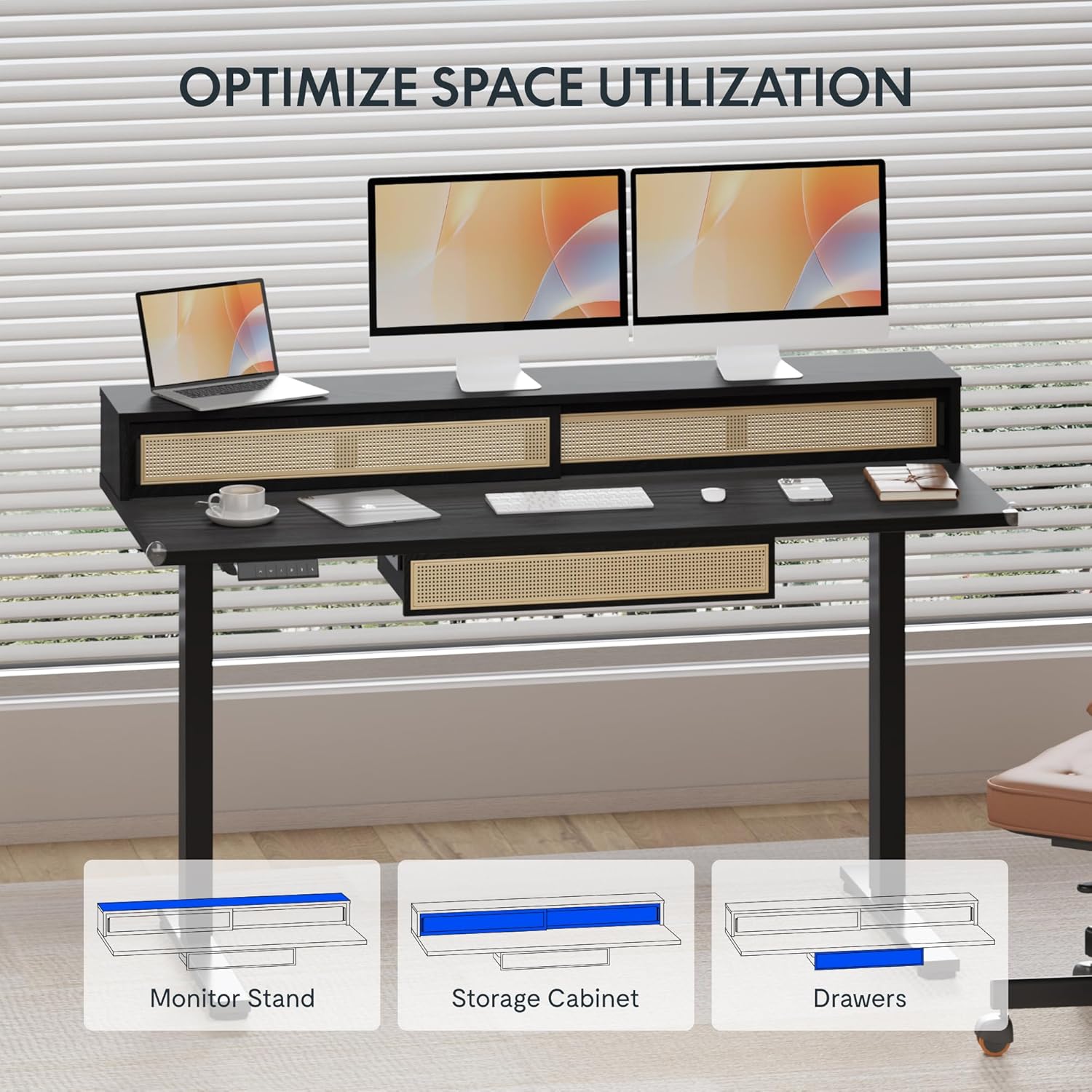
Image: An illustration demonstrating the various storage options, including the monitor stand, storage cabinet, and drawers, for optimal space utilization.
Wartung
Regelmäßige Wartung gewährleistet die Langlebigkeit und optimale Leistung Ihres Schreibtisches.
- Reinigung: Wischen Sie die Schreibtischoberflächen mit einem weichen, fusselfreien Tuch ab.amp Tuch. Vermeiden Sie Scheuermittel oder aggressive Chemikalien, die die Oberfläche beschädigen könnten.
- Inspektion: Überprüfen Sie regelmäßig alle Schrauben und Bolzen auf festen Sitz. Ziehen Sie sie gegebenenfalls nach.
- Kabelmanagement: Ensure cables are neatly organized and not interfering with the desk's movement.
Fehlerbehebung
Sollten Sie Probleme mit Ihrem Schreibtisch haben, beachten Sie bitte die folgenden gängigen Lösungsansätze:
| Problem | Mögliche Ursache | Lösung |
|---|---|---|
| Der Schreibtisch bewegt sich nicht und reagiert nicht auf die Bedienelemente. | Power connection issue, cable disconnected, motor error. | Check power cord connection to outlet and desk. Ensure all motor cables are securely connected. Unplug and replug the power for 10 seconds to reset. |
| Der Schreibtisch wackelt ungleichmäßig oder macht ungewöhnliche Geräusche. | Ungleichmäßige Belastung, lose Verbindungen, Verstopfung. | Ensure weight is evenly distributed. Check for any obstructions under the desk. Verify all assembly screws are tight. |
| Die Speichervoreinstellungen funktionieren nicht. | Voreinstellungen wurden nicht korrekt gespeichert. | Re-save the desired height settings by pressing 'M' then the preset number within 3 seconds. |
Technische Daten
| Besonderheit | Detail |
|---|---|
| Marke | FLEXISPOT |
| Produktabmessungen (T x B x H) | 23.6"D x 47.2"W x 29"H (at lowest point) |
| Farbe | Schwarz |
| Grundmaterial | Legierter Stahl |
| Top-Materialtyp | Holz |
| Mindesthöhe | 28.9 Zoll |
| Maximale Höhe | 46.5 Zoll |
| Anzahl der Schubladen | 1 (under-desk) |
| Enclosed Shelves | 2 (sliding-door desktop compartments) |
| Besonderheit | Corded electric height adjustment, Memory Presets |
| Erforderliche Montage | Ja |
Garantie und Support
FLEXISPOT provides comprehensive warranty coverage for your standing desk:
- Frame and Motor: 5-year coverage.
- Elektronik: 2-year coverage.
This warranty ensures lasting security for your workspace investment. For customer support, technical assistance, or warranty claims, please refer to the contact information provided in your product packaging or visit the official FLEXISPOT webWebsite.