
1. Einführung und Endeview
The BSIDE SH7 is a versatile device combining a high-resolution thermal imaging camera with a comprehensive digital multimeter. This instrument is designed for electrical and electronic professionals, offering advanced diagnostic capabilities for various applications, including home inspection, HVAC, electrical plumbing, and boiler inspection.
Key features include a 320x320 infrared (IR) resolution, a 3.98-inch touch LCD, 15 selectable thermal palettes, and a 20000-count multimeter for precise measurements. The included macro lens enhances its utility for inspecting small electronic components and printed circuit boards (PCBs).
2. Einrichtung
2.1 Auspacken und erste Inspektion
Carefully unpack all components from the carrying case. Verify that the following items are present:
- BSIDE SH7 Thermal Imaging Camera Multimeter
- Makro-Objektiv
- Ladekabel
- Tragetasche
- Bedienungsanleitung
Inspect the device for any visible damage. If any components are missing or damaged, contact customer support.

Figure 2.1: BSIDE SH7 Thermal Imaging Camera Multimeter with included accessories, including the macro lens, charging cable, and carrying case.
2.2 Aufladen des Geräts
The device is equipped with a built-in 2500mAh rechargeable battery. Before first use, fully charge the device using the provided charging cable. Connect the charging cable to the device's charging port and a suitable USB power adapter (not included).
2.3 Ein-/Ausschalten
To power on the device, press and hold the power button located on the side. The device will display a loading screen before entering the thermal imaging mode. To power off, press and hold the power button again.
Video 2.1: Demonstrates powering on the BSIDE SH7 and its initial boot sequence, showing the loading process and transition to thermal imaging mode.
2.4 Attaching the Macro Lens
For detailed inspection of small components, attach the macro lens to the thermal camera. Align the macro lens with the camera's thermal sensor and secure it in place. The macro lens provides a magnification of 0.3X with a working object distance of 35mm.
2.5 Spracheinstellungen
Upon initial setup or if needed, you can change the device's language. Navigate to the 'Settings' menu, then 'More Settings', and select 'Language'. Choose 'English' from the available options.
Video 2.2: Illustrates the process of navigating the menu to change language settings and other configurations on the BSIDE SH7.
3. Bedienungsanleitung
3.1 Wärmebildmodus
The BSIDE SH7 provides a visual representation of temperature differences, allowing for quick identification of hot and cold spots.
- Display Interpretation: The 3.98-inch touch LCD displays the thermal image with temperature readings for the central spot, highest temperature (hot spot), and lowest temperature (cold spot) within the field of view.
- Thermal Palettes: The device offers 15 thermal palettes (e.g., White Hot, Black Hot, Rainbow, Iron Red) to visualize temperature data. Tap the palette icon on the screen to cycle through or select a desired palette from the settings.
- Emissivity and Distance: Adjust emissivity (0.01-1) and measurement distance (0.3-3m) in the settings for accurate temperature readings based on the target material and distance.
- Hoch- und Niedrigtemperaturalarm: Set specific temperature thresholds. The camera will trigger an alarm if the measured temperature exceeds or falls below these set points.
- Image Storage and Export: The device can store up to 19,000 thermal images. Connect the device to a computer via USB to export and analyze the stored data.
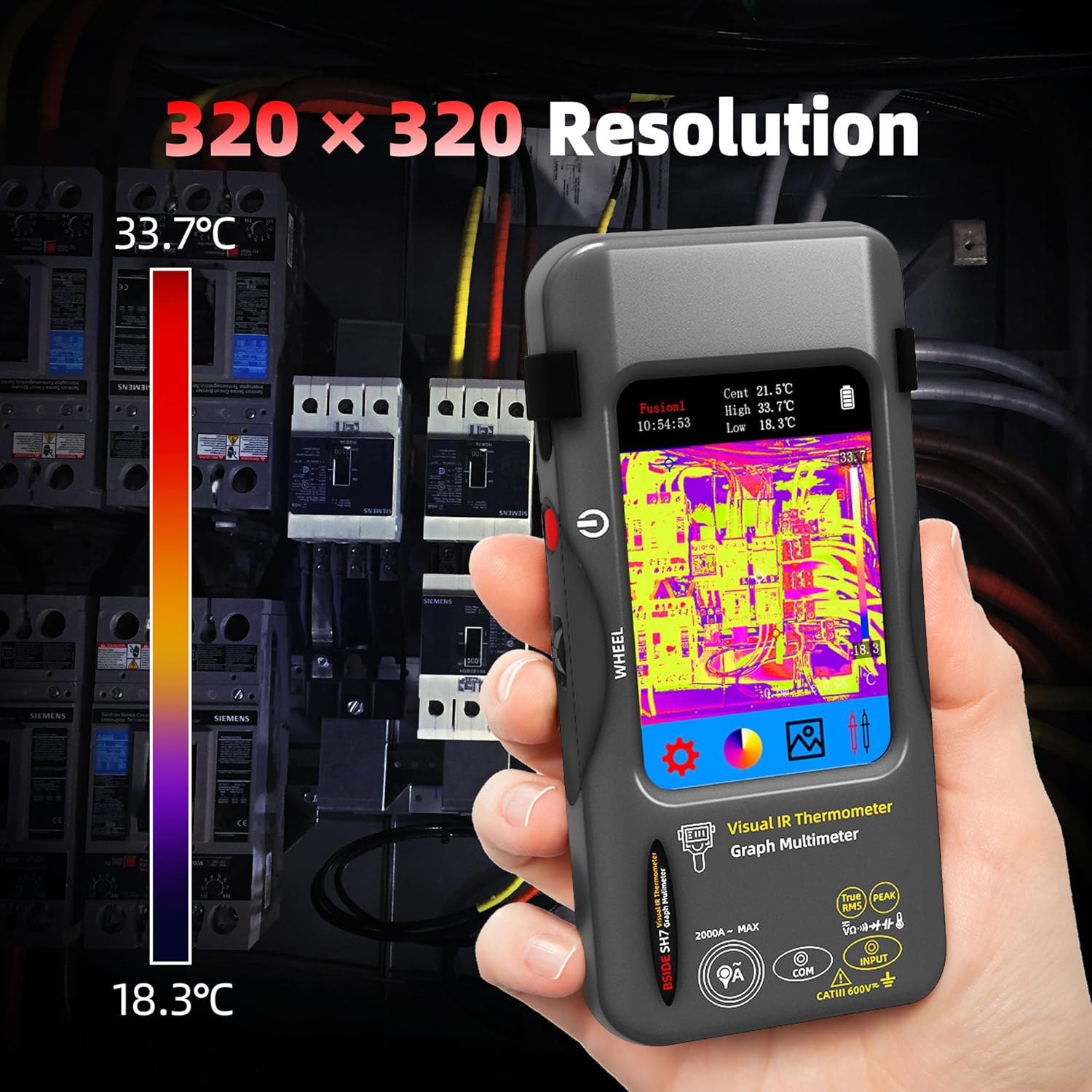
Figure 3.1: Thermal image display showing temperature distribution on a circuit breaker panel, highlighting the 320x320 IR resolution.

Figure 3.2: The device's display indicating hot, cold, and central temperature spots for precise thermal analysis.

Figure 3.3: A visual representation of the 15 thermal palettes available on the device, allowing users to choose the best visualization for their application.

Figure 3.4: The device connected to a computer, demonstrating the capability for real-time image export and data analysis.
3.2 Multimeter-Modus
The integrated 20000-count digital multimeter offers a wide range of electrical measurement functions.
- Bandtage-Messung: Messen Sie DC-Voltage (20mV to 1000V) and AC voltage (20mV to 750V) using the included test leads.
- Resistance and Continuity: Measure resistance (200Ω to 200MΩ) and perform continuity tests.
- Capacitance and Diode: Test capacitance (999.99nF to 99.999mF) and perform diode tests.
- Temperatur messung: Measure temperature from -20℃ to 1300℃ (-4℉ to 2372℉).
- Flexibler Wechselstrom Klamp: The device supports flexible AC current clamp measurements up to 2000A. Note: The flexible AC current clamp ist nicht im Lieferumfang enthalten.

Figure 3.5: The multimeter display showing a DC voltage measurement, demonstrating its 20000-count capability.

Figure 3.6: The device in multimeter mode, performing a capacitance measurement on a circuit board, useful for electronic maintenance.
3.3 Touch LCD Operation
The 3.98-inch color touch LCD allows for intuitive navigation and setting adjustments. Tap icons to select modes, swipe to scroll through menus, and use the on-screen keyboard for input where applicable.

Figure 3.7: A hand demonstrating interaction with the 3.98-inch touch LCD, highlighting the device's user-friendly interface.
4. Wartung
4.1 Reinigung
Regularly clean the device's exterior with a soft, dry cloth. For the screen and lens, use a lens cleaning cloth and a specialized cleaning solution if necessary. Avoid abrasive cleaners or solvents that could damage the display or casing.
4.2 Batteriepflege
To prolong battery life, avoid fully discharging the battery frequently. Recharge the device when the battery indicator is low. If storing the device for an extended period, ensure it is charged to approximately 50% and recharge every few months.
4.3 Speicherung
Store the device in its carrying case in a cool, dry place, away from direct sunlight, extreme temperatures, and high humidity. Ensure the macro lens is protected when not in use.
5. Fehlerbehebung
This section addresses common issues you might encounter with your BSIDE SH7 device.
- Gerät lässt sich nicht einschalten: Ensure the battery is sufficiently charged. Connect the device to the charging cable and allow it to charge for at least 30 minutes before attempting to power on again.
- Ungenaue Temperaturmesswerte: Verify that the emissivity setting matches the material being measured. Ensure the measurement distance is within the recommended range (0.3-3m). Clean the thermal lens if it appears dirty.
- Die Multimeter-Anzeigen sind instabil oder fehlerhaft: Check the connection of the test leads to both the device and the circuit being measured. Ensure the correct measurement function is selected. Replace test leads if they are damaged.
- Touchscreen reagiert nicht: Versuchen Sie, das Gerät neu zu starten. Sollte das Problem weiterhin bestehen, stellen Sie sicher, dass der Bildschirm sauber und trocken ist.
- Cannot export images to computer: Ensure the USB cable is securely connected to both the device and the computer. Check if the device is in the correct mode for data transfer (if applicable, refer to 'More Settings' for 'Format Storage' or 'Update' options, which might relate to data management).
Sollten Sie auf Probleme stoßen, die hier nicht aufgeführt sind, oder falls die Schritte zur Fehlerbehebung das Problem nicht lösen, wenden Sie sich bitte an den Kundendienst.
6. Spezifikationen
6.1 Infrared Camera Specifications
- Anzeigegröße: 3.98 Zoll TFT LCD
- IR-Auflösung: 320 x 320
- Bildschirmauflösung: 320 x 480
- Winkel von View (FOV): 50.0°(H) x 50.0°(V) / 72.1°(D)
- Räumliche Auflösung (IFOV): 8.89mrad
- Temperaturbereich: -20 550 bis 4 ℃ (-1022 ℉ bis XNUMX ℉)
- Thermische Empfindlichkeit/NETD: Less than 60mk
- Aktualisierungsrate: 25 Hz
- Entfernungseinstellungen: 0.3-3 m
- Emissionsgrad: 0.01-1 (einstellbar)
- Thermal Palettes: 15 Optionen
- Number of Storage Images: 19000
6.2 Spezifikationen für digitale Multimeter
- MAX Display: 20000 Zählwerte
- DC-Voltage: 20mV/200mV (±0.1%+3); 2V/20V (±0.05%+3); 200V/1000V (±0.5%+3)
- AC-Lautstärketage: 20mV/200mV (±0.1%+3); 2V/20V (±0.05%+3); 200V/750V (±0.5%+3)
- Flexible AC Current: 200A/2000A (±1.0%+5)
- Widerstand: 200Ω (±0.5%+3); 2kΩ/20KΩ/200KΩ (±0.2%+3); 2MΩ/20MΩ (±1%+3); 200MΩ (±5%+5)
- Kapazität: 999.99nF (±5.0%+20); 9.999µF/999.9µF (±2%+5); 99.999mF (±5%+10)
- Temperatur: -20℃ to 1300℃ (-4℉ to 2372℉) (±2%+5)
- Diode: Ja
- Kontinuität: Ja
6.3 Macro Lens Specifications
- Working Object Distance: 35 mm
- Vergrößerung: 0.3X
6.4 Allgemeine Spezifikationen
- Leistung: 2500-mAh-Akku (eingebaut)
- Größe: 169 x 81 x 26.8M (6.65 x 3.19 x 1.06 Zoll)
- Gewicht: 270 g (9.5 Unzen)
7. Garantieinformationen
The BSIDE SH7 Thermal Imaging Camera Multimeter is covered by a manufacturer's warranty. Please refer to the warranty card included with your product or visit the official BSIDE webDie vollständigen Garantiebedingungen finden Sie auf der Website. Bewahren Sie Ihren Kaufbeleg als Kaufnachweis für Garantieansprüche auf.
8. Unterstützung
For technical assistance, product inquiries, or troubleshooting beyond the scope of this manual, please contact BSIDE customer support. Contact information can typically be found on the product packaging, the official BSIDE webWebsite oder die Garantiekarte.