
1. Einleitung
This manual provides essential information for the safe installation, operation, and maintenance of your TOMZN TOB9-VAP 63A 1P+N WiFi Smart Switch Energy Meter. This device is a miniature circuit breaker (MCB) with integrated energy metering (Kwh, Voltage, AmpDurchschnitt, Wattage), monitoring, and timer relay functions, compatible with TUYA Smartlife applications. It is designed to protect electrical circuits from overloads and short circuits while offering smart control and energy consumption insights.
2. Sicherheitshinweise
WARNUNG: Stromschlaggefahr.
- Installation und Wartung dürfen nur von qualifiziertem Personal durchgeführt werden.
- Vor der Installation oder Wartung des Geräts muss immer die Stromzufuhr am Hauptsicherungsschalter unterbrochen werden.
- Stellen Sie sicher, dass alle Kabelverbindungen sicher sind und den örtlichen Elektrovorschriften entsprechen.
- Das Gerät darf nicht bedient werden, wenn es beschädigt erscheint.
- This device is designed for indoor use in dry environments unless otherwise specified for specific outdoor enclosures.
- The device is rated for 1P+N (Single Phase + Neutral) systems. Ensure correct polarity during installation.
3. Produktüberschreitungview
The TOMZN TOB9-VAP is a versatile smart circuit breaker offering protection and advanced monitoring capabilities.
3.1. Hauptmerkmale
- Überlast- und Kurzschlussschutz: Prevents damage caused by excessive current.
- Energy Metering (Kwh, V, A, W): Monitors real-time and historical energy consumption.
- WiFi-Konnektivität: Remote control and monitoring via smartphone app.
- Timer Relay Function: Schedule on/off times for connected loads.
- VA Protection: Einstellbare Voltage und Amperage protection settings.
- TUYA Smartlife Compatible: Integrates with popular smart home platforms.
- Langlebige Konstruktion: Made with high-quality insulating, flame-retardant, and UV-resistant materials.
- Sichere Verbindungen: Screw-type terminals for stable electrical connections.
3.2. Komponenten und Indikatoren

Figure 1: TOMZN TOB9-VAP WiFi Smart Switch Energy Meter (Metering VA Protection, 1-63A Adjustable). This image shows the device with its input (Power) and output (Load) terminals, WiFi indicator, CE mark, signal light, and the main power button. The display indicates 'Metering VA protection In: 1-63A'.

Figure 2: TOMZN TOB9-63M WiFi Smart Switch Energy Meter (Metering). This variant includes energy metering capabilities (kW·h, W, V, A) but may not have the adjustable VA protection of the TOB9-VAP.
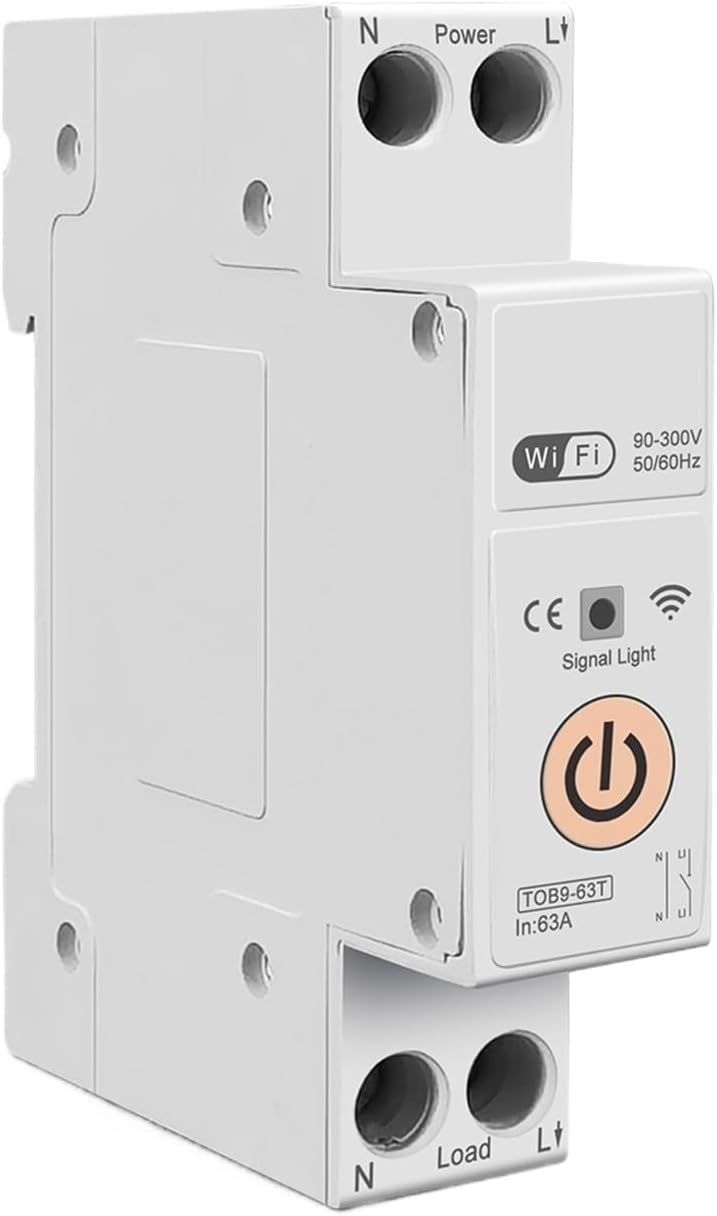
Figure 3: TOMZN TOB9-63T WiFi Smart Switch (No Metering). This basic variant provides WiFi control and circuit protection without energy metering functions.
- Power Terminals (N, L): Input connections for neutral and live wires.
- Load Terminals (N, L): Output connections for neutral and live wires to the load.
- WiFi-Anzeige: Zeigt den Status der WLAN-Verbindung an.
- Signallicht: Zeigt den Gerätestatus an.
- Hauptnetzschalter: Manual ON/OFF control for the circuit breaker.
- Display (TOB9-VAP/TOB9-63M): Shows real-time energy data (Kwh, W, V, A) and protection settings.
4. Einrichtung
4.1. Installation und Verkabelung
- Stromabschaltung: Before starting, ensure the main power supply to the installation area is completely disconnected.
- Montage: Mount the TOB9-VAP on a standard DIN rail within an appropriate electrical enclosure.
- Eingangsverkabelung: Connect the incoming neutral wire to the 'N' terminal under 'Power' and the incoming live wire to the 'L' terminal under 'Power'. Ensure secure screw-type connections.
- Ausgangsbeschaltung: Connect the neutral wire to your load to the 'N' terminal under 'Load' and the live wire to your load to the 'L' terminal under 'Load'.
- Überprüfung: Überprüfen Sie alle Verbindungen auf festen Sitz und korrekte Polarität.
- Strom wiederherstellen: Once installation is complete and verified, restore power to the main circuit.
4.2. App Pairing (TUYA Smartlife)
- Lade App herunter: Download the 'TUYA Smart' or 'Smart Life' app from your smartphone's app store.
- Registrieren/Anmelden: Erstellen Sie ein Konto oder melden Sie sich bei Ihrem bestehenden Konto an.
- Gerät hinzufügen: Tippen Sie in der App auf „+“, um ein neues Gerät hinzuzufügen. Wählen Sie „Elektrik“ > „Leistungsschalter (WLAN)“.
- Verbindungsmodus: Ensure the TOB9-VAP's WiFi indicator is blinking rapidly. If not, press and hold the main power button for 5-10 seconds until it blinks rapidly to enter pairing mode.
- Mit WLAN verbinden: Follow the in-app instructions to connect the device to your 2.4GHz WiFi network. (5GHz networks are not supported).
- Geräteumbenennung: Once paired, you can rename the device for easy identification in the app.
5. Bedienungsanleitung
5.1. Manueller Betrieb
- An / Ausschalten: Press the main power button on the device to manually switch the circuit breaker ON or OFF.
5.2. App Control and Monitoring
- Fernbedienung EIN/AUS: Use the TUYA Smartlife app to remotely switch the circuit breaker ON or OFF.
- Energieüberwachung: View real-time and historical data for Kwh consumption, current (A), voltage (V) und Leistung (W) direkt in der App.
- Timer/Zeitplan: Set up schedules or countdown timers for automatic ON/OFF operations.
- VA Protection Settings: Passen Sie die Überlautstärke an.tage, unter-voltage, over-current, and over-power protection thresholds within the app. The device will automatically trip if these thresholds are exceeded.
- Szenenautomatisierung: Integrate the device into smart scenes with other TUYA-compatible devices.
6. Wartung
- Regelmäßige Inspektion: Periodically inspect the device and its wiring for any signs of damage, loose connections, or overheating.
- Reinigung: Reinigen Sie die Außenseite des Geräts mit einem trockenen, weichen Tuch. Verwenden Sie keine flüssigen Reiniger oder Lösungsmittel.
- Firmware-Updates: Check the TUYA Smartlife app for any available firmware updates to ensure optimal performance and security.
- Profi-Check: For any internal issues or complex repairs, consult a qualified electrician.
7. Fehlerbehebung
| Problem | Mögliche Ursache | Lösung |
|---|---|---|
| Gerät lässt sich nicht einschalten. | No power supply; loose wiring; internal fault. | Check main power supply. Verify all wiring connections. If problem persists, contact support. |
| WiFi indicator not blinking/connecting. | Incorrect pairing mode; weak WiFi signal; 5GHz network. | Ensure device is in rapid blinking pairing mode. Move device closer to router. Ensure router is 2.4GHz. |
| Das Gerät schaltet sich häufig ab. | Overload/short circuit; incorrect VA protection settings. | Reduce load on the circuit. Check for short circuits. Adjust VA protection thresholds in the app if necessary. |
| Ungenaue Energiemesswerte. | Falsche Verkabelung; Gerätefehlfunktion. | Überprüfen Sie die Kabelverbindungen. Sollte das Problem weiterhin bestehen, wenden Sie sich bitte an den Support. |
8. Spezifikationen
| Besonderheit | Detail |
|---|---|
| Modell | TOB9-VAP |
| Nennstrom | 1-63 A (einstellbar) |
| Nennvolumentage | 90-300V AC |
| Frequenz | 50/60 Hz |
| Stöcke | 1P+N |
| Konnektivität | WLAN (nur 2.4 GHz) |
| App-Kompatibilität | TUYA Smart / Smart Life |
| Schutzfunktionen | Overload, Short Circuit, Over-Voltage, Unter-Voltage, Over-Current, Over-Power |
| Verpackungsabmessungen | 0.39 x 0.39 x 0.39 Zoll |
| Artikelgewicht | 3.53 Unzen |
| Hersteller | Generic (TOMZN) |
| Artikelmodellnummer | JCZWUUZZB-DFE767306BB9FC909ED20C115B9 |
9. Garantie und Support
Informationen zu Garantie, technischem Support oder Serviceanfragen finden Sie in der mit Ihrem Kauf gelieferten Dokumentation oder kontaktieren Sie den Verkäufer direkt. Bewahren Sie Ihren Kaufbeleg als Kaufnachweis auf.