
1. Einleitung
This manual provides comprehensive instructions for the installation, operation, and maintenance of your Joying JY-VT131N4 9-inch Android 13 Car Stereo. Please read this manual thoroughly before using the product to ensure proper functionality and to maximize your user experience. Keep this manual for future reference.
2. Produktüberschreitungview
The Joying JY-VT131N4 is an advanced 9-inch Android 13 head unit designed for select Volkswagen, Skoda, and Seat vehicles. It integrates modern features such as wireless Apple CarPlay and Android Auto, GPS navigation, a built-in 4G module, and high-quality audio processing, while retaining many of your vehicle's original functions.
Hauptmerkmale:
- Plug & Play-Installation: Designed for direct integration with compatible vehicle systems, minimizing wiring modifications.
- Schnellstart: Quick startup time, entering the user interface within 2 seconds after the initial boot.
- Advanced Audio Output: Features Optical Fiber and Coaxial Digital Output for superior sound quality with external amplifizierer.
- Integriertes 4G-Modul: Supports SIM card for internet access (data only, no calls/SMS).
- GPS Navigation: Precise positioning with included GPS antenna, supporting offline maps.
- Kabelloses CarPlay & Android Auto: Nahtlose Smartphone-Integration für Navigation, Kommunikation und Unterhaltung.
3. Kompatibilität
This head unit is specifically designed for Volkswagen, Skoda, and Seat vehicles with MQB systems manufactured between 2016 and 2021. It supports factory air conditioning display, parking sensor display, steering wheel controls, door information display, factory amplifier, and factory reverse camera.
Compatible Vehicle Models & Years:
| Marke | Modelle & Baujahre |
|---|---|
| Volkswagen | Jetta VI 2010+, Golf VI 2008+, Passat B7 2010+, Tiguan 2008+, Transporter T5 2010+, EOS 2006+, Caddy 2004+, Amarok 2010+, Beetle 2011+, Sharan II 2010+, Scirocco 2008+, Golf V Plus 2005+, Jetta V 2005-09, Magotan 2007+, Passat CC 2008+, Passat B6 2005-10, Polo V 2009+, Sagitar 2006+ |
| Skoda | Fabia 2007+, SuperB 2008+, Octavia 2007+, Yeti 2009+, Rapid 2012+, Roomster 2006+ |
| Sitz | Leon 2009+, Alhambra 2009+ |
Wichtig: For 2016-2021 models, it is crucial to determine if your vehicle uses an MQB or PQ (non-MQB) CANbus system. This information can typically be found on the original radio sticker. Ensure you select the correct system type when ordering to ensure compatibility.

Image: Applicable Models & Years for Joying Car Stereo.

Image: Guide to checking your vehicle's MQB or PQ system type.
Some vehicles may require an additional fascia panel for a seamless installation. Please check if your vehicle's center console matches the examples provided in the image below to determine if an extra fascia panel is needed.

Image: Fascia panel requirements for specific Skoda and Seat models.
4. Einrichtung und Installation
The Joying JY-VT131N4 is designed for a plug-and-play installation, meaning no cutting of original vehicle wires is typically required. All necessary cables are supplied with the unit.
Installationsschritte (Allgemein):
- Originalradio ausbauen: Entfernen Sie vorsichtig das vorhandene Radio Ihres Fahrzeugs.
- Kabelbaum anschließen: Schließen Sie den mitgelieferten Kabelbaum an die vorhandenen Anschlüsse Ihres Fahrzeugs an. Stellen Sie sicher, dass alle Verbindungen fest sitzen.
- Antennen anschließen: Attach the GPS antenna, 4G antennas, and WiFi antenna to the corresponding ports on the new head unit.
- CAN Bus Setting: If your vehicle is equipped with a CAN bus, ensure the communication protocol switch (white button) on the back of the unit is set to the right side (CAN).
- Montage der Kopfeinheit: Securely mount the Joying head unit into the dashboard opening.
- Testfunktionalität: Before fully reassembling the dashboard, power on the unit and test all functions (audio, navigation, steering wheel controls, etc.).

Image: Rear connections of the Joying JY-VT131N4 head unit.
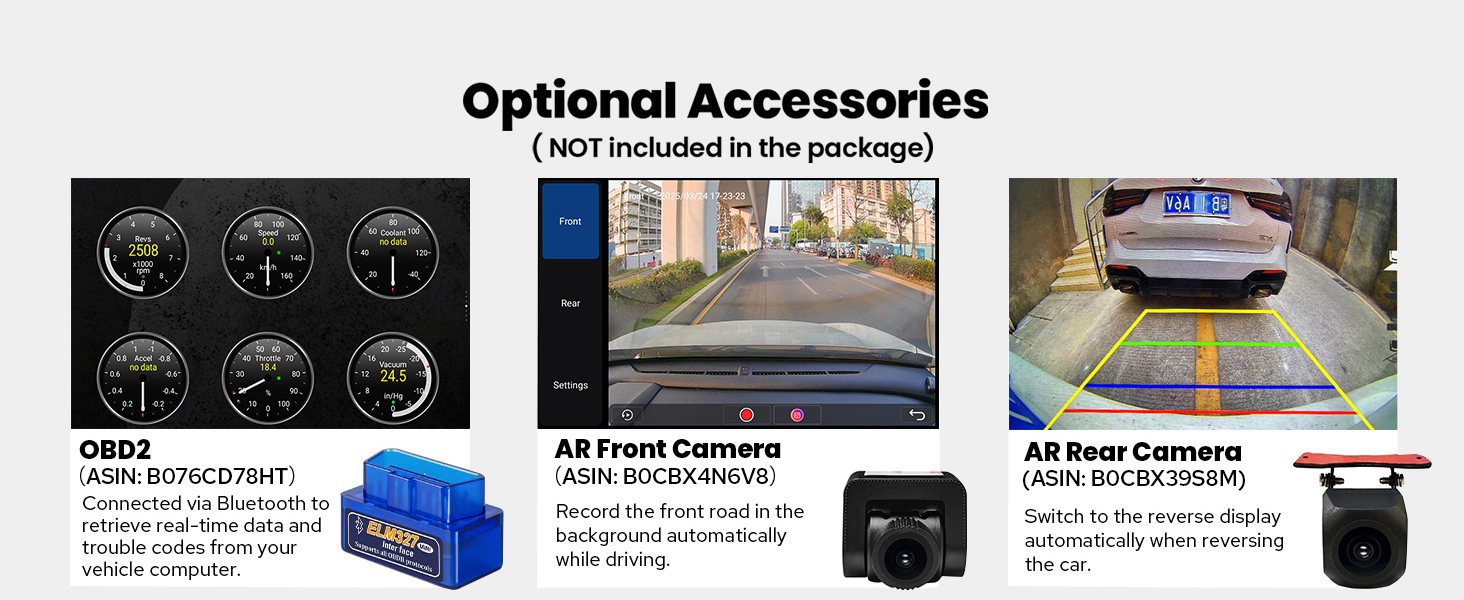
Image: CAN bus switch setting for proper communication with vehicle systems.
5. Bedienungsanleitung
5.1 User Interface and Fast Boot
The unit runs on Android 13, providing a modern and intuitive user interface. After the initial boot-up (which may take 30-40 seconds), subsequent startups are significantly faster, typically entering the user interface within 2 seconds when the car key is inserted.

Image: Joying Android 13 main user interface.

Image: Android 13 interface with LHD and RHD user options.
5.2 CarPlay & Android Auto
Connect your mobile phone via USB cable or Bluetooth to utilize built-in Apple CarPlay or Android Auto. This allows you to access navigation, make phone calls, send messages, and listen to music directly from your phone's apps displayed on the car stereo's screen.

Image: Built-in Apple CarPlay and Android Auto functionality.
5.3 GPS-Navigation
The unit includes precise GPS engines and an antenna for accurate real-time navigation. It supports offline maps, allowing you to download and save map data for specific areas to the car stereo for use without an internet connection.
5.4 4G-Modul
Insert a SIM card into the dedicated slot to enable 4G internet access. This feature supports various FDD-LTE and TDD-LTE bands. Please note that this module is for data access only and does not support phone calls or SMS.
5.5 Radio and Hands-free Calling
Enjoy AM/FM radio functionality. The built-in Bluetooth allows for hands-free calling, enhancing safety while driving.
5.6 Beibehaltung der OEM-Funktionen
The Joying JY-VT131N4 is designed to retain many of your vehicle's original features, including:
- Factory Air Conditioning Display
- Factory Parking Sensor Display
- Werkseitige Lenkradsteuerung
- Factory Door Information Display
- Compatibility with Factory Amplifier and Reverse Camera

Image: Retention of original vehicle features.
6. Audiofunktionen
Experience high-quality sound with the integrated TDA7851 DSP chip and a 48-band graphic equalizer, delivering 4x50W maximum output power. The unit also provides advanced connectivity for external audio systems.
Erweiterte Audioausgänge:
- Optical Fiber Output: For direct digital audio transmission to compatible external amplifizierer.
- Koaxialer Digitalausgang: Another option for high-fidelity digital audio output.
- RCA-Ausgänge: Includes 4 audio outputs (Front R&L, Rear R&L), a dedicated center channel output, and a subwoofer output for comprehensive aftermarket ampVerstärkerunterstützung.

Image: High-quality sound enjoyment features and audio outputs.
7. Multitasking and Connectivity
7.1 Multitasking im Splitscreen-Modus
The unit supports split-screen functionality, allowing you to run two applications simultaneously. For example, you can have navigation on one side and a media player on the other.

Image: Split-screen multitasking in action.
7.2 HDMI-Ausgang
The unit features an HDMI output, providing a full digital image and sound-sending interface. This allows you to connect external displays, such as headrest monitors, to project content from the main screen. This is ideal for passenger entertainment.

Image: HDMI output for projection screen display.
7.3 WLAN-Konnektivität
An independent WiFi antenna ensures stable signal quality and provides fast, smooth internet access. The unit supports 802.11a/b/g/n/AC standards across 2.4GHz and 5GHz spectral bands.

Image: Upgraded WiFi signal for stable internet access.
7.4 USB Ports & Micro SD Card Slot
The unit includes 3 USB ports for connecting external devices, and a Micro SD card slot for additional storage or media playback.
8. Maintenance and Cooling System
The Joying JY-VT131N4 features a dual heat sink design for superior heat dissipation, improved temperature control, and enhanced performance stability. You can set a warning value for CPU temperature or radio volume. If these values are exceeded, the cooling fan will automatically activate to prevent overheating.

Image: Upgraded cooling system with dual heat sink and fan control.
9. Personalisierung
Customize your head unit experience with various personalization options:
- Logo für den Kofferraum: Set a custom logo to display when the unit starts up.
- Anpassbare Hintergrundbilder: Choose from a selection of wallpapers or upload your own.
- Changeable Button Color: Adjust the color of the physical buttons to match your vehicle's interior lighting or personal preference.

Image: Personalized settings for the car stereo.
10. Optionales Zubehör
Enhance your driving experience with these optional accessories (not included in the package):
- OBD2-Scanner: Connects via Bluetooth to retrieve real-time vehicle data and trouble codes.
- AR-Frontkamera: Records the road ahead automatically while driving.
- AR-Rückkamera: Bietet eine klare view when reversing, automatically switching the display.

Image: Optional accessories for the Joying car stereo.
11. Spezifikationen
| Besonderheit | Detail |
|---|---|
| Modellnummer | JY-VT131N4 |
| Anzeigegröße | 9 Zoll |
| Betriebssystem | Android 13 |
| Speicherkapazität | 64 GB |
| Konnektivitätstechnologie | Bluetooth, Ethernet, HDMI, USB, WLAN |
| Besondere Merkmale | DSP, Equalizer, Front View Kameraeingang, RCA, RDS |
| Audioausgabemodus | Stereo (with Optical Fiber and Coaxial Digital Output) |
| Im Lieferumfang enthaltene Komponenten | 9" radio, Power Cable, AR Cable, Screen Ribbon Cable, External Mic, 4G Antenna (x2), WiFi Antenna, USB Cable (x2), GPS Antenna, User Manual |
| Artikelgewicht | 5 Pfund |
| Verpackungsabmessungen | 13 x 9 x 8 Zoll |
12. Fehlerbehebung
If you encounter issues with your Joying JY-VT131N4 car stereo, consider the following common troubleshooting steps:
- Kein Strom: Überprüfen Sie alle Stromanschlüsse und Sicherungen. Stellen Sie sicher, dass der Kabelbaum korrekt installiert ist.
- Kein Ton: Verify speaker connections and amplifier settings. Check the volume level and ensure the audio source is correctly selected. If using external amplifiers, confirm optical/coaxial connections.
- Lenkradbedienelemente funktionieren nicht: Ensure the CAN bus setting is correct (refer to Section 4). Check the steering wheel control settings within the unit's software.
- GPS-Signalprobleme: Stellen Sie sicher, dass die GPS-Antenne ordnungsgemäß angeschlossen und an einem Ort mit freiem Blick platziert ist. view des Himmels.
- CarPlay/Android Auto Connectivity Problems: Ensure your phone's software is up to date. Try reconnecting the USB cable or re-pairing via Bluetooth. Check the settings within the unit for CarPlay/Android Auto activation.
- Langsame Leistung/Einfrieren: Restart the unit. If issues persist, consider performing a factory reset (note: this will erase all user data and settings).
- Überhitzung: Ensure proper ventilation around the unit. Check if the cooling fan is operating. If the fan is not activating, verify the temperature warning settings.
For persistent issues, please refer to the detailed troubleshooting section in the full user manual or contact Joying customer support.
13. Garantie und Support
The Joying JY-VT131N4 car stereo comes with a 2 Jahr Garantie Diese Garantie gilt ab Kaufdatum und deckt Herstellungsfehler sowie Funktionsstörungen bei normalem Gebrauch ab.
For warranty claims, technical assistance, or further inquiries, please contact Joying customer support through their official channels. Please have your purchase receipt and product model number (JY-VT131N4) ready when contacting support.