
1. Sicherheitshinweise
Please read all instructions carefully before assembly and use to ensure safe operation and prevent injury or damage. Keep this manual for future reference.
- Vor der Montage sicherstellen, dass alle Komponenten vorhanden und unbeschädigt sind. Nicht verwenden, wenn Teile fehlen oder defekt sind.
- Um Unfälle zu vermeiden, sollten Kinder und Haustiere während des Betriebs vom Schreibtisch ferngehalten werden.
- Ensure there are no obstructions (walls, furniture, cables, etc.) in the desk's path during height adjustment.
- Do not place heavy or unstable objects on the desk that exceed its maximum load capacity of 100 kg.
- Avoid placing the desk near heat sources, open flames, or in excessively humid environments.
- Unplug the desk from the power outlet before cleaning, maintenance, or if it will be unused for an extended period.
- Verwenden Sie ausschließlich das mitgelieferte Netzteil und die mitgelieferten Kabel.
- Do not attempt to modify or disassemble the desk's electrical components. Contact qualified service personnel for repairs.
2. Produktüberschreitungview
The FLEXISPOT EC5 Lite is an electric height-adjustable desk frame designed for ergonomic workspaces. It features a robust dual-motor system and a stable 3-column leg design.
Hauptmerkmale:
- Dual-Motor Lifting System: Provides smooth, quiet (<50 dB) and stable height adjustments.
- Großer Höhenbereich: Adjustable from 60 cm to 125 cm to accommodate various user preferences and activities.
- Hohe Tragfähigkeit: Supports up to 100 kg, suitable for multiple monitors and office equipment.
- Intelligentes Speicherpanel: Allows saving and recalling up to 4 preferred height settings.
- Antikollisionstechnologie: Automatically stops and retracts the desk if an obstacle is detected during movement, ensuring safety.
- Robuste Konstruktion: Made with reinforced steel for durability and stability.

Figure 2.1: Ultra-High Load Capacity (100 kg)

Figure 2.2: Large Height Adjustment Range (60-125 cm)

Figure 2.3: Powerful Dual Motors
3. Aufbau und Montage
The FLEXISPOT EC5 Lite desk frame is designed for straightforward assembly, typically completed in under 25 minutes. A detailed instruction manual is included with the product for step-by-step guidance.
Montagetipps:
- Schaffen Sie ausreichend Platz für die Versammlung.
- Lay out all parts and hardware according to the included manual.
- Achten Sie darauf, dass alle Schrauben fest angezogen sind, aber ziehen Sie sie nicht zu fest an.
- The frame's width is adjustable to fit various tabletop sizes.

Figure 3.1: Wide Adjustable Frame Width
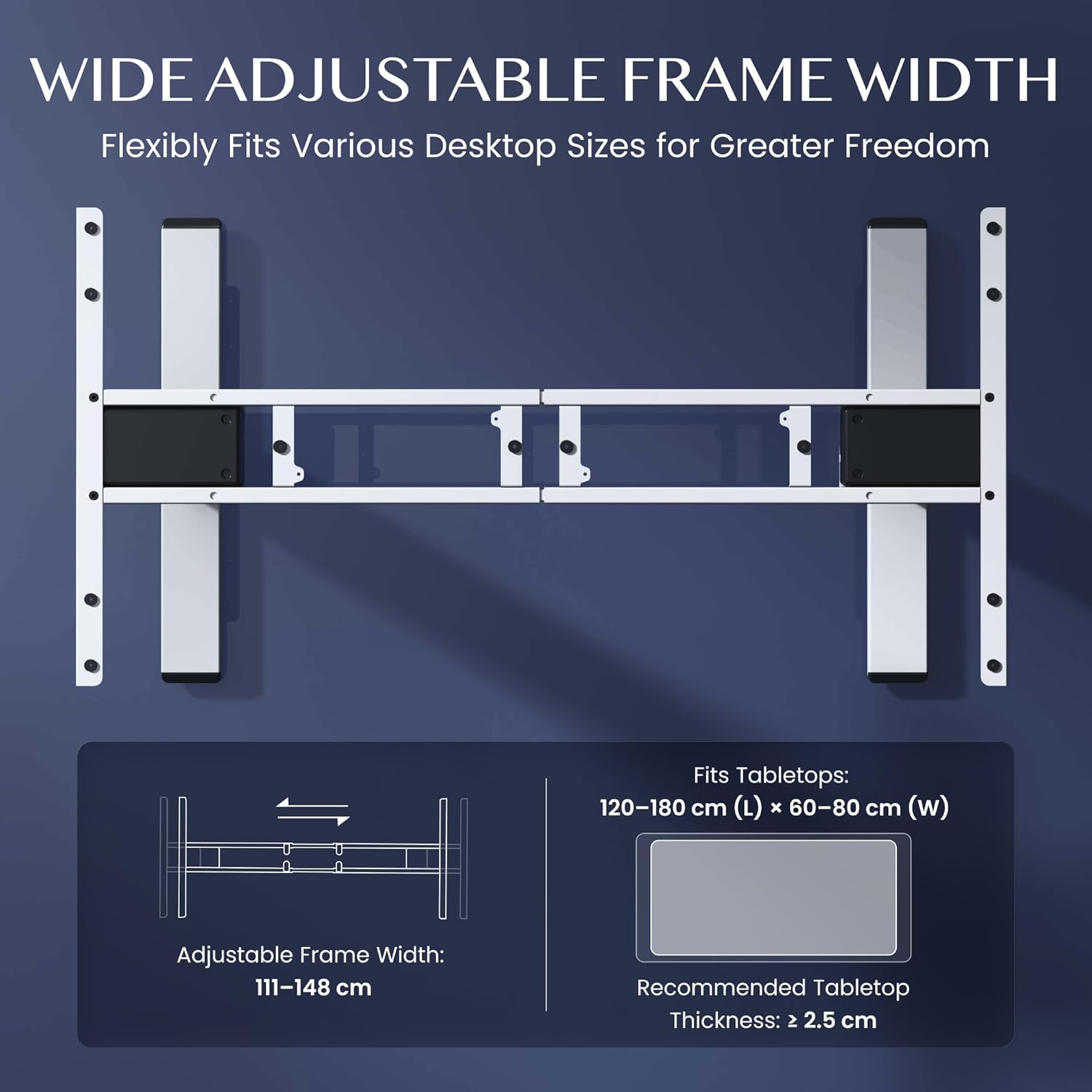
Figure 3.2: Easy Installation Components
4. Bedienungsanleitung
The FLEXISPOT EC5 Lite desk is operated via a digital control panel, offering intuitive height adjustment and memory functions.
Digitales Bedienfeld:

Abbildung 4.1: Digitales Bedienfeld
Höhenverstellung:
- Verwenden Sie die Nach oben (^) Und Unten (v) Die Höhe des Schreibtisches kann manuell über Pfeiltasten auf dem Bedienfeld eingestellt werden.
- Die aktuelle Höhe wird auf dem LED-Bildschirm angezeigt.
Speichervoreinstellungen:
The desk allows you to save up to 4 preferred height settings for quick adjustments.
- Stellen Sie den Schreibtisch mithilfe der Auf-/Ab-Tasten auf die gewünschte Höhe ein.
- Drücken Sie die 'M' Drücken Sie diese Taste. Im Display erscheint „S-“.
- Drücken Sie sofort eine der Zifferntasten (1, 2, 3 oder 4) to save the current height to that preset. The display will show 'S-1', 'S-2', etc., to confirm.
- Um eine gespeicherte Höhe abzurufen, drücken Sie einfach die entsprechende Zifferntaste (1, 2, 3 oder 4Der Schreibtisch fährt automatisch in die gespeicherte Position.
Antikollisionssystem:
The desk is equipped with an anti-collision sensor. If the desk encounters an obstacle during upward or downward movement, it will automatically stop and retract slightly to prevent damage or injury.
5. Wartung
Regular maintenance ensures the longevity and optimal performance of your FLEXISPOT EC5 Lite desk.
- Reinigung: Wischen Sie das Tischgestell und das Bedienfeld mit einem weichen, fusselfreien Tuch ab.amp cloth. Avoid using harsh chemicals, abrasive cleaners, or excessive moisture.
- Inspektionen: Überprüfen Sie regelmäßig alle Schrauben und Bolzen auf festen Sitz. Ziehen Sie sie gegebenenfalls nach.
- Kabelmanagement: Achten Sie darauf, dass alle Kabel ordentlich verlegt sind und nicht eingeklemmt oder verheddert werden, insbesondere bei Höhenverstellungen.
- Netzkabel: Prüfen Sie das Netzkabel auf Beschädigungen. Bei Beschädigung die Verwendung einstellen und den Kundendienst kontaktieren.
6. Fehlerbehebung
If you encounter issues with your FLEXISPOT EC5 Lite desk, refer to the following common troubleshooting steps:
- Schreibtisch bewegt sich nicht:
- Prüfen Sie, ob das Netzkabel sowohl am Schreibtisch als auch an einer funktionierenden Steckdose fest angeschlossen ist.
- Ensure no objects are obstructing the desk's movement, triggering the anti-collision system.
- Uneven Movement or Error Codes:
- Perform a reset: Lower the desk to its lowest position and hold the 'Down' button for approximately 5-10 seconds until the desk slightly lowers further or an 'RST' message appears, then releases. The desk should then reset to its lowest point.
- If an error code persists, consult the full product manual or contact customer support.
- Geräusche während des Betriebs:
- A slight motor hum is normal. If the noise is excessive or unusual, check for loose components or contact support.
Video 6.1: Crash Test Demonstration. This video illustrates the desk's stability and durability under impact, showing minimal disturbance to items on the FlexiSpot desk compared to others.
7. Spezifikationen
Detailed technical specifications for the FLEXISPOT EC5 Lite Electric Standing Desk frame.

Figure 7.1: Desk Dimensions and Specifications
| Besonderheit | Spezifikation |
|---|---|
| Marke | FLEXISPOT |
| Modell | EC5 Lite |
| Farbe | Weiß |
| Produktabmessungen (L x B x H) | 68 x 148.6 x 125 cm (frame) |
| Material | Legierter Stahl |
| Höhenverstellbereich | 60 - 125 cm |
| Maximale Tragfähigkeit | 100 kg |
| Höchstgeschwindigkeit | 25 mm/s |
| Geräuschpegel | <50 dB |
| Rahmenbreitenanpassung | 111 - 148 cm |
| Recommended Tabletop Size | 120-180 cm (L) x 60-80 cm (W) |
| Recommended Tabletop Thickness | ≥ 2.5cm |
| Besondere Merkmale | Electric, Height Adjustable, Smart Memory, Anti-collision Safety |
8. Garantie und Support
FLEXISPOT stands behind the quality of its products with comprehensive warranty coverage.
- Rahmen und Motoren: 5 Jahre Garantie.
- Elektronische Bauteile: 2 Jahre Garantie.
For warranty claims, technical assistance, or any questions regarding your FLEXISPOT EC5 Lite desk, please contact FLEXISPOT customer support through their official website or your point of purchase. Please have your purchase receipt and product model information ready.