
1. Zu Endeview
The Roku Select Series HD TV provides a streamlined entertainment experience. This 32-inch 720p HD television integrates the Roku operating system for easy access to streaming content, live TV, and various applications. It features a voice remote for convenient control and includes technologies like Bluetooth Headphone Mode and Dolby Audio for enhanced sound.
Hauptmerkmale
- Seamless Streaming: Fast Wi-Fi and quick app launches for immediate entertainment access.
- Umfangreicher Inhalt: Access to thousands of streaming apps, free movies, shows, and live TV channels.
- Anpassbarer Startbildschirm: Organize apps and content for personalized viewing.
- Automatic Software Updates: Ensures access to the latest features and applications.
- Smart Home Integration: Compatible with Roku Voice, Siri, Alexa, and Google Assistant for voice control. Supports Apple AirPlay for content sharing.
- Clear HD Picture: 720p HD resolution with Roku Smart Picture technology for optimized visuals.
- Sprachfernbedienung: Search, play, and control streaming with voice commands.
- Verbessertes Audio: Designed for clear speech and louder sound with Dolby Audio technology.
- Bluetooth Headphone Mode: Private listening with wireless headphones.

Image: Roku 32-inch Select Series HD Smart TV with included remote control.
2. Lieferumfang
Vergewissern Sie sich vor dem Fortfahren mit der Einrichtung, dass alle Komponenten vorhanden sind.
- Roku Select Series 32" HD TV
- Stands and screws
- Roku Voice Remote with batteries (2 AAA)
- Stromkabel
- Benutzerhandbuch (dieses Dokument)

Image: Contents of the Roku Select Series TV packaging.
3. Einrichtung
3.1 Auspacken
Nehmen Sie den Fernseher und sämtliches Zubehör vorsichtig aus der Verpackung. Bewahren Sie die Verpackung für späteren Transport oder Serviceeinsätze auf.
3.2 Anbringen des Ständers
- Legen Sie den Fernseher mit dem Bildschirm nach unten auf eine weiche, saubere Oberfläche, um Kratzer zu vermeiden.
- Richten Sie die TV-Ständer an den Schraubenlöchern an der Unterseite des Fernsehers aus.
- Befestigen Sie die Ständer mit den mitgelieferten Schrauben. Achten Sie darauf, dass diese fest angezogen sind.
3.3 Anschließen von Peripheriegeräten
Connect your devices to the appropriate ports on the back of the TV.
- HDMI: Connect up to three HDMI devices (e.g., cable box, gaming console, Blu-ray player) to the HDMI ports.
- USB: Use the USB port for media playback or connecting compatible accessories.
- Optisch (S/PDIF): Zum Anschluss an ein externes Audiosystem.
- Stromkabel: Schließen Sie das Netzkabel an den Fernseher und anschließend an eine Wandsteckdose an.
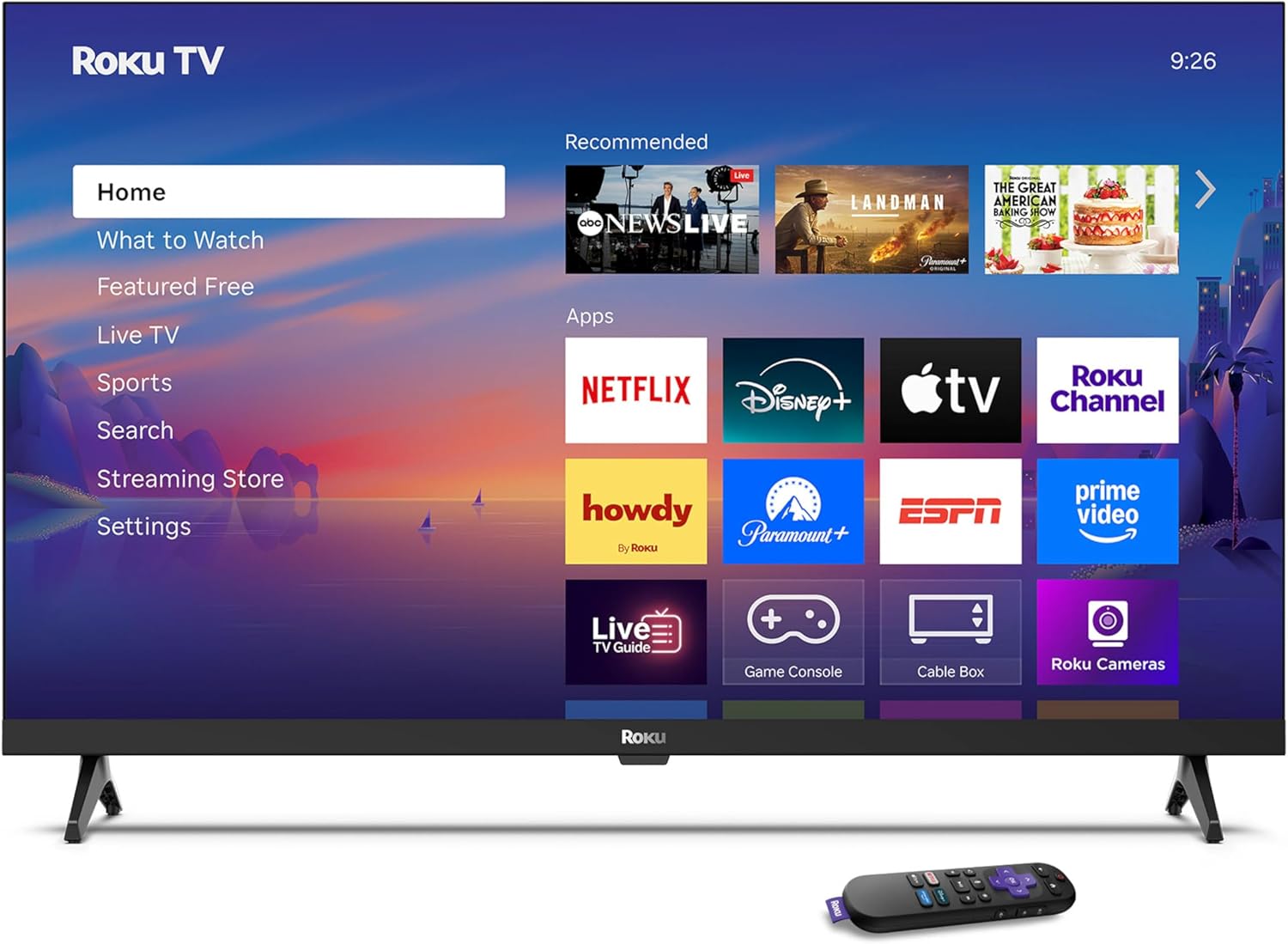
Image: Rear panel connections including HDMI, USB, and optical ports.
3.4 Erstes Einschalten und Netzwerkverbindung
- Plug in the TV and press the power button on the remote or TV.
- Folgen Sie den Anweisungen auf dem Bildschirm, um Ihre Sprache auszuwählen und sich mit Ihrem WLAN-Netzwerk zu verbinden.
- Activate your Roku account or create a new one.
Video: Ein überview of the Roku TV operating system, demonstrating its user interface and features. This video is provided by Roku, Inc.
4. Bedienungsanleitung
4.1 Verwendung der Sprachfernbedienung
The Roku Voice Remote allows for intuitive control of your TV and streaming content.
- Sprachsuche: Press and hold the voice button and speak your command to search for content, launch apps, or control playback.
- Navigation: Verwenden Sie das Steuerkreuz, um durch die Menüs zu navigieren und Elemente auszuwählen.
- App-Verknüpfungen: Spezielle Tasten ermöglichen den schnellen Zugriff auf beliebte Streaming-Dienste.

Image: Features of the Roku Voice Remote, highlighting voice control and shortcut buttons.
4.2 Navigating the Home Screen
The Roku Home Screen provides access to all your installed apps, inputs, and settings.
- Heim: Bringt Sie zurück zum Hauptstartbildschirm.
- Was Sie sehen sollten: Discover recommended content.
- Live-TV: Access free live television channels.
- Streaming-Shop: Browse and add new streaming channels.
- Einstellungen: Adjust TV and system preferences.

Image: The Roku TV home screen interface.
4.3 Anpassen der Bild- und Toneinstellungen
Passen Sie Ihre viewing and listening experience through the settings menu.
- Bildmodus: Select from predefined modes like Standard, Vivid, Sports, or Movie. Roku Smart Picture automatically optimizes settings.
- Klangmodus: Wählen Sie Sound Profiles or enable features like Night Mode for reduced volume fluctuations.
- Bluetooth Headphone Mode: Pair your wireless headphones for private audio.

Image: Picture mode settings on the Roku TV.

Image: Bluetooth Headphone Mode in use.

Image: Dolby Audio technology for clear sound.
5. Wartung
5.1 Reinigung des Bildschirms
Um den Fernsehbildschirm zu reinigen, wischen Sie ihn vorsichtig mit einem weichen, trockenen und fusselfreien Tuch ab. Hartnäckige Flecken können Sie mit einem dünnen Tuch leicht abtupfen.ampBefeuchten Sie das Tuch mit Wasser oder einem für Bildschirme geeigneten Reinigungsmittel. Vermeiden Sie die Verwendung von scharfen Chemikalien oder scheuernden Materialien.
5.2 Softwareaktualisierungen
Ihr Roku TV erhält automatisch Software-Updates, sobald er mit dem Internet verbunden ist. Diese Updates bieten neue Funktionen, Leistungsverbesserungen und Fehlerbehebungen. Stellen Sie sicher, dass Ihr Fernseher für eine optimale Leistung mit dem Internet verbunden bleibt.
6. Fehlerbehebung
If you encounter issues with your Roku TV, refer to the following common solutions:
- Kein Strom: Vergewissern Sie sich, dass das Netzkabel fest mit dem Fernseher und einer funktionierenden Steckdose verbunden ist. Versuchen Sie es mit einer anderen Steckdose.
- Kein Bild/Ton: Verify that the correct input source is selected. Check all cable connections (HDMI, audio). Restart the TV by unplugging it for 30 seconds and plugging it back in.
- Fernbedienung funktioniert nicht: Replace the AAA batteries in the remote. Ensure there are no obstructions between the remote and the TV. For voice remote issues, re-pair the remote if necessary (refer to Roku support for specific steps).
- Netzwerkverbindungsprobleme: Restart your Wi-Fi router and modem. Go to the TV's settings menu, then Network, and try reconnecting to your Wi-Fi network.
- App Not Loading/Crashing: Try restarting the app. If the issue persists, remove the app from the home screen, restart the TV, and then re-add the app from the Streaming Store.
7. Spezifikationen
| Besonderheit | Detail |
|---|---|
| Bildschirmgröße | 32 Zoll |
| Display-Technologie | LED |
| Auflösung | 720p |
| Bildwiederholrate | 60 Hz |
| Besondere Merkmale | Bluetooth Headphone Mode, Dolby Audio, Voice Remote |
| Konnektivitätstechnologie | Bluetooth, Wi-Fi |
| Gesamtzahl der HDMI-Anschlüsse | 3 |
| Anzahl USB-Anschlüsse | 1 |
| Audioeingang | HDMI |
| Betriebssystem | Roku-Betriebssystem |
| Montagetyp | Tischmontage, Wandmontage |
| VESA-Halterungsstandard | 200 x 200 mm |
| Produktabmessungen (T x B x H) | 7"T x 28.3"B x 18.3"H |
| Artikelgewicht | 7.5 Pfund |
| Modellnummer | 32R2D5 |
| UPC | 829610008974 |
8. Garantieinformationen
8.1 Eingeschränkte Garantie
Roku warrants the hardware against defects in materials and workmanship under normal use for a period of one (1) year from the date of purchase ("Warranty Period"). If Roku determines that the device’s hardware is defective during the Warranty Period, Roku’s sole obligation, and your exclusive remedy, will be to either repair or replace the unit with either a new or rebuilt device, at its option. This warranty applies if the product is used in accordance with the provided documentation.
8.2 Rückgabebestimmungen
You may return a device for any reason:
- Within thirty (30) days from the date of purchase from Roku.
- Within the applicable return period if purchased from an authorized reseller or distributor.
Additional details regarding product returns can be found on the Roku support site.
9. Unterstützung
For further assistance, troubleshooting guides, and frequently asked questions, please visit the official Roku support webWebsite: