1. Einleitung
Thank you for choosing the ATsafepro 1/2" Digital Torque Adapter. This device converts a standard ratchet wrench into a precise digital torque wrench, providing accurate torque measurement for various applications. Please read this manual thoroughly before use to ensure proper operation and to maximize the product's lifespan.
2. Packungsinhalt
- 1x ATsafepro 1/2" Digital Torque Adapter (Measuring range: 10-200 Nm)
- 1x 3/8" Adapter
- 1x 1/4" Adapter
- 1x Hex Key (for battery cover)
- 1x Hard Storage Case (Oil-proof and shock-proof)
- 2x AAA-Batterien

Image: ATsafepro 1/2" Digital Torque Adapter and included accessories.
3. Produktmerkmale
- Hohe Präzision: Achieves ±2% measurement accuracy for both clockwise and counter-clockwise torque.
- Smart Torque Warning System: Provides visual (LED) and auditory (buzzer) alerts at 80%, 90%, and 100% of the target torque to prevent overtightening.
- Mehrere Messmodi: Supports Track Mode (real-time display) and Peak Hold Mode (records maximum torque).
- Preset Torque Values: Allows setting up to 9 different torque presets (P1-P9) for various bolt specifications.
- Datenspeicherung: Stores up to 500 past measurement records for quality control and traceability.
- Einheitenumrechnung: Supports 5 types of units: Nm, ft-lb, in-lb, kg-cm, kg-m.
- Langlebige Konstruktion: Main body made of carbon steel for improved impact and wear resistance.
- Energiesparen: Automatic power-off after 2 minutes of inactivity.
- Hintergrundbeleuchtungsfunktion: Ensures clear display visibility in low-light conditions.

Bild: Überview of the digital torque adapter's display and controls.
4. Sicherheitshinweise
Always wear appropriate personal protective equipment (PPE) such as safety glasses and gloves when using this tool. Ensure the adapter is securely attached to the ratchet wrench and the fastener before applying torque. Do not exceed the maximum torque capacity of the device. Keep the device away from water, extreme temperatures, and corrosive substances. Store in a dry, safe place when not in use.
5. Einrichtung
5.1 Einlegen der Batterie
- Locate the battery compartment on the back of the digital torque adapter.
- Use the provided hex key to open the battery cover.
- Legen Sie 2 AAA-Batterien ein und achten Sie dabei auf die richtige Polarität (+/-).
- Replace the battery cover and secure it with the hex key.
5.2 Attaching to a Ratchet Wrench
- Select the appropriate adapter (3/8" or 1/4") if needed, and attach it to the 1/2" drive of the digital torque adapter.
- Insert the square drive of the digital torque adapter (or attached adapter) into the drive of your standard ratchet wrench. Ensure a secure connection.

Image: Digital Torque Adapter connected to a ratchet wrench with various adapters.
6. Bedienungsanleitung
6.1 Ein-/Ausschalten
- To power on, press the 'C' button. The display will light up.
- The device will automatically power off after 2 minutes of inactivity to conserve battery.
6.2 Einheitenauswahl
- Press the 'U' button to cycle through the available torque units: Nm, ft-lb, in-lb, kg-cm, kg-m. Select your desired unit.
6.3 Modusauswahl
Press the 'P/T' button to switch between measurement modes:
- Track-Modus (T): Zeigt den Drehmomentwert in Echtzeit an, während er angewendet wird.
- Peak Hold Mode (P): Records and displays the maximum torque value reached during the application.
6.4 Einstellen von Drehmomentwerten (Voreinstellungsmodus)
- Press the 'Up' or 'Down' arrow buttons to display the 9 preset torque values (P1-P9).
- Use the 'Up' or 'Down' buttons to select the desired preset group. After confirming the group, press the 'M' button to activate it.
- Adjust the data using the 'Up' or 'Down' buttons. Press and hold for 2 seconds to enter rapid adjustment mode.
- Once the adjustment is complete, press the 'C' button to confirm.
6.5 Smart Torque Warning System
- 80% Target Torque: Intermittent buzzer sound (pipipi) and green/yellow LED flashes.
- 90% Target Torque: Intermittent buzzer sound (pipipi) and green/yellow LED flashes.
- 100% Target Torque (Reached/Exceeded): Continuous buzzer sound (peee) and red LED lights up, indicating the target torque has been reached or exceeded. This helps prevent overtightening and potential damage.
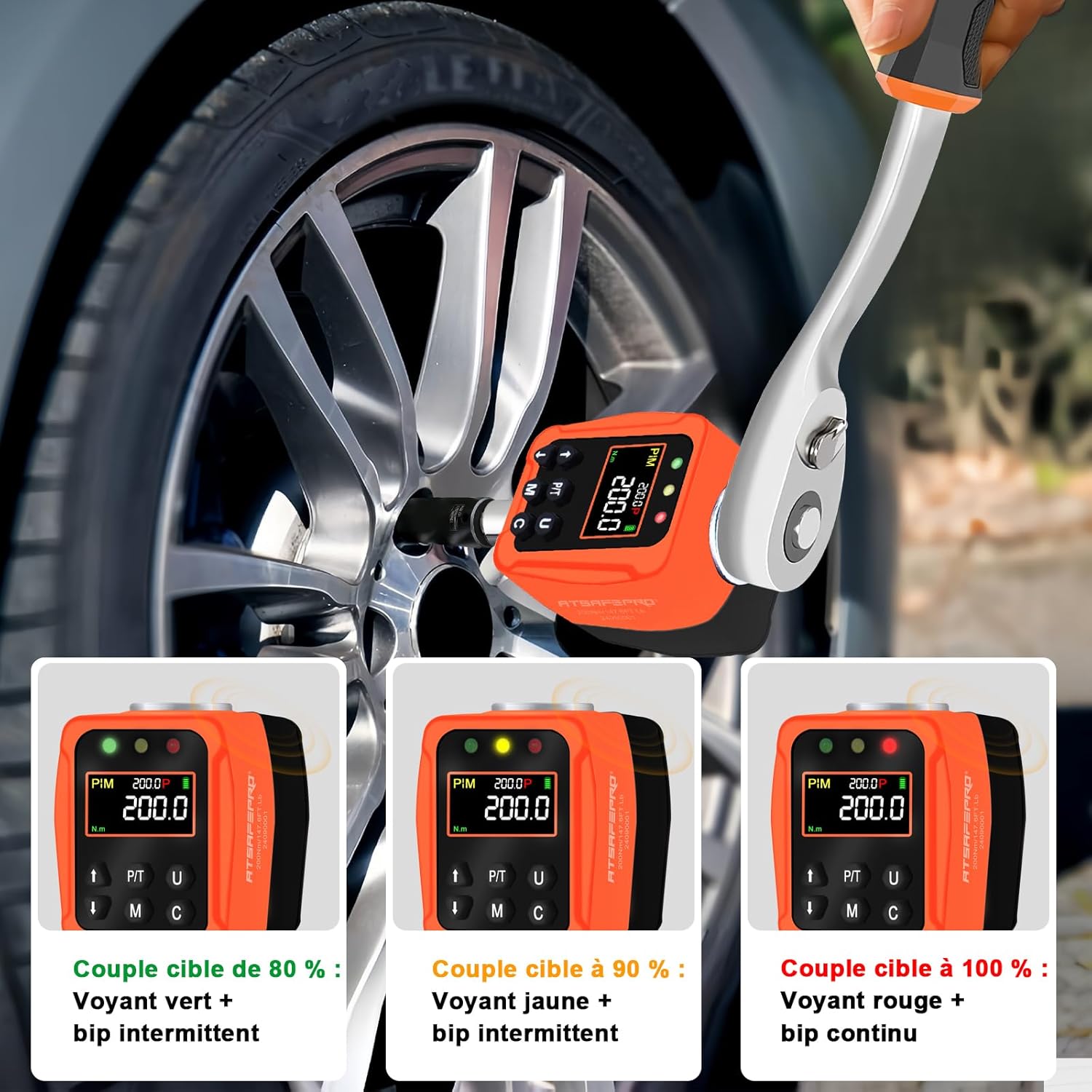
Image: Visual representation of the smart torque warning system.

Image: Display modes and unit options on the digital torque adapter.
6.6 Retrieving Saved Data
- Long-press the 'M' button to activate torque data retrieval.
- Use the 'Up' or 'Down' buttons to browse through the saved data.
6.7 Deleting Saved Data
- Long-press the 'M' button to activate torque data retrieval.
- Press the 'U' button to enter the deletion screen. 'ALL' (delete all data) and 'ONE' (delete individual data) will be displayed alternately.
- After confirming the deletion type, press the 'M' button again to execute the deletion. If 'SUCC' is displayed, the deletion was successful.
6.8 Offizielle Produktvideos
Video: Demonstrates the usage of a digital torque meter, including setting torque values and data management. This video is provided by the seller.
Video: Ein überview of the digital torque meter's features and functions. This video is provided by the seller.
Video: Detailed instructions on how to use a digital torque wrench. This video is provided by the seller.
7. Wartung
- Reinigung: Reinigen Sie das Gerät mit einem weichen, trockenen Tuch. Verwenden Sie keine Scheuermittel oder Lösungsmittel.
- Lagerung: Store the digital torque adapter in its hard storage case in a dry, cool place, away from direct sunlight and moisture. Remove batteries if storing for extended periods to prevent leakage.
- Kalibrierung: For professional use, periodic calibration is recommended to maintain accuracy. Refer to a qualified service center for calibration.
8. Fehlerbehebung
| Problem | Mögliche Ursache | Lösung |
|---|---|---|
| Gerät lässt sich nicht einschalten | Niedrige oder leere Batteriekapazität; Falscher Batterieeinbau | Batterien austauschen; Batteriepolarität prüfen |
| Ungenaue Messwerte | Device needs calibration; Improper use | Contact service center for calibration; Review Bedienungsanleitung |
| Summer/LED funktioniert nicht | Settings issue; Device malfunction | Check settings for warning thresholds; Contact customer support |
9. Spezifikationen
| Besonderheit | Detail |
|---|---|
| Marke | ATsafepro |
| Modellnummer | ATJ10200N-JP |
| Laufwerksgröße | 1 mm (2/12.7 Zoll) |
| Drehmomentbereich | 10-200 Newtonmeter (Nm) |
| Genauigkeit | ±2% (Clockwise/Counter-clockwise) |
| Einheiten | Nm, ft-lb, in-lb, kg-cm, kg-m |
| Datenspeicherung | 500 Datensätze |
| Stromquelle | 2x AAA Alkaline Batteries (included) |
| Automatische Abschaltung | 2 Minuten Inaktivität |
| Produktgewicht | 450 g |
| Verpackungsabmessungen | 12.1 x 9.2 x 7.1 cm |
| Anwendungen | Automotive repair, bicycle maintenance, machinery, DIY, etc. |

Image: Diverse applications of the ATsafepro Digital Torque Adapter.
10. Garantie und Support
ATsafepro products are designed for durability and performance. For warranty information, technical support, or service inquiries, please refer to the contact information provided with your purchase or visit the official ATsafepro webBewahren Sie Ihren Kaufbeleg als Kaufnachweis für Garantieansprüche auf.