
Wichtige Sicherheitshinweise
Bitte lesen und verstehen Sie alle Sicherheitshinweise, bevor Sie dieses Produkt verwenden. Bewahren Sie diese Bedienungsanleitung zum späteren Nachschlagen auf.
- Belüftung: Sorgen Sie für ausreichende Belüftung. Blockieren Sie keine Belüftungsöffnungen.
- Wasser und Feuchtigkeit: Setzen Sie dieses Gerät weder Regen noch Feuchtigkeit aus. Stellen Sie keine mit Flüssigkeiten gefüllten Gegenstände, wie z. B. Vasen, auf das Gerät.
- Wärmequellen: Installieren Sie das Gerät nicht in der Nähe von Wärmequellen wie Heizkörpern, Heizregistern, Öfen oder anderen Geräten (einschließlich ampKonverter (Lüfter), die Wärme erzeugen.
- Energiequellen: Use only power supplies specified by the manufacturer. Ensure the power cord is protected from being walked on or pinched.
- Reinigung: Nur mit trockenem Tuch reinigen.
- Wartung: Versuchen Sie nicht, dieses Produkt selbst zu warten. Überlassen Sie alle Wartungsarbeiten qualifiziertem Servicepersonal.
Packungsinhalt
Bitte überprüfen Sie, ob alle unten aufgeführten Artikel in Ihrem Paket enthalten sind:
- Kuephom CD-X2A Boombox
- Netzkabel
- Benutzerhandbuch (dieses Dokument)
- Fernbedienung
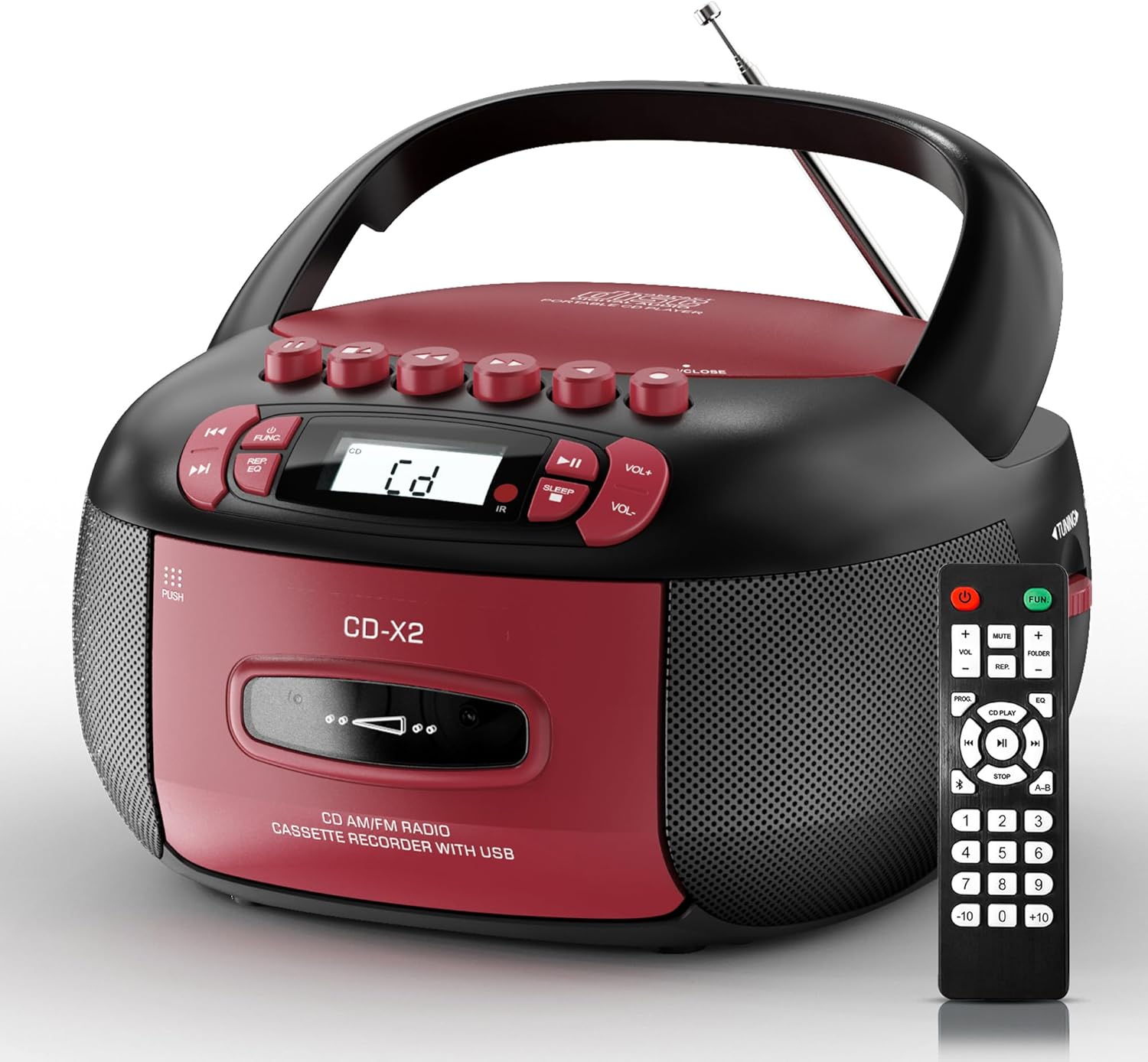
Image: The Kuephom CD-X2A Boombox with its included remote control, showcasing its compact design and red/black color scheme.
Produkt überview
Familiarize yourself with the various components and controls of your Kuephom CD-X2A Boombox.
Bedienelemente auf der Vorderseite
- Einschalt-/Funktionstaste: Press and hold to power on/off. Press to cycle through modes (CD, USB, Bluetooth, Radio, AUX, Tape).
- Lautstärke +/- Tasten: Passen Sie die Wiedergabelautstärke an.
- Wiedergabe-/Pause-Taste: Start or pause playback for CD, USB, Bluetooth, or Tape.
- Stopptaste: Stoppen Sie die Wiedergabe.
- Überspringen-/Suchschaltflächen: Navigate between tracks on CD/USB or fast forward/rewind on tape.
- EQ-Taste: Equalizer-Voreinstellungen auswählen.
- Sleep-Timer-Taste: Stellen Sie den Sleep-Timer ein.
Bedienelemente an der Seitenwand
- Abstimmknopf: Manually tune AM/FM radio stations.
- Kopfhöreranschluss: Schließen Sie Kopfhörer für privates Hören an.
- AUX-Eingangsanschluss: Schließen Sie externe Audiogeräte an.
- USB-Anschluss: Insert USB drives for MP3/WMA playback.
Funktionen der Oberseite
- CD-Fach: Top-loading compartment for CDs.
- Kassettenfach: Frontladerfach für Kassetten.
- Teleskopantenne: Für besseren Radioempfang ausziehbar.

Image: The boombox highlighting its multiple functions including CD/MP3, Bluetooth, Type I/II tape, USB, FM/AM Radios, Sleep timer, Remote, Phone jack, AUX, and Tape recording.

Bild: Nahaufnahme views of the boombox's phone jack, top-loading CD player, telescopic antenna, and tape play/record buttons.
Aufstellen
Stromversorgung der Boombox
Wechselstromversorgung
- Connect the supplied AC power cord to the AC IN jack on the back of the boombox.
- Plug the other end of the power cord into a standard AC wall outlet (120V~60Hz).
Batterieleistung
- Open the battery compartment cover located on the bottom of the boombox.
- Insert 6 x 'C' size batteries (not included), ensuring correct polarity (+/-).
- Schließen Sie den Batteriefachdeckel fest.
- When operating on battery power, disconnect the AC power cord.

Image: The boombox demonstrating both AC power connection and the use of 6 C-size batteries for portable operation.
Fernbedienung
- Insert 2 x 'AAA' batteries (not included) into the remote control, observing polarity.
- Point the remote control towards the boombox's IR sensor for optimal operation.

Image: An individual comfortably operating the boombox using the remote control from a distance.
Bedienungsanleitung
Allgemeine Bedienung
- Ein-/Ausschalten: Press and hold the Power/Function button to turn the unit on or off.
- Funktionsauswahl: Press the Power/Function button repeatedly to switch between CD, USB, Bluetooth, Radio (AM/FM), AUX, and Tape modes.
CD-Wiedergabe
- Öffnen Sie die Abdeckung des CD-Fachs.
- Place a CD (CD, CD-R, MP3, WMA compatible) onto the spindle with the label side facing up.
- Schließen Sie die Abdeckung des CD-Fachs.
- Press the Power/Function button to select 'CD' mode.
- Drücken Sie die Wiedergabe-/Pause-Taste, um die Wiedergabe zu starten.
- Use the Skip/Search buttons to navigate tracks.
- Press the Repeat button to repeat a single track, folder, or all tracks.
- Press the Program button to program a custom playback sequence.

Image: The boombox's display showing 'CD' mode, with icons indicating compatibility with CD, CD-R, CD-RW, WMA, and MP3 formats, along with single cycle, repeat folder, repeat all, random play, and play in order options.
Kassettenwiedergabe und -aufnahme
- Press the 'OPEN/CLOSE' button on the cassette compartment to open it.
- Legen Sie eine Kassette ein.
- Schließen Sie das Kassettenfach.
- Press the Power/Function button to select 'TAPE' mode.
- Drücken Sie die Play-Taste, um die Wiedergabe zu starten.
- Use the Fast Forward/Rewind buttons to navigate the tape.
- Aufnahme: In TAPE mode, select the desired source (CD, Bluetooth, USB, or AM/FM radio). Press the Record button to begin recording onto the cassette. The unit features an auto-stop function when the tape reaches its end.

Image: A hand inserting a cassette tape into the boombox's front-loading compartment, with controls for tape operation visible.
AM/FM-Radio
- Press the Power/Function button to select 'RADIO' mode. Press again to switch between AM and FM bands.
- Extend the telescopic antenna for better FM reception. For AM, rotate the unit for best reception.
- Use the Tuning knob on the side to manually tune to your desired station. The frequency will be displayed on the screen.

Image: A man relaxing on a couch with the boombox, which displays various FM/AM radio frequencies, indicating good reception.
Bluetooth-Konnektivität
- Press the Power/Function button to select 'BT' (Bluetooth) mode. The display will show 'BT' and flash, indicating it's in pairing mode.
- On your mobile device, enable Bluetooth and search for 'CD-X2A'.
- Select 'CD-X2A' to pair. Once paired, the 'BT' indicator will stop flashing.
- Sie können jetzt Audio drahtlos von Ihrem Gerät auf die Boombox streamen.

Image: A woman in a living room wirelessly streaming audio from her smartphone to the boombox via Bluetooth 5.1, indicating a stable connection.
USB-Wiedergabe
- Insert a USB flash drive into the USB port on the side of the boombox.
- Press the Power/Function button to select 'USB' mode.
- The boombox will automatically detect and play compatible MP3/WMA files.
- Verwenden Sie die Wiedergabetasten (Play/Pause, Stop und Skip/Search), um die Wiedergabe zu steuern.
AUX-Eingang
- Connect an external audio device (e.g., smartphone, MP3 player) to the AUX-in port using a 3.5mm audio cable (not included).
- Press the Power/Function button to select 'AUX' mode.
- Steuern Sie die Wiedergabe direkt von Ihrem angeschlossenen externen Gerät aus.
Einschlaftimer
- While the unit is playing, press the Sleep Timer button.
- Repeatedly press the button to cycle through available sleep timer durations (e.g., 15, 30, 60, 90 minutes).
- Das Gerät schaltet sich nach Ablauf der gewählten Zeit automatisch aus.

Image: A man sleeping in bed with the boombox on his nightstand, illustrating the sleep timer feature which allows the device to turn off automatically.
Wartung
- Reinigung: Reinigen Sie die Außenseite des Ghettoblasters mit einem weichen, trockenen Tuch. Verwenden Sie keine Scheuermittel oder Lösungsmittel.
- CD-Pflege: Fassen Sie CDs an den Kanten an. Reinigen Sie verschmutzte CDs mit einem weichen, fusselfreien Tuch, indem Sie von der Mitte nach außen wischen.
- Kassettenpflege: Keep cassette tapes away from direct sunlight and heat. Periodically clean the tape heads with a specialized cassette head cleaner.
- Lagerung: Bei längerer Nichtbenutzung das Netzkabel abziehen und die Batterien entnehmen. Das Gerät an einem kühlen, trockenen Ort aufbewahren.
Fehlerbehebung
Sollten Sie auf Probleme stoßen, finden Sie in der folgenden Tabelle häufige Probleme und Lösungen.
| Problem | Mögliche Ursache | Lösung |
|---|---|---|
| Kein Strom | Netzkabel nicht angeschlossen; Batterien leer oder falsch eingelegt. | Check AC connection; Replace or correctly insert batteries. |
| Kein Ton | Lautstärke zu niedrig; Falscher Funktionsmodus ausgewählt; Kopfhörer angeschlossen. | Lautstärke erhöhen; Richtigen Modus auswählen; Kopfhörer abziehen. |
| Die CD springt oder spielt nicht ab. | CD dirty or scratched; CD inserted incorrectly; Incompatible CD format. | Clean or replace CD; Insert CD correctly; Ensure CD is compatible (CD, CD-R, MP3, WMA). |
| Radiostörungen/schlechter Empfang | Antenne nicht ausgefahren/positioniert; schwaches Signal. | Extend and adjust telescopic antenna; Try repositioning the unit. |
| Bluetooth nicht gekoppelt | Boombox not in pairing mode; Device Bluetooth off; Device too far. | Ensure boombox is in 'BT' mode and flashing; Enable Bluetooth on device; Move device closer. |
| Kassette spielt/nimmt nicht auf | Tape inserted incorrectly; Tape heads dirty; Auto-stop engaged. | Insert tape correctly; Clean tape heads; Check tape end. |
Technische Daten
| Besonderheit | Detail |
|---|---|
| Modellnummer | CD-X2A |
| Produktabmessungen (L x B x H) | 8.39 x 4.8 x 8.54 Zoll |
| Artikelgewicht | 3.45 Pfund |
| Stromquelle | AC 120V~60Hz or 6 x 'C' size batteries |
| Konnektivitätstechnologie | Aux-Anschluss, Bluetooth, USB |
| Lautsprechertyp | Stereo (2W+2W output) |
| Unterstützte Disc-Formate | CD, CD-R, MP3, WMA |
| Supported Tape Types | Type I/II Cassette |
| Radiobänder | AM/FM |
| Besondere Merkmale | Tape Recording, Sleep Timer, Earphone Jack, Remote Control |
Garantie und Support
Kuephom products are designed for reliability and performance. This product comes with a standard manufacturer's warranty against defects in materials and workmanship under normal use.
For warranty claims, technical assistance, or any questions regarding your Kuephom CD-X2A Boombox, please contact Kuephom customer support. Refer to the contact information provided with your purchase documentation or visit the official Kuephom webWebsite für Supportdetails.
We are committed to providing lifetime service support and 7/24 customer assistance for our products.