
1. Einleitung
Thank you for choosing the VAVA 5.5" 720P HD Video Baby Monitor. This manual provides essential information for the safe and effective use of your device. Please read it thoroughly before operation and retain it for future reference.
This monitor offers a secure and clear way to observe your baby with its 5.5-inch 720p display, two-way audio, night vision, and pan/tilt/zoom capabilities. It operates on a dedicated wireless connection, ensuring privacy and reliability.
Lieferumfang
- Babyphone (Elterneinheit)
- Camera (Baby Unit)
- AC-Netzteil x2
- Kit montieren
- Kamerahalterung
- Netzkabel x2
- Benutzerhandbuch

Image 1.1: VAVA 5.5" 720P HD Video Baby Monitor components, including the parent unit (monitor) and baby unit (camera).
2. Sicherheitshinweise
Bitte beachten Sie die folgenden Sicherheitsvorkehrungen, um Stromschläge, Verletzungen oder Schäden am Produkt zu vermeiden:
- Keep the monitor and camera out of reach of children.
- Do not place the camera or power cords within 3 feet (1 meter) of the crib.
- Use only the provided AC power adapters.
- Setzen Sie das Produkt weder Wasser noch Feuchtigkeit aus.
- Stellen Sie das Produkt nicht in der Nähe von Wärmequellen oder direktem Sonnenlicht auf.
- Ensure proper ventilation; do not cover the product with blankets or other materials.
- Versuchen Sie nicht, das Produkt selbst zu reparieren oder zu verändern. Wenden Sie sich an den Kundendienst, um Unterstützung zu erhalten.
3. Produktüberschreitungview
Elterneinheit (Monitor)
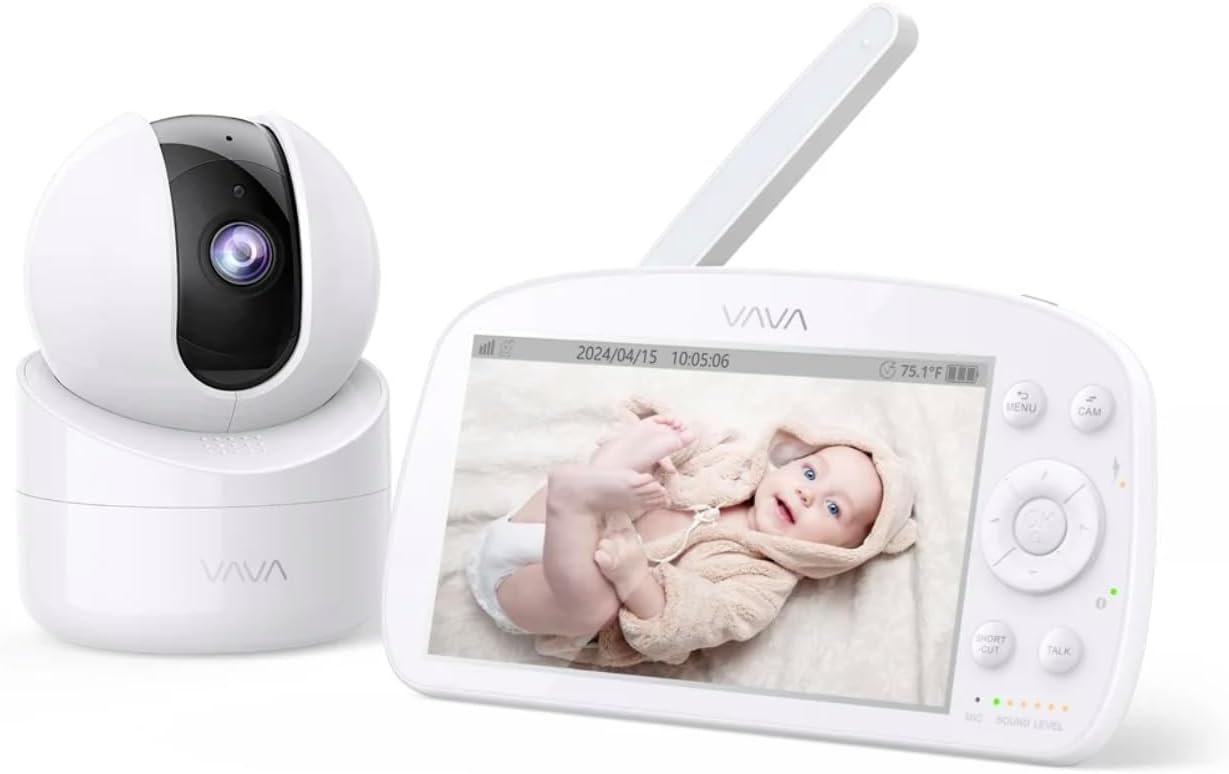
Image 3.1: The VAVA parent unit (monitor) and baby unit (camera) shown together.
The parent unit features a 5.5-inch HD display, control buttons, a microphone, speaker, and an antenna for signal reception.
Babyeinheit (Kamera)

Image 3.2: The VAVA baby unit (camera) with its pan/tilt base, featuring the lens and microphone.
The baby unit includes a 720p camera with infrared LEDs for night vision, a microphone, speaker, and a temperature sensor. It supports pan, tilt, and digital zoom functions.
4. Einrichtung
4.1 Kameraplatzierung
Platzieren Sie die Babyeinheit (Kamera) an einem Ort, der eine klare Sicht ermöglicht. view of your baby in the crib. Ensure it is at least 3 feet (1 meter) away from the crib to prevent entanglement with cords. The camera can be placed on a flat surface or mounted to a wall using the included mount kit.

Abbildung 4.1: Beispielample of camera placement, mounted above a crib for optimal viewing.
4.2 Einschalten
- Connect one AC power adapter to the baby unit and plug it into a power outlet.
- Connect the second AC power adapter to the parent unit and plug it into a power outlet. The parent unit has a built-in rechargeable battery for portable use.
- Press and hold the power button on the parent unit to turn it on. The display will activate.
4.3 Paarung (falls erforderlich)
The baby unit and parent unit are pre-paired at the factory. If the connection is lost or you are adding an additional camera (up to 4 cameras supported), follow these steps:
- Drücken Sie auf der Elterneinheit die Taste SPEISEKARTE Taste.
- Navigate to the camera icon (Pairing) and select it.
- Choose an available camera channel (e.g., CAM 2, CAM 3, CAM 4).
- Press the pairing button on the back of the baby unit within 10 seconds.
- Once paired, the image from the camera will appear on the parent unit display.
5. Bedienungsanleitung
5.1 Steuerelemente der übergeordneten Einheit

Image 5.1: The parent unit in use, displaying the live feed from the baby unit.
- MENU-Taste: Access settings, pairing, lullabies, and other functions.
- Navigationstasten (Auf/Ab/Links/Rechts): Navigieren Sie durch die Menüs und steuern Sie die Schwenk- und Neigebewegung der Kamera.
- OK-Taste: Auswahl bestätigen.
- TALK-Taste: Press and hold to speak to your baby through the camera's speaker (Two-Way Audio).
- ZOOM-Taste: Magnify the image (2X-4X digital zoom).
- VOX-Modus: Voice Operated eXchange. The screen will turn on automatically when sound is detected from the baby unit. Adjust sensitivity in the menu.
- Schlaflieder: Select and play lullabies from the menu to soothe your baby.
- Nachtsicht: Automatically activates in low light conditions, providing a clear black and white image.
- Autopilot-Modus: Cycles through connected cameras automatically.
5.2 Camera Control (Pan & Tilt)
From the parent unit, use the navigation buttons to remotely adjust the camera's viewing winkel:
- Drücken Hoch/Runter to tilt the camera vertically.
- Drücken Links rechts to pan the camera horizontally.
6. Wartung
6.1 Reinigung
- Vor der Reinigung beide Geräte vom Stromnetz trennen.
- Use a soft, dry cloth to wipe the surfaces of the monitor and camera.
- For the camera lens, use a lens cleaning cloth to avoid scratches.
- Keine Scheuer- oder Lösungsmittel verwenden.
6.2 Batteriepflege (Elterneinheit)
- Um die Lebensdauer des Akkus zu verlängern, vermeiden Sie häufiges vollständiges Entladen des Akkus.
- Charge the parent unit regularly.
- Wenn Sie das Gerät über einen längeren Zeitraum lagern, laden Sie den Akku auf etwa 50 % auf und lagern Sie es an einem kühlen, trockenen Ort.
7. Fehlerbehebung
| Problem | Mögliche Ursache | Lösung |
|---|---|---|
| Kein Bild auf der übergeordneten Einheit | Parent unit is off; Camera is off; Out of range; Not paired. | Ensure both units are powered on. Move units closer. Re-pair the camera (see Section 4.3). |
| Schlechte Bildqualität | Weak signal; Obstructions; Dirty lens. | Move units closer. Remove obstructions. Clean camera lens. |
| Kein Ton oder verzerrter Ton | Volume too low; Out of range; Interference. | Increase parent unit volume. Move units closer. Avoid placing near other electronic devices. |
| Der Akku der Elterneinheit entlädt sich schnell | High screen brightness; VOX mode off; Old battery. | Reduce screen brightness. Enable VOX mode. Contact support for battery replacement if necessary. |
| Kamera reagiert nicht auf Schwenk-/Neigebewegungen | Connection issue; Camera malfunction. | Check connection. Power cycle both units. If issue persists, contact support. |
8. Spezifikationen
| Besonderheit | Detail |
|---|---|
| Modellname | VAVA 5.5" 720P Video Baby Monitor |
| Modellnummer | 83-24011-022 |
| Anzeigegröße | 5.5 Zoll |
| Videoauflösung | 720p HD |
| Übermittlungsbereich | Bis zu 900 Fuß (Sichtlinie) |
| Konnektivitätstechnologie | Wireless (Dedicated 2.4GHz FHSS) |
| Stromquelle | Corded Electric, Rechargeable (Parent Unit) |
| Besondere Merkmale | 2-Way Audio, Night Vision, Pan & Tilt, Zoom (2X-4X), VOX Mode, Lullabies, Temperature Sensor |
| Verwendung im Innen- und Außenbereich | Innenbereich |
| Montagetyp | Tischhalterung |
| Technische Daten | 8.46 x 8 x 5 Zoll |
| Artikelgewicht | 2.2 Pfund |
| UPC | 191280045666 |
9. Garantie und Support
9.1 Garantieinformationen
VAVA products are designed and manufactured to the highest quality standards. This product is covered by a manufacturer's warranty from the date of purchase. Please refer to the warranty card included in your package or visit the official VAVA webAuf der Webseite finden Sie die detaillierten Garantiebedingungen.
9.2 Kundendienst
If you encounter any issues or have questions regarding your VAVA 5.5" 720P HD Video Baby Monitor, please contact VAVA Customer Support. Our team is available to assist you with troubleshooting, technical support, and warranty claims.
Die aktuellsten Kontaktinformationen finden Sie hier: www.vava.com/support