
1. Einleitung
This manual provides essential information for the safe and effective use of your Mibro GS Pro2 Multisport Smartwatch. Please read this manual thoroughly before using the device and retain it for future reference.
Produkt überview
The Mibro GS Pro2 is a versatile multisport smartwatch designed for various activities, featuring a 1.43-inch AMOLED display, Bi-Band GNSS for precise positioning, and extensive health and fitness tracking capabilities.

Image 1.1: Mibro GS Pro2 Smartwatch. This image displays the Mibro GS Pro2 smartwatch from an angled perspective, showcasing its round dark gray casing, black silicone strap, and the digital watch face with various data points like time, date, and weather.
2. Einrichtung
2.1 Erstaufladung
Before first use, fully charge your Mibro GS Pro2 smartwatch. Connect the magnetic charging cable to the charging contacts on the back of the watch and plug the USB end into a standard USB power adapter (not included).
- Eine vollständige Aufladung dauert in der Regel etwa 2.5 Stunden.
- The watch will display a charging indicator on the screen.
2.2 Koppeln mit Ihrem Smartphone
To unlock the full functionality of your Mibro GS Pro2, pair it with your smartphone via the dedicated Mibro Fit application.
- Laden Sie die App herunter: Suchen nach "Mibro Fit" in your smartphone's app store (iOS or Android) and install it.
- Benutzerkonto erstellen: Öffnen Sie die Mibro Fit App und folgen Sie den Anweisungen auf dem Bildschirm, um ein Konto zu erstellen oder sich anzumelden.
- Bluetooth aktivieren: Stellen Sie sicher, dass Bluetooth auf Ihrem Smartphone aktiviert ist.
- Gerät hinzufügen: In the Mibro Fit app, navigate to the "Device" or "Add Device" section.
- Select Watch: Select "Mibro GS Pro2" from the list of available devices.
- Kopplung bestätigen: Sowohl auf Ihrer Uhr als auch auf Ihrem Smartphone wird eine Kopplungsanfrage angezeigt. Bestätigen Sie die Kopplung auf beiden Geräten.
Nach der Kopplung synchronisiert die Uhr Daten mit der App, und Sie können Einstellungen anpassen, Benachrichtigungen erhalten und view detailed activity reports.
3. Bedienung des Geräts
3.1 Grundlegende Navigation
The Mibro GS Pro2 features a responsive touchscreen and physical buttons for navigation.
- Touch-Screen: Wischen Sie nach oben, unten, links oder rechts, um durch Menüs und Widgets zu navigieren. Tippen Sie, um Elemente auszuwählen.
- Seitentasten: Use the physical buttons on the side of the watch to access specific functions (e.g., power on/off, return to home screen, quick access to sports modes). Refer to the watch's on-screen prompts for specific button assignments.
3.2 Ein-/Ausschalten
- Einschalten: Press and hold the power button (usually the top right button) until the Mibro logo appears.
- Ausschalten: Press and hold the power button, then select "Power Off" from the options displayed on the screen.
3.3 Anrufe tätigen und entgegennehmen
When connected to your smartphone, the Mibro GS Pro2 allows you to manage calls directly from your wrist.
- Anrufe entgegennehmen: When a call comes in, the watch will display the caller ID. You can tap the green icon to answer or the red icon to reject the call.
- Anrufe tätigen: Access the call function on your watch (usually through the phone icon or a dedicated widget) to dial numbers or select contacts from your synced phonebook.
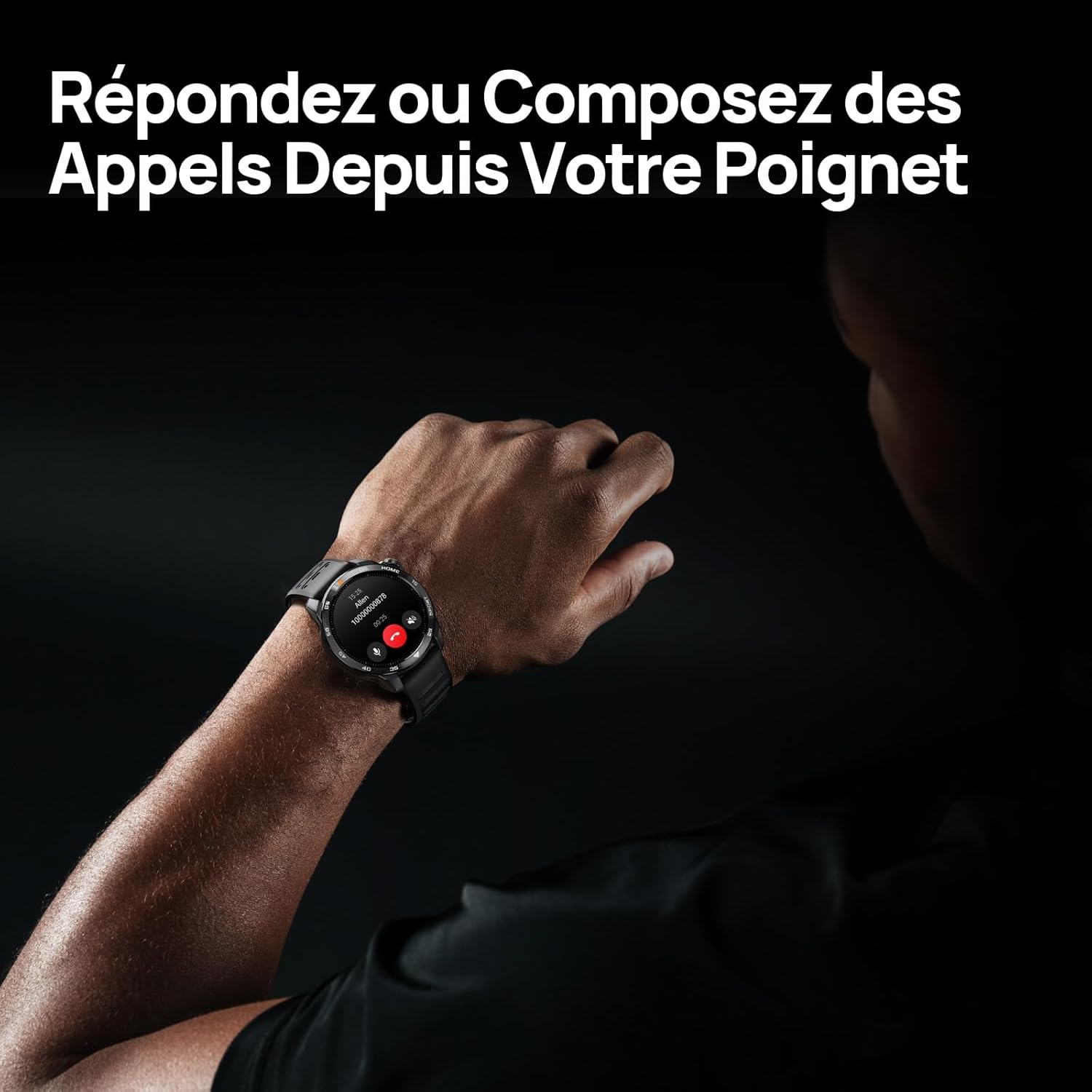
Image 3.1: Responding to calls on the Mibro GS Pro2. This image shows a person's wrist with the Mibro GS Pro2 smartwatch displaying an incoming call notification, illustrating the ability to answer or decline calls directly from the watch.
4. Funktionen
4.1 Anzeige
The Mibro GS Pro2 features a vibrant 1.43-inch AMOLED display, offering clear visibility even in bright outdoor conditions.
- Größe: 1.43 Zoll
- Typ: AMOLED
- Auflösung: 466x466 Pixel
- Helligkeit: Spitzenhelligkeit bis zu 1200 Nits
- Merkmale: Touchscreen, Anti-fingerprint coating.

Image 4.1: Mibro GS Pro2 1.43" AMOLED High Brightness Screen. This image highlights the smartwatch's display specifications, including 1200 nits peak brightness, 466x466 resolution, and 60 fps refresh rate, demonstrating its clarity and responsiveness.
4.2 Multisport Modes
The watch supports over 150 sports modes, providing tailored data analysis for each activity. This includes intelligent transitions for multi-discipline events like triathlons.
- Aquatic Sports: Suitable for open water swimming and pool swimming, calculating parameters such as distance, pace, and trajectory. The watch is 5ATM water resistant.
- Radfahren: Tracks various cycling metrics, including outdoor cycling, indoor cycling, mountain biking, and short-distance modes.
- Läuft: Offers professional running algorithms, including running dynamics, performance index, and physical analysis based on real-time data. It records trajectories and provides long-term training plans.
- Other Sports: Includes modes for hiking, skiing, padel, and many more.

Image 4.2: Mibro GS Pro2 with 150+ Sports Modes. This image shows the smartwatch displaying various sports icons, indicating its extensive support for over 150 different physical activities, including swimming, cycling, and running.

Image 4.3: Mibro GS Pro2 5ATM Water Resistant. This image depicts a swimmer wearing the Mibro GS Pro2 smartwatch, with on-screen data showing swimming metrics like distance, stroke count, and calories burned, highlighting its water resistance and aquatic sport tracking capabilities.
4.3 GPS and Outdoor Navigation
The smartwatch features precise dual-frequency geolocation (Bi-Band GNSS) with real-time deviation alerts. It provides accurate route data and altitude variation measurements for outdoor activities like cycling tours or hiking.
- Dynamically adjust start/end points directly on the watch.
- Store up to 10 backup routes for navigation in areas without signal.
- Includes Barometer and Altimeter functions for environmental data.

Image 4.4: Mibro GS Pro2 Dual-Frequency GPS for Precise Outdoor Navigation. This image shows the smartwatch displaying a map and route tracking, alongside a smartphone app showing a detailed outdoor run trajectory, emphasizing its accurate GPS capabilities for outdoor activities.

Image 4.5: Mibro GS Pro2 Barometer and Altimeter. This image displays the watch showing barometric pressure, a compass, and altitude readings, with a person climbing in the background, illustrating its environmental sensing capabilities.
4.4 Gesundheitsüberwachung
The Mibro GS Pro2 provides comprehensive health tracking features to help you monitor your well-being.
- Herzfrequenz-Überwachung: Kontinuierliche Herzfrequenzmessung.
- Überwachung des Blutsauerstoffs (SpO2): Misst den Sauerstoffsättigungsgrad im Blut.
- Schlaf-Tracking: Überwacht den Schlaftages (leichter Schlaf, Tiefschlaf, REM-Schlaf) und liefert einen Schlaf-Score.
- Stressüberwachung: Erfasst den Stresspegel im Laufe des Tages.
- VO2 Max & Erholungszeit: Professional metrics for training optimization.
- Aktivitätsverfolgung: Records calories burned, total distance, and steps taken.

Image 4.6: Mibro GS Pro2 VO2 Max & Recovery Time. This image shows the smartwatch displaying VO2 Max percentage and recovery time recommendations, along with training effect metrics, aiding in professional workout analysis.

Image 4.7: Mibro GS Pro2 Blood Oxygen (SpO2) Monitoring. This image illustrates the watch's ability to track blood oxygen saturation levels over a 24-hour period, displayed as a graph on the watch face.

Image 4.8: Mibro GS Pro2 Sleep Tracking. This image shows the smartwatch displaying sleep quality metrics (Good, BPM, Stress) and a breakdown of sleep stages (Awake, Light Sleep, Deep Sleep), with a person sleeping in the background.
4.5 Akkulaufzeit
The Mibro GS Pro2 offers extended battery life to support prolonged use.
- Täglicher Modus: Ungefähr 20 Tage.
- GPS-Modus: Ungefähr 20 Stunden.
- Energiesparmodus: Bis zu 50+ Tage.

Image 4.9: Mibro GS Pro2 Ultra-Long Battery Life and Fast Charging. This image illustrates the watch's battery performance, showing 2.5 hours for a full charge and estimated usage times for daily mode (20+ days), power-saving mode (50+ days), and GPS mode (20 hours).
4.6 Intelligente Funktionen
Beyond fitness tracking, the Mibro GS Pro2 integrates seamlessly with your digital life.
- Nachrichtenbenachrichtigungen: Receive alerts for calls, SMS, and app notifications (e.g., TikTok, WhatsApp, Telegram, Instagram, Facebook, Snapchat).
- Musiksteuerung: Steuern Sie die Musikwiedergabe auf Ihrem Smartphone direkt von der Uhr aus.
- Finde mein Telefon: Finden Sie Ihr gekoppeltes Smartphone mithilfe der Uhr.
- Anpassbare Zifferblätter: Personalize your watch with various watch face designs.

Image 4.10: Mibro GS Pro2 New Daily Health & Well-being Features. This image shows icons representing sleep tracking, wake-up reminders, music control, and 'find my phone' functionality, indicating the watch's smart features for daily use.

Image 4.11: Mibro GS Pro2 Message Push Notifications. This image shows the smartwatch displaying a message notification, surrounded by logos of popular social media and messaging apps, illustrating its capability to receive alerts from various platforms.

Image 4.12: Mibro GS Pro2 Personalized Watch Faces. This image displays a variety of digital watch faces, showcasing the customization options available to users for personalizing their smartwatch display.
5. Wartung
5.1 Reinigung Ihrer Smartwatch
- Reinigen Sie die Uhr regelmäßig.asing und Riemen mit einem weichen, damp Tuch.
- Bei hartnäckigen Verschmutzungen eine milde Seifenlösung verwenden und anschließend gründlich mit klarem Wasser abspülen.
- Um Korrosion zu vermeiden, stellen Sie vor dem Laden sicher, dass die Ladekontakte sauber und trocken sind.
- Vermeiden Sie die Verwendung von aggressiven Chemikalien, Scheuermitteln oder Lösungsmitteln, da diese die Oberfläche und die Dichtungen der Uhr beschädigen können.
5.2 Wasserbeständigkeit
The Mibro GS Pro2 is 5ATM water resistant, meaning it can withstand pressures equivalent to a depth of 50 meters. This makes it suitable for swimming and showering. However, it is not recommended for diving or high-pressure water activities.
- Bedienen Sie die Tasten nicht unter Wasser.
- Nach Kontakt mit Salzwasser die Uhr mit Süßwasser abspülen und gründlich trocknen.
5.3 Batteriepflege
- Vermeiden Sie häufiges vollständiges Entladen des Akkus.
- Bewahren Sie die Uhr an einem kühlen, trockenen Ort auf, wenn Sie sie längere Zeit nicht tragen.
- Verwenden Sie ausschließlich das mitgelieferte Ladekabel.
6. Fehlerbehebung
6.1 Uhr lässt sich nicht einschalten
- Stellen Sie sicher, dass die Uhr vollständig aufgeladen ist. Schließen Sie sie für mindestens 30 Minuten an das Ladegerät an.
- Um einen Neustart zu erzwingen, halten Sie den Netzschalter 10-15 Sekunden lang gedrückt.
6.2 Kopplung mit Smartphone nicht möglich
- Stellen Sie sicher, dass Bluetooth auf Ihrem Smartphone und Ihrer Uhr aktiviert ist.
- Stellen Sie sicher, dass sich die Uhr in Bluetooth-Reichweite Ihres Telefons befindet.
- Starten Sie sowohl Ihr Smartphone als auch die Uhr neu.
- Löschen Sie gegebenenfalls den Bluetooth-Cache Ihres Telefons und versuchen Sie es erneut mit der Kopplung.
- Stellen Sie sicher, dass die Mibro Fit App auf die neueste Version aktualisiert ist.
6.3 Ungenaue GPS-Messwerte
- Stellen Sie sicher, dass Sie sich in einem offenen Außenbereich mit freier Sicht befinden. view des Himmels.
- Warten Sie, bis die Uhr ein stabiles GPS-Signal empfängt, bevor Sie Ihre Aktivität beginnen.
- Ensure the watch's firmware is up to date via the Mibro Fit app.
6.4 Benachrichtigungen werden nicht angezeigt
- Check notification settings in the Mibro Fit app to ensure they are enabled for desired applications.
- Verify that your phone's notification permissions are granted to the Mibro Fit app.
- Stellen Sie sicher, dass die Uhr über Bluetooth mit Ihrem Telefon verbunden ist.
7. Spezifikationen
| Besonderheit | Detail |
|---|---|
| Marke | Mibro |
| Modellnummer | GS Pro2 |
| Anzeigegröße | 1.43 Zoll |
| Anzeigetyp | AMOLED |
| Betriebssystem | Echtzeitbetriebssystem |
| Konnektivität | Bluetooth |
| Besondere Merkmale | Touchscreen, Water Resistant (5ATM), Bi-Band GNSS, Health Monitoring |
| Kompatible Geräte | Smartphone |
| Batteriezusammensetzung | Lithium-Ionen |
| Akkulaufzeit (Tagesmodus) | Ca. 20 Tage |
| Akkulaufzeit (GPS-Modus) | Ca. 20 Stunden |
| Wasserbeständigkeit | 5ATM |
| Abmessungen (Uhrengehäuse) | 48 mm (Durchmesser) x 12 mm (Dicke) |
| Armbandlänge | 265 mm |
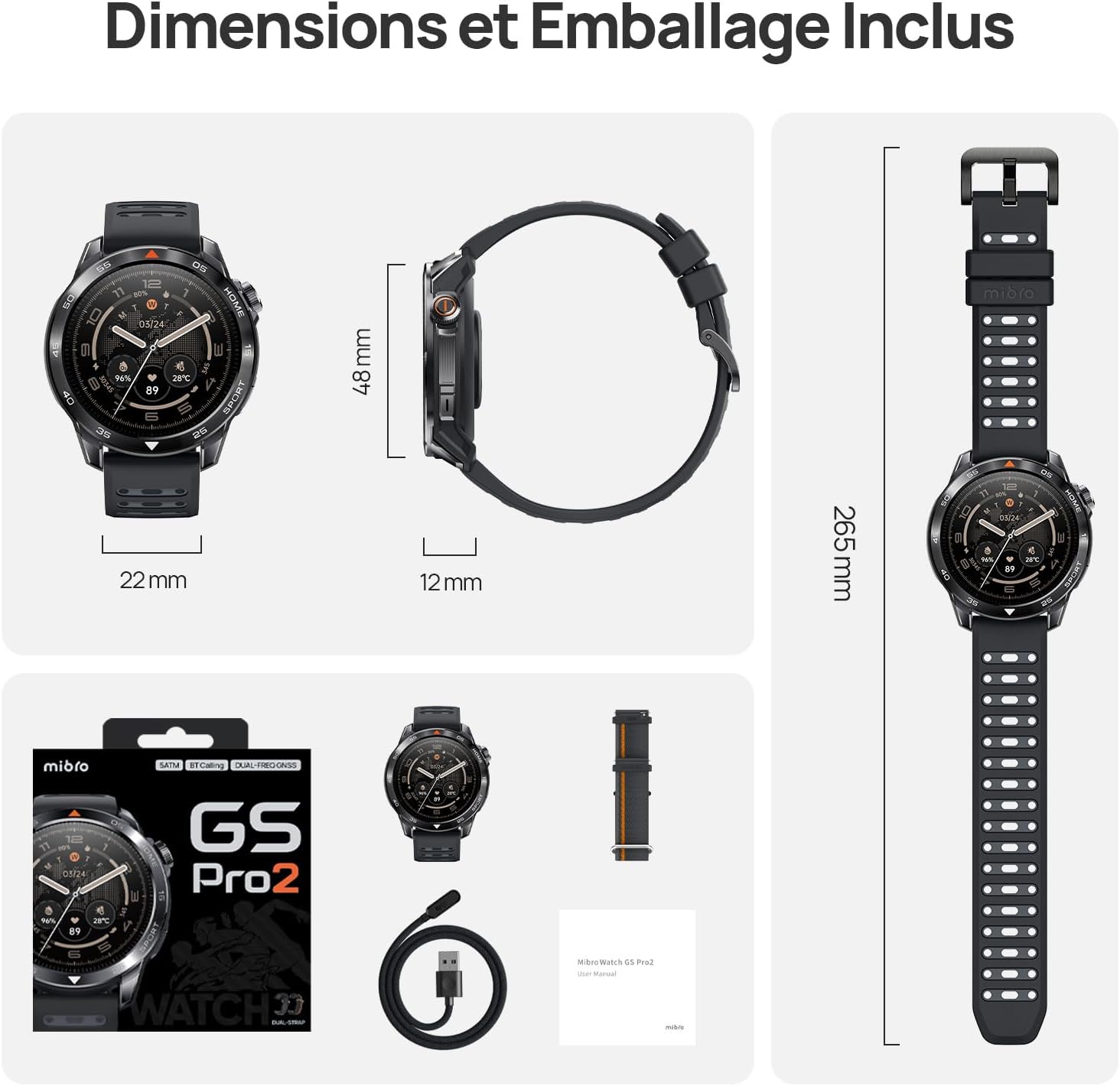
Image 7.1: Mibro GS Pro2 Dimensions and Included Packaging. This image provides a visual representation of the watch's dimensions (48mm diameter, 12mm thickness, 265mm strap length) and shows the contents of the product packaging, including the watch, charging cable, and user manual.
8. Garantie und Support
8.1 Herstellergarantie
The Mibro GS Pro2 comes with a 1 Jahr HerstellergarantieDiese Garantie deckt Material- und Verarbeitungsfehler bei normalem Gebrauch ab. Bitte bewahren Sie Ihren Kaufbeleg für Garantieansprüche auf.
Die Garantie deckt keine Schäden ab, die durch Missbrauch, Unfälle, nicht autorisierte Änderungen oder normale Abnutzung verursacht wurden.
8.2 Kundendienst
For technical assistance, troubleshooting, or warranty inquiries, please refer to the official Mibro website or contact their customer support channels. Specific contact details may be found on the product packaging or the official Mibro webWebsite.


